
Overview
This documentation needs review. See "Help improve this page" in the sidebar.
Default content gives your module and install profile a way to ship default content as well as configuration. It does so by leveraging core's Serialization, REST and HAL modules. It supports entity references between content (as well as files if you have File entity).
How does it work
To get started, enable the Default Content module first. Any module that requires default content can put hal+json versions of the entities (created with the drush commands) inside content/{entity_type} folders.
Once your custom module is enabled, the entities you exported will be imported to the new environment.
For example, have a look at default_content_test_yaml, which has:
- modules/default_content_test_yaml/content
- modules/default_content_test_yaml/content/node
- modules/default_content_test_yaml/content/node/imported.json
- modules/default_content_test_yaml/content/taxonomy_term
- modules/default_content_test_yaml/content/taxonomy_term/tag.json
You can use the default_content_test_yaml module as an example, and import the three nodes included with these steps:
- Move
default_content_test_yamlmodule from/default_content/tests/modulesinto/modules/customfolder - Delete three YAML files in the
/default_content_test_yaml/config/installfolder - Remove line
hidden: TRUEfrom thedefault_content_test_yaml.info.ymlfile (Optional) - Remove line
package: Testingfrom thedefault_content_test_yaml.info.ymlfile - Add
core_version_requirement: ^9 || ^10in thedefault_content_test_yaml.info.ymlfile - Enable the module, and see that three nodes have been created under Content (
/admin/content)
Drush commands
Content export works with a set of drush commands. The following drush commands are supported.
default-content-export
Exports a single entity.
- Arguments
-
- entity_type The entity type to export. (Required).
- entity_id The ID of the entity to export. (Required).
- Options
-
- file Write out the exported content to a file instead of stdout
- Aliases
- dce
Both the entity-type and the node-id must be provided. By default, the exported entity is printed to stdout(), but can also be saved to a file using the file option.
Note
Beware of modules that add extra layers of access control (i.e. field_permissions and group). By default, drush runs as user anonymous and may not have access to the fields or nodes. See example below about how to run as a different user.
Examples
$ drush dce node 123
$ drush dce taxonomy_term 456 --file=modules/custom/demo_module/content/taxonomy_term/456.json

# Run export as different user than anonymous
$ drush --user=1 dce node 123
Or with other entity types.
$ drush dce node <node id>
$ drush dce taxonomy_term <taxonomy term id>
$ drush dce file <file id>
$ drush dce media <media id>
$ drush dce menu_link_content <menu link id>
$ drush dce block_content <block id>
default-content-export-references
Exports an entity and all its referenced entities.
- Arguments
-
- entity_type The entity type to export. (Required).
- entity_id The ID of the entity to export.
- Options
-
- folder Folder to export to, entities are grouped by entity type into directories.
- Aliases
- dcer
The entity type is mandatory, the entity id is optional. When omitted, all entities of the given type are exported.
Example
$ drush dcer node 123
$ drush dcer node 123 --folder=modules/custom/demo_module/content/
default-content-export-module
Exports all content defined in a module info file. A module's .info.yml-file can contain a section with default files. This command will export the files mentioned in that section.
- Arguments
-
- module The name of the module.
- Aliases
- dcem
Example
Relevant contents of my_default_content_module.info.yml:
default_content:
    node:
      - c9a89616-7057-4971-8337-555e425ed782
      - b6d6d9fd-4f28-4918-b100-ffcfb15c9374
    file:
      - 59674274-f1f5-4d6a-be00-fecedfde6534
      - 0fab901d-36ba-4bfd-9b00-d6617ffc2f1f
    media:
      - ee63912a-6276-4081-93af-63ca66285594
      - bcb3c719-e266-45c1-8b90-8f630f86dcc7
    menu_link_content:
      - 9fbb684c-156d-49d6-b24b-755501b434e6
      - 19f38567-4051-4682-bf00-a4f19de48a01
    block_content:
      - af171e09-fcb2-4d93-a94d-77dc61aab213
      - a608987c-1b74-442b-b900-a54f40cda661
Export this content with:
$ drush dcem my_default_content_module
Exporting Content from Views
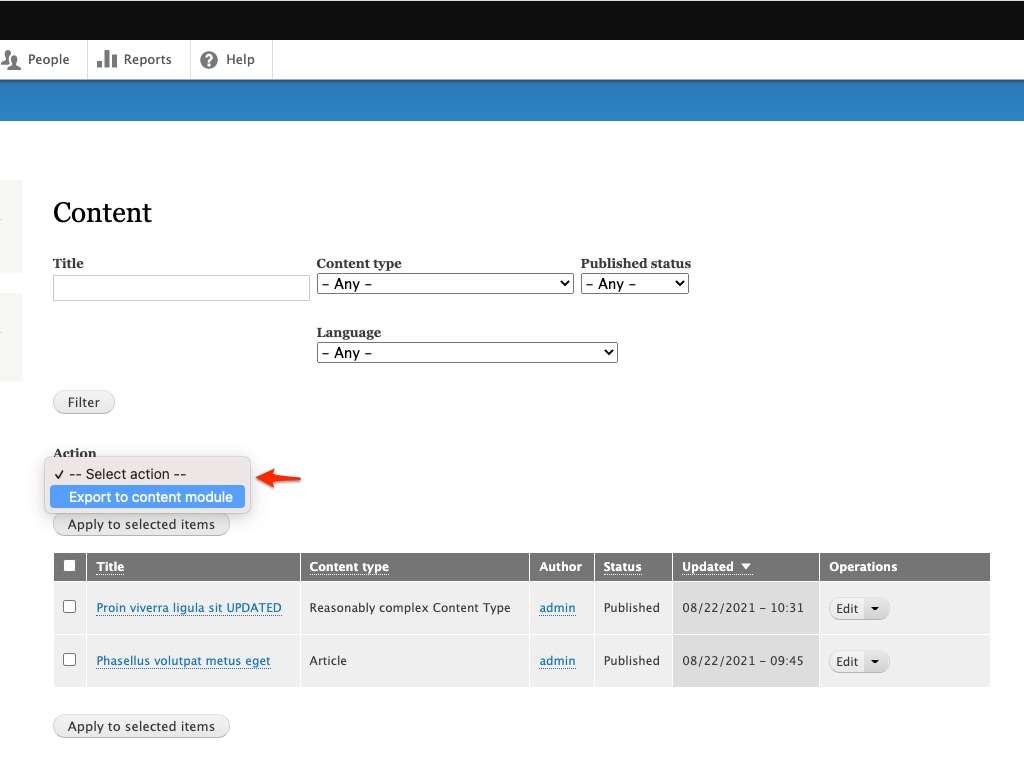
Export Action for Default content module provides a Views Bulk Operation action that can be added to any view to allow selected content from the view to be exported to the content module
Help improve this page
You can:
- Log in, click Edit, and edit this page
- Log in, click Discuss, update the Page status value, and suggest an improvement
- Log in and create a Documentation issue with your suggestion

