

 The 2026 Drupal Business Survey is open. Your response will help shape the future of the Drupal business ecosystem.
It would be nice to clarify date/time field validation on date/time field editor UI and create 2 completely different validation modes and allow webform builders to choose the suitable method because based on actual UI user can't decide actually how the date and time validation working and both modes can be useful based on use-case.
Suggested modes:
"range" mode:
e.g. allow to submit every moments between two specified moments. E.g.
date/time min: 2018-01-01 08:00
date/time max: 2018-01-03 22:00
With these settings validator shoud allow to submit:
2018-01-01 08:00
2018-01-01 08:01
...
2018-01-03 21:59
2018-01-03 22:00
"range-in-day" mode
e.g.
Date min: 2018-01-01
Date max: 2018-01-03
Time min: 08:00
Time max: 22:00
It should:
allow:
2018-01-01 08:00
2018-01-01 08:01
...
2018-01-01 21:59
2018-01-01 22:00
deny:
2018-01-01 22:01
2018-01-01 22:02
.....
2018-01-02 07:58
2018-01-02 07:59
allow:
2018-01-02 08:00
2018-01-02 08:01
...
2018-01-02 21:59
2018-01-02 22:00
etc.
| Comment | File | Size | Author |
|---|---|---|---|
| #13 | interdiff-3017679-10-13.txt | 6.99 KB | jrockowitz |
| #13 | 3017679-13.patch | 38.73 KB | jrockowitz |
| #10 | 3017679-10.patch | 34.35 KB | jrockowitz |
| #10 | interdiff-3017679-6-10.txt | 15.01 KB | jrockowitz |
| #10 | Test Element Date time Webform Demo Site.png | 168.51 KB | jrockowitz |

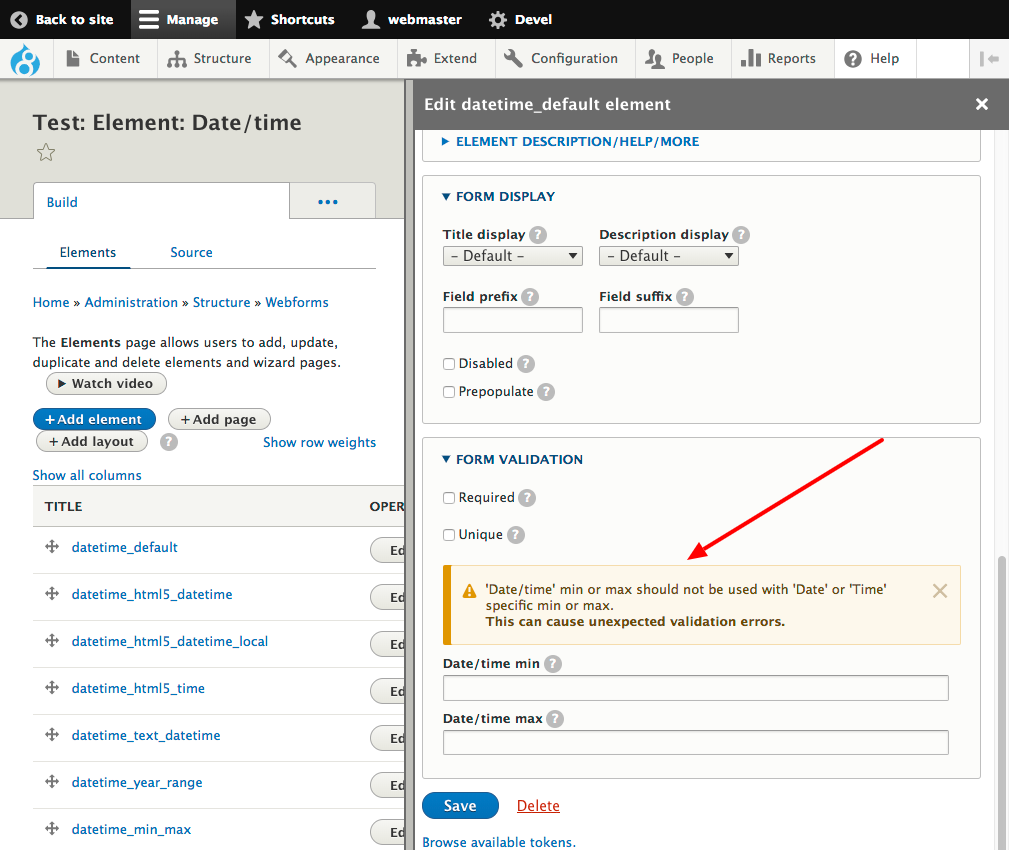

Comments
Comment #2
jrockowitz commentedThe attached patch adds support for date/time min/max validation while preserving date min/max validation.
I know it is a little confusing but this does cover all use cases. We might want to include some additional help text.
Comment #3
kepesv commentedWow.
You are GREAT!
I've tested the newly introduced Date/time min and Date/time max fields you highlighted at the bottom of the screenshoot.
Generally it is working properly!
My notes:
1., we are using "HTML date input - use the html5 date element type" field type. The new date/time min and date/time max settings actually doesn't limit the HTML5 calendar to the dates which are allowed so user can choose with the calendar popup earlier and later days. The server side validation will deny to submit the form. It would be nice if the Date/time min and Date/time max fields could be affect the html5 calendar popup. (the "old" date min and date max settings (highlighted red on the top of your screenshoot) are limiting correctly the html5 calendar popup, similar solution could be ok.)
2., date/time min and date/time max popup example: "Date/time min Specifies the minimum date/time. Accepts any date in any GNU Date/Time Input Format. Strings such as today, +2 months, and Dec 9 2004 10:00 PM are all valid." I've tested with "Dec 9 2004 10:00 PM". Based on this example I've tried to set min: Jan 12 2019 00:00 AM and max: Mar 15 2019 23:59 PM. I don't know why but field settings form doesn't allow me to save these values. There is no error message but not save. Finally i've tried this format to min 2019-01-15T00:00:00 and 2019-03-12T23:59:59 to max and these values are saved correctly. Validation is working with these formats.
Comment #6
jrockowitz commentedThe attached patch fixes both issues from #3.
Comment #7
kepesv commentedThanks for Your crazy fast response.
patched, tested:
1., good job!
2., Jan 12 2019 00:00 AM and Mar 15 2019 23:59 PM date/time min and date/time max values now throws "The Date/time min could not be interpreted in GNU Date Input Format.". It is probably correct. But the popup (mouse over the "?") still says "Accepts any date in any GNU Date/Time Input Format. Strings such as today, +2 months, and Dec 9 2004 10:00 PM are all valid." so I think popup text example is not so lucky because I created this min and max values based on this poup message and these are doesn't works so the example is misleading i think. Just a text correction required with an other example.
3., (a new one :)) I thought in case I leave blank date/time min and date/time max fields and set date min, date max, time min, time max fields then I got working method mentioned as ""range-in-day" mode" described in the issue above. But not:
test situation:
date min: 2019-01-15
date max: 2019-03-12
time min: 08:00
time max: 20:00
date/time min: empty
date/time max: empty
Webform allow me to submit 2019-11-16 05:00. I think this shouldn't be an allowed value.
So webform on server side doesn't validate the time based on time min and time max. (html5 time field get the limits so with the up and down arrows in the time field (google chrome browser) I can't select lower hour than 08 and higher than 22 but with keyboard I can type lower/higher and form allows me to submit it. )
4., To avoid unwanted cases I recommend a little UI tuning: I didn't tested "mixed mode" when I set up date min, date max, time min, time max, AND date/time min and date/time max fields too but I think this is probably a wrong combination and we should prevent webform admins to use the two kind of date validations parallel. A soultion could be e.g. introduce a radio button and in "state A" (I called it "range-in-day" mode) date min, date max, time min, time max fiuelds are shown and fillable. In "state B" (I called it "range mode") date/time min and date/time max fields are shown. ("State C" (the default one) could be "disable validation").
Comment #8
jrockowitz commented2. Jan 12 2019 00:00 AM and Mar 15 2019 23:59 PM are simply not valid dates because of the AM and PM.
Below are the valid and correct formats.
Jan 12 2019 00:00 AM => Jan 12 2019 12:00 AM
Mar 15 2019 23:59 PM => Mar 15 2019 11:59 PM
I will work on 3. and 4.
Comment #10
jrockowitz commentedThe attached patch fixes 3. and adds the below warning to address 4..
Comment #13
jrockowitz commentedAttached patch fixes #3018241: Notice: Undefined offset: and remove abbreviation of min and max.
Comment #16
jrockowitz commentedI committed the patch. Please download the latest dev release to review.
Comment #18
enorm commentedHi Jacob,
is it possible to extend the patch or is it a complete new thing:
Notice: Undefined offset: 1 in Drupal\Core\Datetime\Element\DateElementBase::datetimeRangeYears() (line 36 of core/lib/Drupal/Core/Datetime/Element/DateElementBase.php).
drupal 9.4
webform: 6.2.0-beta2
php: 7.3.28
can you confirm the solution? if yes, it would be nice to include this in the module;
thanks, Erich
Comment #19
enorm commentedFor the webform module, same issue same function and same possible solution above in my first commet:
Notice: Undefined offset: 1 in Drupal\webform\Plugin\WebformElement\DateBase::datetimeRangeYears() (line 637 of modules/contrib/webform/src/Plugin/WebformElement/DateBase.php).