Problem/Motivation
The form button like the default "Submit" button of any
webform, is not accepting
any #states conditions once the dialog is initialized.
The problem is in getting the default state of the button to initialize in the
dialog. Because once you start entering input values the button's state is
updated.
The issue is Drupal.behaviors.dialog.prepareDialogButtons in
core/misc/dialog/dialog.ajax.es6.js clones the primary buttons
without copying the #states conditions.
This must be a core States API issue.
Steps to reproduce
- Install the webform module.
-
Using the built-in "contact" form, create a condition to hide the
"Send message" button.
-
"Hidden" if "Your Name" textfield value is "Hide Button".
The yaml #state condition will be something like:
'#states':
  invisible:
    ':input[name="name"]':
      value: 'Hide Button'
-
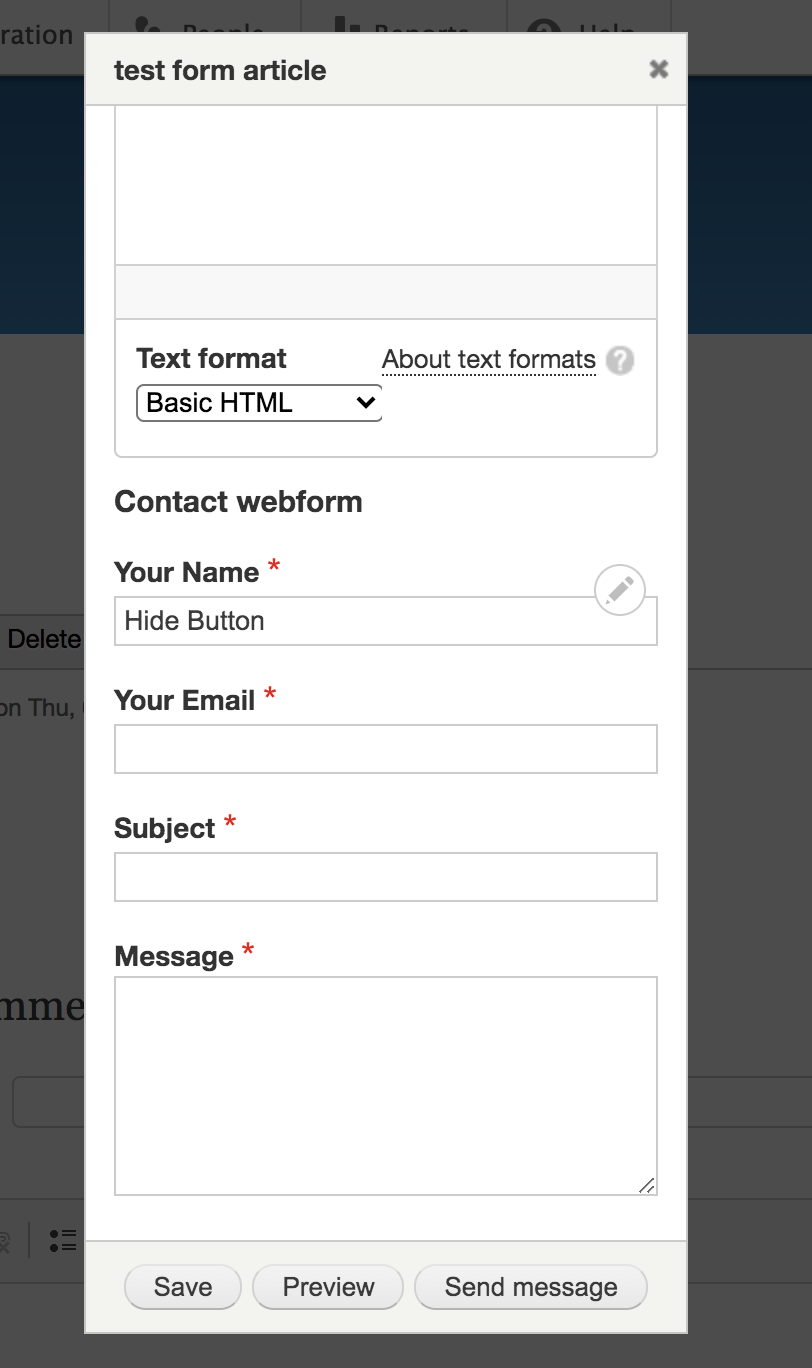
Add the "contact" form as a field of type "webform" to the article content
type.
-
Create one test article, lets consider the article nid is "12".
-
Launch the created article in a dialog/popup using the below code:
<a class="use-ajax" data-dialog-type="modal" href="/node/12">
Open article
</a>
-
Find the webform field and try to input inside the "your name" field the text:
Hide Button.
-
You will notice that the "Send message" button is still visible without any
changes for its #states.
Proposed resolution
The issue is Drupal.behaviors.dialog.prepareDialogButtons in
core/misc/dialog/dialog.ajax.es6.js clones the primary buttons
without copying the #states conditions.
This must be a core States API issue.
Remaining tasks
N/A
User interface changes
N/A
Introduced terminology
N/A
API changes
N/A
Data model changes
N/A
Release notes snippet
N/A
Reference
The discussion of the webform issue
here,
lead to create this core issue.
Below is the source code of a configured "contact" form to speed up the
reproducing of the issue:
name:
  '#type': textfield
  '#title': 'Your Name'
  '#required': true
  '#default_value': '[current-user:account-name]'
  '#multiple__no_items_message': '<p>No items entered. Please add items below.</p>'

email:
  '#title': 'Your Email'
  '#type': email
  '#required': true
  '#default_value': '[current-user:mail]'

subject:
  '#type': textfield
  '#title': Subject
  '#required': true
  '#states':
    visible:
      ':input[name="name"]':
        value: Webform
  '#multiple__no_items_message': '<p>No items entered. Please add items below.</p>'
  '#test': 'Testing contact webform from [site:name]'

message:
  '#title': Message
  '#type': textarea
  '#required': true
  '#test': 'Please ignore this email.'

actions:
  '#type': webform_actions
  '#title': 'Submit button(s)'
  '#states':
    invisible:
      ':input[name="name"]':
        value: 'Hide Button'
  '#states_clear': false
  '#submit__label': 'Send message'


 Show commands
 changes


Comments
Comment #2
Drutech commentedComment #3
c.e.a commentedany update concerning this issue ?!
Comment #4
c.e.a commentedThis is a really complex #states API issue which needs to be solved by Drupal core...
Anyone with enough knowledge can step forward to solve this issue ?!
thank you,
Comment #5
c.e.a commentedComment #6
c.e.a commentedAny update on this core issue ?
Comment #7
c.e.a commentedComment #8
vflirt commentedHere is a patch. I think this is about any form put in dialog not just webforms so this is really Major.
Comment #9
vflirt commentedComment #10
alonaoneill commentedComment #11
vflirt commentedThe patch applied clean to latest 8.8.x-dev
Comment #12
vflirt commented@alonaoneill could please describe why it needs reroll and what you are looking for.
Comment #13
vacho commentedThe patch applies fine over 8.8.x.
Comment #14
alonaoneill commentedSorry, my mistake. Didn't apply for me first time, but then did!
Comment #15
yogeshmpawarSetting back to Needs Review as per above comments.
Comment #18
c.e.a commentedApplied patch #8 on Drupal 8.8.5 as below:
and still the button no following any condition (Hidden, Disabled...)
Comment #19
k.skarlatos commentedNot working (Drupal 8.9.2)
Comment #20
anu.a_95 commentedComment #21
Vidushi Mehta commentedAdded a patch for 9.1.x
Comment #22
snehalgaikwad commentedTested patch #21 on 9.1.x but issue is still there. Button is not getting hidden on condition. Attaching screenshot of modal after applying patch.
Comment #24
tanubansal commentedTested #21, I am also facing the same issue mentioned in #22
Please check
Comment #27
menwithbeards commentedhi all, are there any hopes of sorting this issue out? I would look into it myself, but I'm afraid this #states stuff is still a bit out of my league at the moment :/
Comment #28
nathan tsai commentedWork around with drupalAutoButton = FALSE.
Need this patch, though: https://www.drupal.org/project/drupal/issues/2793343
Comment #29
ranjith_kumar_k_u commentedRe-rolled #21 for 9.4.
Comment #30
yogeshmpawarUpdated patch will resolves CSpell errors.
Comment #31
priyanka.sahni commentedVerified the issue by applying the patch, patch was successfully applied.
Steps to Reproduce -
1. Go to the terminal -> Apply the patch
2. Install the webform.
3. Copy the git link using below link.
https://www.drupal.org/project/webform/git-instructions
4. Copy the webform module in the modules folder under Drupal.
5. Go to the site.
6. Go to /admin/modules
7. Enable the web forms and webform UI.
8. Go to /admin/structure/webform/manage/contact/source
9. Paste the below code
name:
'#type': textfield
'#title': 'Your Name'
'#placeholder': 'Hide Button'
'#required': true
'#states':
invisible:
':input[name="name"]':
value: 'Hide Button'
'#default_value': '[current-user:display-name]'
email:
'#title': 'Your Email'
'#type': email
'#required': true
'#default_value': '[current-user:mail]'
subject:
'#title': Subject
'#type': textfield
'#required': true
'#test': 'Testing contact webform from [site:name]'
message:
'#title': Message
'#type': textarea
'#required': true
'#test': 'Please ignore this email.'
actions:
'#type': webform_actions
'#title': 'Submit button(s)'
'#submit_hide': true
'#submit__label': 'Send message'
10. Go to /admin/structure/webform/manage/contact
11. Mark the Your Name as hidden
12. Go to /admin/structure/types/manage/article/fields/node.article.field_test_menu
13. Create the article
14. In the body field, Enter the text as "
Open article
"
15. Save the article.
16. Copy the node link.
17. Open in incognito window.
18. Verify.
Before Patch -

After Patch -

Comment #32
priyanka.sahni commentedComment #34
rinku jacob 13 commentedRe-rolled patch#30 for 9.5.x. Thanks @yogeshmpawar
Comment #35
sonam.chaturvedi commentedApplied patch #34 on 9.5.x-dev.
Test Result:
Patch applied successfully but issue is not resolved. 'Send Message' Button is not getting hidden on condition when webform is launched in modal pop-up.
Attaching screenshot of modal after applying patch

Moving to Need Work
Comment #37
hchonovRe-roll for core 9.5.1.
Comment #39
hchonovRe-roll for 10.1.x
Comment #40
gauravvvv commentedI have fixed the failures also attached interdiff for same. please review
Comment #41
gauravvvv commentedComment #42
smustgrave commentedThe IS appears to be missing the proposed solution.
Also should add a test case showing the issue.
Comment #43
huzookaSharing my very naive alternative patch (on top of 10.2.x), maybe this can help some of you.
Comment #46
claudiu.cristeaAny chance for a Drupal 11 MR?
Comment #48
saidatomThe previous implementation triggered dialogButtonsChange events on every form element state change (disabled, readonly, required, visible, checked, collapsed), causing dialog buttons to be recreated too frequently. This created a race condition where tests tried to interact with buttons while they were being recreated, resulting in "element not interactable" errors.
Changes:
- Updated dialog.ajax.js to use button.disabled property instead of getAttribute('disabled') to return proper boolean values for jQuery UI
- Modified states.js to only trigger dialogButtonsChange when submit buttons themselves change state (disabled or visible), not for every form element
- Other state handlers (readonly, required, checked, collapsed) don't trigger button updates as they don't apply to submit buttons
Comment #49
smustgrave commentedThanks for picking up!
Can the summary be updated to use the standard template
Was previously tagged for tests which will still be needed
Comment #50
saidatomComment #51
saidatomComment #52
alorencComment #53
alorencIt does not work for me
It is fine when the web form is visited directly.
However, when it is opened as a modal, the button is not hidden.
Comment #54
alorencComment #55
saidatomComment #57
smustgrave commentedSorry this one needs a rebase please.
Leaving IS update tag as the proposed solution is talking about fixing an es6 file which we know isn't the case