Problem/Motivation
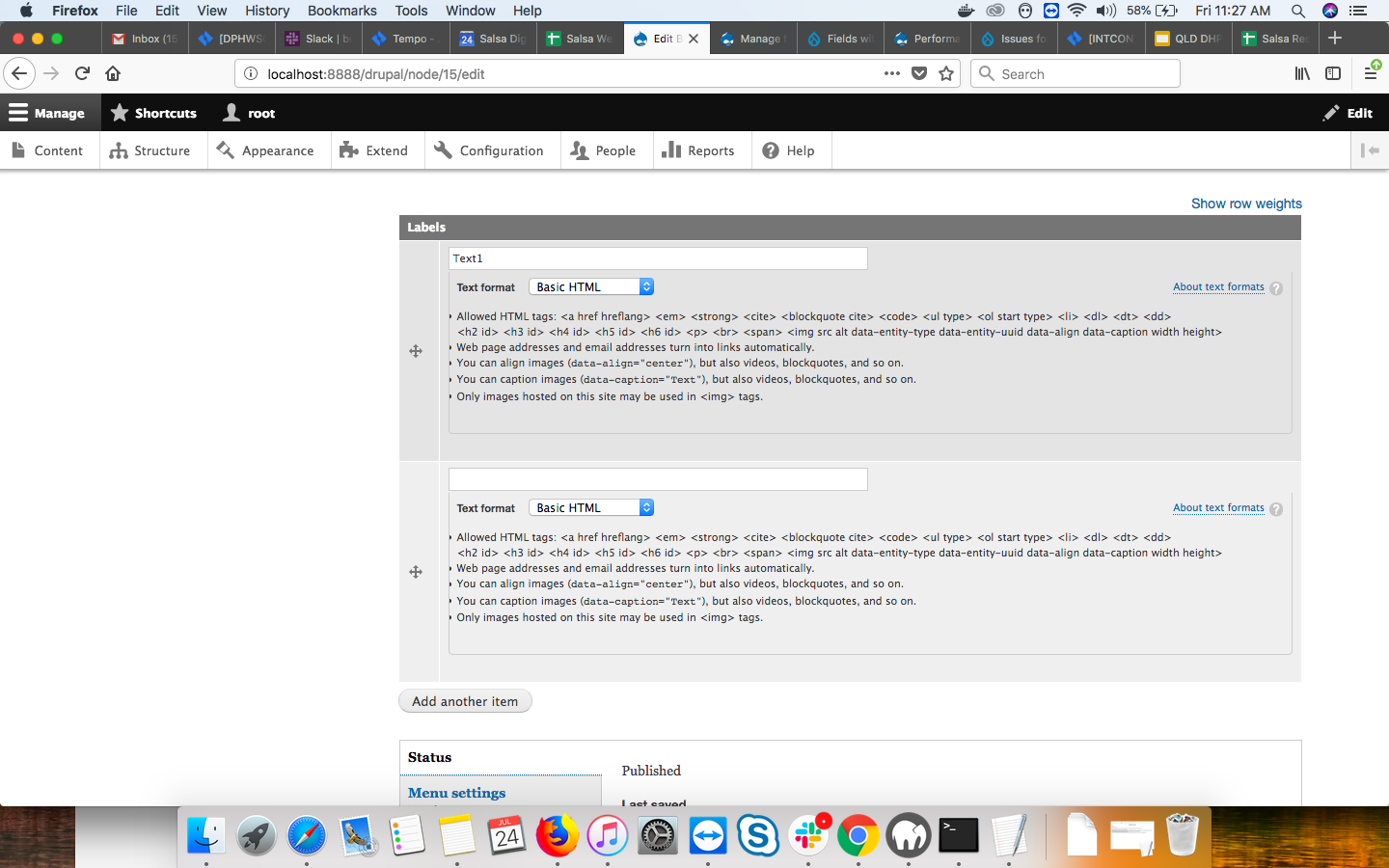
If a field has unlimited cardinality, then it is always displayed with one input too many. For example, I added a textfield named "Labels" to a content type and gave it unlimited cardinality. I create three label values, as illustrated here:

Then I Save the form and go to Edit it again. When I do, one extra Label input has been added, even though I have not clicked the "Add another item" button. And there's no way to get rid of this extra input field:

Always adding an unused text field gives users the impression that the form was not completely filled out even when it was, or that they clicked the "Add another" button when they did not.
I tracked the source of the "bug" down to a single line in the WidgetBase class. It looks like an off-by-one error to me, with respect to the difference between how the number of elements is calculated for a fixed, multiple cardinality field vs. how the number of elements is calculated for an unlimited cardinality field.
Steps to reproduce
Proposed resolution
Adjust the widget to not display an extra empty field.
Remaining tasks
Decide on the which fix to implement, the one in #3318259: Remove auto added empty field from multiple values field. or the one in patch in #34.
Add a test
Review
Commit
User interface changes
Introduced terminology
API changes
Data model changes
Release notes snippet


 Show commands
 changes






Comments
Comment #2
lisastreeter commentedComment #3
lisastreeter commentedThis patch fixes the rendering of unlimited cardinality fields on edit forms for me by removing the "extra" input.
Comment #5
dpiSimilar idea #2384889: [PP-1] Initial number of fields visible on the form should be configurable for fields set to unlimited value
Comment #7
wiifmI had exactly the same issue, there was always another 'blank' row at the bottom of an unlimited cardinality field. This is a confusing UX for sure.
Applying the (simple 1 line) patch fixed the issue.
Marking as 'Needs Review' to get more eyeballs on this issue. But this is a +1 from me.
Comment #8
wiifmComment #11
tanubansal commentedTested via below mentioned steps on 9.1 :
1. I added a textfield named "Labels" to a content type and gave it unlimited cardinality.
2. Then I Save the form and go to Edit it again. When I do, one extra Label input has been added, even though I have not clicked the "Add another item" button. And there's no way to get rid of this extra input field
Same issue is there on drupal 9.1
Can we have a patch for 9.1?
Comment #12
mayurjadhav commentedI have tested the #3 Patch Manually and it works as expected, Test is failing just because of ajax fatal error, While adding more field using Add more button getting ajax fatal error which leads to fail all the test.
Comment #13
paulocs@mayurjadhav is right, if we try to create a new content type with the unlimited cardinality field we have to click twice on the button "Add another item" to add an item.
Comment #14
mandclu commentedI like this idea, but I would suggest that this should be something that could be configured in the widget settings. I see that #2384889: [PP-1] Initial number of fields visible on the form should be configurable for fields set to unlimited value has proposed something similar, though I feel that might be just for an empty field.
Comment #15
shivam kaushal commentedComment #16
shivam kaushal commentedComment #20
gisleThe patch in comment #16 is the same as the one submitted in #3 - except that the one in #16 adds bloat by not removing a now redundant assignment.
Please do not pretend to participate in fixing stuff when you provide no improvement over what others already have done by others (in fact it is worse).
Comment #21
gisleAdding back #2384889: [PP-1] Initial number of fields visible on the form should be configurable for fields set to unlimited value. No grounds for its removal was given in comment #15, and to me, the removals looks like a mistake by an inexperienced new community member.
Comment #22
longwaveAlso restoring the issue summary which was deleted in #15
Comment #23
longwavePersonally I always thought this was "by design" to allow extra values to be added easily without needing to click "Add another item" first. But I can also see how this could be considered confusing.
Comment #24
darren ohThis was by design, but it has always been annoying and difficult to override.
Comment #25
gisleI also understand that this is by design. And I have never been annoyed by this – or even thinking about it as an issue until I stumbled across this.
Incidently I've seen identical behaviour lot of other places. For instance the dialogue to add another subdomain provided by my registrar works in the same way.
My vote is for leaving it alone.
Comment #26
mandclu commentedI think this pattern works well for simple fields where the behaviour doesn't add a lot complexity, and also in situations where there's a reasonable expectation that a user will need multiple entries.
I maintain Smart Date and one of the things I've struggled with is the balance between power and complexity. If a field is configured to manage timezones and recurring dates, there's a lot to the interface. Having an extra, empty field makes the overall interface look much more complicated, and also deviates from one of the aims for that module, which is to make Drupal's date handling as close as possible to how popular calendar apps work. If you go to create an event in a Google or Apple calendar, it doesn't give you two sets set fields, it gives you one. For Smart Date I was able to add a configuration option to suppress Drupal's default behaviour, but I agree with the sentiment that this should be generally available as part of the standard configuration for WidgetBase, when a field has unlimited values.
I agree that there are plenty of examples of where the current behaviour makes sense, but there are also lots of examples of where it doesn't, so making the behaviour configurable would allow Drupal to meet both. So I'd support the approach suggested in #2384889: [PP-1] Initial number of fields visible on the form should be configurable for fields set to unlimited value.
Comment #27
longwaveShould this behaviour be determined by the field widget? Simple widgets can opt in and complex widgets can opt out?
Comment #32
smustgrave commentedrunning patch #3 against latest dev to see what fails.
With regards to #27 the setting makes sense but if this extra field is causing an accessibility issue don't think we should
Comment #33
smustgrave commentedI'll work on the test cases.
Comment #34
smustgrave commentedTesting a new patch to see failures.
Comment #35
smustgrave commentedOh wow that patch worked.
Comment #36
larowlanDiscussed this with @andrewmacpherson to validate the a11y aspect.
He indicated that there is no a11y issue with having an extra empty field.
Which then makes this a feature request rather than a bug.
@smustgrave rightly pointed out that #2384889: [PP-1] Initial number of fields visible on the form should be configurable for fields set to unlimited value would then render this a duplicate, because that is allowing the number to be configured, so that would also solve this problem.
As a result, marking as a duplicate of #2384889: [PP-1] Initial number of fields visible on the form should be configurable for fields set to unlimited value and transferring credit over there.
Comment #37
larowlanComment #38
darren ohThis is a usability bug because it gives the user the impression that a form has not been completely filled out even when it has. It should not be blocked pending a new feature.
Comment #39
smustgrave commentedCan you provide a link or report of how this is an accessibility issue?
Comment #40
darren ohNot sure why this became about accessibility. It is a usability bug as I explained above. I have removed comments from the description that may be causing confusion.
Comment #41
darren ohComment #42
darren ohComment #43
smustgrave commentedRight so the extra field was by design. In https://www.drupal.org/project/drupal/issues/2384889 site builders could configure their fields to remove that extra field or add extra I suppose. Making this ticket moot
Comment #44
darren ohI like the new feature provided by #2384889: [PP-1] Initial number of fields visible on the form should be configurable for fields set to unlimited value. This is still a design bug and should not be blocked by that feature if a fix is ready.
Comment #45
abhijith s commentedApplied patch #34 on 9.5.x.But the extra field input item is still showing after applying this patch. Attaching screenshot for reference.
Needs work
Comment #47
joaopauloc.dev commentedComment #48
joaopauloc.dev commentedHey guys the patch above didn't work for me in 10.1.
Based on the thread above if I understood correctly the following scenario should happen.
Considering only cardinality unlimited!
Field X with an unlimed value of any type of field.
Creating new content
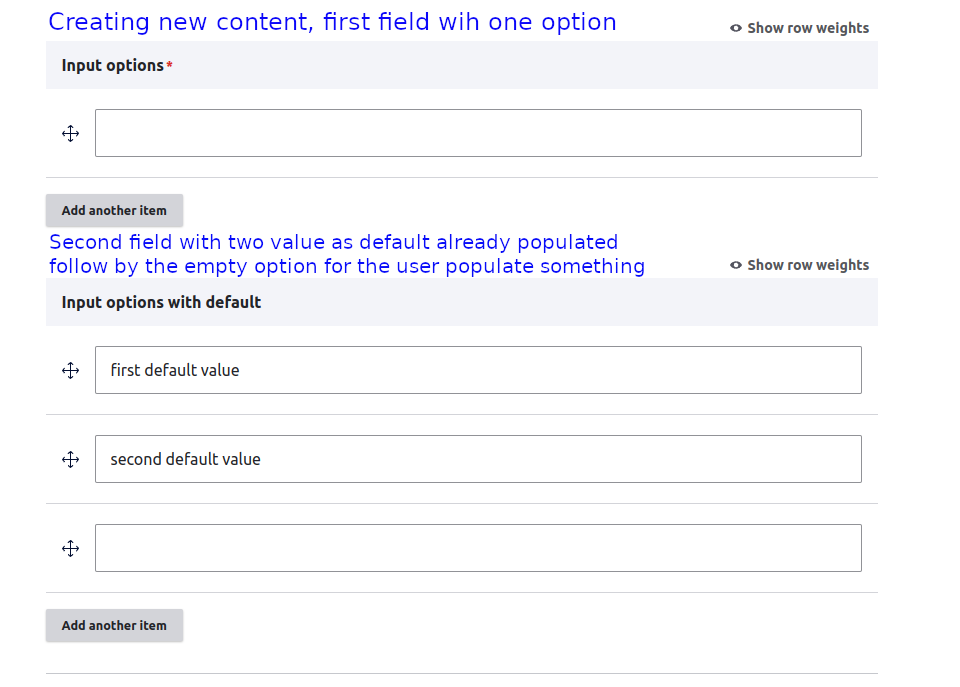
The field should appear with only one empty option and the button to add more.
If the user clicks on add more another option will appear.
Editing content.
The field should list all values defined without any empty field to be populated by the user. If the user wants to add one more item it's necessary to click on Add more button and then populate the field.
Creating new content with a default value.
Let's suppose that we have a field unlimited with two values as default.
The field will appear with the default value(s) follow by another empty field for the user to populate what he wants.
See the attachments to check how it will work after this patch and please validate if attend what this issue wants to fix.
Regards.
Comment #50
joaopauloc.dev commentedTests failed fixed.
Functional\NestedFormTest ok
field\Functional\EntityReference\EntityReferenceFieldDefaultValueTest ok
FormTest is already failing before applying the patch in my local tests.
Also was necessary remove the code of the first patch 2980806-34-WIP.patch because started to fail some tests.
Trying to run again and wait if is something wrong in my local configurations.
Comment #51
joaopauloc.dev commentedComment #52
darren ohNew content with a default value should be the same as editing existing content. No need to have a blank field when there is a default value.
Comment #53
joaopauloc.dev commentedHey @darren-oh, I will adjuste that.
Also I'm having some problems to fix this test failing. This particulary test are failing without my patch. I don't know how to fix it.
Comment #54
smustgrave commentedFYI the ultimate fix will be covered in #2384889: [PP-1] Initial number of fields visible on the form should be configurable for fields set to unlimited value truly doubt this one will be merged.
Comment #55
joaopauloc.dev commentedThanks @smustgrave, I was trying to fix the php units that are failing.
Also the approach to have config to set how many empty items to be displayed is better.
Should we close this issue?
Comment #56
joaopauloc.dev commentedComment #57
darren ohThe issues are similar but not the same.
Comment #58
joaopauloc.dev commentedNo matter if this issue will be merged or not, I spent too much time investigating this issue to not provide the possible fix that I found :). If the issue is still not merged someone can use this patch.
Removing extra input when the field settings have a default value. See the picture attached.
With this change, we don't have an extra input by default in any situation, only when the user clicks in add more button.
Also, the test that failed for me doesn't make sense so I changed how the test works. But I think is necessary to be validated by someone else.
This is the test that failed.
Drupal\Tests\field\Functional\FormTest::testLabelOnMultiValueFields
Behat\Mink\Exception\ExpectationException: The string "alert('a configurable field');" was not found anywhere in the HTML response of the current page.
The test check $this->assertSession()->assertEscaped("
alert('a configurable field');");
But when we create a field with this label the tag script is filtered and the label becomes alert('a configurable field');
So I think the correct way to validate if the tag script is filtered is to check if the tag script doesn't appear on the page as my changes do.
But will amazing if someone else confirms that in a code review.
$this->assertSession()->pageTextContains("alert('a configurable field');");
alert('a configurable field');$this->assertSession()->pageTextNotContains("
");
Comment #59
prasanth_kp commented@joaopauloc.dev thanks for the patch. #58 Patch Applied on 10.1.x-dev and it fixes the issue.
Comment #60
joaopauloc.dev commentedDidn't work as expected when we use unlimited fields with paragraphs.
Comment #61
dpiSeems to me like there might be a lot of crossover between this and #1156338: Fixed maximum number of field values, but use «add more» similar to when cardinality «unlimited» is used
Maybe both should be triaged into a _Optimising add more button behavior_ issue
Comment #62
anybodyStrongly agree! :)
Comment #64
gorkagr commentedHi!
Thanks joaopauloc.dev for the patch. Unfortunately i could not apply it for 9.5.x so here it goes a path for that version.
I have noticed a duplicated declaration of $context that you have removed in your patch (I think the reason it does not work with 9.5.x), but i have opened an issue (https://www.drupal.org/project/drupal/issues/3378657) to spot that duplication and remove it, so i have omitted it from my patch.
PD: I have not tested it within fields inside paragraphs, but once i have a bit of time, i will check this too
Best
Comment #66
joaopauloc.dev commentedHey folks, I created a new merge request regarding the comments above, the number of extra inputs to be displayed should be a configuration.
A new configuration was added to the field storage settings, like the image below:

When the unlimited option is selected a new field is displayed for the user to choose how many extra inputs will be displayed.
Example:


Field with 3 extra inputs to be displayed:
So, for the editing form, as I configured 3 extra inputs but populated only 2, any extra input will appear.
Once we define a number of extra inputs to be displayed when the user is adding the number of inputs selected will appear, If the user is editing but there is no value added previously, the number of inputs keeps the configuration, since the user added more or fewer items that were configured, only the values populated is displayed without any extra input.
Maybe we need to discuss the rules mentioned above, how we should display the inputs if the user is editing.
Comment #67
joaopauloc.dev commentedComment #68
smustgrave commentedIf we are going to change the schema we will need an upgrade path with tests.
Comment #69
anybodyThere's another aspect, which makes this fix major from my perspective. If the added field is a required field (or contains a required field in a compound field widget), there's no way to remove the extra field, and you're unable to submit the form with the required field!
That makes using
#requiredimpossible on custom compound field widgets!But without the required indicator, the user can't see which compound fields are required, until submit (validation)!
So the best solution is to not add the new line automatically and be able to remove it.
Just ran into this when implementing Homebox 3.x.
Comment #70
anybodyComment #71
edwardsay commentedAdding 10.2 support for patch #3
Comment #72
sathishkumar commentedComment #73
sathishkumar commentedComment #74
sathishkumar commentedComment #75
plach@sathishkumar
Thanks for the patches, but the changes will be merged to the development branch first, then backported.
Comment #76
pameeela commentedI can't reproduce the behaviour reported in #69 on D11.
Steps:
Bumping down to normal, unless someone has different steps to reproduce that? I am 50-50 on the usability aspect, I could see both sides of the argument.
Comment #78
prashant.c11.xDrupal 11have following pointsExtra inputs to displayis not good from the usability point as it giving an impression that the cardinality text field is standalone, it has moved the cardinality text field which should be next to the dropdownAllowed number of valuesExtra inputs to displaytext field should be validated for the max value either on Form submit or on value change, currently it allows greater values than cardinality, however on the frontend displaying the fields correctly but the value is still allowed to be enteredThanks!
Comment #80
quietone commentedI was triaging #3318259: Remove auto added empty field from multiple values field. and came here because this seems like a duplicate. In fact this was closed as a duplicate of a different issue and credit was moved over there. That was issue #2384889: [PP-1] Initial number of fields visible on the form should be configurable for fields set to unlimited value. After reading three incomplete issue summaries and the comments on three issue, I have decided that this one should go back to the original intention, which was a UX issue. And, since this is the older issue and has more discussion I am closing #3318259: Remove auto added empty field from multiple values field. as a duplicate and moving credit. The work here, from about #47 is out of scope and should move to #2384889: [PP-1] Initial number of fields visible on the form should be configurable for fields set to unlimited value, the original issue to add the extra configuration.
This issue is solely about the UX of the extra blank field that appears on edit. See the remaining tasks for what needs to be done.
Everyone, please keep the issue summaries up to date. Incomplete summaries makes it more difficult to work with an issue and to get it to commit. Thanks.
Comment #81
anybodyRe #76 I still think this is Major, see the reason given in my comment in #69.
That also means @quietone (#80): I wouldn't say this is *only* UX, it's also a heavy logical validation issue for all cases where this applies to compound fields (widgets) like IEF (#3099844: Required fields inside referenced entity make an optional IEF (erroneously) required) and others.
Until this issue is fixed, if the additionally added empty entry, if containing a required field, blocks saving the parent entity due to
requiredattribute validation (can just be hacked)So getting this fixed isn't only UX for more complex widgets than just autocomplete.
For that reason, I'm setting this back to Major, but of course we can still discuss that. Even better: Let's just fix it and also unblock #2384889: [PP-1] Initial number of fields visible on the form should be configurable for fields set to unlimited value then.
Comment #83
grevil commentedI don't think we should add the new "cardinality_display" setting on the field definition? Outside the Widget, this setting seems to be quite useless IMO.
I think it should be rather implemented as a Widget Setting, which only appears if the cardinality is set to above 1 (including -1 for unlimited). I'll create a second branch for this, so we can always go back, to the original field definition solution by @joaopauloc.dev.
Comment #85
pameeela commentedBased on the screenshot in #78, I'm concerned we are trading one usability problem for another. This increases the complexity of this form widget a lot.
I agree that having the empty widget causes confusion and have had this complaint from clients. I can see the case for having it but I don't really think this needs to be a setting in the UI. If people really want to be able to override it, we can still have the configuration and allow code overrides?
Comment #86
anybody@pameeela, thanks for the feedback. That's not a bad idea. In core we could add methods for the programmatic part, but leave out the widget settings (maybe) and implement them in contrib, if anyone needs it?
So we'd have clean solution in core available, but not cluttering the UI!
One difficult thing @grevil and me had issues with is the difference between:
All are different valid cases that the Core API should support better!
Both need to be handled separately for an excellent and complete solution in our eyes!
Might this be a topic for the UX meetup?
Comment #87
pameeela commentedOf course, it is never simple! And I agree also that having better support for configuring this generally would be ideal.
As for this specific issue, I would say by default:
And then add support for configuring both of those in code?
Comment #88
anybody@pameeela: Great! Agreed on that! Here are the details I'd like to propose:
I'd say we should solve that using the
cardinality_displayvariable, defaulting to1so it can also be set to0or any number of fields to show generally (<= cardinality)I'd vote for a boolean option for this one. Do you have an idea for a good machine name?
Maybe sth. like:
I'm not a native speaker, so maybe you have a better idea! :)
Once we're clear on these points, let's do it!
Comment #89
ckrinaAgreed with the latest comments: as @pameeela suggested, if settings can be moved out of the UI would help not increasing Drupal's complexity. And since several of these assumptions don't follow a specific or generic UX rule and can change based on project & form specific case (but are necessary decisions to be taken) a setting in code is the best solution.
Just make sure the work happens on the right issues as @quietone suggested: specific and focused changes have better chances to get in, faster (it took me 30min to understand what happened in this issue).
Comment #90
artyom hovasapyan commented#74 works for me, but we need to change `>` to `>=` .
When there is 1 saved item and you open the node, you will see 2 item (1th with value and 2nd is empty). Using `>=` fixes this problem.
Comment #92
artyom hovasapyan commentedI found a quick solution. It works, but the implementation is not very clean.
This works for field/paragraph_field, but you must add the .multivalue_extra_value_fields class to each field where it is needed.
You can use this code example:
.JS file
CSS file
module/theme code: