Problem/Motivation
The uninstall box for Layout Builder is grayed out with the message
The Layout Section field type is used in the following field: node.layout_builder__layout
The "Manage Fields" page shows the Layout field as locked.
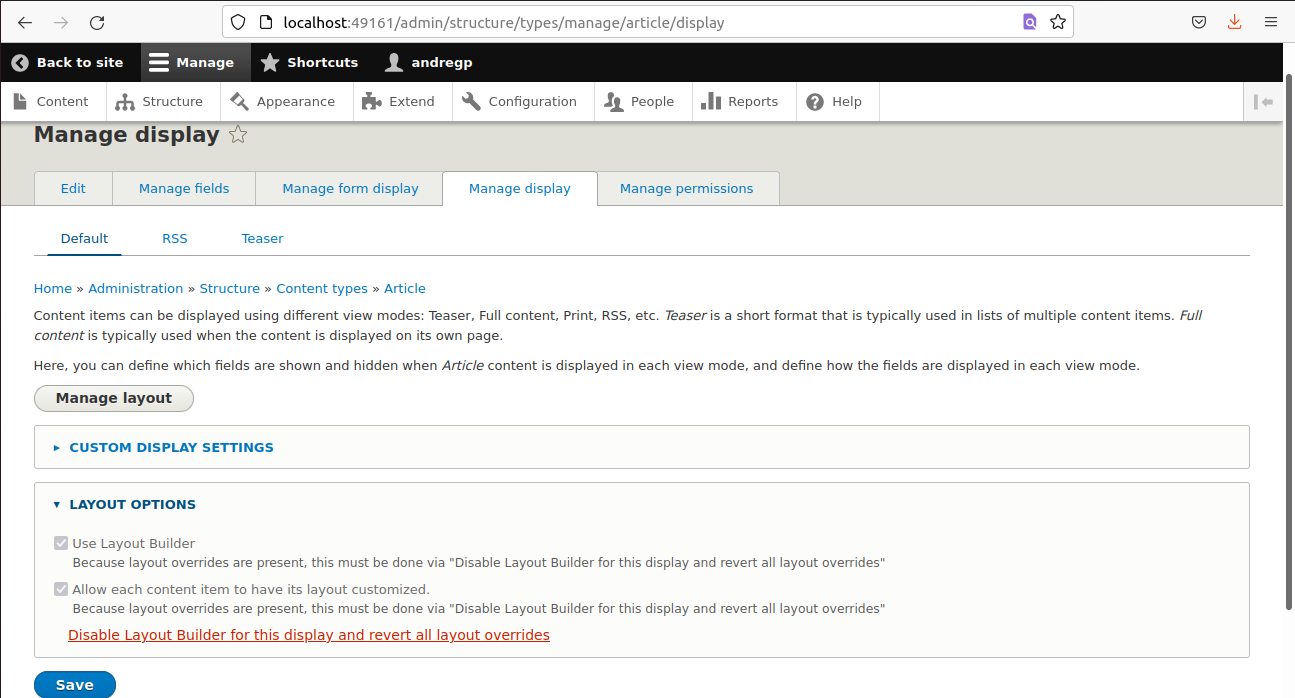
The "Manage Display" page says
You must revert all customized layouts of this display before you can disable this option.
Without individually checking each node, there is no way to determine which must be reverted
Proposed resolution
- A "Revert layout overrides" button (see Remaining Task for notes regarding button styling) on Manage Display that works for only that single bundle. This will appear in the "Layout options" fieldset.
- This button is only visible if the layout has overrides
- When this button is visible, the "Use Layout Builder" and "Allow each content item to have its layout customized." fields are disabled and hidden.
- The hidden fields will be replaced with the following language: "Layout Builder is enabled for this view mode, and some content items have their layouts customized. Before Layout Builder can be disabled, you must revert these overrides."
- This button will first take the user to a confirmation form, to confirm they're OK with all overrides being deleted.
- After confirming, Layout Builder will be disabled for that display and all overrides in that bundle will be removed from the database (including revisions) and remove all tempstore data for overrides in that bundle
Remaining tasks
UX review - reviewed 9/2/22)Write tests - tests are written- Determine if the Manage Display page should use the #button_type' => 'danger', or a normal button style. See comment #102 for a summary of the current discussion.
- Code updates based on UX review in #94.
Update screenshots in User interface changes - updated 12/30/22
User interface changes
The Manage Display UI will be slightly different here is it before patch:

And after:

And the confirmation screen.

API changes
N/A
Data model changes
N/A


 Show commands
 changes



Comments
Comment #2
johnwebdev commentedIt's because one of your Basic page has a overriden layout which prevents Layout Builder from being uninstalled. You'll have to reset those nodes overriden layout (You can do that by going to that node's layout and choose Revert layout) or delete them.
Comment #3
bloomt commentedI cannot find revert layout on any page. It is not on manage display, it is not on manage layout.
Is there some page that I am missing?
Comment #4
mihi-r commentedHas anyone found a solution to this? I can't find a way to reset the layout as post #2 has suggested.
Comment #5
Lloyd_87 commentedHi Mihi-r
I also had the same issue, what i did was to untick the layout for a content type that i was trying to configure with layout builder, then cleared cache and uninstalled. it worked for me
Comment #6
tim.plunkettThis provides a VERY DANGEROUS BUTTON that will permanently remove all layout overrides for a given bundle.
It should probably be behind a confirmation form.
But in the meantime, it might help!
Comment #7
tim.plunkettThis patch *should* work for 8.5 and 8.6, but targeting for 8.7
Comment #9
tim.plunkettOops, empty patch.
Comment #10
andrewbelcher commentedThis is made extra necessary by the fact that revisions hold layout data, so you have to revert layout for every revision (or delete every revision). A global remove custom layouts is a much better way to handle that.
Comment #11
tim.plunkettLet's get some input from @DyanneNova on direction
Comment #12
rhiss commentedRemoving the checkbox (Allow each content item to have its layout customized.) on each contentypes Manage display unlocks the layoutfield and lets you uninstall the Layout Builder.
I had problems using/configuring the ief_table_view_mode Module after the Layout Builder was active.
Comment #13
rjh427 commentedAs Comment #5 Lloyd_87 indicated, uncheck the "Allow each content item to have its layout customized." checkbox then uninstall the layout_builder module.
I stumbled over this problem quite by accident. It wasn't immediately obvious how to undo the changes that were made because even though I unchecked the checkbox, the changes that were made did not revert properly. It took uninstalling the layout_builder module to do that.
Comment #14
tresero commentedThere is no easy solution. The "Allow each content item to have its layout customized." can't be unchecked. It says "You must revert all customized layouts of this display before you can disable this option."
WTH? Absolutely horrific dev experience. What am I missing?
I guess layouts is the new thing, but I prefer not to use it. Can't I just delete it?
Comment #15
tim.plunkettThat checkbox is unchecked by default. And is only disabled if you start using the functionality.
This issue is about making it easier to stop using once you choose to start using it.
Comment #16
tim.plunkettComment #17
tim.plunkettThis need some work from @DyanneNova, not ready for wider review.
Comment #19
tim.plunkettComment #20
dyannenovaI think the current patch is the right direction. We need a confirmation page after clicking Revert All to warn the user that they are irreversibly deleting data from all content of that type before they proceed.
Comment #21
tim.plunkettThanks!
Comment #22
ccasals commentedPartially complete route addition.
Worked on / "complete":
- addition of a confirm form
- moving the actual revert process to the confirm form controller
- using DI for the services used in the revertAll method
Outstanding todos:
- finish wiring this up, hasn't been tested and I'm pretty sure it will just fall over in present state
- finish making this a dynamic route instead of a static one.
- run the reverts as a batch process.
Comment #23
johnwebdev commentedSetting to NR for tests :)
Comment #25
tim.plunkett@johndevman I think @ccasals left it at NW because it's a partial implementation. Give the testbots a break! :)
Tagging for the work done at DrupalCon
Comment #26
ccasals commentedBefore wrapping up the rest of this, some patch hygiene :)
Reroll of patch in #9
interdiff for the reroll
interdiff between reroll and #23
(thanks for pointing that out @tim!)
Comment #27
yogeshmpawarTriggering bots for tests.
Comment #28
ccasals commentedSo this patch "works" - the reversion takes place, the layout field is removed, and the display is set back to the default as it was before LB. However, there is still the message: `Fields pending deletion` when uninstalling Layout Builder is attempted - either through drush or the UI
Also includes a re-reroll of 2980299-revert-26-reroll.patch which was formatted incorrectly.
Comment #29
ccasals commentedPatches flummox me, apparently.
Comment #30
tim.plunkettThis is looking really good! Thanks for continuing to push on this @ccasals.
Two pointers on things that have changed since 8.6:
loadFromStorageId()is deprecated. You'll likely need to$entity_storage->loadMultiple($ids)and loop over the entities instead of the IDs, then pass them in as context.See
\Drupal\layout_builder\Plugin\SectionStorage\OverridesSectionStorage::deriveContextsFromRoute()(the middle part after extractEntityFromRoute) for an example.There's a new
removeAllSections()method that can be used nowComment #32
bnjmnmComment #33
bnjmnmThis patch:
@throwsannotations should only be used when an exception is thrown in the method itself.DefaultsSectionStorageTestso it passesRevertAllConfirmtoRevertAllConfirmFormso it follows form controller naming conventions.LayoutBuilderEntityViewDisplaythat had been moved toRevertAllConfirmFormRevertAllConfirmFormso it successfully removes overrides for the bundle.LayoutEntityHelperTraitare from a not-yet-committed patch for #3035992: Stale values can be displayed by the Layout Builder UI but are saved correctlyThis still needs tests and (as mentioned in #22) the reverts should use a batch process.
Comment #34
bnjmnmComment #35
bnjmnmAdded tests and removed a bit of redundant code in
LayoutEntityHelperTraitI attempted to move the reverts to run in a batch process, but ran into errors when calling
$override_section_storage->removeAllSections();stating that thelayout_builder__layoutwas not found despite it being present. My attempts were unsuccessful so they're not in this patch, and hoping I just overlooked something obvious that will be apparent once I've had a bit of distance (is something out deriving contexts from routes throwing this off?). If anyone has suggestions as to why this doesn't work in a batch process, happy to hear them:Comment #36
bnjmnmChanged the reverts to a batch process, this is fully ready for review now.
Comment #38
bnjmnmComment #40
dqdConfirming, after testing around on this interesting issue I run into the issue scenario described in the summary.
After reverting all nodes I was able to disable Layout Builder for the content type. The checkboxes were greyed out before.
@ actual stable Drupal core release non of the patches applies atm here. Maybe sth wrong here on our side.
Comment #41
tim.plunkettThe patch in #36 applies cleanly to 8.9.x, 8.8.x, and 8.8.1
It has tests now, and needs review.
Comment #42
dqd@tim.plunkett Are your sure with applying on 8.8.1 ? hm, I need to retest ...
Comment #43
dqdOk. For some reason the first attempts failed but after @tim.plunkett has stated that it should work, I re-tested the patch here on a fresh 8.8.1 with enabled Layout Builder for content type "page" and it worked. Thanks @tim.plunkett for confirming again that it should apply. No idea what went wrong before. Here the output. Testing 8.9.x and 8.8.x will follow.
Comment #44
dqdI can confirm that the patch applies cleanly and a new link is occuring under the Layout checkbox and that the user is now able to easely revert changes made and disable Layout Builder on Manage Display @ Drupal 8.8.1 and that the checkboxes are not greyed out no more.
But a possible follow up?
extend/uninstall...
The field has been removed from the Manage DIsplay field management by reverting and unchecking Layout Builder and Custom Layout for each item, but it seems to have some left overs. Running cron several times did not remove it.
Possibly related?: #2861863: InvalidArgumentException "Field is unknown" in ContentEntityBase
Maybe appears only for projects with multiple languages installed?
Comment #45
tim.plunkettI'd need a longer backscroll to understand that error.
Comment #46
dqd@tim.plunkett: Yeah ...Maybe its cleaner to create a new issue? Because it has some other related issues and is another step in the whole problem than the one solved here in this issue. But still: they are more than related. I am even not sure if the patch has created this error and SWOD.
Let's say it the other way around: The patch here fixes the problem described in the issue headline and summary, yes, but after applying it, the error message from the closed core issue regarding unknown field in case of a multilanguage setup occures in the next step #2861863: InvalidArgumentException "Field is unknown" in ContentEntityBase And since this issue has been closed because of the overall problem, that it only describes a correct error message which has possible multiple reasons, I think it falls back to the individual core components and contrib modules causing it. Or our latest patch version here :/
Comment #47
dqdI think it still needs work, since the patch causes errors and WSOD including this error reported on #2861863: InvalidArgumentException "Field is unknown" in ContentEntityBase
Would love to read other reviews testing the patch on a multi-language setup.
I tried to provide steps to reproduce but the main issue does not appear no more in a fresh Drupal core installation from what I see here.EDIT: Ok we managed to reproduce the main issue from Summary and the secondary issue caused by the patch again. It seems to require more than 1 test node created. Here: Fresh Drupal installation on https://stm5e18fc4d9ca89-5noulyeqtcsebr896mg1ydo5gyzcotea.tugboat.qa Feel free to join the test (admin/admin) with Devel and Devel generate installed for creating mass content in different languages.Fields pending deletionComment #48
tim.plunkettI know it would be tedious, but can you try the exact about but without Devel (aka only core modules)?
That would provide a clear set of steps we could use to write a core test case.
Comment #49
dqdMakes sense... Done! Any reports or logs I should add?
New (corrected) reproduction steps done here:
Fields pending deletionComment #50
dqdAdditionally we tested to revert all Layout changes made manually (without the patch applied) down back to the point where Layout builder is able to get disabled again on the content type (remove all custom layout settings manually) which works and does not cause the issue described in #46/#47. I will try to find time to read the patch code again... not sure where to look at yet at a glance since we have some dead lines here and some operational failuer (office off time) due to illness (many people suffer from a gastric flu virus over here atm). :/
Interestingly enough another issue appears here: old layout settings re-occure after enabling Layout builder again ... \0.0/ which makes no sense because we have removed them before disabling Layout builder ...
Comment #51
tim.plunkettI followed the instructions and after step 10, I was able to uninstall the module. No "Fields pending deletion" message at all.
Comment #52
dqdOk, thanks for taking the time to report back, Tim.
Weird ... Yeah, so .... doing it again (one MORE time) all seems fine now and the patch works, creates the link to revert changes and makes it easy to disable and uninstall Layout Builder. +1 for the awesome work on this.
There is just something going on here, but we just don't know yet what it is. But maybe unrelated to this issue ... Where is the overlapping here in our 2 test scenarios causing the same issue? This should be the spot to look at from our side to make sure this issue here is not affected. I actually need only one more test running OK like yours and then I can compare. Let me try to test on another environment a fourth time.
Comment #53
tim.plunkett#40-52 are unrelated to this issue. Please open a new one (or two) to discuss.
Rerolling #36 and making a few adjustments.
Comment #54
tim.plunkettInlined revertAll and moved the redirect to be part of the batch.
Done tweaking now.
Comment #55
dqd+1 ... and I can confirm that an input link "Disable Layout Builder for this display and revert all layout overrides" occures under Layout options in Manage Display and clicking the link causes:
Confirming this choise will cause:
Layout Builder disabled and all overrides removed.... and all layout changes made have been reverted and Layout Builder is disabled for this content type (unchecked). Uninstalling Layout Builder is now not greyed out no more (on extend/uninstall) and can be selected for uninstalling.
+1 and RTBC from me. Great work on this and a great and handsome addition!
Comment #56
dqdComment #57
goncalo.dumas commentedSorry for not having read every single answer.
I had a particular node blocking this function (Allow each content item to have its layout customized.).
I had no possibility of checking each one individually since there are more them 350 nodes under this content type.
I went to the database and under the table "node__layout_builder__layout", I managed to get the node ID of the offending.. node.
Opened using the dirty URL and reverted it to the standard layout, allowing me to uncheck the "Allow each content item to have its layout customized" option.
Comment #58
josephdpurcell commentedJust adding some info here in case it's helpful for identifying the issue. I am seeing this on cron run, specifically when the "Purges deleted Field API data" cron is run:
I'm using Drupal 8.8.4 and PHP 7.2.27. I did not try the patch. Currently, we are not seeing any critical behaviors like a WOSD, but it's possible we just haven't gone to the right page to see it.
Comment #59
tim.plunkett#58 is that as a result of the patch?
It reads like something that would happen if someone manually removed the LB field in an attempt to solve this bug, but didn't correctly remove it and all references to it.
Comment #60
dqdI can confirm Tim's assumption on #58 since we had that scenario already and it was indeed that case.
Comment #61
josephdpurcell commentedSorry, it seems I made this ticket more confusing!
#58 is not a result of the patch submitted in #54. I wrote comment #58 thinking this ticket was to address the issue I was observing, and wanted to share that I had too had experienced this issue.
I applied the patch from #54 and still see my error in the cron log for "Purges deleted Field API data", which is:
However, suggesting that it has to do with the data structure on a content type prompted me to identify the problematic nodes, delete them, run the cron again and see if the error resolves. To do this I put a breakpoint on line 587 on docroot/core/lib/Drupal/Core/Entity/ContentEntityBase.php and then inspected
$this->entityKeyswhich showed the bundle and revision ID. I went the long route of looking up the node the revision belongs to in MySQLselect * from node_revision where vid=101;, then going to /node/{nid}/delete. I only had to repeat that twice because there were only 2 nodes that were causing the issue.In conclusion, I don't know the original cause. Fortunately, I can easily re-create those 2 problematic nodes. It's unclear how this ticket relates to my problem (if at all). And, it's unclear if there is a solution that doesn't require data loss.
I'm unblocked -- thank you for the help!!
Comment #63
xjmLooks like we need a reroll on D9. The 9.1.x test fails with:
Comment #64
johnwebdev commentedComment #65
tim.plunkettI don't think this issue ever had any usability review done, both of the functionality and of the UI text.
Comment #67
abhinand gokhala k commentedDrupal already providing an option for Disable Layout builder.
So I think this bach process only needs to consider reverting the customized layout.
So I have removed one line from the above patch.
Comment #68
abhinand gokhala k commentedSolved patch error
Comment #70
anmolgoyal74 commentedFixed the deprecation notices.
Comment #72
anmolgoyal74 commentedFixed the failing tests.
Comment #73
capysara commentedPatch applies and resolves issue on simplytest.me
With patch:
Comment #74
dqdSince #65 hasn't been addressed yet seriously I fear to set this RTBC. Also #67 "Drupal already providing an option for Disable Layout builder." tells me this issue maybe needs more discussion? Do we "cross-fix" an issue from the wrong side here?
Comment #76
jrbd commentedi fix it
1) go to /admin/structure/types
2) choose each content type
3) go to manage display and unselect layout builder.
Comment #78
danflanagan8From #76:
That does not work if there are any layout builder overrides in place for that content type. If overrides exist, the checkboxes are grayed out:
This is the problem the issue is attempting to overcome.
This needs a reroll.
Comment #79
danflanagan8This would also really benefit from some before-and-after screenshots in the IS. It would be a lot easier to get a usability review if we make it easy on the reviewers. Tagging for an issue summary update to get some screenshots in the IS.
Comment #80
ranjith_kumar_k_u commentedRe-rolled #72
Comment #82
andregp commentedI fixed the deprecation errors on patch #80 and updated the IS with the screenshots of the site with/without my patch.
Comment #84
andregp commentedI'm gonna check why there are still 2 errors left on the tests.
Comment #85
andregp commentedI tried but, couldn't figure out why the fails on the tests above...
Comment #86
andregp commentedThey were random errors, sending back to needs review.
Comment #88
gaurav_drupal+1 for the patch, #82 works. Thanks
Comment #89
gquisini commentedHi,
I'll review
Comment #90
gquisini commented#82 patch works just fine.
Comment #91
danflanagan8This still needs a usability review. I'm setting back to NR.
I added a comment to the upcoming Usability meeting in an attempt to get this on their radar. I'm not sure I'll be able to join this meeting, but anyone who really wants this to get to RTBC needs to communicate with the Usability team.
#3299065: Drupal Usability Meeting 2022-07-29
Comment #94
dyannenovaWe reviewed this issue in the UX meeting on Sept. 2nd. The agreed upon solution was to hide the disabled radio options and replace them with these words above revert button:
"Layout Builder is enabled for this view mode, and some content items have their layouts customized. Before Layout Builder can be disabled, you must revert these overrides."
The revert button text should be changed to "Revert layout overrides"
Here's a screenshot of the suggested solution:

The attendees on the call were AaronMcHale, benjifisher, rkoller, shaal, simohell, and myself. The recording is available here: https://youtu.be/iPWyziQHAFk
Comment #95
aaronmchale#3306259: Drupal Usability Meeting 2022-09-02
Comment #96
aaronmchaleSomething else that probably should be looked at.
The "Revert layout overrides" link, in Claro, uses a very big, very scary looking red button style, it draws all focus, even though it is not the primary action button on the page (Save is the primary button).
#button_type' => 'danger',is probably not appropriate, particularly as this link takes the user to a confirm form, there's nothing actually dangerous about this link. I would opt for using the normal button style, essentially what the "Manage layout" link is using.Comment #98
xjmI think this is probably a major bug.
Comment #99
Deshna Chauhan commentedAdded patch against #99 in 10.1.x version
Comment #100
bnjmnmIgnore patch #99 above, additional work should be based on #82
@Deshna Chauhan There are several things incorrect with your patch in #99
I've seen similar patch problems with a few contributors from Dotsquares. If anyone from that company would like guidance on finding issues that legitimately need rerolls and how to do those rerolls properly, have them find me on Drupal Slack and I'm happy to help.
Comment #101
xjmThe next step in this issue is to address @DyanneNova's review from #94 (starting from #82 as @bnjmnm indicates), and possibly #96 as well. That said, I am not sure I agree with this statement:
It is deleting data -- possibly a lot of data -- so it should probably be styled however we elsewhere style buttons that delete lots of data. Maybe it's the confirm form button that needs that styling?
Comment #102
capysara commentedI've updated the IS and the Remaining Tasks based on previous comments, starting with the UX review in #94. Regarding Remaining Task #3
I didn't find instances of "deleting lots of data" in core, which is probably by design since it's dangerous. The only Danger Button that I saw was in the views_ui when deleting a field. (There is no confirmation message for this action, but it's not really "dangerous" because you're deleting config, which means this could potentially be a separate ticket to remove the Danger Button here.) I found several examples of core using

action-link--dangerwhen there is a Delete link that's followed by a confirmation page. In Claro, it looks like a red link with a trash can icon [screenshot], and the confirmation page uses the `button--primary` (blue button) for the Delete button. But, again, the examples I found are NOT destructive data deletions.Based on my understanding of the User Interface Standards for buttons, the Big Red Button on the Manage Display page is not appropriate, as it is not part of a "set of other buttons." However, the Confirm button on the confirmation page could use the Danger Button as it is a destructive alternative.
All that being said, this question may be a unique case without a precedent (I didn't find one in core, but maybe someone else has an example), and it's possible that the Standards need to be updated to cover this specific situation.
And not to completely derail this conversation or push anyone's buttons (haha), but it may be worth noting that there are arguments, e.g., this 7 year old debate, for not using Big Red Buttons at all.
Comment #103
capysara commentedUpdates based on UX Review.
Comment #104
capysara commentedComment #105
capysara commentedAssuming that we're going with the suggested solution in #94, here's a patch based on #82 that replaces the disabled fields with markup and updates the button text.
Comment #106
capysara commentedUpdated screenshots (in Claro theme) to reflect comments from UX review (comment #94).
Comment #107
capysara commentedComment #109
ressaThanks for working on this. The patch applies (with a few offsets) against the latest dev-release, and I can revert a Layout, which was locked.
The layout of the button is slightly broken, though: The "Revert layout overrides" is shown at the end of the text, to the right, and not below.
Comment #117
murrow commentedI've just used a patch from @hswong3i's #116 merge request on D10.4.1 and it works fine for me. Is it true that the only thing holding this up is the button?