To reproduce:
- enable product variation field injection on the product type form
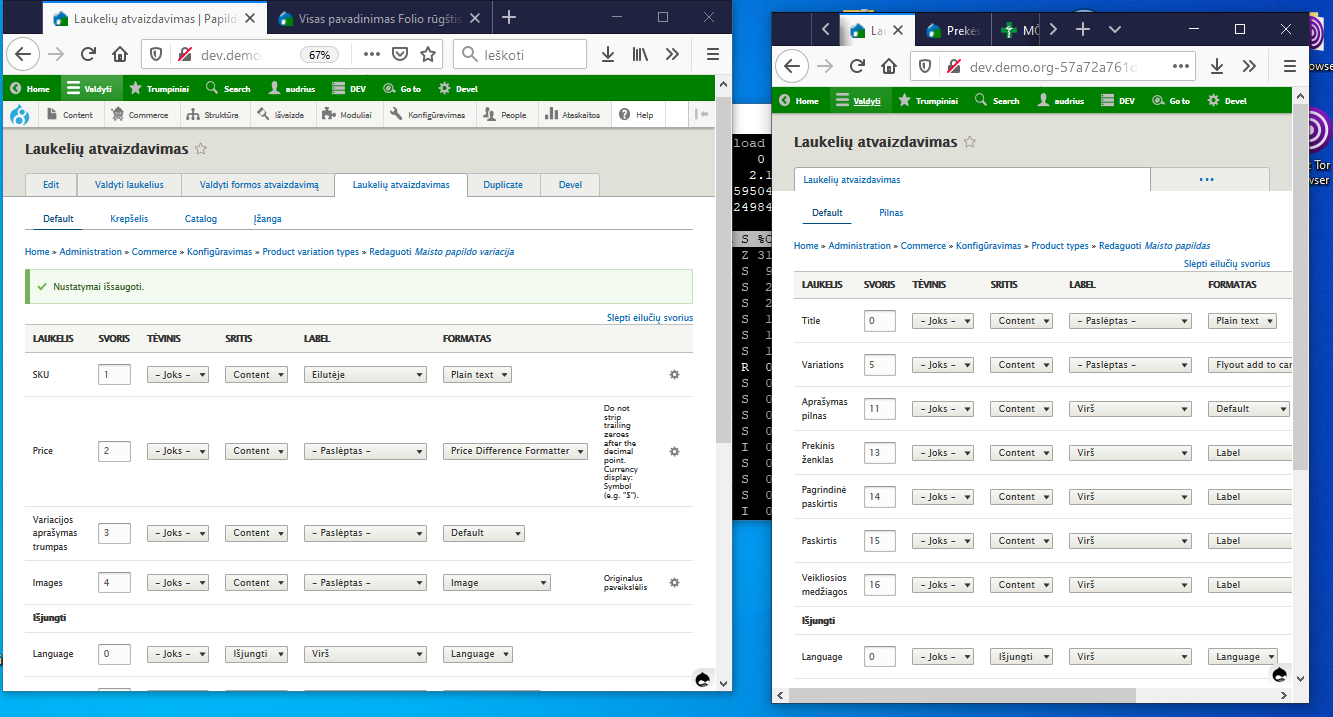
- at admin/commerce/config/product-variation-types/default/edit/display, set the title field to show
- create a product with 2 variations
On the product page, the order of fields is:
- Price (from the PV)
- Add to cart form (from the product)
- Title (from the PV)
Not sure what the best fix is TBH.
Two possibilities:
- Expose the fields from the PV as pseudofields on the product using hook_entity_extra_field_info(). Don't know if there would be a circularity issue there though, as we need to know the fields visible on the PV when declaring the extra fields for the P. That would allow you to intermingle them as you wish.
- Expose a single pseudofield on the product, which outputs all the fields from the PV together. Simpler, but might have theming implications as the PV fields would become 2nd-class citizens.


Comments
Comment #2
joachim commentedComment #3
andybroomfieldI came across this issue whilst trying to work out how to position the price field on a commerce product from the variation.
I went with the pseudo field route for the whole injected fields.
WIP here https://github.com/andybroomfield/commerce_injected_fields_display if its useful to anyone.
Comment #4
rwilson0429 commentedIt seems that there is a solution for this in the drupal commerce2 documentation at https://docs.drupalcommerce.org/commerce2/developer-guide/products/displaying-products/product-display.
As the documentation states: "The fields from the Product variation type display are combined with those of the Product type display. At this point, you may be wondering how to control the positions of the Product variation fields, in relation to the Product fields. When a product is rendered, all the product and product variation fields are sorted based on weight. To control the field positions, you should use the Show row weights link to explicitly set the weight for each field. This link is located at the top-right of each Manage display configuration form."
https://docs.drupalcommerce.org/user/pages/03.commerce2/02.developer-gui...
Comment #5
bunthorne commentedI followed the directions from https://docs.drupalcommerce.org/commerce2/developer-guide/products/displ... and was unable to get the fields to render in the order that I specified using the weights across the Product and Product Variation display settings. I tried the following:
[Product Variation] Media image = 0
[Product] Body = 1
[Product] Variations/Add to Cart form = 2
[Product Variation] List Price = 3
[Product Variation] Price = 4
The actual display I'm getting:
[Product Variation] Media image
[Product Variation] List Price
[Product Variation] Price
[Product] Body
[Product] Variations/Add to Cart form
Comment #6
griz commentedSame here, I can't move the price field using the weight selector.
What's the way forward for a site builder - use Panels? Or spend hours learning Twig?
I don't really want to do either. Bring back tpl.php... and don't even get me started on Composer :(
Comment #7
playfulwolf commentedCan confirm this with the latest Commerce release: with some magic (manually inserting row weights) can move almost all fields except price and title of variation.
Comment #8
playfulwolf commentedIt is probably related, but the field order in form is also different, so fields really intermingle
Comment #9
neograph734Comment #10
playfulwolf commentedYes, documentatn mentions this, but you can change the row values till the world end - some do not match in the output.
For example I cannot put Sku above Price field
Comment #11
playfulwolf commentedComment #12
imclean commentedThis gets even more fun with the Field Layout module. For a quick custom solution, we've used
hook_preprocess_commerce_product()to move the PV fields into the same region as the variations field of the product.You can also grab the weight from a PV field or hard code it.
Comment #13
kevinsiji commented#12 works for me.
Comment #14
gravisrs commented#3 is closest to solve this problem in appropriate way, since this solution would work with any extra display modules (Panels, Field Group, Display Suite, etc. ), but instead of one virtual "Injected Variation Fields" it should have each field exposed separately.
This is also similar approach as in Drupal 7 Commerce.
Comment #15
johnpitcairn commentedOh jeez ... first time I've actually configured a "normal" product display for D8/9, previously I was just displaying individual variation entities. This is just an awful site building experience.
I agree injected pseudo-fields managed in the same place as product fields is the way to go, with one pseudo-field per injected variation field.
Comment #16
Drupal_hippie commentedPlease elaborate how to implement #12.
Comment #17
imclean commented@Drupal_hippie, you put the code in a custom module (or theme). For example, if your module was called "my_module" the function would be called
my_module_preprocess_commerce_product().At a minimum you'd need a
my_module.info.ymlfile and amy_module.modulefile to put the function in. Drupal.org has some docs on creating modules but it's mostly a reference rather than a guide. There are some good guides on other sites.Comment #18
Drupal_hippie commented@imclean, now it's clear, many thanks to you and to all contributors!
I was able to implement #12 as a module.
Looks like code is quite old and throws some errors in current Drupal version, but I think it's possible to fix it. With no luck for now though.
Comment #19
imclean commented@Drupal_hippie. I recommend the devel module and kint, installed with composer
composer require kint-php/kint.Within the hook use
kint($variables)orksm($variables)to see the value of $variables.Comment #20
Drupal_hippie commented@imclean
Nice modules, will surely try them. Thank you, I appreciate your advise!
____________
I tried kint and found it very interesting, thanks!
Also I found symfony var dumper and can recommend it as well, at least it doesn't kill my server instantly ;)
https://drupal.stackexchange.com/questions/211928/how-can-i-make-kint-lo...
Comment #21
niki v commentedIt works as designed, no need for any coding or modules.
When setting the product-type display, use "show row weights" and number accordingly. Then go to your corresponding variation display and number the variations sequentially as you would like them positioned in the product display.
For example:
Product display
image - 0
body - 1
Product variation
price - 2
stock level - 3
Product display
add to cart form - 4
categories - 5
tags - 6
Comment #22
anybody