

 The 2026 Drupal Business Survey is open. Your response will help shape the future of the Drupal business ecosystem.
Problem/Motivation
Currently the entity browser form display offers two only options for buttons:
Display Edit button
Display Remove button
Small problem: to many clicks
For fields with cardinality 1 this generates a tedious workflow, when you quickly want to change an existing selection: You first have to remove the existing reference, and then select a new entity.
Big problem: counter-intuitive interface
For entities that don't "feel" like stand-alone, self-contained entities (e.g. image media entities), it can be very misleading for editors: Instead of removing the reference, the current interface can easily trick them into using the edit button (which edits the referenced entity and might unintentionally affect other nodes) instead of using remove and selecting another entity.
Proposed resolution
I suggest to add a third form display option
Display Replace button
Even when checked the button must only be visible when there already is a referenced entity.
This button should
- open the entity browser
- allow the editor to do their selection as usually
- on submit the selection should replace the current reference(s)
| Comment | File | Size | Author |
|---|---|---|---|
| #36 | interdiff-31-36.txt | 733 bytes | marcoscano |
| #36 | 2913798-36-1.x.patch | 29.99 KB | marcoscano |
| #36 | interdiff-32-36.txt | 733 bytes | marcoscano |
| #36 | 2913798-36-2.x.patch | 29.98 KB | marcoscano |
| #36 | file_widget_replace.mp4 | 1.66 MB | marcoscano |


Comments
Comment #2
miro_dietikerWe have this problem in Paragraphs Collection with the "From library" Paragraph.
It's a single value required reference.
For single value required references, a delete button never makes sense. Instead it maybe should always display the replace button?
Comment #3
johnchqueGonna try this. :)
Comment #4
johnchqueFirst try, was able to append a button for triggering the modal for the entity browser, will look for a better way in following patches.
Comment #5
johnchqueComment #7
johnchqueTried to debug this with no luck, modal form is displayed, the problem comes when selecting the new entity to reference. May need to add a new ajax callback.
Comment #8
marcoscano@yongt9412 are you still working on this issue?
I've had a try on this as well, using a different approach. The idea here is that we re-purpose the "Remove" button when the field is required and cardinality === 1. (As per the suggestion in #2) This way we don't have much to do, once the selection removal still takes place, and the only thing we need to make sure is to tweak some labels and open again the browser after the selection was emptied.
This patch works for my manual testing, but I haven't worked on tests yet, let's see what the testbot says.
Feedback on the approach appreciated.
(Note: no interdiff because it's a completely different approach from #4)
Comment #9
miro_dietikerAre we still determining triggering elements by label instead of by ID? There is so much that can go wrong this way...
The button really needs a class to determine if it's replace or remove. Otherwise you can not represent it properly with an icon.
Comment #10
marcoscano@miro_dietiker thanks for reviewing!
Addressed the feedback from #9 and added some tests.
Thanks!
Comment #11
berdirInteresting idea to do it automatically for single-value/required fields.
I'm wondering if we should make it an explicit setting, separate from delete for two reasons:
a) BC: We don't automatically change existing sites which might confuse users/form alters. Instead, users can opt-in to this by editing the field and disabling remove and enabling replace.
b) We have quite a few different scenarios in our project, required single value, non-required single value, required multi-value. A separate setting allows us to experiment a bit. Especially since we actually customize those buttons and use icons for them, so we might have space for a delete and replace icon.
Related to that, I'm also wondering how a replace button would work for a multi-value field.. I guess the expection would be that it is placed at the specific location, so we'd need support for that (we already have support for first/last, so possibly we can extend on that internally?)
And last, wondering how this place together with the mode where the existing selection is shown in the browser, I guess replace then means that entity browser opens with the others shown as the remaining selection?
Thoughts?
Comment #12
marcoscano@Berdir Thanks for reviewing!
I believe there are two main issues potentially at scope here:
Issue 1: (arguably a usability bug) - Don't show a "delete" button in required single-valued fields
Issue 2: (feature request) - Add a new "Replace" button in other scenarios as well
The patch in #10 only intends to address Issue 1.
I agree that the BC concern is a valid one, and doing it straight away may cause some issues (or at least some confusion for existing sites). With that in mind, what about then:
- We add a new checkbox on the widget settings (states-enabled only when the "Show remove button" is marked), saying something like:
Use a "Replace" button instead of a "Remove" one when the field is required and single-valued- This will not be marked by default
- We only change the button behavior if
* field is required
* cardinality === 1
* the new setting was enabled
Concerning Issue 2:
I'm not 100% convinced this is a feature we should support? I see several tricky points we would need to consider (such as the ones mentioned in #11), and I'm not sure the benefits outweigh the added complexity to the code. I'd be happy to explore that path though, if you think that feature is a must.
It's true that if we go for the third-button idea, it may make sense to change the approach and leave the "Delete" button as is, and just hide it when the new "Replace" button is there and the field is required+single-valued.
Comment #13
marcoscanoOK, after discussing this a bit further with @Berdir, the idea with this new patch is:
- We create a new setting on the widget config such as "Display Replace button"
- This new setting is disabled by default
- We indicate there that this button will only be shown when there is a single entity in the current selection (regardless of the field cardinality or if it's required or not)
This way we address the BC concerns, and also provide users with a more flexible tool so they can configure it depending on each use case.
Supporting the "Replace" functionality in multi-valued selections brings up a whole set of new concerns, as mentioned before, and we could defer that discussion to a follow-up, if necessary.
Comment #14
berdirCan we make a selector that matches both so we just need to have one click() call? the lines are very long anyway, so maybe split them into some variables like var data_drupal_selector?
I guess it will also not work with another plugin, as theoretically someone could have a different one that works differently.
Comment #15
marcoscanoThanks for mentioning that! :)
At first, it appeared to me that it was impossible to use a single selector once the markup was so different, but this patch shows that it is indeed possible :P
Thanks!
Comment #16
miro_dietikerThe "Note that " is IMHO superfluous for a description.
So cancelling the replace process will still empty the original selection.
Better would be to keep the selection and only replace it after the new selection is confirmed.
Is this much harder?
Comment #17
marcoscanoStill investigating, it seems not trivial at first sight.
For now, this patch at least addresses #16.1
Comment #18
miro_dietikerIMHO also an option to get this in and create a low prio follow-up to update code and support cancellation without data loss.
Comment #19
marcoscanoYep, I agree that losing the current selection after canceling the modal is not a big deal compared to this feature as a whole.
If a follow-up is OK for dealing with that, then this is NR :)
Comment #20
miro_dietikerTested it with our Hero Paragraph media field (Hided the remove button, added the replace button) and the selection was cleared, but no Browser was opened. Where did my Browser go?
=====
Random trap / follow-up? I also tried to enable auto submission in the EB for the Hero media field, but that resulted in this message inside the overlay: "The website encountered an unexpected error."
Effectively it is "Drupal\Core\Config\ConfigException: Used entity browser selection display cannot work in combination with settings defined for used selection widget."
I thought then OK never mind, let's tune the selection mode in the form widget settings and switched to "Edit selection", now even editing the node shows the "unexpected error". :-)
So no idea how this auto-select should work then... And why not validate illegal selections or auto-healing by falling back to a default value.
Comment #21
marcoscanoIndeed, the form structure changes when there is a paragraph on it :)
This new selector should deal with both cases.
Comment #22
berdirThis works great for us and is fully backwards compatible. Didn't test but I guess the patch is compatible with both branches.
Comment #23
marcoscanoComment #24
berdirThere is a filename difference in 8.x-2.x
Comment #25
marcoscanoOpened #2947843: Prevent clearing current selection if user aborts replace operation as a follow-up to deal with the issue indicated in #16.2
Comment #26
primsi commentedHm, patch seems to be against 8.x-2.x but issue states it's against 8.x-1.x. I guess it's the former?
Comment #27
miro_dietikerNo @Primsi: #21 is against 8.x-1.x and #24 is the very same against 8.x-2.x as the passing tests confirm.
Comment #28
primsi commentedI was testing this yesterday a bit with a fresh install of 8.4.x + EB 8.x-2.x. When I press the replace button the browser doesn't appear. Didn't investigate this further though.
Comment #29
miro_dietiker@Primsi your table headings are off by one as well with the weights visible. Did you check if there is some JS error in your console?
Comment #30
marcoscanoI'm on it, we checked normal entity reference fields inside and outside paragraphs, but not file widgets, which produce a different markup. I'm also updating the tests so we cover all these cases.
Comment #31
marcoscanoThanks for testing it @Primsi !
Indeed we were not dealing correctly the field widget scenario. This modification seems to deal correctly with all scenarios we've tested so far, for me.
My phpunit is doing something weird with the javascript in the file test, not sure if it's my setup or what. In manual testing everything seems to work though. Let's see what the testbot says, if everything is OK I'll prepare the 2.x branch patch as well.
Comment #32
marcoscanoAnd this should be the same patch as above, but for the 2.x branch.
Comment #34
marcoscanoRe-queuing to be tested against 2.x
Comment #35
primsi commentedThis almost looks good :) I noticed two issues with the file widget:
The replace button is always displayed even the widget it configured not to.Anyhow, I can commit 8.x-1.x patch if there are no additional concerns.
EDIT: re n.2 not sure what it was, re-saved the widget and seems to work fine.
Comment #36
marcoscanoThanks for the feedback!
This should take care of the table head offset.
For the second issue, I couldn't reproduce it... maybe it's related with the table offset too? Could you please try to reproduce it with these new patches?
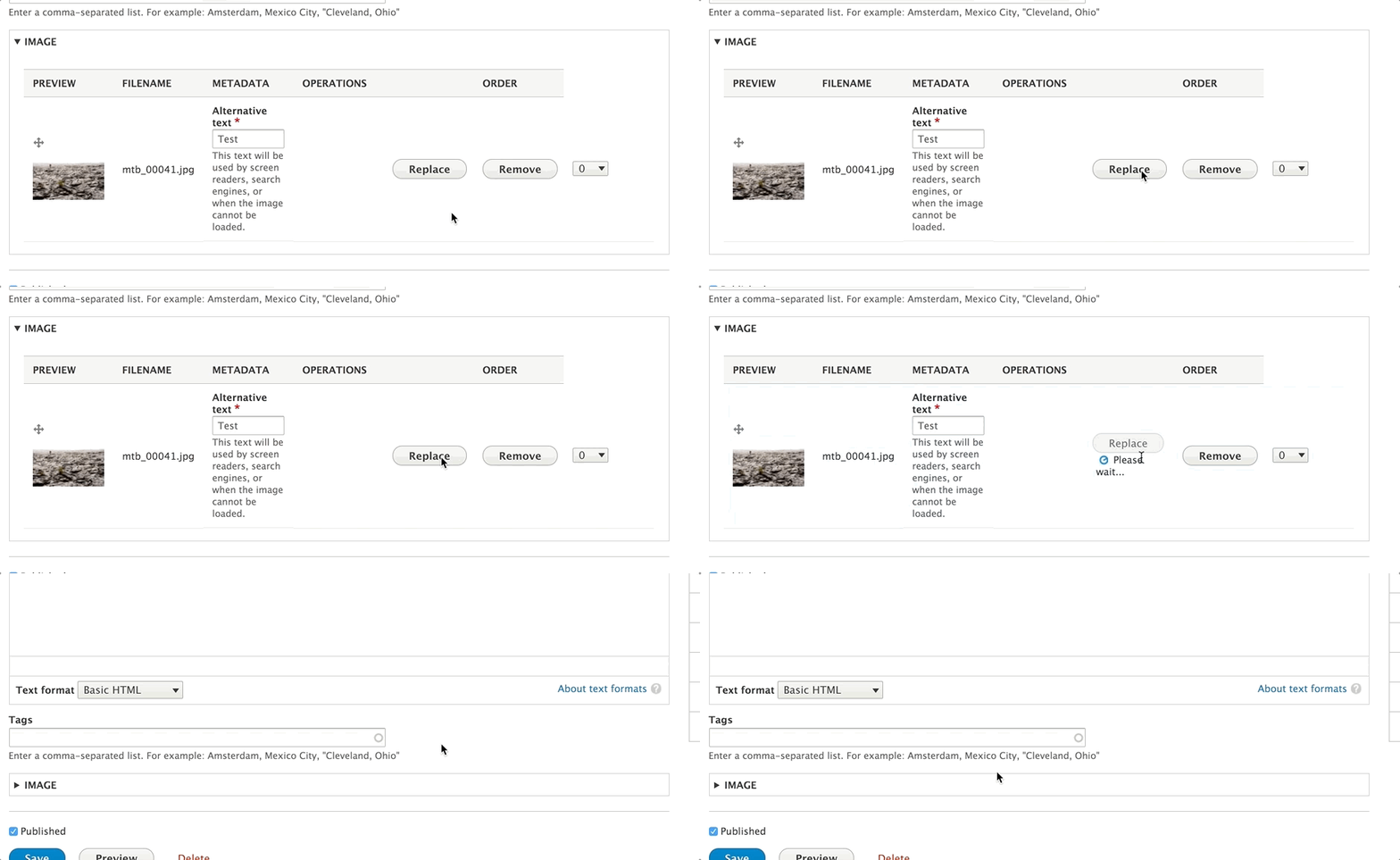
Here's what I have: video (mp4)
Thanks!
Comment #37
marcoscanoOh just saw the comment edit. OK then! :)
Comment #40
primsi commentedCommitted, thx.
Comment #42
dddbbb commentedJust tried this on 8.x-1.x and clicking "Replace" just does the same as "Remove".