Problem/Motivation
If the paragraphs field is not required but it's widget has a default paragraph type selected this results in the required fields from of the paragraph to still be validated - and if empty the validation for the host entity fails.
If there are none required fields, the empty paragraph item is still saved. This could cause labels with empty items displayes
Another use case can be found in paragraphs collection where we have a paragraph type "separator" that does its job without having any field filled. So it needs to save although all fields are empty.
Proposed resolution
Add an option to skip save if all fields are empty on each paragraph type.
Required fields would still trigger validation.
Remaining tasks
User interface changes
API changes
Data model changes


 Show commands
 changes




Comments
Comment #2
primsi commentedNot sure if I understand this correctly. Which title is showing?
Comment #3
saranya ashokkumar commentedHi Primsi,
I explain you clearly. I have created one paragraph as "Paragraph 1". In article content type, I added that paragraph entity reference field as "paragraph". When I create content for article, I didn't give value to the paragraph field because it is not required field and saved it.

In node view page of the article, "paragraph" label is showing.

Comment #4
miro_dietikerThe paragraph instance libk is added by default. Even if the fields are empty, there is one instance.
You can remove that (remove button).
And if you don't want a paragraph added by default, you can edit the paragraphs field widget settings and choose there to not create an instance by default.
We can not simply check if fields are empty and then drop the pragraph. I consider adding this as a feature for special paragraph types, but it also would need to be an opt-in. Do we already have an issue for that?
Comment #5
miro_dietikerCouldn't find an issue for the empty behavior proposed. Reopening.
Comment #6
miro_dietikerTo clarify, in paragraphs collection we have a paragraph type "separator" that does its job without having any field filled. So it needs to save although all fields are empty.
So skip save if empty is an opt im setting on each pragraph type.
Comment #7
primsi commentedComment #8
miro_dietikerChanged proposal a bit. I see no reason to skip validation for required fields..?
Comment #9
hazaI could be an awsome feature.
For some users, they might just click on buttons they see on the admin interface, just to see what is going on. Then, you'll get an attached paragraph that might be empty if they don't fill them.
Thah means that we also needs to deal with removing labels on the front, and also add more useless data to load for Drupal.
Comment #10
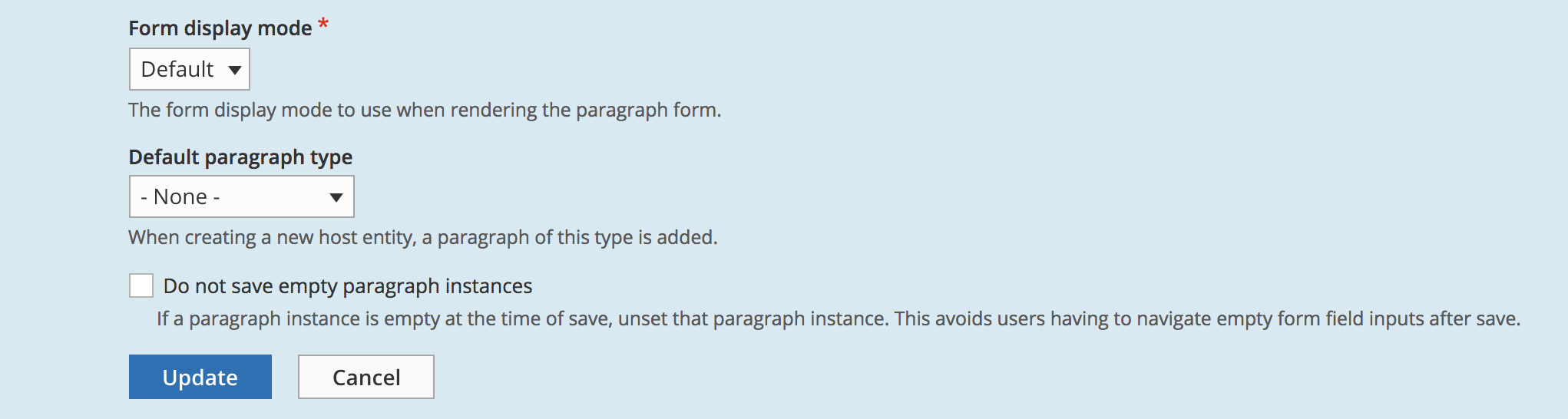
mark_fullmerOur organization has identified the same UX issue -- namely, that users who open a paragraph type but do not enter any data will end up with an empty paragraph instance. The attached patch provides an "opt-in" as Miro specifies in #4, by adding a checkbox field to the paragraph form widget settings, as shown below:
Implementation
- If the paragraph instance setting is checked (i.e., opted-in)...
- for each paragraph instance delta, if ALL non-base fields (as determined by
!method_exists($definition, 'isBaseField'))...- are determined to be empty (as determined by
$field_instance->isEmpty())...- then the form element delta is unset (
unset($values[$delta])), and accordingly not saved.Miro, if this implementation seems sensible, let me know & I can proceed to add unit tests.
Comment #12
miro_dietikerThank you for progressing here.
I'm not sure if a general opt in on the widget does the job.
We have a paragraph type "Separator" that has no field and should never be removed.
My first guess would more be to add a setting per paragraph type if it should be removed when all fields are empty.
As this setting would be opt in only, there wouldn't be the need for a per-widget setting.
(Hint: we have a similar setting already about what paragraph types are allowed to be promoted into the Library, by the Paragraph Library module.)
Needs discussion, no final decision yet.
Comment #13
mark_fullmerThanks for the quick feedback, Miro. I can see the rationale for having this setting globally apply to each paragraph type. For the sake of discussion, a few thoughts:
1. Regardless of whether this setting lives at the paragraph type level or the widget level, since it is designed as an opt-in, a paragraph type such as the "Separator" would not be affected unless someone intentionally opted in. The "Separator" paragraph type could still be misconfigured even if it were on the paragraph type edit form.
2. With the setting at the widget level, this provides the flexibility for this to be controlled on a per-entity basis. On the other hand, it's hard to think of a use case where such granularity would be wanted on a single site.
3. From a UX perspective, we could phrase the question as "Does the behavior not to save empty fields relate more to the inherent nature of the paragraph type, or to the edit form on which the paragraph type is being configured?" If we agree on the former, I think this opt-in should go on the paragraph type edit form; if the latter, the widget settings.
4. If this were to be implemented at the paragraph type level, I assume it would be added to the Paragraph schema, rather than via an alter (as the "allowed to be promoted" setting is in the Paragraph Library module)?
Comment #14
berdirI'm also not quite sure where that setting should live, a few pretty random thoughts:
* Paragraph types like separator that have no fields at all would be pretty easy to identify, if they have no configurable fields, they are never "empty". However, it gets more complicated with optional fields, because you could easily have a paragraph type with an optional field that is also valid when empty. So that sounds like a setting per paragraph type is indeed needed.
* That setting would not be a third party setting but a top-level key when defined in the main module, yes.
* How should we treat behavior settings with empty paragraph types? Is a paragraph with an empty field but some behavior configurations empty or not?
* Maybe we should just treat a default paragraph different from others. Unsure how to approach that, though.
Comment #15
droprocker commentedMiro, thanks for the hint!
I agree with Mark that this feature is needed if you want to use paragraphs as a substitution of Field Collection Module as they mention on their project page.
Mark, I cannot install the patch at #10 via composer on D8.5.1. Do you have any solution?
Comment #16
mark_fullmerHi der_wilko,
Hrm -- I just tried applying the patch with composer-patches against the 8.x-1.x-dev branch of paragraphs, and it worked without issue. Which version of the Paragraphs module are you installing?
My (partial) composer syntax:
Comment #17
mark_fullmerThe attached patch moves the "save on empty" setting to the paragraph type, rather than in widget settings:
The business logic to prevent the empty save is still located in the InlineParagraphsWidget's
massageFormValues()method, which doesn't quite seem ideal (since it would need to be added to any paragraph widget implementations), but I wasn't clear where in the Paragraph entity class an equivalent check for empty fields should go (preSave seems already too "late").Comment #18
rainer f. gottlieb commentedDelted the comment, I was wrong.
Comment #19
caspervoogt commentedWe ran into this on a project recently, too. I just tested the patch from #17 and this works great. I like the approach that has been taken and it's RTBC as far as I'm concerned ... I see the status is still "Needs Work" but what work is actually still needed?
Comment #20
caspervoogt commentedI ran into an issue that I believe this patch caused; I could no longer delete any paragraphs. I have tried with patches #10 and #17 with the same results;
Notice: Undefined index: entity in Drupal\paragraphs\Plugin\Field\FieldWidget\InlineParagraphsWidget->massageFormValues() (line 1314 of modules/contrib/paragraphs/src/Plugin/Field/FieldWidget/InlineParagraphsWidget.php)followed by;
Error: Call to a member function getFieldDefinitions() on null in Drupal\paragraphs\Plugin\Field\FieldWidget\InlineParagraphsWidget->massageFormValues() (line 1314 of modules/contrib/paragraphs/src/Plugin/Field/FieldWidget/InlineParagraphsWidget.php)If I unchecked "Save paragraph instances, even when fields are empty", and then tried editing my node and deleting an item from that field, it deleted fine.
Comment #21
ñull commentedI see the same issues as described #2877695-20: Skip saving empty paragraphs for certain types. Patch #17 solves the issue but adds another.
I think the solution is not in a patch but in a form setting discovered by a colleague of mine.
Go to Content Type > Your content type > Manage Form Display -> Settings of Paragraph field (the gear symbol) -> Default paragraph type > None.
This causes that no default paragraph form is shown and therefore it is never added empty by default.
Since this seems to work here, I post this comment as Needs Review. If it is approved I would say this should become "Closed (works as designed)"
Comment #22
miro_dietiker@null as a maintainer i‘m aware of those settings. You can even see this settingin previous comments on a screenshot.
This issue is because this is not satisfying in some cases.
A field collection like use case with one minimalistic field per paragraph is asking for removal of ALL paragraphs that are empty. Not just the default one.
Comment #23
rainer f. gottlieb commented#21 did it for me, thanks ñull, for the hint.
Comment #24
bkosborne+1 to having this as an option. In the meantime, I think I will have to write a custom validation function on the parent entity that checks the paragraph values to remove the empty ones.
Comment #25
emb03 commented@miro_dietiker yes, this setting is not available if you are using field collections in your paragraph type. This is annoying!
Comment #26
jaykainthola commentedI couldn't apply patch #17 in 8.x-1.12 version using composer.
If we are applying this manually then its working fine.
Comment #27
jayemel commentedThis setting "Default paragraph type > None" is only visible if you're using the Paragraph form mode widgets (Paragraphs Classic, Paragraphs EXPERIMENTAL). I prefer Inline Entity Form because its collapsible option is cleaner and more intuitive.
So unfortunately if I want to use paragraphs (I do) along with Inline Entity Form, I'm left having to perform if-empty logic in my templates.
I agree it's handy UX to have the empty paragraph there and ready to be filled in. I don't agree that it's good design to then save an empty paragraph if the user did not fill it in.
Comment #28
ey commented@jmljunior can you elaborate how do you workaround the problem using templates?
This was the whole use case of field collection, which was insisted to be replaced by this module. I am totally unhappy how paragraphs handles the things so ugly. Maybe it has its own use cases but no way a replacement for field collection module. What a shame that it was discontinued in favor of paragraphs.
Comment #29
berdirComments like that aren't helping anyone. The current behavior isn't on purpose, this simply is a feature that doesn't exist yet. You're welcome to help making it work, by helping create a patch that passes the existing tests and tests the new setting or paying someone to do that.
Comment #30
nickgrace commented#21 also solved the issue for me, too. Thank you!
Comment #31
System Lord commented#21 doesn't solve the issue. As mentioned earlier, curious people will naturally click on "Add a paragraph" which will generate the paragraph, then they're stuck with the same problem.
At least until this issue is resolved consider this:
Where the warning triangle appears when a paragraph is closed, include: "Be sure to save this form to keep your changes or remove this section." The triangle sitting out there with no information attached to it is confusing to users. If a paragraph is never closed (exposing the warning triangle), include "Be sure to remove this section if you're not using it." somewhere in the open paragraph.
I would expose the "remove" button and place it next to "Edit" and "Collapse" buttons. This way it will be easier to understand "Be sure to save this form to keep your changes or remove this section." Note: I would use the term "section" instead of "paragraph" since it will make more sense to users that don't understand Drupal projects. Better still, include the "remove" button inline with the text: "Be sure to save this form to keep your changes or remove this section."
If a user ignores the "remove section" option, no big deal. The form will just save as it normally does now.
It's true that exposing the "remove" button is risky if the user has entered field values, but I think for now giving users more information/options is better than leaving them confused. Plus, they will "remove" a section with data only ONCE.
Make the "remove" button RED to reinforce the risk.
At the very least "Be sure to save this form to keep your changes or remove this section." should be printed with the warning triangle.
A safe and clean option that you can implement right now is to add this to your css. It displays when open or collapsed:
Comment #32
joegraduateThe attached patch is a re-roll of #17 that updates
InlineParagraphsWidget::massageFormValues()to account for the changes made by #3041886: Resolve Unused Variable (removal of$deltakey from foreach loop) and adds a check to ensure$item['entity']is set to address the issues identified in #20.Comment #33
joegraduateComment #34
joegraduateComment #35
joegraduatePatch #32 is broken because unsetting the paragraph
$itemby reference inside theforeach ($values as &$item)does not work. The attached patch restores the$deltakey removed from the foreach loop in #3041886: Resolve Unused Variable so the item can be properly removed from the values array.This patch also addresses a couple of coding standards issues.
Comment #36
chike#35 worked for me, thanks.
Comment #37
elamanWorks with Classic widget, haven't tested with EXPERIMENTAL.
Comment #38
tomimikola commentedI've been succesfully using the #35 patch but with the latest core update it stopped working. I found out the status and created properties were considered as not empty and caused the paragraph to be saved.
I made a naive update to the patch. The root cause (with behaviour of the isBaseField & created/status) needs to figured out. Hopefully someone has time to look into it and verify if the issue real.
Here's update patch and interdiff.
Comment #42
arismag commentedComment #43
lexsoft commentedAdding patch #38 for Paragraphs (stable) widget
Comment #44
deepalij commentedApplied patch #43 on Drupal 10.1.x-dev
Patch applied cleanly
But, still able to save the empty paragraph with the "Paragraph" label.
Refer to the attached screenshot
Comment #45
vija commentedI'm also able to save empty paragraph with #43 patch
Comment #46
lexsoft commentedYou need to disable a checkbox per paragraph type. It's enabled by default so it does not break existing behaviors.
Comment #47
coaston commented#44 worked for me, But without #46 I would not notice it, so thank you @lexsoft.
Comment #48
fallenturtle commentedI'm on Drupal 9.5.3 and Paragraphs 1.15. I'm finding that the "Save paragraph instances, even when fields are empty." checkbox doesn't stay unchecked. I tried to uncheck it with both an existing parapgraph and a new one.
Comment #51
m0925j commentedWe still have this problem in drupal version 10.2.6, paragraph version 8.x-1.17, what I want is for the default to not create an empty paragraph entity when no value is filled in, for the default to display the paragraph widget in the node creation form, and for the default to not create an empty paragraph entity when the Add paragraph button is clicked but no value is actually filled in. Instead of having to be manually removed by the user.
Comment #52
abelpzlI ran into the same problem on drupal 10.3.1 and paragraphs 1.17.
The merge request made by Codebymikey solved my problem.
Comment #53
diwakar07 commentedHi,
I reviewed MR !118 on drupal 10.3.0 and paragraphs 1.17, it successfully fixes the issue.
It adds an option in the paragraph type edit form to Enable/Disable - "Save paragraph instances, even when fields are empty", by default it is enabled.
On disabling this option, I was able to save the node by adding a blank paragraph type, and no label was rendered for the blank paragraph type added on node.
Attached are the SS for references.
This looks good to me.
Moving to RTBC!
Thanks.
Comment #54
berdirReviewed.
Comment #55
sourav_paulI've checked the issue On D10.3.3.
MR!118 was applied cleanly .
MR fixed the issue.
Attaching SS:

Before applying the MR:
After applying the MR:
Comment #56
sourav_paulComment #57
sourav_paulI've resolved the review changes..
Please Review the updated changes.
Comment #58
codebymikey commentedUpdated the PR and requesting further review of the changes.
Would ideally be nice if a test was also introduced as part of this change to avoid unintentionally breaking it.
I don't have time to write a functional test for it at the moment, but if someone else wants to have a go at it, you're more than free to!
Comment #59
sourav_paul@berdir Could you please look into it?
Comment #61
volegerUploading the MR 118 diff as a patch for composer patching needs
Comment #64
zviryatko commentedHello, added fix for php's annotations to fix for D11.
Comment #65
jmee commentedusing this as a patch is working well (Drupal 10.5.2, applied patch using composer)
I did run into one issue, using this setting with a paragraph type that included a boolean field. An 'empty' boolean field is still saved to the database as a 0 value.
I'm not sure if it makes sense to include this case in the scope here, since it could be difficult to account for without adding another setting to the UI, and has more to do with how the boolean field type works. There are definitely some site building workarounds, like using a list field instead of a boolean, or simply not setting a default paragraph type in the field widget.
thanks for the work done here!
Comment #66
liam morland@#65: That sounds like a bug. This can be worked-around by using radio buttons instead of a single checkbox. It seems to me that this behaviour should not be changed by switching which widget is in use.
The root problem is that radio buttons allow there to be a difference between false and null. But a checkbox, if un-checked, can be interpreted as false, which means that a value has been set. That could be seen as a core bug.
We might be able to work-around this for the purposes of this patch by having it check if the field is boolean. If so, consider a false value to be empty. I have added commits which do this.
Comment #67
liam morlandPatch with current state of merge request.
Comment #68
giorgoskLatest patch works great with Drupal version 11.2.8 and paragraphs version: 8.x-1.19