

 Come together with the global Drupal community in Rotterdam, 28 Sept – 1 Oct 2026. Sessions, contribution, connection, and Early Bird savings until 8 June.
Adding any of the following to the 'Allowed HTML tags' produces a JS error and breaks functionality:
<thead>, <tr>, <tbody>, <td>, <tfoot>
This is due to the following in /core/modules/filter/filter.filter_html.admin.js:
sandbox.innerHTML = allowedTags[t];
node = sandbox.firstChild;
Any of these tags return null instead of a Dom element.
| Comment | File | Size | Author |
|---|---|---|---|
| #12 | 2865842-parse-tags-12.patch | 3.05 KB | b_sharpe |
| #6 | 2865842-JS_error.png | 135.08 KB | b_sharpe |

Comments
Comment #2
b_sharpe commentedForgot to add
<caption>to the listI actually can't find any documentation as to why this is, and why only table elements, here is a simple example.
I've marked this as major as without these elements in the list, you cannot add a table using the WYSIWYG, but with them you cannot rely on the admin page JS functions (i.e. Custom styles won't auto populate)
Comment #3
phenaproximaWhat is the JS error you get?
Comment #4
b_sharpe commentedBasically both just due to calling tagName on null:
Chrome -
Uncaught TypeError: Cannot read property 'tagName' of nullFF -
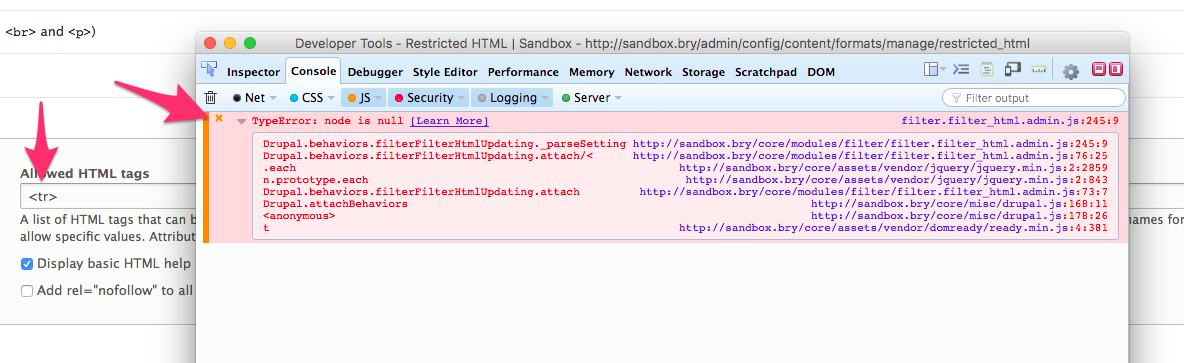
TypeError: node is nullComment #5
phenaproximaI think this needs explicit steps to reproduce...
Comment #6
b_sharpe commentedSteps to reproduce:
/admin/config/content/formats<tr>)If you save that field, it will also now error anytime you manage that field. Screenshot also attached.
Comment #7
wim leersPatches welcome :)
Comment #8
maxocub commentedI don't know how to solve this yet, but I did some digging and I think I found the reason.
If we take
<tbody>as an example, the code above is trying to set the<tbody>as the inner HTML of a<div>, which is not valid, so the node variable is then null.I'm no JavaScript expert, but one way to avoid this error for table elements would be to have the sandbox be set as a
<table>for table elements, but there must be a better way to avoid this kind of conditional treatment.Comment #9
wim leers#8: interesting! Good find — that seems plausible. I wrote that code, and @nod_ reviewed/RTBC'd it, but apparently there are edge cases where this fails. So… we'll need to come up with a different way to achieve what that part of the code does, since it apparently doesn't work in all cases.
Although I wonder if this is something that is browser-specific?
Comment #10
wim leersComment #11
b_sharpe commented@wim it's not browser specific, check out my fiddle from the #2. That's why I hadn't patched yet, I haven't been able to come up with a way short of a rewrite as you suggest.
I did test omitting them and just leaving
<table>and can confirm this disallows tables, so ckeditor does need the tags to work.Comment #12
b_sharpe commentedFor reference, here is every tag that will fail based off of the list here:
So the question is do we want to create a list of exceptions for tables and create them as children of a table node, then omit the non-table elements (is there a reason to allow frame/frameset?) or should it be rewritten to support all tags?
A simple work-around is to create the element itself, rather than create a div and then use the firstChild, but since we're dealing with only a few of many, it may not warrant creating a new DOM node for every tag rather than re-using the original div, so maybe something like the attached patch would suffice.
Comment #13
wim leersWell…
<!DOCTYPE>,<body>,<head>,<html>cannot possibly ever make sense in a text format. And I'd argue the same is true for<frame>and<frameset>.So that then pretty much just leaves
<table>-related elements. Which… maybe means we can special-case just those elements? We could make the parent<table>instead of<div>for those :)Comment #14
droplet commentedIt's a Public Security issue involved these functions: #2725255: Unfiltered data in "Allowed HTML tags".
Comment #15
b_sharpe commentedAdding related issue and postponing as this issue may not be relevant once the related issue is fixed.
Comment #19
tom.moffett commentedIs this something that is still being worked on? I ran into this issue, and it's breaking the "CKEditor plugin settings" section. The JS code that runs to hide/show the vertical tabs doesn't get to execute correctly, and all but the last tab is shown, however, more tabs should be showing. I can go into dev tools and manually change elements to show so I can edit, but it's obviously not ideal and not good for non-dev users who might configure a text editor.
Comment #22
rromore commentedI've rerolled the patch in 2725255 and can confirm that resolves this issue as well.
Comment #25
nod_Probably solved by #2556069: JS error with elements in "allowed HTML tags" that can't be direct descendants of a div
Comment #29
quietone commentedI tested this on Drupal 10.1.x, standard install. I used the steps given in #6. I was not able to reproduce the problem. In #15 a maintainer suggested that this has been fixed, and my testing confirms that. There also, hasn't been any reports of this on a supported version of Drupal.
Therefore, closing as outdate If you are experiencing this problem on a supported version of Drupal reopen the issue, by setting the status to 'Active', and provide complete steps to reproduce the issue (starting from "Install Drupal core").
Thanks!