Problem/Motivation
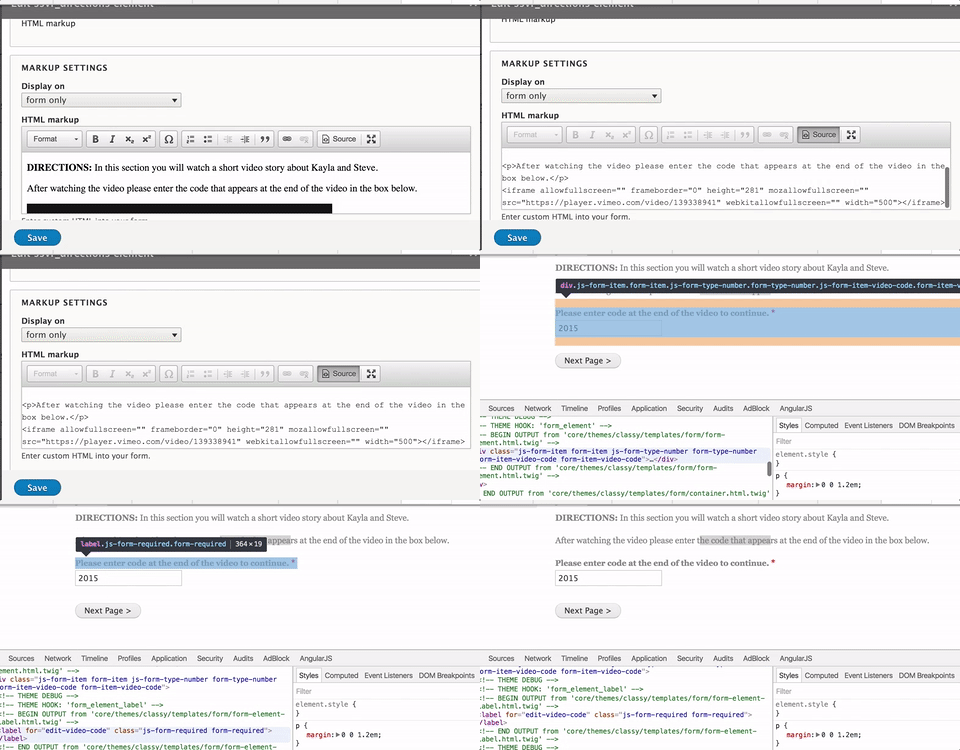
When i create a form with HTML markup, I add html code to the field and view it through the WYSIWYG. I can view all my rendered code even iframes. However, when I save and try to view this code on the form, the iframe is gone. As in, if you view the code, you will not see the iframe element.
<p>After watching the video please enter the code that appears at the end of the video in the box below.</p>
<iframe allowfullscreen="" frameborder="0" height="281" mozallowfullscreen="" src="https://player.vimeo.com/video/139338941" webkitallowfullscreen="" width="500"></iframe>
Proposed resolution
Remaining tasks
User interface changes
API changes
Data model changes



Comments
Comment #3
jrockowitz commentedComment #6
jrockowitz commentedComment #8
jrockowitz commentedSo out-of-box the YAML Form module does not allow iframes and script tags to be outputted by the Markup element. I fixed the CKEditor to correctly filter out these unsupported tags.
To add support for iframes you need to update your 'Allowed tags' via the Admin settings form (admin/structure/yamlform/settings)
You can enter the below list of allowed tags, which I have append the iframe tag.
a abbr acronym address article aside b bdi bdo big blockquote br caption cite code col colgroup command dd del details dfn div dl dt em figcaption figure footer h1 h2 h3 h4 h5 h6 header hgroup hr i img ins kbd li mark menu meter nav ol output p pre progress q rp rt ruby s samp section small span strong sub summary sup table tbody td tfoot th thead time tr tt u ul var wbr iframeThis page offers some more information about #allowed_tags.
Comment #9
jrockowitz commented@robpowell BTW, what browser add-on or application are you using the create the animated sceencast gif?
Comment #10
robpowell@jrockowitz, thanks I'll take a look at the patch tonight.
I work on a MAC and use GIPHY Capture. Pretty light weight tool with minor editing baked in.
Feel free to get me here, rob dot p dot powell at gmail. I've been trying to expand my drupal developer network.
Comment #11
robpowellgreat the patch worked for me.