

 The 2026 Drupal Business Survey is open. Your response will help shape the future of the Drupal business ecosystem.
After the release of the new dev-version of Search API, I get this error if I do a search:
The website encountered an unexpected error. Please try again later.
In the log:
Drupal\Component\Plugin\Exception\PluginNotFoundException: The "text" plugin does not exist. in Drupal\Core\Plugin\DefaultPluginManager->doGetDefinition() (line 52 of /var/www/public/example.com/core/lib/Drupal/Component/Plugin/Discovery/DiscoveryTrait.php).
I use Search API together with the alpha release of Search API Autocomplete, if that makes any difference.
| Comment | File | Size | Author |
|---|---|---|---|
| #16 | 2826822-16.patch | 661 bytes | mpp |
| #7 | fields.png | 50.21 KB | ressa |


Comments
Comment #2
ressaComment #3
ressaAnd here is some more info for debugging:
Comment #4
ressaHere are my Processors and the View, attached:

Comment #5
drunken monkeyThanks for reporting this problem!
It seems the cause is that the "Rendered item" processor (I guess the view tries to display that processor's field, right?) creates a property definition with the data type
text– which is not a data type known by Drupal (by default), leading to that error.We can either create a Typed Data plugin for that type, so it can be used in this cases, or just use one of the existing fulltext types for the processor.
The attached patch implements the latter suggestion, please test whether it fixes your problem!
Comment #6
ressaThanks for the patch! I get this error message while viewing any page, after applying it:
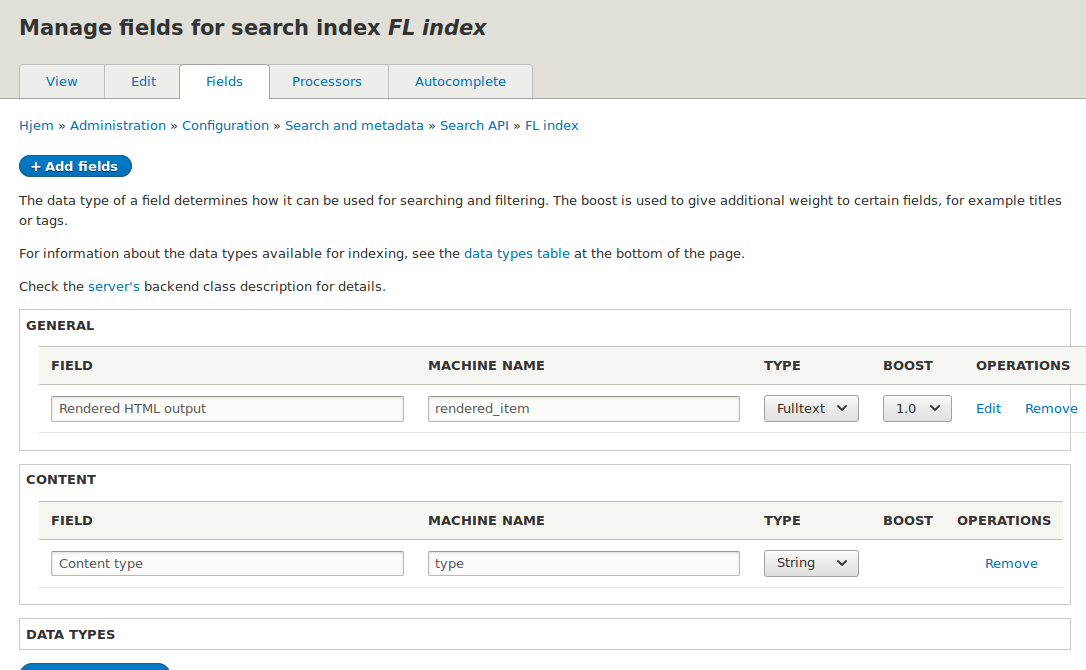
Comment #7
ressaAnd here the two fields I use. Let me know if you need more info!

Comment #8
ressaOn a hunch, I just tried removing the field which was present after I created my full-text Search View - the one which is created after selecting my index (called
Index FL index) underView settings -> Showduring the Views creation process.The field I removed was called
Index FL index: Rendered HTML output, and that seems to fix this issue. It's a bit counter-intuitive that the field which is added when creating the View is not needed, but perhaps that's necessary somehow? Anyway, it now works again :-)Comment #9
bddemers commentedI installed Search API yesterday and after doing a search, I got, 'The website encountered an unexpected error. Please try again later.' My website is still down and that message is all you get when going to my site. Without going into a boring explanation of why I don't have a backup for the site...I don't have a backup recent enough to help. Can I go into a file and modify it manually or delete whatever Search API has done to get my site back? Thanks...Newbie Drupal User.
Comment #10
bddemers commentedRessa, looks like you figured it out. Can you please tell me where to locate the file and what line needs to be removed? I am very new to drupal, but learning fast. I am building my site, but of course it is down now with the same error you received. Please help. Thank you so much. Brian Demers
Comment #11
drunken monkey@ ressa: Good to hear it works again!
@ bddemers: That error message is very, very generic, it can have all kinds of causes. If it really has the same cause as discussed here, you'd probably need to manually modify (or remove) the search index in the database.
You can find it with the following database query:
Locate the right index and either remove it, or remove the field setting you think might cause this from the serialized index data.
In any case, you might also need to
TRUNCATEall cache tables.To find out where the error comes from, try:
and then in that PHP array set
error_leveltoverbose. That should give you more information on the error page.Otherwise, you could try removing the Search API module from the server and see if that gives you a more manageable error. But in general, getting back from this site state without knowing what went wrong is rather tricky, especially for a Drupal beginner.
Comment #13
bddemers commentedThank you dm,
Was able to get in to site management and uninstall search API and reinstall the core search.
All is well again.
Now my problem is connecting my newly installed drush to my host.
See..
https://www.drupal.org/node/2830742
Thanks again,
Brian D
Comment #15
mpp commentedThis commit seems to trigger the error in #6 upon site re-installatin:
[ERROR] The "" entity type does not exist.Recreating the rendered item field didn't solve the issue, but results in the following warning:
The yml config section describing the HTML rendered item:
Comment #16
mpp commentedReverting the commit in #12 seems to fix the issue for us. Note that we don't use this field in the view display and we don't have the initial issue reported here.
Comment #17
Vlad_Bo commentedStill doesn't work if rendered item field is used in index. Reverting #12 commit doesn't fix problem, "text" plugin still doesn't exist.
Comment #18
Vlad_Bo commentedIf rendered item processor is used and this field is displayed in Views it doesn't work in both cases (text/field_item:text_long.string).
Comment #19
drunken monkey@ mpp: See #2839932: PluginNotFoundException exception in Views when using an index with multiple entity types. And please either re-open the issue or open a new one if you want to discuss problems – very few people read closed issues.