

Closed (won't fix)
Project:
Drupal.org security advisory coverage applications
Component:
module
Priority:
Normal
Category:
Task
Assigned:
Unassigned
Reporter:
Created:
11 Nov 2016 at 18:55 UTC
Updated:
4 Jan 2017 at 17:26 UTC
Jump to comment: Most recent, Most recent file

Comments
Comment #2
wmcmillian commentedComment #3
PA robot commentedWe are currently quite busy with all the project applications and we prefer projects with a review bonus. Please help reviewing and put yourself on the high priority list, then we will take a look at your project right away :-)
Also, you should get your friends, colleagues or other community members involved to review this application. Let them go through the review checklist and post a comment that sets this issue to "needs work" (they found some problems with the project) or "reviewed & tested by the community" (they found no major flaws).
I'm a robot and this is an automated message from Project Applications Scraper.
Comment #4
vipul.patil7888 commentedHi wmcmillian-coalmarch,
Thanks for your contribution. I have tested this.
Current testing flow:
1. Fresh vanilla Drupal installed 7.x
2. Installed the module via drush and all dependencies were asked and got installed. (Install instructions attached)
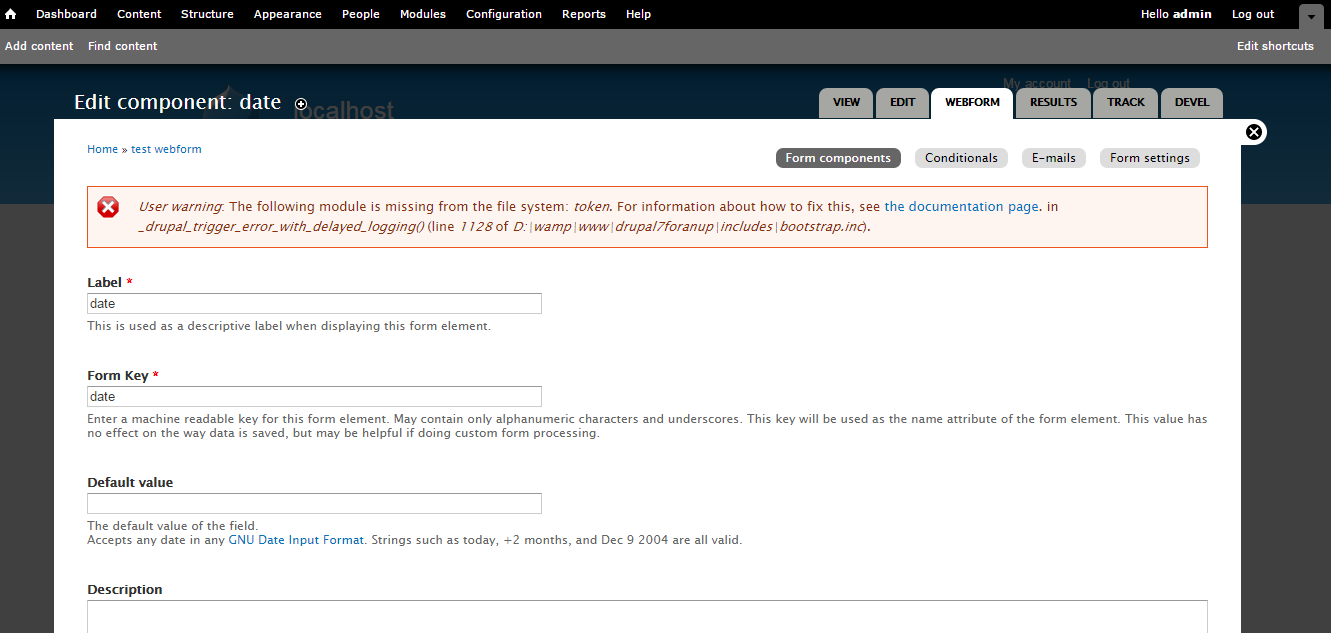
3. As per readme.md, while creating the date component, got warning for Token module (screenshot attached)
Thanks
Comment #5
saveva commentedHi Will.
I did a manual review of your code and I installed the module on a test site without problems. I did not do any further testings apart from installation, activation and deactivation. I found two things that you should consider:
1. Coding style & Drupal API usage:
Include a hook_help implementation for your module.
2. README.md:
Correct the README.md. In the introduction section "based off of" should read "based on"
3. You should set a master version in your project. To do so access your sandbox project and under Version Control set the version to work from to 7.x-1.x as the default version.
Regards.
uh
Comment #6
saveva commentedComment #7
klausi@saveva: Thanks for your review! Is this now RTBC or are there application blockers left and this should be "needs work"?
Comment #8
saveva commentedHi Klausi, hi Will.
Returning to this to answer the question posted by Klausi: I did some further tests and added a date field to a webform. The configured webform restrictions for dates apply if you select dates with dropdown selects but if you use a datepicker the datepicker loses connection with the date form fields (no update). Once you disable the plugin date selection via the jquery popup calendar works.
Another point is that the jquery datepicker only partially shows the configured restrictions, e.g. it does not apply configured year restrictions in the jquery popup calendar.
From my viewpoint your plugin should be compatible with the basic features offered by the webform module. At least you should test this and inform the user that your plugin does not allow to use the jquery popup for date selection. I set this to "needs work" but if you feel that this is an error, please reset to "needs review".
Regards.
uh
Comment #9
wmcmillian commentedHello all,
I have addressed the issues brought up here:
@saveva:
I've fixed the datepicker issues, it should work as expected (tied to date elements, year excluded, etc).
I've implemented a hook_help function
And I've corrected the grammatical issue in the README.md
@vipul.patil7888
The warning is issued via theme_webform_token_help() in the webform module and appears to be intentional. It's unrelated to my module, so there is nothing I can do.
I've also, through a suggestion IRL, added an option to restrict by relative dates.
I've updated this to "Needs Review" accordingly.
Comment #10
wmcmillian commentedComment #11
sandip27 commentedHello @wmcmillian-coalmarch,
I did some automated test for the module and findings can be found at pareview.sh Review
Thanks
Comment #12
PA robot commentedClosing due to lack of activity. If you are still working on this application, you should fix all known problems and then set the status to "Needs review". (See also the project application workflow).
I'm a robot and this is an automated message from Project Applications Scraper.