

Closed (fixed)
Project:
Webform
Version:
8.x-5.x-dev
Component:
Miscellaneous
Priority:
Normal
Category:
Task
Assigned:
Unassigned
Issue tags:
Reporter:
Created:
3 Nov 2016 at 17:58 UTC
Updated:
23 Feb 2019 at 14:05 UTC
Jump to comment: Most recent, Most recent file


Comments
Comment #2
jrockowitz commentedRight now, writing a custom composite element is best way to get a group of reusable elements.
Below are the two plugins and templates used to implement an Address element.
http://cgit.drupalcode.org/yamlform/tree/src/Element/YamlFormAddress.php
http://cgit.drupalcode.org/yamlform/tree/src/Plugin/YamlFormElement/Yaml...
http://cgit.drupalcode.org/yamlform/tree/templates/yamlform-composite-ad...
Comment #3
fenstratMoving to Webform queue, see #2827845: [roadmap] YAML Form 8.x-1.x to Webform 8.x-5.x.
Comment #4
anpolimusComment #5
Sarah10 commentedThanks!!
Comment #6
Sarah10 commentedHi, I have created two plugins and template to implement custom composite element.
What am I doing wrong? Why is it not showing up without table format?
Thanks!
Comment #7
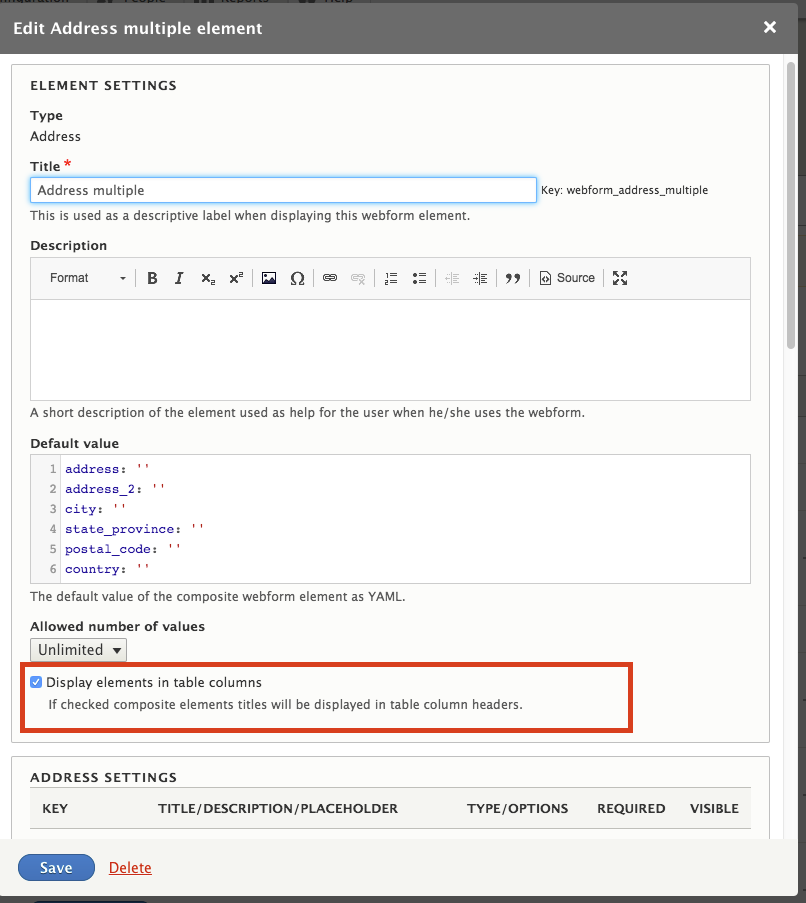
jrockowitz commentedYou must configure and check 'Display elements in table columns'.
Comment #8
Sarah10 commentedYes, If I check the box "Display elements in table columns" - It is working perfectly fine.
If I do not check the box - Nothing is coming up., It's totally empty like blank screen
Comment #9
Sarah10 commentedAnd even if I make it as "Limited" and number of values as "1" - It is showing up a blank screen.
Comment #10
jrockowitz commented@sattapuram You might need to slowly duplicate an existing composite element and figure out what is missing from your custom element.
Comment #11
Sarah10 commentedI figured it out....It is because of the theme..
Reverting to the core theme solved the issue.
Thanks!!
Comment #12
Sarah10 commented@jrockowitz How do I include File upload field in my composite element?
I tried in different ways...the field is showing up but the file is nowhere saved/uploaded.
Comment #13
jrockowitz commentedComplex elements (aka entity and file references) are not supported by composites without some hacking.
I am working on #2884624: Allow composite sub elements to be formatted which should help support complex elements with in composites.
Comment #14
gilles.koffmann commented@Sarah10: I have the same problem as you. Field does not show up when it is not in table column.
What do you mean by "Reverting to the core theme solved the issue." ?
I have created my composite element in my own module and I ve basically duplicated the address composite element
I have added in mymodule_theme
And in the mymodule.theme.inc i have added a preprocess function like this
But it does not enter this function.
And finally I have added a template file webform-composite-participant.html.twig in the templates directory of my module
I´m using beta13
Comment #15
n3xo commentedHow can i create a Custom Composite element? there is docs?
Comment #16
jrockowitz commentedThere is no documentation. Hopefully someone can contribute some documentation.
Comment #17
lpalgarvio commentedTake a look at the example that I've published.
https://github.com/solsoft/Drupal8WebformCompositeExample
I pulled the code from a previous project that I developed and adapted for sharing.
It has not been tested, but should work with no or little changes.
Comment #18
jrockowitz commented@lpalgarvio Your example inspired me to create #2893508: Add webform_example_composite.module. Thanks.
Comment #19
zombree commented@jrockowitz If I use your webform_example_composite module code, adding the example composite field to a webform and setting that example composite field to have unlimited values, the webform will not submit. I get no error messages, just the form refreshing instead of submitting and loading the confirmation page.
If I add it as a single value field, it works fine.
Further testing shows the same issue with the Link composite field provided by the Webform module. I have not tested all the composite fields provided, but assume they behave in a similar fashion.
I noticed that in the code for webform_example_composite you specified that Webform composite can not contain multiple value elements (ie checkboxes) or composites (ie webform_address), but it seems that composites themselves cannot be set to accept more than 1 value without breaking the form. Is this supposed to be the case, or is this a bug? I had very much hoped to be able to create a composite that could be set to "Unlimited" values.
I am using Webform 8.x-5.0-beta15, for reference. Thank you for any guidance you can provide.
Comment #20
zombree commentedScrap that. Isn't that the way of it, you test every way to Sunday and then finally post a comment, only to prove yourself wrong a few minutes later.
The lack of form submission was due to something completely unrelated (someone removed all attributes from submit button in input--submit.html.twig), but only happened when I used composite fields with unlimited values. Apologies for false alarm; I'd erase my comment if I could.
Comment #21
kingfisher64 commentedWould anyone be kind enough to upload a working composite example with basic instructions on how to do this?
I've asked here as it was suggested that documention for custom composite creation should go however this thread appears to the only one where people have had success adopting the example.
Many thanks
Comment #22
zombree commentedHey @kingfisher64, I will post code from my working composite on your question over in this issue: https://www.drupal.org/node/2883734
Comment #23
jrockowitz commented@zombree and @kingfisher64
Actually, the 'here' in https://www.drupal.org/node/2883734 should be linked to https://www.drupal.org/docs/8/modules/webform/webform-cookbook. Fixing it now.
Comment #24
kingfisher64 commented@zombree and @jrockowitz - thank you both for your help and advice and kindness.
Comment #25
0sarah0al commentedYou, guys are awesome!!
Thank you so much..
Comment #26
jrockowitz commentedI just committed #2916573: Provide a basic customizable composite element. which makes it easy to create a simple custom composite element via the UI.
There is also the webform_example_composite.module which demonstrate how to create an advanced custom and reusable composite element.
For "composite form" support, I think this feature should be handled in a new ticket.. once someone is ready to build it.
Comment #27
jrockowitz commentedComment #28
jrockowitz commented