

Closed (fixed)
Project:
Geocoder
Version:
7.x-2.x-dev
Component:
Code
Priority:
Critical
Category:
Bug report
Assigned:
Unassigned
Issue tags:
Reporter:
Created:
25 Aug 2016 at 07:15 UTC
Updated:
15 Oct 2020 at 15:23 UTC
Jump to comment: Most recent, Most recent file

Comments
Comment #2
remyyyyySame here.
Exception : Google API returned bad status.\nStatus: REQUEST_DENIED dans geocoder_google() (ligne 122 dans /home/.../www/sites/all/modules/geocoder/plugins/geocoder_handler/google.inc).
Comment #3
rsbecker commentedThe solution to this problem appears to be to set Google API authorization to "none." Then run the geocoder.
An API key is no longer needed for Google maps. I have it set in Openlayers. but not in Geocoder.
Comment #4
spgd01 commentedGoogle now requires the API for all new sites as of June 2016. So this solution will not work anymore. I have a new site and geocode is not working on that site do to API not working.
Console returns:
Comment #5
Ddroid_za commentedSame issue here.
Comment #6
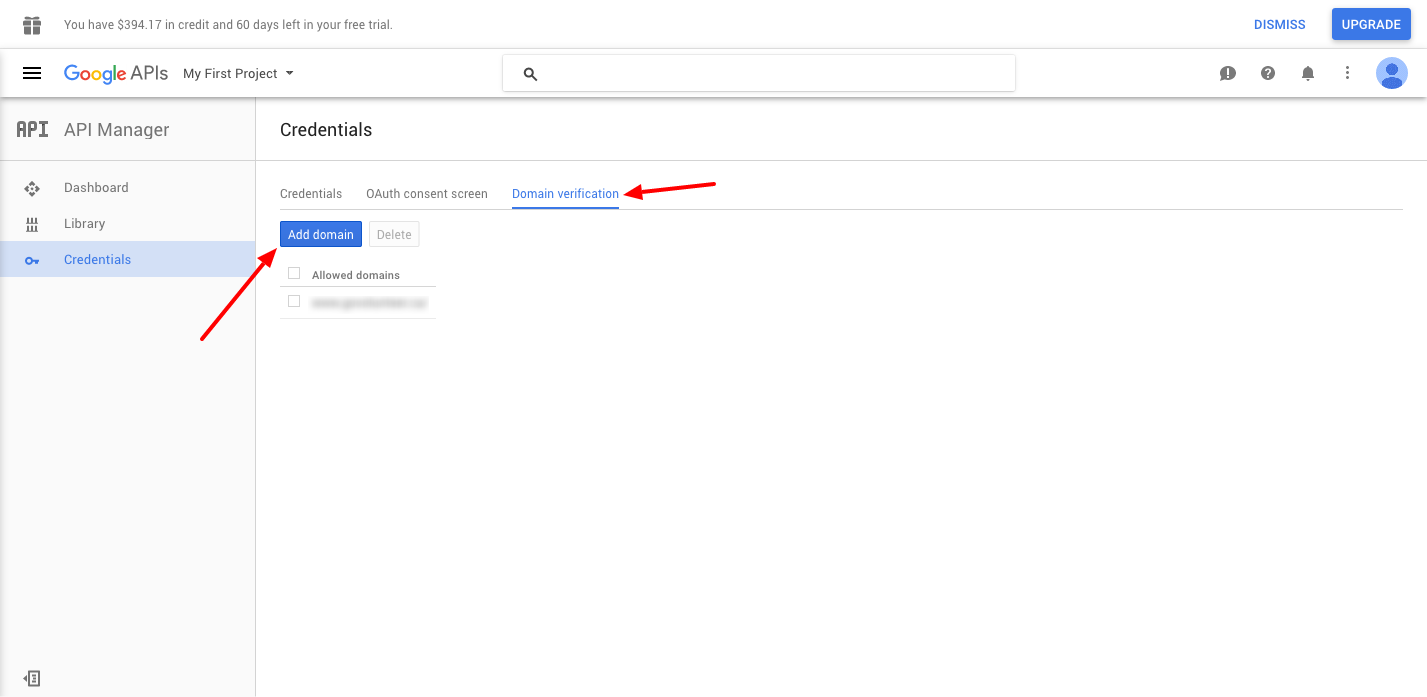
pixelsweatshop commentedI was having the same issue, even though I had entered setup the app and inserted the API key. Once I added my domain to the Domains Verified area of the app setup (which means verifying your domain Google Search Console), then it worked and stopped throwing the REQUEST_DENIED in dblog.
Comment #7
pixelsweatshop commentedAdded a screenshot for anyone needing additional help.
Comment #8
spgd01 commentedDomain Verification does not resolve the issue. the domain is already verified and google maps is working with Get Directions Module. It is not working with this module with the same API Key.
Comment #9
spgd01 commentedComment #10
xaa commentedI am using ip_geoloc and geocoder. The geocoding was working fine few weeks ago.
Removing the key as #3 suggests is working here.. Surprisingly.
Comment #11
pixelsweatshop commentedI had to loop back around to this as I was mistaken. I was able to fix the Exposed geofield where I was receiving my REQUEST_DENIED by verifying with google, however my geofield on the node itself was not geocoding when being saved. I was seeing the REQUEST_DENIED in dblog. In my field seetings, I just checked off "Use HTTPS instead of HTTP in the query URL to Google ?" and everything is geoding again. If you are having issues, give that a try. Otherwise there is something else going on.
Comment #12
spgd01 commentedI am no longer getting the database log for "Request_Denied" I think that was a fluke months ago. Google API Key simply is not working! I need this to work NOW! I had this working years ago but it is not working on a new site with the API do to Google new restrictions.
I am using a "location field" with an address and using geocoder to "geocode from another field," the location field. It works for a second and then google rejects it because API key is NOT sent. I know the key works because I am using the same key for "get Directions Module" You can see both cases here on a site I am working on:
http://forestofears.org/locations/contact-forest-ofears-ossining-ny
Geocode must not be sending the key!
I get the following in Chrome debugging:
I really need this resolved now because the event it this Saturday! please help
Comment #13
behindthepage commentedI solved this problem by removing the HTTP referrers key restrictions from the API key on the credentials edit page.
Geocoding API can only have IP address referrers restrictions.
Comment #14
spgd01 commentedbehindthepage, Thanks but it did not work. I tried no key restrictions and IP address referrers with no luck.
Comment #15
ollie222 commentedI believe that behindthepage is correct in #13, the Google Geocoding API does not support http referrer restrictions and if you try will return an error such as this.
Change it to ip address restriction and it should work (obviously ip address of server, not your own).
Comment #16
ollie222 commentedOne other thing that may be worth pointing out is that if you're also using something like the Google Maps Javascript API to display the results on a map then you can't use the same key for both as that API can't use ip restrictions and you have to use referrer restrictions instead.
All you have to do is create two API keys, one with browser restriction and one with ip restriction depending on whether it's a browser or server key.
Comment #17
retiredpro commentedSolution from #3 worked for me. Thanks rsbecker
Comment #18
thmohd commented#3 should work. one more thing you need to check is if you are using HTTPS on your website then you need to change the Google URL to request https instead http inside /sites/all/modules/geocoder/plugins/geocoder_handler/google.inc
Comment #19
lias commentedI can confirm that #3 also worked on my site and I didn't have to modify the geocoder_handler for HTTPS. It is working again, now that the key has been removed.
Comment #20
spgd01 commented#3 DOES NOT WORK! GOOGLE REQUIRES AN API KEY AS OF 2016!
Everyone. We NOW need to use an API on new domains. As I said the api key is not being sent to Google with Geocoder. Other Modules are using the same API without an issue. But Geocoder is not even sending the key:
Google Maps API error: MissingKeyMapError
Google Maps API warning: NoApiKeys
Google Maps API warning: SensorNotRequired
Comment #21
aporie#7 works for me
Comment #22
spgd01 commentedI apologize. I never got 7.2 to work and am working on 7.1 right now. I will make a different issue and come back to this.
Comment #23
spgd01 commentedI am an idiot and didn't realize the error was from geofield. I apologize.
https://www.drupal.org/node/2757953
Thank you to all who tried to help!
Comment #25
vijayxtreme commented#16 was super helpful to me.
Comment #26
dmegatool commentedJust had the error :
You can't use a public key without restrictions if you don't want it to be abused and get charged for it. The solution was to use an ip restriction. Worked for me. Didn't see it mentionned anywhere so I just hope it can help somebody. Why is it that HTTP referrer doesn't work and ip restriction works ?
Comment #27
sohal khatwani commentedI had this same issue. Using a different API key for the Geocoding with IP restrictions worked. Seems like you can't use the same API key with HTTP Referrer restriction on. It's quite strange but this seemed to work. Also I could not get the Geocoder to work with the 7.x-1.3 but not with the latest version 7.x-1.4. Will probably need to create a new issue for this.
Comment #28
tory-w commentedTo clarify with this error that was showing up in "Recent log messages" any time a node with a Geocode field was saved...
Exception: Google API returned bad status. Status: REQUEST_DENIED Message: API keys with referer restrictions cannot be used with this API. in geocoder_google() (line.......
... if you are getting this error, go to your Google Cloud Platform website (where you got the API key in the first place). In "APIs & Services", go to "Credentials" and click edit (the pencil) in the same row as the API key you are using. You should now be on a page that says "Restrict and rename API key". Under "Application restrictions" select None and then Save.
This fixed the error for me. I did notice that after I updated from PHP 5.6 to PHP 7.1 this error started showing up. I'm not sure if it is related though.
Comment #29
dmegatool commented@tory-w You can't use unrestricted keys on a production server. That means everybody can get that key and use/abuse it. You don't want to pay for that... You need to restrict by ip for server requests and by domain for user requests.
Comment #30
FireHawkX commentedI am not 100% sure if here is the right place to post or if I should have made a new issue... But I am getting a very similar error (in oct 2020)
The weird part is that I am NOT using anything from Google... Geocoder is using Bing (I do have my api key and it works perfectly to geocode)
Yet every day i get a bunch of errors in my log when viewing maps using views (Map (Leaflet API, via IPGV&M) :
Exception: Google API returned bad status. Status: REQUEST_DENIED Message: You must use an API key to authenticate each request to Google Maps Platform APIs. For additional information, please refer to http://g.co/dev/maps-no-account in geocoder_google() (line 133 of C:\xampp\htdocs\...\geocoder\plugins\geocoder_handler\google.inc).
Only the first map view of the day will spam my log with these errors... afterwards they dont seem to appear somehow...
Geocoder is setup to only geocode on SAVE... and viewing a map should not be saving anything anywhere either...
If anyone could take a few mins to reply I would be most grateful! :)
Thanks for taking the time to read and have a nice day!