

Closed (duplicate)
Project:
Pathauto
Version:
8.x-1.x-dev
Component:
Code
Priority:
Major
Category:
Bug report
Assigned:
Unassigned
Reporter:
Created:
4 Aug 2016 at 05:11 UTC
Updated:
12 Feb 2026 at 07:38 UTC
Jump to comment: Most recent, Most recent file
 Show commands
 changes
Comments
Comment #2
ziomizar commentedAs reported in src/PathautoWidget.php
This break the bulk generation in updateEntityAlias()
Because for taxonomy->term $entity->path->pathauto is always FALSE.
Comment #3
ziomizar commentedComment #5
ziomizar commentedSorry! current patch break the normal path alias, overriding the fieldset that actually exist in taxonomy_term
Comment #6
berdirBut it should exist, this fix is not correct, the problem has to be somewhere else.
Please extend \Drupal\pathauto\Tests\PathautoBulkUpdateTest with a case for taxonomy terms
Comment #7
ziomizar commentedStep to reproduce:
1. Create some terms
2. Install pathauto and create a pattern for taxonomy terms
3. Bulk generate alias for taxonomy term result in "No new URL aliases to generate."
In all other cases it works as expected, I saw that the same behaviour is valid for nodes, and seems to be the normal and correct behaviour.
Maybe as features request (if not already present) can be created a "forced" generate, i saw $option['force'] but at the moment is not used from any forms settings.
Attached tests doing same checks as in PathautoBulkUpdateTest but for taxonomy terms, interdiff in this case no make sense as the first patch is completely wrong.
Comment #8
ziomizar commentedComment #9
sublime90 commentedThanks for looking at this guys. Much appreciated!
Comment #10
prodpicks commentedAs stated in #2, the pathauto is always false.
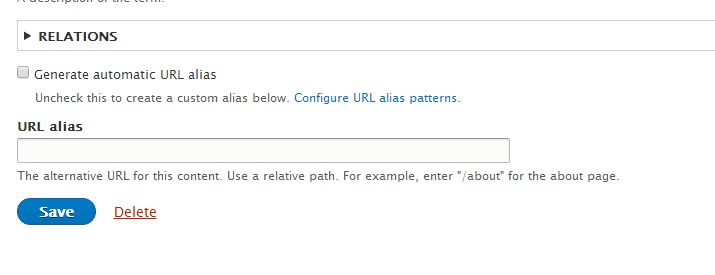
See attached image that the Generate automatic URL alias is by default unchecked. There is no way to set that box by default to be checked.
Once I go through each term and check that box, then it will automatically set the URL alias pattern that I have created.
Maybe create a check box in settings that will default all taxonomy terms to have the "Generate automatic URL alias" checked. This will solve a lot of headaches.
edit: if the pattern is built before the term is created, then the box is checked. Then I guess what you are talking about "forcing" the term to be check boxed when you do a bulk update?
Comment #11
berdirYes, that's exactly the point. I'm not sure what should happen in this case, pathauto stores that the term did not get an automatic alias and will not generate one until you force it to.
We could say we only store that information if there is a matching pattern, but the next thing that will happen is that someone opens a bug report that pathauto overwrote his previously manually created alias after saving. Really not sure what to do.
Comment #12
berdirAnyway, this isn't in needs review, because it is not fixing anything, we just have a (passing) test. I'm also pretty sure this is not specific to terms, it happens for everything.
First, we need to make that fail. The easiest way to do that should be to move the createPattern() call after creating the terms.
And then we probably need one or even two checkboxes/options, wording and exact behavior is not obvious:
[x] Force creating of aliases for entities without alias
The second part is important, because forcing isn't like forcing of the views action, we still only create aliases for entities that do not yet have one. We could add a second checkbox
[x] Force overwriting existing aliases that do not match the pattern
That would then basically remove the condition to only load entities without an aliases. And it would imply the first option, so that should be hidden if this is selected.
+ Descriptions to explain this a bit more.
Comment #13
ziomizar commentedLast test was just to prove that taxonomy have the same behaviour than nodes.
Nothing wrong with the current code (all tests pass).
For that reason i've moved the state of this issue to "need review", just to have some feedback about the suggestion in #7 to implement an extra option to force regeneration of all paths, i'm not so expert with all the states of the issues yet ;).
Anyway i guess that providing two checkboxes as suggested in #12 could help to do this operation without write extra code or delete all the aliases.
Comment #14
berdirYes, setting to needs review was the right thing to do to have th tests run, nothing wrong with that. But now that we've proven that, it needs work again.
Comment #16
lpsolit commentedI think this is not the right approach. IMO we should offer some UI to mass-enable "Generate automatic URL alias" for items having no alias, on a per-content basis. Then you can use the Bulk generate page to create missing aliases without any hack.
If we implement a "force" checkbox, then we are going to make things even worse/more confusing, because 1) the "automatic" part of "Generate automatic URL alias" would not be followed (admins could bypass this checkbox, so why bother having one?), and 2) admins would constantly be confused about why some items only have their alias updated in a bulk generate and not some others (answer: because they forgot to check "force" and some aliases are not supposed to be automatically set/updated). Why my proposal the rule would be very simple: either a node/term/any item has the "Generate automatic URL alias" checkbox set and bulk generate affects them, or they don't have this checkbox set and bulk generate has no effect on them. No exception, no hack. I also think this would let us close tons of similar issues reported here and there.
Comment #17
berdirThere are reports by a bunch of people where a force option would have helped. It's quite possibly just a workaround and there is a bug somewhere in how we deal with entities that were created before pathauto was installed or maybe when it was installed but there were no patterns.
Comment #18
Zeddix commentedI think the discussions about "force-checkboxes" is just a sympton of a different underlying problem.
The problem is the "Generate automatic URL alias checkbox", or rather the approach pathauto takes(i bugs me for quite a few years now).
Pathauto works under the assumption that you only want an automatic alias if you check that checkbox. So you have to do something in order to get something "automatically" done for you.
The way i see it pathauto should always generate aliases for all content. If you need a manual alias you should be able to overwrite pathauto with a checkbox "Use a manual alias(do not autogenerate)" following the input field. This alias should then be flagged(in the database) as manual, and should be listed separately on the admin pages.
This would also solve a lot of "bulk-generate" bugs. Just generate/update aliases for everything except the nodes that are marked for manual aliases.
Basically the manual case should be the exception and the autogeneration the default.
Comment #19
ziomizar commentedHi Zeddix,
Pathauto is a contrib module and its not enabled by default.
So pathauto works under the assumption that there are lot of existing aliases already created manually.
With this assumption would be a giant problem change all the existing aliases without ask for a confirmation, that because some old url can have an high rank on search engines or for example some marketing campaigns are enabled on some specific url.
IMHO its better ask to force a bulk update also for existing alias than do it whithout confirmation, because its very easy forget to flag a "use a manual alias" checkbox.
Comment #20
Zeddix commentedHey ziomizar,
yes i am aware of that. But upon installation pathauto could just set a "use a manual alias" flag for all existing content. So this would not break any exisiting sites. Later you could delete the aliases you want to have auto-generated instead in the admin overview.
And for new content you can't forget to set the flag, since the alias inputfield will only be enabled once you did check it.
Are there any advantages of a "Generate automatic URL alias checkbox" over a "use a manual alias checkbox"?
I see quite some problems are caused by the "Generate automatic URL alias checkbox" and it requiers extra work for the user. I don't see them with a "manual alias checkbox".
Comment #21
ziomizar commentedHi Zeddix,
So this is a schema of this two scenarios
1. "Use a manual alias(do not autogenerate)"
- all the existing alias are flagged as "use a manual alias"
- when you bulk generate you generate all the path but not the flagged aliases
- when you bulkk generate you don't ask to rebuild so you have to found a way to remove all the flag to all the nodes with "Use a manual alias(do not autogenerate)".
2. "Use an automatic alias"
- all the existing alias are no flagged
- when you bulk generate you generate all the flagged aliases, you can select an extra checkbox that force all the aliases (flagged and no-flagged) to be regenerated.
As you said there is no big advantages between 1 and 2.
But i guess that in both cases you need a force generate checkbox, because in this way you don't have to use something like views bulk update or other custom code to unflag/flag all the aliases.
Comment #22
Zeddix commentedHey ziomizar,
yes thats about it. However flagging the manual stuff has some advantages i think:
- You don't have to worry about aliases on content creation, unless you want a specific one(which requiers user intervention anyway). Meaning an author will not "break" by accident any alias sheme.
- Checking a list of manual aliases (in a view with bulk operations) and removing the manual flags is a bit more intuitive then adding a "generated" flag.
- You could add one or two checkboxes with the option to "do not autogenerate alias" and "Use a manual alias" to content. Both aliases could be treated separately without the need of admin access.
A force checkbox for all (flagged and no-flagged) aliases seems to be a bit to much, since you almost always have some aliases you dont want to have regenerated. The "all or nothing" approach does not help much. So a view for managing all manual aliases is better i think. Extending the view from "admin/config/search/path" is a good option.
Comment #23
mxtGoogleing around about this issue I found that for D7 a workaround exists querying database directly in this way:
UPDATE pathauto_state SET pathauto="1" WHERE entity_type="taxonomy_term";What is the corresponding workaround for D8? I can't find any 'pathauto_state' table within the DB...
Thank you for any help.
Comment #24
dqdAs @Berdir already stated under #12 we can consider this being an issue not only with terms. For further reference here another report marked as duplicate in favour of this one here: #2802289: Mass update of URL alias checkbox some time ago - We should consider one of these issues as a final starting point and should edit the OT and title for a roadmap on this. Not shure if this isn't somewhat "Major" already? ... Couldn't reach Berdir in Slack today... Let's wait and see ...
Comment #25
mtiftSorry for the potentially off-topic comment, but for others that end up here looking for an answer to the question posed in #23, I believe that answer is:
SELECT * FROM key_value WHERE collection = 'pathauto_state.taxonomy_term';For nodes it is:
SELECT * FROM key_value WHERE collection = 'pathauto_state.node';Comment #26
dqd#23 / #25 - As I added already for consideration in the other issue (read here), again, please, I strongly recommend, do not cause parallel communication about work-arounds in the official issue which is about fixing it in the project/module/contrib. I appreciate your wish to help and to share ideas but I it is the wrong place for that. Feel free to add it to the docs or blog posts and link them here. Otherwise it will raise noise about your work-araounds in the issue timeline and will ping all contributors. And such advices are dangerous in the wrong hands.
SInce this is the official issue about the problem we should add that if users try your hints, nobody can help them if it breaks.
Comment #27
xaa commentedimho the priority should be increased to Major as an existing feature is broken in silence
Comment #28
transmitter commentedAny update on this?
I just ran into the same problem unfortunately.
Comment #29
dqd@#27 that's what I recommended already on #24 but I would like to leave up to the maintainers.
@#28 we encourage and invite all community members to chime in to issues and help. Feel free to add helpful infos or ideas how to solve it or patches if you are familiar with it.
Comment #30
xaa commentedComment #31
bunthorne commentedI think I found the problem happening when I used Taxonomy Manager to import terms.
Comment #35
mably commentedLooks like the test from #7 added to MR passes fine without any patch.
So the problem has probably been fixed upstream.
Anyone to confirm?
Comment #36
mably commentedClosing as a duplicate of #3068140.
Feel free to reopen if necessary.
Comment #38
mably commented