

 Come together with the global Drupal community in Rotterdam, 28 Sept – 1 Oct 2026. Sessions, contribution, connection, and Early Bird savings until 8 June.
Problem/Motivation
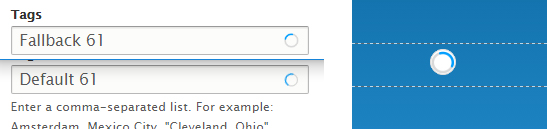
We need to build out the spinning circle throbber for use in autocomplete and ajax loading events based on the Proposal: A Style Guide for Seven.
Proposed resolution
Replace the existing spinner with a preferred SVG version, falling back to a GIF for older browsers.
Testing instructions
The spinner is used on taxonomy fields (entity reference, taxonomy term), so from a clean install you can just add an Article node and check the tags field; see #9 for instructions on what CSS to change to keep it running continuously, and how to check the fallback animated GIF.
| Comment | File | Size | Author |
|---|---|---|---|
| #97 | interdiff-93-97.txt | 1.41 KB | Anonymous (not verified) |
| #97 | 2775725-97.patch | 114.54 KB | Anonymous (not verified) |
| #95 | throbber-93.mp4 | 303.23 KB | Anonymous (not verified) |
| #93 | 2775725-93.patch | 113.14 KB | lauriii |
| #78 | Screen Shot 2017-03-16 at Thursday, March 16 - 2017 - 8.20.17 PM.png | 16.97 KB | aaronchristian |
Issue fork seven-2775725
 Show commands
Start within a Git clone of the project using the version control instructions.
Or, if you do not have SSH keys set up on git.drupalcode.org:
 compare









Comments
Comment #2
aaronchristian commentedAttached are the throbber elements to be used. SVG for modern browsers and a GIF for fallback support (i will upload later). I can assist with writing some HTML5 animations if we want to go that route as well. Fallback support can be determined on body classes if SVG's are supported. Both should meet accessibility standards as a benchmark.
Comment #3
aaronchristian commentedComment #4
aaronchristian commentedAttached is the transparent gif animation.
Comment #5
aaronchristian commentedComment #6
gábor hojtsyThis looks amazing to me personally :)
Comment #7
aaronchristian commentedThanks @Gabor, I'll cleanup the fallback GIF as I originally started with the SVG (and converted to gif from there). As Angie and Andrew noted it looks like the tail drags a bit just due to some extra frames that are in the animated GIF.
Comment #8
aaronchristian commentedComment #9
aaronchristian commentedAdding patch for replacement of autocomplete throbber & ajax throbber (small & fullscreen).
Notes:
It can be hard to get that throbber going if you have no content/tags on your site, since this throbber "grows" and has more of an overlay effect rather than a hard replacement of the light grey to blue spinning clock you can fake it by adding the class "autocomplete-loading" to the "autocomplete-enabled" div.
Also if you want to see what the fallback looks like just replace the .spinner div with this;
Future Plans:
Comment #11
gábor hojtsyTried this on a quick test site and it works fabulous on the tags autocomplete widget. Look like this needs to be applied to AJAX too and then get some more topic-expert reviewers :)
Comment #12
gábor hojtsyVersion move was unintentional.
Comment #13
yoroy commentedCompare with #1974928: Update Drupal's default throbber icons and decide on which design and which implementation to move forward with.
Comment #14
manjit.singhIt looks cool !! @AaronChristian
But In some of cases i have observe that it spin so quick that we can't figure out, Is it loading or not.
Comment #15
aaronchristian commentedGreat, thanks @Manjit.Singh, yes i have also observed this, I could add a delay on the fade out, or make a full rotation before stopping. This is noted in an earlier comment because of the fact that the spinner "grows" and the lack of terms within a base drupal install.
I can make this addition but would love to find out if this is the throbber we plan on pursuing or not.
Comment #16
aaronchristian commentedComment #17
gábor hojtsySo #9 says "Replace all AJAX progress throbbers with the same SVG/GIF treatment." that to me means that work is not yet done. Also it sounds like having two throbbers in core would be bad, so I think that would be a requirement to fix in this issue?
Comment #18
jp.stacey commentedI think it would be good to get clarity on a couple of points:
1. the ultimate goal of this issue i.e. what "done" looks like
2. what further work is required to bring it to that state
This sounds like a lot but I think really it's just process! But with this in mind I've reworded the issue description using the standard template: please feel free to edit if you don't think it matches the situation.
@GáborHojtsy could you also clarify (approximately?) what extra work you think needs doing? Is it that there are spinners that are not yet fixed by this patch? Can you suggest where?
Comment #19
jp.stacey commentedComment #20
vulcanr commentedJust tested this patch, and with a simple test creating a new Article page, trying to change the author, the throbber/loader doesn't appear.
I agree with jp.stacey. I think we are missing the point here, how it should look like?
Comment #21
lauriiiOn the UI perspective things look good. I tested multiple different use cases including Node edit form, Field UI and Block UI. Good work on that!
However, I'm afraid that we need to limit all the changes to Seven theme. That's why I'm moving this to the Seven issue queue.
I'm not sure if we can modify the throbber at all in Stable theme because it might affect themes people have built. Anyway, we don't have to deal with that here.
I'm also quite confident that we can drop the fallback gif throbber since svg images seem to be supported pretty well: http://caniuse.com/#feat=svg
#13: Seven styleguide includes design for throbbers which I believe we should here.
Comment #22
gábor hojtsy@jp.stacey, @vulcanr: it could very well be that your setup being local was/is too fast to respond and therefore no throbber seen, see @lauriii and I seen it work :)
Comment #23
vulcanr commented#22 +1
Comment #24
lauriiiComment #25
juhog commentedComment #26
Bojhan commentedComment #27
tkoleary commentedComment #28
manjit.singhComment #29
tkoleary commentedShouldn't we reference this svg file rather than inlining it? Then it will be more easily used elsewhere if needed.
Comment #31
gábor hojtsyRerolled since the patch did not apply anymore to autocomplete.js. Hope this reroll is good (vs. binaries, etc).
Comment #32
gábor hojtsyComment #33
tikaszvince commented@tkoleary We cannot apply CSS formatting on SVG image included as an image (with
imgtag) or as background image. With CSS we can control the size, color, etc. of SVG image parts if its placed as inline element.Comment #34
john cook commentedTested Gábor's re-roll against 8.4.x.
The throbber when testing in the tags auto complete widget, the throbber is displayed at full size and not resized to fit the widget.
Comment #35
aaronchristian commentedHey guys just checking back in on this after being away on holidays for a few weeks. Does anyone need me to pick this back up? Sounds like we're getting close, would love to get this wrapped up and moved into core soon!
Comment #36
gábor hojtsy@AaronChristian: yes please, I can help push this forward as much as possible but not do the actual making it work :)
Comment #37
xmacinfoMarking RTBC! Awesome implementation!
Tested Gábor patch #31 on Drupal 8.4.0-dev (latest pull). See screen capture attached.
Comment #38
xjmThanks everyone for your work on this.
No new patch was added between #34 and #37, so how did #34 get fixed?
Setting back to NR to confirm what the difference is. We can't commit this if it looks like #34 for some users, unfortunately. :)
Also, be sure to clear your browser caches. It might help to document the exact steps you use from e.g. "Install the Standard profile" to the screenshot to help figure out why we are getting different results.
Comment #39
xmacinfoWhen I tested the patch #37 I used a fresh 8.4.x-dev cloned from git.
I tested only on a single browser. Maybe we need to have this patch confirmed in another browser, in addition to Firefox.
Comment #40
wturrell commentedBest thing is if we knew which browser + OS John Cook was using in #34, so we could double-check.
I've successfully tested the SVG and the fallback GIF (by manually editing classes as per instructions in #9), against the latest commit to 8.4.x, on:
- Opera 43.0.2442.806
- Firefox 51.0.1
- Chrome 56.0.2924.87
- Chrome Canary 58.0.3010.0
- Safari 10.0.3 (11602.4.8.0.1)
all of those Mac OS X El Capitan 10.11.6 desktop non-retina.
Looks very nice. Can someone check it's OK on some mobile devices?
Comment #41
xmacinfo@wrturrel Based on your tests, you should put this issue back to RTBC. :-)
By the way, I tested this on Retina Mac Firefox 52.0b5.
Comment #42
vulcanr commentedJust tested this aswell and working fine. Retina Mac Firefox 51.0.1
Comment #43
john cook commentedI've just re-tested Gábor's patch and it's working now.
Please disregard comment #34, I'm putting it down to "Tester Error".
Also, because of the extensive testing since then, I'm marking as RTBC.
Sorry everyone - I'm an idiot. :)
Comment #44
john cook commentedP.S. Here it is working.
Comment #45
alexpottWe need to make sure that the new throbber is compatible with what's been done on #2793207: Fix off-set and goofy white jagged background of AJAX throbber when clicking Place Block - can some post a screenshot of the new throbber on the blue bartik header?
Comment #46
serg2 commented8.4.x on simply test me with place block enabled. With and without this patch:
Comment #47
alexpott@serg2 thanks! So the screenshots prove this needs work.
Comment #48
serg2 commentedSorry for the lack of a proper patch:
Comment #49
xmacinfo@serg2 Can you reroll the patch? :)
Comment #50
serg2 commentedThat should be it (but first core patch so please check!)
Comment #51
serg2 commentedA screenshot in chrome for #50 patch. Marking as Needs Review.
Comment #52
wturrell commentedIs there a way to stop it immediately disappearing, for testing purposes? (Seems to look ok.)
Comment #53
john cook commented@wrurrell, have a look at comment #9. It suggests setting "autocomplete-loading" as a class on the container element.
Comment #54
tkoleary commentedserg2: I played around with this a bit and here are some thoughts:
The stroke width is too narrow here for instances where the input is smaller like the autocomplete. I'd push it up to at least 10.
Same applies here.
If I understand correctly Moernizr gives us inline SVG, but for the fallback we can still have an SVG referenced as a file, which covers all browsers and retina displays.
Whoa, 1000? That's going to put it above everything else that has a z-index. Is that what we want?
Same comment as above.
This went by so fast I didnt even see it.
I changed this to just ease-out in the browser and it worked better. The slow expansion of the dash means it's gone before it has a chance to appear.
Comment #55
serg2 commentedre #54 I have made the changes suggested for points 1,2,4,6,7.
1. Done
2. Done
3. Use SVG file rather than GIF. Not done yet
4. Doing a quick scan of different z-indexes on the same pages the throbber is present I found values of 500-1250 so left it as 1000.
5. Use SVG file rather than GIF. Not done yet
6. Increase from 1.8s to 2.6s. The dash animation may need to be changed to fit in with this. Will visually test against this patch
7. Done
This will need visual browser testing & screenshots again.
Comment #56
tkoleary commented@Serg
Looks much better. Visually tested in Chrome/Mac/Sierra.
Comment #57
frederickjhI did a screen capture at 15 fps then dumped the frames into a animated gif. This is a bit slower than the original. I figure there should be ~67ms between frames. This gif is with 100ms between frames.

Comment #58
serg2 commented@frederickjh: is that with the patch applied?
It should appear as:
@tkoleary: I am not sure about the increase in line thickness made in #55. This moves us too far away from the style guide. The patch was RTBC back at #43 and my intention was just to re-roll after #2793207: Fix off-set and goofy white jagged background of AJAX throbber when clicking Place Block had been committed.
I will upload a new patch just with the essential changes and some screenshots which can hopefully then be committed, with other changes as follow ups.
Comment #59
frederickjh@serg2 Yes that is with 2775725-55.patch applied on 8.4.x. It did however complain about whitespace.
But, I am not sure that should change anything.
Comment #60
frederickjhRegarding the thickness, It could be that I had the screen zoomed in when I did the screen capture. I am on Ubuntu 14.04 with high dpi screen. There are some issues there so I many times have to zoom in so things are the normal size. The zoom goes in steps and so it may not be the exact same size as it would be on other screens.
Comment #61
serg2 commentedHere is a minimal re-roll from #31. The only additional changes are the animation adjustments suggested by tkoleary in #54.
Browser testing and screenshots to follow
Comment #62
serg2 commentedI tested in multiple browsers and it works fine, as before.
Here is a screenshot from Chrome:
@frederickjh I am sure that must have been a browser cache issue. Would you mind clearing caches etc and then checking?
Comment #63
aaronchristian commentedYup small warning on the training spaces but this has come together quite nicely. Good work everyone.
Are we still needing this one converted into an SVG?
Comment #64
gábor hojtsyComment #65
frederickjh@serg2 I would try clearing the caches but I have already removed that development environment. Sorry it did not come out correctly. I thought I had run
drush crbefore recording the screencast.Comment #66
ressa@frederickjh: You can test Drupal 8.4.x together with the patch at simplytest.me:
https://simplytest.me/project/drupal/8.4.x?patch[]=https://www.drupal.or...
To make the throbber run continuously, use the "autocomplete-loading"-tip in #9.
The patch seems to work fine (Ubuntu 16.04 64-bit, Firefox 51.0.1):

Comment #67
xmacinfo@ressa: you can mark RTBC. Thanks for the tip with Simplytest.me.
I used Simplytest.me and tested the following browsers successfully.
I like the stroke width and the speed and animation.
I suggest to commit this and later on deal with the fallback icon.
Comment #68
wturrell commentedAdded basic testing instructions to Issue Summary (for taxonomy terms and inline block-placement).
Still unsure if there's a way to continuously activate the animation for the latter (I used classes in #9 when doing previous tests.)
Comment #69
jwilson3I don't want to stop progress on this vast improvement, but an inline SVG buried inside javascript with no template seems really hard for a front-end dev to override. Possibly even more difficult than what we currently have. Is there a javascript variable or template system we could leverage here to facilitate an override? Is there an argument for not using an external SVG file added added as a background image via css?
Comment #70
tkoleary commented@jwilson3
It's true that we could use pure css like: http://codepen.io/filipekiss/pen/yJxFo
But i'm not convinced that this complex css is any better as a developer experience than the relatively simple variables that the svg provides.
Comment #71
heddnre #69: +1 to your suggestion. We had to replace the circle icon with a goofy running dog on a client site. It meant we had to implement our own ajax callback and the work to swap out the simple icon was pretty extensive, for what seemed like a fairly simple theme thing.
Comment #72
wturrell commentedWe need to get someone to check this in Windows browsers before we RTBC, imho. Note you only need to do IE11 / Edge, as when 8.3.0 comes out the current plan is to formally drop support for IE9 and 10.
Comment #73
xmacinfo@jwilson3 see comments in #29 and #33 as to why inline SVG was choosen.
I have Windows with IE9 and IE10, but if we drop support with 8.3.0, I will not test on Windows as I do not have Windows 10.
Comment #74
ressaI just tried it on Browserstack and it looks fine, but probably best to also have a genuine Windows machine test it:

os=Windows, os_version=8.1, browser=IE, browser_version=11.0
Comment #75
tkoleary commented@xmacinfo Yes that's true but we were talking about referencing the svg rather than putting it in the code there. We have not as yet looked at a pure css (no image file) solution like the example in the link in #70.
Presumably the advantage there is both simpler dev experience and no need for fallback or polyfill for other browsers like IE.
Comment #76
xmacinfo@tkoleary Agreed. CSS would be great. But if we want to implement the throbber in CSS we may have to change this issue to “Needs work”. We would also need to know more precisely which browsers support that type of CSS animated icons.
Comment #77
vulcanr commentedI agree with @tkoleary at #70 & #75, I don't think that pure CSS will give us a better experience, and it's a lot of code to build a simple animation. I would rather go as well with a SVG.
Comment #78
aaronchristian commentedIt would be great to roll this in as the MVP version, and if someone would like to enhance the experience create another issue. I think this is a big step in the right direction, but it has seemed to have stalled due to quite a bit of discussion on best practices (but no real consensus).
The solution that is implemented is very close to the spinning throbber that you see when you update google chrome. It's using inline SVG's with some animations.
What are everyone elses thoughts?
Comment #79
xmacinfoI would also go for inline SVG like developed here (current patch).
CSS icon is not a a good option.
All other icons in Drupal 8 are now using SVG. We should stay inline with the other icons and use, accordingly, SVG for the throbber.
Comment #80
aaronchristian commentedAre we good to set this to RTBC for the time being?
Comment #81
jwilson3IMHO, no, this is not RTBC. My point about it being too difficult to override an inline SVG buried inside autocomplete.js was echoed by @heddn and has not been addressed. We had a JS template system in Drupal 7; I don't know if this has gone away in d8, but if it has not, this is a prime candidate to use it. Even if there is no proper "template system" per-se we should at the very least expose the SVG in a variable that can be overridden easily by a themer without temptation (for newbies) to hack or replace and override the entire autocomplete.js file.
Additionally, abstracting the inline svg into a separate template opens it up for easily droping it into other usages as well.
Edit:
One more point. The current patch modifies a core js file, which has nothing to do specifically with the Seven theme because it will affect all themes, so 1) the scope of the original issue has changed and the issue summary and title needs updating and 2) to drive home the importance of my previous point above, with the current patch as is, there wouldn't actually be a way to cleanly "override" the throbber for any single core theme, without introducing duplicate code.
Comment #82
serg2 commentedShall we try to move this along by making a small plan:
1) Design of throbber is done - Great
2) There is no longer a need for the fall back gif, we can simplify the patch by removing it and modernizer. We will be only be supporting IE11 and up soon - Agreed?
3) The throbber is added by Stable which can be overridden is a subtheme but cannot be directly edited - Override in Seven?
4) It must be easier for themers to override the SVG - How?
The best solution to (4) is to put the SVGs directly into twig templates (directly as DOM). This method provides the most options such as changing the color of the svg from a module [#23506) or in simply CSS. I have not seen this in core but have tested it and it works.
Comment #83
serg2 commentedComment #84
serg2 commentedComment #85
serg2 commentedFollowing on from #82 I thought it best to ask if the following would be a good for developer experience:
this is the existing core/themes/classy/templates/form/input.html.twig
<input{{ attributes }} />{{ children }}and with the SVGs added along with required mark up would be:
The CSS (style) would be put into theme CSS and each of the SVGs given classes which could make them easily target by themers.
Please excuse the rough code, the purpose here is to try to move the issue along with alternatives to existing approach.
Comment #86
xmacinfoAs mentionned in https://www.drupal.org/node/2775725#comment-11991807 :
That way, we offer an uniform experience. Furthermore, CSS icons are more hacks and should be avoided.
Comment #87
gábor hojtsy@xmacinfo: what do you mean? the patch uses SVG :)
Comment #88
xmacinfoYes, this is the point, this patch is using SVG and should be committed as is, unless we see some implementation bugs.
What I mean is that that we must should stop thinking that a better solutions would be to use CSS-icons (or pure CSS) as mentioned in https://www.drupal.org/node/2775725#comment-11948957. That type of CSS icons (pure CSS icons) are hacks and should be avoided.
Comment #89
john cook commentedI've had an idea for point 4 of serg2's comment #82, although I don't know if it's a good idea.
The is the option for libraries-override in the theme's yml. How about having a magic™ library that handles the throbber with a path to the image to be used relative to the theme directory.
eg:
Although, this would mean having Drupal understand what the
imgparameter means. And it is, of course, something for another issue.It would be nice to get some other peoples thoughts.
Comment #91
fisherman90+1 for your Idea @john-cook #89. Because if you want to overwrite the styling of the throbber in your Theme, 99% of the time you want it to be consistent over all the elements. Also this way it's very easy to change for a frontend dev. That's why I think it's a much better approach than putting SVG inside the templates or inline to the JS.
Sadly I don't know the implications for core to use this approach, but I would welcome it.
Comment #93
lauriiiRerolled the patch against 8.6.x.
The current approach overrides the throbber icon everywhere. We should limit the scope of this issue only to Seven. I'm personally happy with the current approach for creating the animation.
Comment #95
Anonymous (not verified) commentedAfter the #93 patch I checked the page
/admin/structure/types/manage/page/form-display. If to move item to 'disabled' region, throbber looks not nice (breakpoint on index.php for hold).Works:
Not works:
Comment #96
lauriii@vaplas thanks for the feedback!
Tagging issue which would make theming throbber easier which might help this issue.
Comment #97
Anonymous (not verified) commentedReason of #93 fail in:
Now fullscreen throbber blocks the UI, so we cannot click by link, until
ajax-progress-fullscreenexists on page.Patch contains only fix for this fail (works for PhantomJS and Selenium), but not for #95.
Comment #98
john cook commentedComment #99
ressaNice find @vaplasm. I can't validate if the problem you discovered is solved, but the patch seems to apply fine. I do get a few warnings about trailing whitespace:
PS. I used the work-in-progress in #2911319: Provide a single command to install & run Drupal to quickly apply the patch like this:
Quick install Drupal 8 and apply patch
EDIT: Updated to use latest patch from single command install, and also install Umami demo for sample content.
Comment #100
lauriii@ressa that is fine, it is caused by non code files in the patch.
Moving back to NW to work making this Seven specific as mentioned on #93.
Comment #101
ressaThanks @lauriii, that makes sense. Do you know how the animation can be activated to test the problem pointed out in #95? (I used the technique in #9 when doing previous tests.)
Comment #102
lauriii@ressa I used a chrome network profile with a very long latency for testing that. The problem can be seen for example when you change field widget.
Comment #103
ressaThanks @lauriii, that technique is more efficient and also works for fx taxonomy fields. For others, here's how to create a Chrome network profile with long latency:
How to keep the throbber icon running in Chromium or Chrome
Right-click on the page and click Inspect. Select Network > Online > Add > Add custom profile, call it fx "Very slow", enter fx 2000 in the Latency field and click Add. Now you can select the Very slow option under Network and watch the page load quite slowly when you change field widget or enter a taxonomy term, giving you more time to observe the throbber icon.
To quickly create a Drupal 8 installation with test content and also apply a patch, you can use the commands under "Quick install Drupal 8 and apply patch" in #99.
Comment #108
ressaThere has been great progress with updating the throbber icon in the new Claro theme #3087950: Progress throbber position is incorrect, so adding here for reference.
Comment #110
nod_consolidating issues under the JavaScript tag
Comment #114
longwaveThe Seven theme has been removed from Drupal 10 core. However, this issue affects more than just the Seven theme - the throbber is used core's default CSS - so moving this to the CSS component for further discussion.
Comment #117
jwilson3There was already an issue that was marked postponed on this one which IMO should be reactivated now that this one is no longer a blocker.
It probably makes sense to have core maintainer (@laurii?) pull over issue credits from here to that issue, too.
#1974928: Update Drupal's default throbber icons
Putting this into RTBC for maintainer visibility.
Comment #118
jwilson3Edit. moved comment to other issue.
Comment #119
nod_a 6 years old patch can't really be RTBC :) Please go through it, make sure it's still the right design, and put that in a MR
It would help a lot for someone to go through the related issue and post the credits in a comment. I'll update the issue credit here
Comment #120
smustgrave commentedBelieve this belongs in the seven theme now.
Comment #121
jwilson3The idea is to copy credit from everyone who worked on this issue into the older original one that is still open in Drupal core's issue queue: #1974928: Update Drupal's default throbber icons
I've already done this on the other issue which now has an MR.
The design changes proposed here would be something that remains scoped to the Seven theme only. I'm not certain that makes any sense to be evolving now that Seven theme is removed from core. Assuming maintainers of Seven think this has any chance of getting in, and still want this in an MR, then it may be easiest to just copy over the MR approach from that core issue here for Seven. It could use one of the two SVGs proposed on that issue (see the codepen in that issue's summary for reference).
I'm leaving this in NW to:
Comment #122
nod_thanks for the work on the other issue. I didn't realize this one was related to seven
Comment #123
avpadernoComment #124
avpadernoComment #125
avpadernoModenizr has been deprecated in Drupal core (#3239980: Deprecate Modernizr); any usage has been removed from Drupal core (#3281559: Remove modernizr usages from core).
We should not rely on that library.
Comment #126
avpadernoComment #127
jwilson3I suggest starting over with a clean MR that just pulls in the SVG throbber that ended up getting committed to Core in #1974928: Update Drupal's default throbber icons using the same approach from that issue for the Seven theme. No modernizer needed.
Comment #128
jwilson3Was about to pick this up, but neither throbber-active.gif nor throbber-inactive.png from core have been copied into the seven theme, meaning it inherits whatever core has already.
The only icon I see in the seven theme codebase is https://git.drupalcode.org/project/seven/-/blob/2.0.x/images/loading-sma... referenced only by jQuery UI Dialog.
https://git.drupalcode.org/project/seven/-/blob/2.0.x/css/components/dia...
The loading-small.gif is out of scope of this issue, therefore, I suggest closing this one and opening a follow-up issue to pull down the animated loading-small.svg for core in #2575253: Update loading icon and use SVG.
Comment #129
avpadernoI would like to get a new throbber in Seven, but as SVG image like Drupal core does.
Comment #130
jwilson3Why not just inherit the one from Drupal core?
Comment #131
avpadernoI feel, like aaronchristian and others who worked on this issue, that the proposed throbber fits better the theme styles.
This issue is not just about replacing the throbber with a SVG image, but also giving a new one to the Seven theme.
Comment #132
avpadernoComment #133
avpadernoComment #134
avpadernoComment #135
avpadernoI am closing this issue since, despite the issue summary, its patches update the Drupal core throbber, not only the Seven theme's one.
As there has not been progress in about six years, I am now inclined to use the default Drupal throbber.
Comment #136
xjmAmending attribution.