Problem/Motivation
The Facebook Instant Articles Drupal module was architected to be a loosely coupled, flexible tool for integrating Drupal sites with Facebook's Instant Articles service – for both new and seasoned Drupal developers.
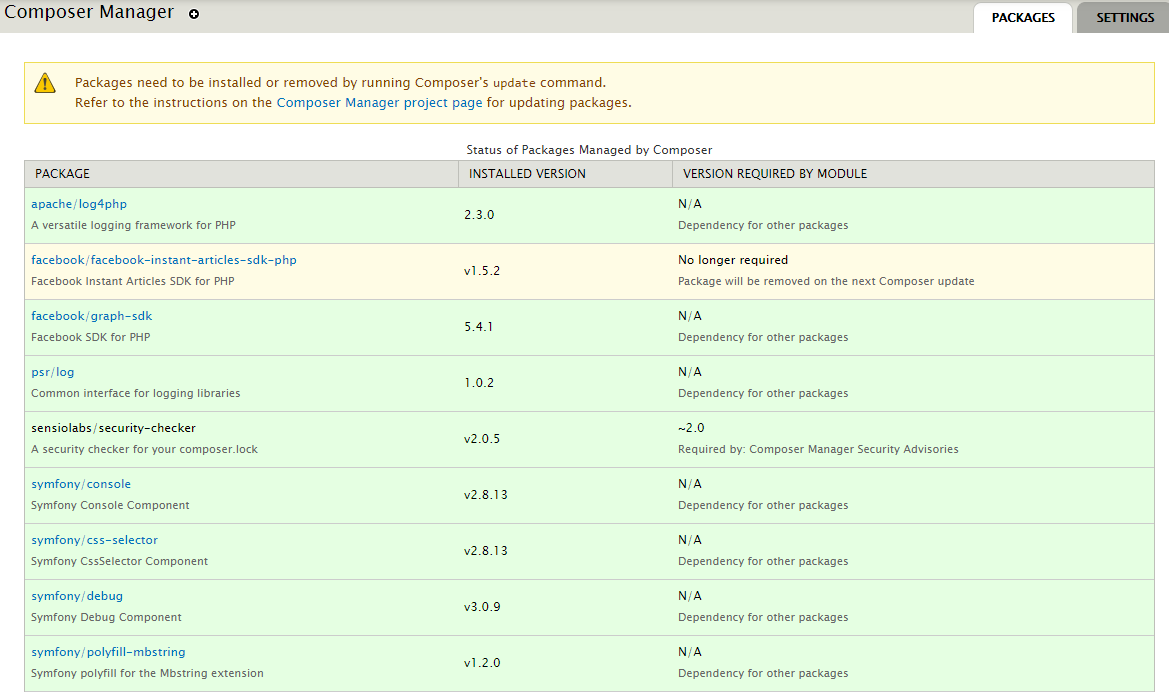
The Drupal module depends on the Facebook Instant Articles PHP SDK, so in order to make use of the SDK classes developers will have to have strategies for 1. managing the dependency, and 2. autoloading it's classes.
While the module's project page and README "strongly recommends" using the Composer Manager module to handle both strategies in Drupal 7, it is not immediately clear to some developers how to do this (or whether they should choose another strategy for managing the dependency and/or autoloading). Due to this potential lack of clarity/detail, the called class requirements are not met, so some developers are reporting HTTP ERROR 500, PHP Fatal errors, or WSOD.
Proposed resolutions
There have been several proposals for addressing this:
- Update the README and project page to Clarify Composer Manager steps for developers unfamiliar with it.
- 90% or more of developers on Drupal 7 sites will not have an alternative autoloading/dependency management strategy already in place (and those who do will not need help with this issue. Tl;dr, if you're reading this, you will need to learn how to properly use Composer Manager + drush with this module).
- Wrap ALL class calls in a conditional to ensure they are callable.
- This would be unnecessary cruft – because if the SDK is not properly downloaded and it's class files autoloaded, this module will not work at all).
- Wrap ONLY the
hook_init() \Logger call in a conditional to ensure it is callable.
- Unlike #2 (wrapping ALL class calls), the use case for this one call is that if a developer now installs the module without reading (or fully understanding) the README, they may be locked in a WSOD until they disable the module directly in the {system} table.
Remaining tasks
- Get feedback on the Proposed Resolutions. In particular, recommendations for wording in the README would very helpful.
- Implement the resolution(s)
- Ensure all resolution(s) are full documented, so any new issues opened for this problem can be closed and pointed to that documentation.
User interface changes
None.
API changes
None.
Data model changes
None.
Original report by itpromanager
Fatal "HTTP 500 Error" when installing base module
I get this fatal error when installing the base module, when i check the log entries, it states that the module was installed, no error output in the log entries, but site disappears on screen and outputs "HTTP 500 error". I have to go into the database and disable the module in order to get the site back.


Comments
Comment #2
mikejon-es commentedI'm getting this:
PHP Fatal error: Class 'Logger' not found in ../sites/all/modules/fb_instant_articles/fb_instant_articles.module on line 184 request_id="v-55b11ace-3ec6-11e6-9ed0-22000aab1d28"
Comment #3
andrew perriman commentedSame issue with 7.x-2.0-rc1.
Same as https://www.drupal.org/node/2705477#comment-11319451
Comment #4
andileco commentedSee if my comment on this page helps: https://www.drupal.org/node/2751097#comment-11398309
Comment #5
christophweber commentedYou really want to enable the base module via drush so you don't run into PHP time limits. The Composer Manager-based automatic downloads and installs take their merry time, and you almost certainly will run into timeouts if enabling via the admin interface.
Hope this helps.
Comment #6
scottrigby@ChristophWeber @andileco,
Do either of you - or anyone else - have ideas for clarifying this in the README?
I admit that there is a bit of a learning curve for people unfamiliar with using Composer with Drupal in D7 (aka composer_manager). But as Composer is now the industry standard for managing PHP dependencies, the way this module uses that is actually the correct way. However if any improvements can be made to the README to lower the barrier of entry, then that would be really helpful.
Comment #7
scottrigbyComment #8
andileco commented@scottrigby - I'll try to think of some ways to describe this in the next few days.
I think it's more than just a learning curve. A lot of people use Drupal on shared hosting and never touch the command line. I think those people should still be able to use modules like this one.
In my opinion, Composer Manager (for Drupal 7) needs a user interface like Core's Update Manager, where people can check boxes and click a button to have the back end handle the Composer commands if they are not comfortable or able to do so via the command line. Without that, there will be a lot more issues like this one. I also think modules relying on package management should not break, but instead provide warnings on the Status Report page, like happens with many D7 modules when a dependency is not properly downloaded and placed correctly in the libraries folder.
I also find, for my Drupal 7 sites, that Composer is more than I want to deal with. For one of my sites, I have a Docker container for testing. In my Dockerfile for the testing instance, I actually prefer to replace replace fb_instant_articles.module with a version that comments out line 172
/* \Logger::configure($configuration); */and takes care of the WSOD issue rather than having to install Composer and run the commands. Because none of my other modules rely on it.As I ramp up my Drupal 8 work, I'll get more into the Composer workflow. But for Drupal 7, it feels like too much of a hassle.
Sorry for the soap box!
Update: looks like efforts are being made to address the lack of UI: https://glamanate.com/blog/conductor-composer-ui
Comment #9
adriancotter commentedI had this issue the other day. With the same error around Logger.
I got around the error (after much banging around) by disabling the modules in the DB
And then running a rebuild registry.
I at some point double checked my paths in composer manager -- and found what I think was the problem here -- that the references to files were built incorrectly in the composer.json file because the file paths were not good. I adjusted the paths in composer manager and it worked fine from there.
However, I am still having a similar issue in my production environment when I enable the display module... I get a PHP Fatal Error around the EntityPropertyWrapper. The same solution does not seem to present itself.
Comment #10
scottrigbyUpdated summary
Comment #11
scottrigbyComment #12
scottrigbyHi everyone,
I changed the Title and Issue Summary. Please give feedback so we can give more clarity to the proposed resolutions, and make a plan to get this resolved.
Thanks!
Comment #13
adriancotter commentedSo I have not worked totally fixed all my problems as of yet. Some weirdness in GIT or GitLab is keeping me from getting it sorted on my staging server.
However -- the root of all these WSOD, PHP Fatal error problems is that your composer artifacts -- the actual vendor files -- are not where they should be. Just because things look hunky dory in the Composer Manager screen does not mean you have your path settings correct. This is especially important to realize if you are moving vendor files around via GIT or the like.
I have a multisite setup, and after reading the docs, talking with various devops folks at BADCamp, and asking support at Blackmesh, I have my composer files in a separate repository in a separate file structure, with a symlink that I can point to from my Drupal install. I run composer on my dev branch of my Composer files, and then push those around to my other servers. Composer manager is on my stage and prod, but the auto settings are turned off. For some reason I had problems using a relative link for the vendor directory, so I changed it to a absolute path (this is sucky because it means things will break when I push the database to another server, but it'll do and it seems like composer manager automatically does this for the file directory ANYWAY, I may move this to the settings.php file to get around that problem).
One thing to know is that composer manager doesn't actually tell you if the files are there. It really only tells you what is in the JSON file (and/or maybe the class mapper php file). This comes into play if, for instance, you forget to add some files to GIT, but the composer.json and other composer files get moved over... Composer Manager looks like it is happy, but as soon as you turn on FB Instant Pages, it blows up.
In terms of what the module could do -- adding a little troubleshooting section in the readme certainly would help.
ALSO having an error check if Logger is there would be great to have -- with a message that was "Hey it looks like your Composer Vendor files are not where they should be... (listing the path that it is looking for if possible)"
It would also be worthwhile if when you turned on sub modules similar checks were made. I don't think you have to wrap every call, only check at their init. Maybe there is something that Composer Manager could be doing better in this, but given the potential complexities and differences in people's process, having some help here in this regard would be welcome.
If I can help in this effort, I would try and give it a go.
Comment #14
adriancotter commentedOkay, I worked out my issues, and can add another little issue to potentially troubleshoot.... One reason your files may not be where you thing they should be.
When you run composer update or install, one of the vendor file libraries it downloads is apache/log4php
This directory contains a .git file belonging to some repository other than yours.
When I commit that directory it adds it as an archived folder (in GitLab at least), rather than all the files -- so while it sort of looks like the vendor files are being added to the repository -- actually, the files are not being added at all. So when I merge to stage, although composer looks like all is good, my fb_instant_articles is blowing up when I turn it on.
So if you are committing your files to GIT, you may be running into similar issues.
For the short term, I ran deleted and removed the directory from my branch, ran composer update, and used "find .git -delete" to remove the offending file. I added the files back in and all is well and good in the world for the moment.
For the long term:
Comment #15
scottrigby@adriancotter:
Yep that would cause this issue, if you rely on a parent git repo to deploy the packages between environments.
The
apache/log4phppackage requirement is defined in Facebook PHP SDK Composer.json file. The Composer package itself is maintained on Packagist by the Apache group. I'm not sure why this package defaults to git clone - normally that happens on dev versions (see this explanation), but the version we get is considered a stable version. Perhaps some issue with their package? Others have reported this same issue as well. You can contact @log4php on Twitter (if you reach out to them there, free to ping me on the post as well, @r6by). They also have mailing lists and an issue tracker. Let me know how it goes!BTW, eventually I would like to see the Facebook PHP SDK prioritize this issue to Move hard-coded \Logger calls to new SDK Logger interface. You can follow there… in the meantime, this will be something to watch out for.
Yes, composer_manager allows you to configure the vendor directory location, so if you intent to deploy your vendor directory in code, you could also set that variable in code, and add a gitignore location to match.
We should probably note the .git directory download in the forthcoming Troubleshooting section of the README. If someone wants to help write this up in a terse way, that would help :)
Comment #16
mjhinds commentedI've been working on installing this module, unsuccessfully, on a site hosted on Pantheon and have a couple of things to add to this discussion and am hoping someone has figured out and will share a workaround to getting this to work on Pantheon.
I've tried to install this module five or six different ways on our development site and have always ended up with the WSOD. The only way I can get the site back is to restore a backup.
This has included both Drupal 7 versions. I've been using Drush, command line composer, and composer manager in different configurations. Pantheon doesn't like composer manager very much and recommends using the settings in composer manager's documentation to disable automatic enabling of dependencies.
The error I've been getting is the log error documented above. I tried to comment it out and then got another error from a line in the 430s, which ended that experiment.
I've been using composer manager for several other modules and while it's finicky it has been working.
One thing I noticed downloading the Facebook PHP SDK package is that the Apache/log4php file doesn't download it clones itself. Tracing it back the file is a mirror of another project on Github, I don't know enough about this to know if that's part of the problem or not. I also don't have any idea how to work around this, which makes the module unusable at this point for me.
If anyone knows how to work around or fix this issue in general or for Pantheon hosted sites any help would be appreciated.
As far as updating the Read Me files and documentation it wasn't clear to me when I started trying to install the module how the dependencies worked, the references to the sub-modules make it seem like the Facebook PHP dependency might just be for people using the API submodule.
I recently installed the Google Amp module and think their read me file, which has a lot of the same processes, was pretty clearly written. If someone can help me get this working I'd be happy to help update the read me file and other documentation.
Comment #17
alexpottThe problem I'm seeing with systems like pantheon and platform.sh is that they don't want you to check all code into github that's not yours. So the workflow is:
1. Get your custom code
2. Build out your site using drush make
3. Get the live database
4. Run drush composer-json-rebuild
5. Run composer install
But the problem is fb_instant_articles_init() prevents this workflow from working. Because in trying to run drush composer-json-rebuild you need a full bootstrap in which all hook_init's are fired. Since the composer dependencies are yet to be downloaded this can't possibly work.
I suggest that the code in fb_instant_articles_init() is wrapped in a
if (class_exists('\Logger')) {to make this more robust.Comment #18
alexpottComment #19
oranges13I'm pretty seasoned with Drupal development but I'm absolutely lost on how to integrate composer into an *existing* D7 site that is currently using Drush for module management.
I'd like to keep using drush if possible, but I need the Facebook SDK in order to attempt to use Instant Articles without WSOD'ing my site.
Here's the questions I need answered:
1) Where do I install composer in relation to my drupal root for it to work correctly?
2) Where does the composer.json need to live in relation to my drupal root?
3) Where do we expect the composer downloaded dependencies (the facebook sdk) to live in relation to my drupal root?
So far I have installed a local copy of composer and required the facebook sdk, but this composer.json file is NOT in my drupal root at all (it's in my user's home directory). Is that enough? Are these global PHP libraries being installed or something drupal specific that I need to look for?
To be clear, I am not talking about the `composer_manager` module, I'm talking about command-line composer, which I'm more than willing to use.
Comment #20
adriancotter commentedYou can still use drush. Composer is only going to be relevant to fb_instant_articles and other modules that want you to use it. And even if you were using composer for all your module and contrib code, you'd still use drush for enabling and disabling modules.
In some ways it doesn't matter where you have the composer maintained files. They don't have to be publicly accessible on the web.
I maintain my composer files in a separate git repository (on the same server) -- as some have recommend to me.
My biggest issue with using composer has been the paths to those files when I move around my sites to different servers and to my local development setup. I have been using composer manager which is perhaps the problem, i am not sure. (I am in the midst of trying to get it working locally on a machine and am struggling)
i think part of the question is your larger ecosystem, if you have local, dev, stage, prod, etc. a single site or a multi-site...
Comment #21
scottrigby@alexpott I somehow missed your patch. Sounds like #3 of the Proposed Resolutions is what you (and most people) agree would be helpful.
About the patch: For this module we're using a GitHub PR workflow, and I have CI syncing that to the d.o repo. The d.o project page, and CONTRIBUTING file in the project root explains how these play together (though you wouldn't need that info - it's for people who may know how to use PRs but not d.o, or vice versa). Do you mind opening up a PR there? I could do it for you if you're backed up.