

Closed (fixed)
Project:
Bootstrap
Version:
8.x-3.x-dev
Component:
Code
Priority:
Normal
Category:
Feature request
Assigned:
Unassigned
Reporter:
Created:
7 Dec 2015 at 20:34 UTC
Updated:
28 Dec 2015 at 23:34 UTC
Jump to comment: Most recent, Most recent file


Comments
Comment #2
ettiene commentedI just changed
$files = $ancestor->fileScan('/^deprecated\.(inc|inc\.php|php)$/');to
$files = $ancestor->fileScan('deprecated.inc');in bootstrap/src/Bootstrap.php on line 804.
It's probably not the correct fix, but since it's looking for the file 'deprecated.inc' I thought there's no need for a regular expression if you can just as well specify the file name.
It worked in my case.
Comment #3
3dnathaniel commentedI went ahead and implemented your change and it no longer displays the error.
Comment #4
markhalliwellUm... the path doesn't even with

/, I don't how you're doing that:Comment #5
markhalliwellIt could be a file system issue although, not entirely sure what's going on here. Regardless, some conditional directory separator checks can be added.
Also, this file really shouldn't be loaded unless it's opt-in to begin with.
Comment #7
markhalliwellComment #8
marzie commentedHi Mark,
I am also getting this
Could not include file: .... themes/bootstrap/deprecated.inc
I have a new drupal 8 install and using alpha 8.x-3.0-alpha2 2015-Dec-07
It appears to be looking here
htdocs\drupal8/drupal8/themes/bootstrap/deprecated.inc
but there is a deprecated.inc file in the
htdocs\drupal8/themes/bootstrap/ directory.
sorry am new to this hope i can help somewhat.
If you want me to check something let me know
Thanks
M
Comment #9
amirimran commentedHi,
I also got this
Could not include file: /var/www/html/d8/d8/themes/contrib/bootstrap/deprecated.inc
Drupal: 8.0.1 (clean install, no other module or theme installed beside Bootstrap)
Bootstrap: bootstrap 8.x-3.0-alpha2
I replaced Bootstrap with latest dev (Bootstrap 8.x-3.0-alpha2+18-dev) and the error was gone.
This is what i found!
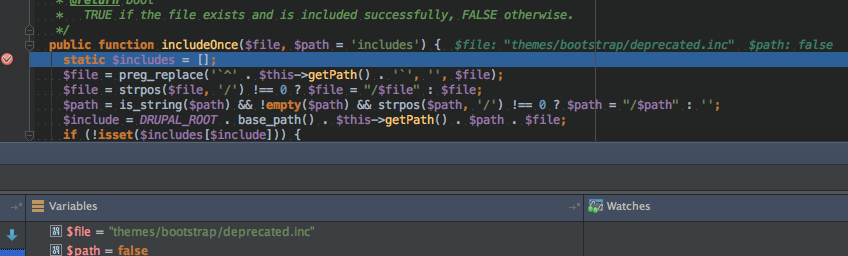
1. As my drupal is installed in sub directory "d8" this is how the path is being printed for include function at line 418 inside includeOnce() in file bootstrap/src/Theme.php
DRUPAL_ROOT: /var/www/html/d8
base_path(): /d8/
$this->getPath(): themes/contrib/bootstrap
$path: /deprecated.inc
Following line at 423 (inside includeOnce() in file bootstrap/src/Theme.php) is creating this include.
$include = DRUPAL_ROOT . base_path() . $this->getPath() . $path . $file;
So from above i see that problem is with DRUPAL_ROOT and base_path() both printing "d8" which is my sub directory for this drupal installation.
base_path() would have only printed "/" if my drupal would not have been in sub directory.
I guess following can solve this in easy way (assuming that DRUPAL_ROOT is supposed to have sub directory in it)
$include = DRUPAL_ROOT . '/' . $this->getPath() . $path . $file;
Note:
For my site i have only configured apache virtual host using this path: /var/www/html/d8/
RewriteBase not defined in .htaccess and neither base_url defined in settings.php
* Bootstrap 8.x-3.0-alpha2+18-dev does add a new check by adding a line at 821 in bootstrap/src/Bootstrap.php as if ($ancestor->getSetting('include_deprecated')) but path problem still remains.
* Bootstrap 8.x-3.0-alpha2+18-dev does not allows me to change theme settings as i am getting following
The website encountered an unexpected error. Please try again later.
i guess that should be unrelated to above problem, but i wanted to re produce this by enabling include_deprecated from settings.
Comment #10
chappy commentedHi amirimran,
I can only confirm your description. Also the fix you suggested works well for me.
Stepan
Comment #11
markhalliwellHm, guess DRUPAL_ROOT now has the sub-dir included with it... odd. Ok, I'll commit a fix for this.
Comment #13
markhalliwellComment #14
marzie commented@amirimran
Bootstrap Bootstrap 8.x-3.0-beta1 works looks awesome thanks.
When will the sub-theme functionality be looked at? I does not appear to work for me. I.e .Cyborg theme
I then got the error on the index.php page
"The website encountered an unexpected error. Please try again later."
i went to the admin/config/development/performance manually in the browser and cleared the cache.
All looks good now thanks Mark
Regards
M
Comment #15
markhalliwellThanks @marzie, I've created a follow-up issue for #14.