Title: Creating a Custom Block
Section: Blocks
File name: block-create-custom.txt
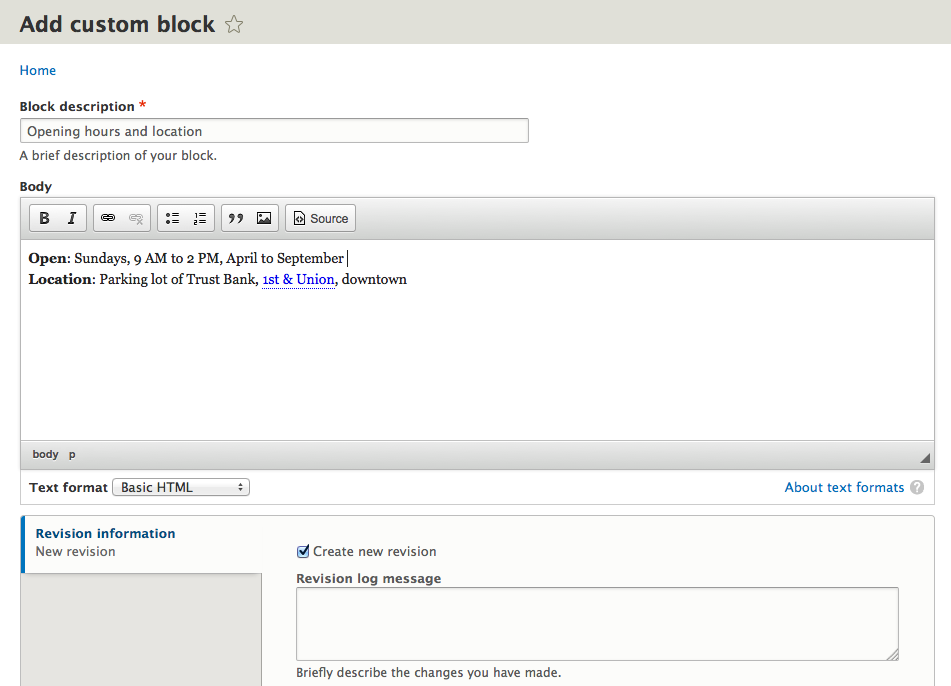
Covers: Create a block showing hours and location. Place it in the Sidebar Second region.
Attribution
<<language-add>>::
  Adapted by https://www.drupal.org/u/jredding[Jacob Redding] from the the drupal.org community documentation at https://www.drupal.org/documentation/modules/block. Copyright 2000-2015 by the individual contributors to the
  https://www.drupal.org/documentation[Drupal Community Documentation]
Checklist for this phase
- Does it follow the template?
- Have the comments and placeholder text been removed from the template?
- Is everything the topic was supposed to cover included, and nothing extra?
- If there are @todo notes, are they clear?
- If there are images included, do they include instructions for how to redo them in a comment? (Note: Screenshots do not need to be perfect. Just make a rough cut.)
- Is attribution provided?


Comments
Comment #1
jredding commentedComment #2
jredding commentedComment #3
jredding commentedComment #4
jredding commentedComment #5
jredding commentedMinor updates to the documentation page.
Comment #6
jhodgdonThanks Jacob!
A few minor things to fix here:
a) Can you go through and remove all the // lines from the template?
b) Sentence Case Please In The Title
c) The "Goal" section should tell what the user's goal is, not what the writer's goal is, for the topic. And hopefully something specific, like "Create a block showing the farmer's market location" or whatever.
d) In the cross-reference <> should not have the .txt
e) Check the numbering. You probably don't need the [start=] everywhere, and I think you'll have two #3's?
f) Number list formatting: indent each item's following lines, like:
g) I think you'll need a bullet list within that longer numbered list item?
Comment #7
jhodgdonWe decided to use separate issues for each phase of writing/editing.
Comment #8
jhodgdonHi! Are you still working on this? Hopefully yes -- if not, please comment here and let us know we need to find someone else. And if you are, do you know when you might finish writing this topic?
By the way... there have been quite a few updates to our processes since the sprint where you took this on. For one thing, we have a more concise guide to contributing (with links to specific instructions) on the project page:
https://www.drupal.org/project/user_guide
Also, the templates and some guidelines have changed, especially in the area of screen shots and images.
And we've finally made a complete outline for the guide! See
https://userguide-drupal.redesign.devdrupal.org/d8guide/en/index.html
to find your topic, along with its new template. We also put more notes about what each topic should cover in the tracking spreadsheet; see
https://docs.google.com/spreadsheets/d/1ov0FyJhKrJe7PYvohzV5UrrLyRaVCy2A...
for that.
Thanks!
Comment #9
jredding commentedYup. Still working on this. I'll post something up later tonight incorporating your changes.
Comment #10
jredding commentedHere's an updated file with a bit better formatting. Next I'd like to work on getting the images into it - I couldn't find the image naming and folder location information specifically what goes in the image markup?
ex:
image:/path/imagename.png[Image Title]
Comment #11
jhodgdonHere's the image information:
https://userguide-drupal.redesign.devdrupal.org/guidelines/good-writing.... (guideline about making an image and a table of values)
https://userguide-drupal.redesign.devdrupal.org/guidelines/formatting.ht... (practicalities of adding images to AsciiDoc)
Regarding your most recent version -- it's looking good! A few thoughts:
a) We're trying to relate everything to the Guiding Scenario:
https://userguide-drupal.redesign.devdrupal.org/d8guide/en/preface-scena...
So in the current tracking spreadsheet, the suggestion for this topic is:
Create a block showing hours and location. Place it in the Sidebar Second region.
b) When I did this in Drupal 8 recently to try to make a demo site for the User Guide, I found that as I was creating the block, the last step after I clicked Submit was that I was asked to place it in a region. I don't think the instructions you wrote reflect that?
c) Might want to also suggest as prerequisite knowledge the "block-regions" topic (this is "Concept: Regions in a Theme" and has been moved from the Block chapter to "Planning your Site").
Looks great, other than that!
Oh, one more thing: Boris/batigolix was working on another topic and he had a good format for the table of values that we want to use when inserting an image to illustrate filling in a form. His table looked something like this:
I am about to put this into the standards/guidelines pages so we can standardize on this, but I haven't done it yet...
[EDITED this comment so (c) was clearer, it thought my reference was an HTML tag, oops!]
Comment #12
jredding commentedWonderful! Thank you for this information. i'll look for my next pocket of time and make these changes.
Comment #13
jhodgdonUpdating summary...
Comment #14
jhodgdon@jredding: Are you interested in fixing the few things that were mentioned in comment #11, or should we find someone else to finish this up? Thanks!
Comment #15
ifrikComment #16
batigolixGiving this a Shot
Comment #17
batigolixAttributing
Comment #18
batigolixI addressed the points made in #11. Find the new text attached.
Comment #19
batigolixComment #20
eojthebraveThanks @jredding and @batigolix for seeing this through. I've just read through and the text looks good, and everything follows the checklist above. I made a few minor tweaks to formatting/style so that things match the guidelines, and then committed this. Bam!