

Closed (outdated)
Project:
Paragraphs
Version:
7.x-1.x-dev
Component:
User interface
Priority:
Normal
Category:
Feature request
Assigned:
Unassigned
Reporter:
Created:
22 Apr 2015 at 23:35 UTC
Updated:
2 Jan 2026 at 16:48 UTC
Jump to comment: Most recent, Most recent file



Comments
Comment #1
jstollerComment #2
howdytom commentedIs there any progress on the collapsible paragraphs? I would love to see this feature.
Comment #3
sumachaa commentedAttaching a patch which has the feature to Expand/Collapse Paragraph bundles when the edit mode is open
Comment #4
howdytom commented@sumachaa: Thank you! This is exactly I was looking for. Expanding/Collapsing ParagraphBundles is working as expected. Well done!
One addition would be to use Drupal’s default collapsible fieldset with a arrow icon instead.
Comment #5
jstollerAdding another related issue (with patch) and updating the issue summary.
Comment #6
jrbThe patch in #3 worked for me except when the paragraph bundle included a fieldset. In that case, the fieldset was not hidden.
I've attached a new patch that fixes this.
Comment #7
miro_dietikerBy quickly reading this issue, i see it looks like you propose UI changes.
We always need screenshots with UI changes: Before and after.
Comment #8
antonyanimator commentedSuggestion:
Automatically collapse item if another item is added. This is how inline entity form works. Thanks
Comment #9
miro_dietiker@antonyanimator We have the plan to support drag and drop beyond fields and nestings.
This requires that you have multiple paragraphs open.
Due to that goal, we can not only have one paragraph (and its parents) open.
Comment #10
recrit commentedUpdated patch rolled against the latest 7.x-1.x-dev with the following updates:
Comment #11
recrit commentedUpdated row click to target "td.paragraph-bundle-content > .paragraph-bundle-title".
Comment #12
recrit commentedAdded settings for:
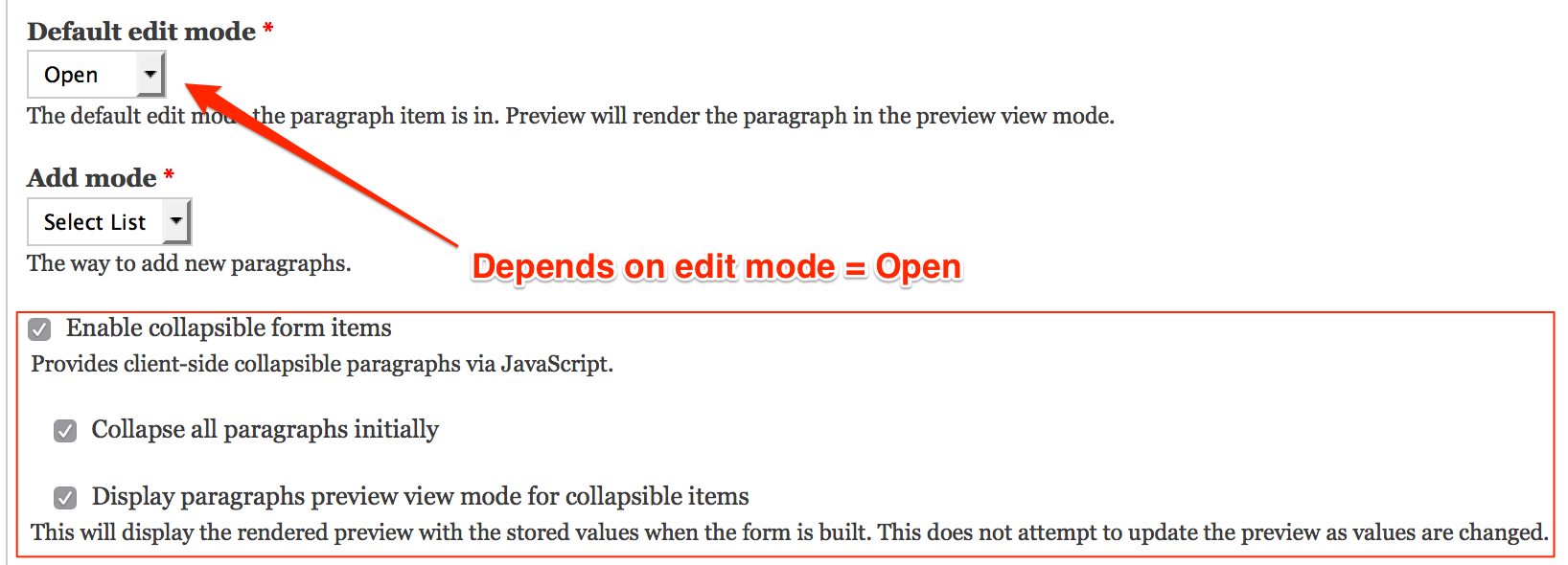
* "Enable collapsible form items" - depends on default edit mode = "open".
* "Collapse all paragraphs initially" - depends on collapsible to be enabled.
Comment #13
recrit commentedThis update adds a setting to display the preview - This displays the preview with the stored values at the time of the form build. Currently, there is no attempt to update the form as values are changed.
Comment #14
recrit commentedChanged the default to FALSE for preview mode enabled.
Comment #15
recrit commentedMajor cleanup of original implementation:
Comment #16
miro_dietikerThank you for working on this!
I'm excited more people help with improving this collapse topic.
You are listing UI changes. Please always provide screenshots (before + after sometimes makes sense) with these kind of updates.
Also, you will need to set the issue to "needs review" to trigger the testbot.
We discussed a lot in D8 context and had some clear ideas and even started working on them.
I would want to sync the strategy before we do D7 only commits.
Comment #17
recrit commented@miro_dietiker thanks ... I'm still actively developing it. There will be an update for new paragraphs added via AJAX, currently the events are not registering. After that I can set to needs review and then provide screenshots.
Comment #18
recrit commentedVarious improvements when new content is added:
Comment #19
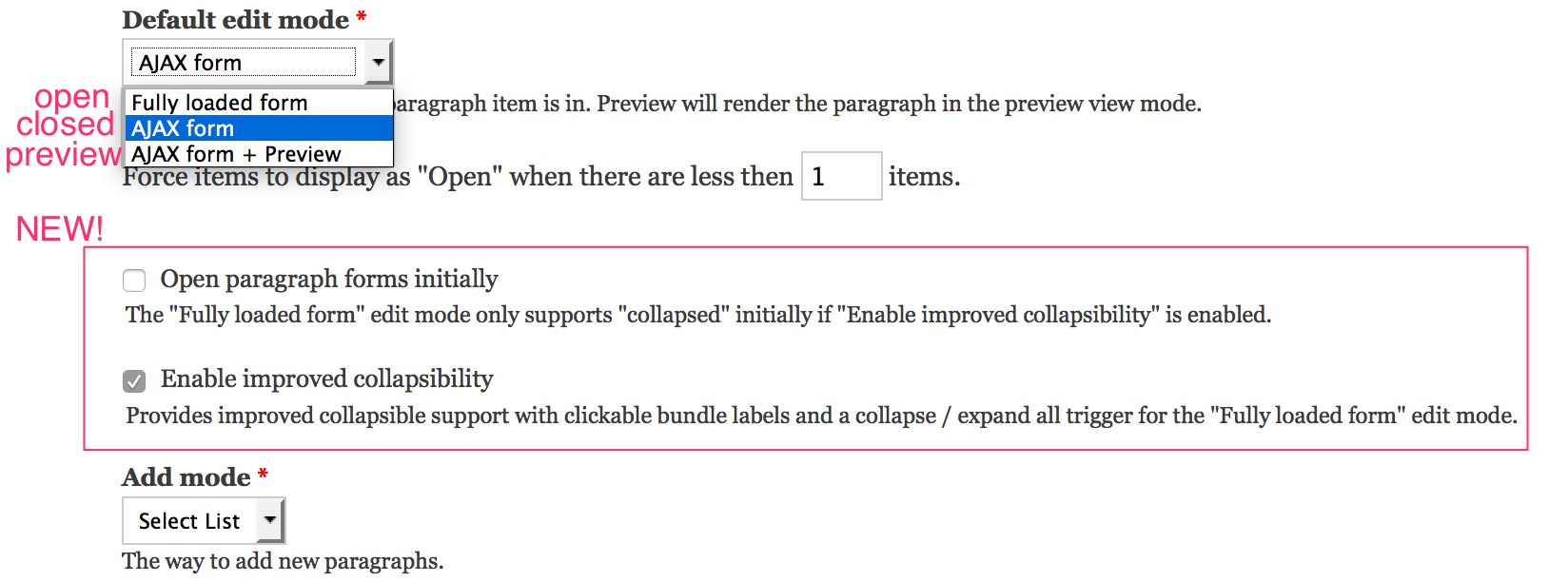
recrit commentedAttached are some screenshots of the widget and settings.
Comment #20
miro_dietikerSomething similar (collapse / uncollapse click) has been proposed in D8 issue, but not yet implemented.
For D8, an issue proposes to have a collapse all button.
How does your solution deal with nesting?
Are you traversing all children with collapse / uncollapse state?
Or do you apply it only on one level and display the link again on every level?
BTW why a link and not a button?
Comment #21
recrit commentedHow does your solution deal with nesting?
The link is disabled on all widget's field multiple table, so it repeats down the worm hole.
The "collapse / expand all" recursively finds any ".paragraph-bundle-content-collapsible" beneath it's ".field-multiple-table". See toggleParagraphs(). There is an open issue where the nested "collapse / expand all" text does not toggle accordingly when they're collapsed / expanded.
The paragraph row click currently only expands it's top level.
why a link and not a button?
I've used a link since there is no server side submit / AJAX. This allows the admin theme to style the link. I could add the "button" class to the link which is commonly used by admin themes to style links as buttons.
Comment #22
antonyanimator commented@recrit, that patch is sweet, thanks!
Comment #23
antonyanimator commented@recrit, it didn't find it too clear that by clicking on the paragraph type text that it will expand and show the contents of that paragraph. Would you be able to add something like (click to show) or something next to the text. Thanks
Comment #24
recrit commentedAdd a toggle to the bundle title along with an image the same as the collapsible fieldsets.
Comment #25
recrit commentedupdated to always show the form actions so a user can remove the paragraphs similar to the closed edit mode.
Comment #26
miro_dietikerFor 8.x we had the idea that we will add the collapse / expand actions, but trigger the regular server side interaction.
We fear that duplicating the logic in JS (and server side) could add risk for consistency issues, with a need to maintain both in sync.
I still don't understand how this interacts with the server side option "closed" or "preview". In that case, a server side interaction would be needed to biing back the elements.
Comment #27
recrit commented@miro_dietiker - this patch only operates on the "open" edit mode where the entire form is loaded on the page, so there is nothing that duplicates logic client side or server side.
Comment #28
jstoller@recrit: Why the "open" edit mode? Shouldn't these enhancements work on the "preview" mode? That seems more appropriate.
Comment #29
recrit commentedjstoller: "open" in the paragraphs widget builds the entire paragraph form on the page. The "preview" mode does not. It only displays the rendered view mode of a paragraph but still has the Edit AJAX button. The goal of this patch is to provide a client side only collapse / expand, therefore the entire form needs to be on the page.
Comment #30
recrit commentedUpdated patch to fix labels for nested triggers when recursively collapsing / expanding all.
Comment #31
miro_dietikerAha, then see also our discussions in 8.x and why we decided against a client side JS.
#2721941: Add a JS based collapse / expand
One of the key arguments for me is that the resource problem with many paragraphs and deep nesting is not resolved and thus everything still needs to be loaded initially.
Comment #32
jstoller@recrit: "Open" vs. "Preview" indicates the state paragraphs items should appear in when the field is first loaded. However, IMHO the functionality should be the same at that point, allowing items to be collapsed or expanded at will. We shouldn't be crippling the Preview mode relative to the Open mode.
Comment #33
recrit commented@jstoller - have you tested the patch or is this just conjecture?
Comment #34
antonyanimator commented@recrit the toggle on the bundle title doesn't display for me.
I think the background image is not being called from the correct place
Comment #35
recrit commented@animare - the patch is adding 2 binary files (images) within the project directory at images/collapsed.png and images/expanded.png. Verify that these files exist.
If not, check that git is applying the patch correctly. If you're using "drush make" then it could be your version of drush so try doing a manual "git apply".
For ref: the patch was created with "git diff --full-index --binary" so that the images were included.
Comment #36
antonyanimator commentedThanks recrit, I was using patch -p1, used git and it works great, thanks!
Comment #37
recrit commentedImprovements made in this patch:
* CSS based for the initial collapsed / expanded. Before it would JS toggle all expanded to collapsed.
* Tracking of collapse/expanded state so that it persists after an AJAX refresh, example: after a delete of a paragraph item within the same field.
* Lots of JS changes so I did not post an interdiff with all the noise.
Comment #38
jstoller@recrit: I have not yet tested your patch. I'm just expressing my expectation for how the module should function, which appears to be different then your description of how it functions using this patch. Namely your comment:
I also want to make sure this supports the features gained from #2577229: Display paragraphs as open when item count is low.
Comment #39
antonyanimator commented@recrit I have a paragraph within a paragraph (i.e. for a "rota" node, with the "day" as one paragraph type and "shifts" paragraph type nested within "day" paragraph type.
When the "Day" paragraph is set to collapse all by default, when creating say a new node the first paragaph is closed, when for my situation it would be best open initially so that the user doesn't have to click twice. That is the button for shift will be visible. I've uploaded some images, hopefully it is clear.
Thanks
Comment #40
recrit commented@jstoller, the forced open setting ( #2577229: Display paragraphs as open when item count is low) is only shown for the closed edit mode. This patches sole purpose is the open edit form mode, so that the entire form is loaded on the form and then expanded / collapsed via client side javascript (no AJAX calls).
@animare, Nice catch! I've updated the patch to always expand new items added.
Comment #41
recrit commentedsome patch cleanup - removed unused code and removed order class added from another patch.
Comment #42
antonyanimator commented@recrit, "Collapse all paragraphs initially" is not collapsing them, also if you add a new paragraph, the previous one doesn't close.
Thanks for your time and work on this!
Comment #43
recrit commented@animare, np and thanks for testing!
This update extends the expanding to nested fieldsets within the paragraph's fields.
Comment #44
antonyanimator commented@recrit, hi, not sure if the new patched worked as my previous comment still applies
Thanks
Comment #45
recrit commented@animare, the patch #43 did not address that. I will provide an update shortly for that.
Comment #46
antonyanimator commentedah ok, no rush, cheers
Comment #47
recrit commented@animare - "collapse all initially"is working as expected for me .. Ensure that your browser cache and Drupal cache is cleared, then re-test. The collapsing initially is driven by the CSS class "collapsed" now. This only drives the "initial" display. After that, the opened/closed states are stored client side to sync after an AJAX call - such as "Add another". This was implemented to provide a better UX if an editor has some opened for editing / referencing the content, and then adds another item.
Comment #48
recrit commented@animare - to keep a minimal number of instance settings, we could couple the "collapse all initially" setting with "force collapsed on AJAX rebuild" .. Then add a special class to the item so that it does not restore the closed/opened state.
Comment #49
antonyanimator commented@recrit, yeah its still not working for me, I think it is to do with the nested paragraph type. So "day" paragraph type with "Shift" paragraph type as a field within it. The nested "Shift" doesn't correlate with the settings for the "Shift" field paragraph set to collapse all initially. Hope that makes sense.
Not to worry if its not possible / a good idea.
I think I want a mix of inline entity form's editing process with paragraph's features.
Comment #50
antonyanimator commentedHaving thought about it a bit more
I think what I need is to be able to use the Default edit mode with Preview and buttons selected. But just to have the items collapse automatically when a new one is added.
Maybe I should start a new issue as this is different from what you have provided in your patch which I wouldn't want to change as it works nicely as a collapse all, expand all option.
Comment #51
recrit commented@animare: Correct that would be a different use case since the goal here is to have the open forms. The open forms allow the admins to see all the content and search all of the content via CTRL+F in order to find the paragraph controlling a piece of content.
@animare: UPDATE: This patch improves the targeting for "ajax new content". Before it was checking if the paragraph was "being_edited", however every new paragraph added while using the "open" edit mode has this set.
Comment #53
recrit commentedLooks like some test grid issues, re-queuing.
Comment #59
recrit commentedComment #60
antonyanimator commented@recrit, tested it and it is working great, my main paragraph type "Day" is collapsing automatically when a new paragraph is created and any "shifts" created within day are also collapsiping when a new shift is added. The workflow is really clean and usable.
One last request (if possible / good idea) is that you know where the remove button is for a paragraph, similar to how the closed system works, could there be an edit button that could open the collapsed paragraph in addition to the collapse triangle. For me it would really make it user friendly from a noobs point of view.
Thanks!
Comment #61
recrit commented@animare, this update adds fake button links for EDIT and COLLAPSE. These need to be a fake edit button so it wouldn't do any actual submitting of the form. I've added JQuery UI Button effects to them to make them more button like.
Comment #62
recrit commentedNext Goals for this patch:
Comment #63
antonyanimator commented@recrit, you're the man! Don't think I've ever experienced such quick responses to feature requests. It works exactly as I needed it to and definitely opens up the possibilities for me, as I am not a coder I couldn't code those things that you've done so would have probably had to use a different solution. Thanks again!
Comment #64
recrit commentedUpdated patch with the following:
Example: 9 large paragraphs could take 20+ seconds to collapse / expand
A full table of the supported modes and options to follow.
Comment #66
recrit commentedNew patch with correct variable $collapsible_all_markup.
Comment #67
recrit commentedComment #68
antonyanimator commented@recrit, tried out the patch, before the previous items would close when adding new items, but that doesn't seem to happen anymore. I tried out all the edit modes.
Thanks
Comment #69
recrit commented@animare, thanks reporting. I should be able to get to it today. It'll be an easy fix as I had to update that logic to support AJAX modes.
Comment #70
recrit commentedUpdated to target fake button with jQuery UI on new items.
@animare: This update does not affect what you reported. I just tested on "open" / "Fully loaded form" / JavaScript only and I'm seeing the other items collapse.
Make sure your settings are:
edit mode: "Fully loaded form"
Open paragraph forms initially : unchecked
Enable improved collapsibility: checked
Comment #71
recrit commentedminor update to fix returns when toggling multiple items.
Comment #72
recrit commentedimproved expanding nested collapsible fieldsets within the paragraph.
Comment #73
antonyanimator commented@recrit,
You are correct it does work.
Also I've found that the paragraph is not using the preview view mode correctly with this open form mode selected, it does work on the "ajax and preview"
Thanks
Comment #74
recrit commented@animare - correct, the open form + preview is no longer supported since it would show stale data after any value was changed which leads to editor confusion.
Comment #75
volker23 commentedI have tested #72 and it works like a charm. Great improvement of UX. Thanks for your efforts to make this module better!
Comment #76
recrit commentedRe-arranged the addition of the new button classes in order to play nice with other patches such as #2612120: When a paragraph field is collapsed, required fields on the paragraph entity are not correctly validated..
Comment #77
recrit commentedAdded better targeting to exclude expanding / collapsing fieldsets within the text input format filter tips.
Comment #78
recrit commentedAdded a helper function
controller.findItemContentElementto find the content wrapper even when "ajax-new-content" class div is wrapping it. This makes all the find next level code consistently find the correct elements.Comment #79
recrit commentedmissed one for findItemContentElement.
Comment #80
miro_dietikerThis looks promising, but the JS complexity is frightening me without any test coverage...
Comment #81
recrit commented@miro_dietiker, what test coverage would you want?
D7 PHP Unit tests can test the functionality of the code - I have a field configured with X and it produced Y html output.
D7 does not support JS unit tests, that was added in D8.
Automated user acceptance tests would require a Selenium setup, or similar.
For user acceptance testing, I can confirm that it has been verified by humans for my current project.
Comment #82
miro_dietiker@recrit i'm always more thinking about the effects of this issue on our D8 directions. I'm not maintaining the D7 branch. Jeroen will need to decide if he can maintain this JS complexity without test coverage in D7.
I'm more concerned that if we add features, we want to have parity in D8 ASAP, so we would need to write the missing JS tests (oh time..) and our D8 prio in JS related things is more supporting drag and drop across fields and hierarchy and in general the collapsed summary (ajax) and collapse+expand all actions.
But in general, i'm very happy to see proposals that push the limits of our UX.
Comment #83
recrit commentedPatch update:
Updated All Toggle to track all items in order to update the action of the "all" trigger.
- If any items are open, then the "all" action is "Collapse All".
- if all items are closed, then the "all" action is "Expand All".
Comment #84
recrit commented- improved toggle all text updating per row updates
- added current mode classes: being_edited = class "editing", removed = class "removed".
- hid fake button links for edit and collapse button when the item is removed / pending confirm delete.
Comment #85
heyyo commentedHi @recrit, I'm using your patch and it works great.
But for an unknown reason Expand All link has no effect with the theme Adminimal
Comment #86
jwineichen commentedThis is pretty slick. #84 works for me.
Comment #87
d.fisher commentedI've just tested #84 against the latest RC (7.x-1.0-rc5) and the patch has failed with the following errors:
Sadly against a deadline at the moment so can't look in to re-rolling this but wanted to make everyone aware.
Comment #88
vinmassaro commented@Darren Fisher: the patch applies cleanly to 7.x-1.x-dev, not 7.x-1.0-rc5.
Comment #89
d.fisher commentedOK cheers, I will test against the dev branch!
Comment #90
pachabhaiya commentedThanks @recrit. Patch #84 works great for me.
I've rerolled patch #84 so that it applies cleanly on latest 7.x-1.x-dev branch.
Comment #91
miro_dietikerWe have added the "expand all" functionality to the experimental widget in Drupal 8.
I realised we have accidentally only added it to the top level: #2903061: Add a collapse / edit all button to nested paragraphs
We also have added autocollapse in Drupal 8.
I'd be very interested in feedback for the Drupal 8 implementation of those proposals. Is there anything we missed?
Comment #92
rudi teschner commentedThe collapse all / expand all button does not seem to work for me. I'm still trying to find out, if its related to nested paragraphs or modules i've added.
But that aside ... I really love the performance gain when switching from ajax callbacks to fully loaded form. It's huge! :)
Do you expect that "fully loaded" has performance issues on pages with a lot of paragraphs?
UPDATE1: I've found the reason for this behaviour on my site. The field-multiple-table is embedded by an additional div, so it isn't found by the .children() part of the findTriggerItems function. Changing that part to find().first() repairs the expand all / collapse all functionality for me.
But thanks to this change now nested paragraphs don't behave as they should. Still working on it. ^_^'
UPDATE2: I've found that the best behaviour for the nested paragraphs on my system was drop the intermediate step completely by moving the selector into the find.
Comment #93
bluegeek9 commentedUnfortunately, Drupal 7 is End of Life and no longer supported. We strongly encourage you to upgrade to a supported version of Drupal.