Problem/Motivation
Simply saving a bundle in the admin UI causes the entire bundle array to be stored in the database. This can cause some serious issues when a sub-module (provider) decides to change some fundamental information like a render hook (that cannot be overridden from the UI).
Proposed resolution
Only store the overridden properties of a bundle in the database when icon_bundle_save() is invoked and simply merge these differences into the bundle array instead of replacing it when icon_bundles() is invoked.
Remaining tasks
- Create a patch (containing an update hook to re-save existing bundles)
User interface changes
None
API changes
None
Original report by Kristi_06:
I had the Icon API and Icon Menu enabled on my site and added icons before my menu link names. It was working great. Then, all of a sudden, my icons stopped showing and I started getting hundreds of errors in my logs everyday (an error reported for every single page that was viewed).
There error is as follows: Theme hook icon_html_tag not found
Disabling the modules stops the errors from happening. Anyone have any idea why the module would just stop working and throwing all of these errors?



Comments
Comment #1
markhalliwellThe only way this could happen is if there is a provider that specifies the render property of a bundle to be
html_tag:http://cgit.drupalcode.org/icon/tree/includes/theme.inc#n91
By default, Icon API comes with
imageandspriteas possible renderers:http://cgit.drupalcode.org/icon/tree/includes/render.inc#n9
What provider are you using?
Comment #2
Kristi_06 commentedI was using Font Awesome Icons
Comment #3
markhalliwellAh, that module. I actually helped fix this in their 7.x-2.x branch. See the related issue.
Comment #4
Kristi_06 commentedI upgraded the fontawesome module as you suggested and reenabled my Icon API and Icon Menu modules - the icons still do not show up on the menu and I'm back to getting all of the errors in my logs that I reported above. This is not fixed or a duplicate unfortunately.
Comment #5
Kristi_06 commentedComment #6
markhalliwellIt has to be a duplicate. That issue removed the
html_tagrender callback to use the properspriteone instead. Make sure you have cleared your caches as well.Comment #7
Kristi_06 commentedI've cleared my cache - I've run the update code and I'm telling you it's still not working. I don't know how to make that more clear. It is not a duplicate of the FontAwesome problem that you are addressing. I'm sorry, I'm sure that would be easiest, but that's not the case.
Comment #8
Kristi_06 commentedComment #9
markhalliwellUnless you have some other provider that has specified
'render' => 'html_tag'in their bundle information, this is impossible.site/all/modulesorsite/all/modules/contrib.Comment #10
Kristi_06 commentedI DID UPGRADE - please stop telling me I didn't when I know that I did! I've triple checked and continuing to repeat yourself is not helpful after I've specifically said time and time again that I did upgrade.
I'll attempt your other suggestion, but since I've pretty much tried them all I doubt it will do much good, and you seem content to continue suggesting the same thing over and over again after I've addressed it already, which is not helpful in the least, only extremely annoying.
Comment #11
Kristi_06 commentedHere's your proof so we can stop talking about the upgrade that I've tried to tell you was done.
Comment #12
markhalliwellThen you will need to search your code base for where
icon_html_tagor'render' => 'html_tag'is used. I only know of one project that attempted this and it was already fixed.Comment #13
gausarts commentedThe html_tag is part of fontawesome.module 1.x which is removed at 2.x. It is stored in registry. Regular cache clear didn't help. Nor the upgrade process strangely.
Using registry_rebuild helped remove the traces of "html_tag".
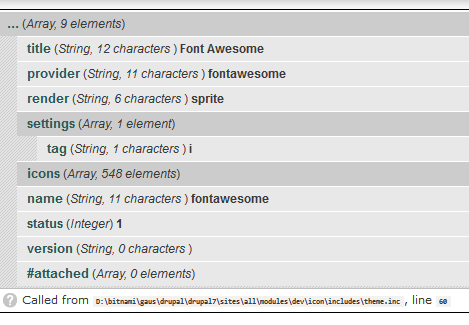
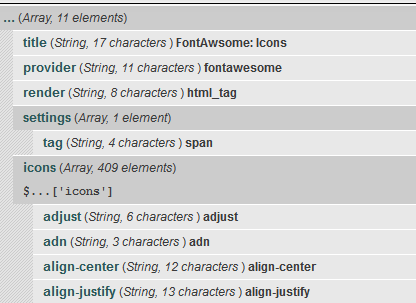
Attached are what I captured before and after.
Hope this helps.
Comment #14
markhalliwellThe only way I could see this sort of "caching" happen, is if there was some DB entry in the
{icon_bundle}table: http://cgit.drupalcode.org/icon/tree/icon.module#n335 that caused what the module provided to be overridden. Regardless though, this module just uses simple cache_[g/s]et functions... so I still fail to see how a registry rebuild would help at all (as there are no classes in the module currently, let alone any that are in the registry).Comment #15
gausarts commentedSorry, I have no idea how the icon module works. I just highlighted "search your code base for where icon_html_tag " part which was no helpful since no trace of that in the code base after Fontawesome update.
As the OP said the icons suddenly disappeared, and lots of "Theme hook icon_html_tag not found" logged after I updated Fontawesome. I did clear cache several times to no avail, and that is why I came by here. However the registry rebuild did help after regular cache clearing failed like the previous commenter said a couple of times.
Perhaps theme_registry is more appropriate word I should have said, and the actual tag in the cache table which kept "icon_html_tag", not {icon_bundle}.
I am sure you know better, CMIIW, but I think it was Fontawesome 1.x which registered "html_tag" renderer, and converted into 'icon_' . $bundle['render'] (icon_html_tag) by theme_icon, which is unfortunately not officially supported theme function by icon_icon_render_hooks() as you pointed to https://www.drupal.org/node/956520 at icon_theme(), and already clarified above:
At 2.x, Fontawesome changed the renderer/ theme function into "sprite" without hook_update() to clear the removed "icon_html_tag". Hence the thread created.
Unless you provide a hook_update(), perhaps a warn to clear theme_registry will help cool down the OP, and maybe more people who may likely miss the icons soon after update?
On second thought, this really should move to Fontawesome module, not a dup here, for easy finding, isn't it?
Comment #16
markhalliwellThe theme_registry "cache" is still located in the main
{cache}table. Everything in that table is removed when all caches are cleared (meaning they would have to be rebuilt anyway). Regardless, Icon API (nor Font Awesome) have never done anything with the theme registry. It's Icon API that cachesicon_bundles,icon_providersandicon_render_hooksin the main{cache}table.It only ever uses the
{icon_bundle}table if a bundle has been imported (via a module like Fontello or Icomoon that allows uploading an archive file) or if a coded bundle (like the one from Font Awesome) has been overridden (i.e. custom settings).We could try putting in an update hook in Font Awesome (to clear out/update anything set in
{icon_bundle}... but this might be kind of tricky. We'd have to first extract any custom settings that were set, pull in the new bundle array, overlay the extracted settings and then re-set the entry.On a side note, it may be worth re-evaluating what exactly is stored in the
{icon_bundle}table and to simply merge in just the stuff that can be overridden (i.e. settings) and not the basic/info stuff like the renderer.Comment #17
gausarts commentedI haven't got a chance to revert and re-produce it, sorry, might be no valid solution I proposed at my first post, but in case you wondered why I did use registry rebuild last time, I'd like to make a clarification.
I landed here after a linkicon module issue reporting a broken Fontawesome integration:
https://www.drupal.org/node/2453995
In that issue I thought I had identified the problem better. That issue mentioned about missing "icon" class which was identified and resolved already, and different from the missing actual "icons". Hopefully no mixed issues.
And the problem is about the icon API and Fontawesome integration, not when they are dis-integrated.
I didn't experience issues myself at another site when they are dis-integrated. So perhaps nothing happened for those users with dis-integration.
After several failing cache clearing, I went to Fontawesome configuration page:
admin/config/media/icon/bundle/fontawesome/configure
Thinking that disabling and re-enabling, and re-saving, might help/refresh anything, I disabled and re-enabled it. Still no joy, then when I went back there again:
admin/config/media/icon/bundle/fontawesome/configure
I got WSOD this time, several times after refreshing, and when checking Apache error logs, it was timeout error. At this moment I thought something screwed up with Fontawesome, as I can get in into other admin pages just fine.
That was why I run registry rebuild, and it brought back the Fontawesome admin page, and also icons.
At this very moment I didn't think about any debug, nor thought the module overkill. I just wanted to get my icons back soon as the OP did, although not really urgent for me.
I did however capture screenshots before and after as mentioned above.
I am not sure if the OP got the same situation as mine. However I am not so serious as it is my own module integration with icon module. Perhaps he got a live site screwed up, and mine just local testing this moment.
Anyway it was resolved at my end since my first post here. I just clarified for just in case a registry rebuild still made no sense.
Indeed after some relaxing time, I think registry rebuild is just overkill, and as you the creator already clarified no class registry needed clearing, but the point is the registry rebuild module helped clearing things properly at that "stressing" moment. It doesn't have to be about class registry clearing, but might be as simple as clearing the problem we have here with improper icon_html_tag removal.
Agreed, not about icon API (nor Font Awesome), it is Drupal stored it once you registered a theme function AFAIK.
However I didn't think more complex than you did, perhaps what is needed is just theme_registry clearing during hook_update() as I thought later on. I tend to think to ignore {icon_bundle}. But I couldn't assure it as no re-production with that solution at my end, but at least I thought that is the less overkill solution I could think of now to improper icon_html_tag removal.
Comment #18
markhalliwell@gausarts, please don't get me wrong, I certainly appreciate the verbosity and thoroughness of your findings. I certainly helps more than "it's not working" comments. It has, in fact, allowed me to actually focus on the issue at hand so I could help come up with a possible solution.
The complex nature of the theme system is indeed a bit hard to grasp (I should know, I have spent years deciphering it lol). I don't think, however, the real issue lies there at all. In fact, the original OP error message "Theme hook icon_html_tag not found" is just the byproduct of how Icon API uses the theme system. This message would never be generated if something has not physically invoked that theme hook (i.e.
theme('icon_html_tag', array(...))).The error message happens because there actually is no theme hook registered, as it normally would be in icon_theme(), by modules declaring any icon_render_hooks() (which Icon API already declares two out of the box via icon_icon_render_hooks(): image and sprite).
So there is no actual code that invokes these registered theme hooks with a static string, instead it is the Icon API that invokes a dynamic theme hook call based on whatever the bundle (provider) has defined (@see theme_icon()).
I am 99.999% sure that this is the exact reason why this entire issue has occurred in the first place. At some point, probably even before this issue/upgrade, you also did the same thing.
This would thus essentially cache the previous Font Awesome module's render hook "html_tag", which is why normal cache clears weren't working. What perplexes me still though, is how a registry rebuild would have fixed this. That Drush command knows nothing of the
{icon_bundle}table. Regardless though, this bit is really less as important.I digress though, simply saving the form in any bundle's admin UI will, in fact, cause the bundle to be stored in the
{icon_bundle}table, regardless if it is overridden or not (@see: icon_bundle_save()).I now believe that this is the crux of the real issue: it should be saving just the diff of the bundle instead of the entire bundle array.
That being said, I am moving this back to the Icon API issue queue. I will attempt to work on this some time later this week.
Comment #19
markhalliwellCreated the following related issue in Font Awesome (as it will need to specifically look for this database entry). This module's update hook will have to be a little more abstract.