Closed (fixed)
Project:
Open Atrium
Version:
7.x-2.26
Component:
Code
Priority:
Normal
Category:
Support request
Assigned:
Unassigned
Reporter:
Created:
8 Nov 2014 at 16:25 UTC
Updated:
31 Dec 2014 at 22:51 UTC
Jump to comment: Most recent, Most recent file


Comments
Comment #1
mpotter commented1) The Logo next to the main menu can be changed in the Open Atrium -> Config -> Banners area
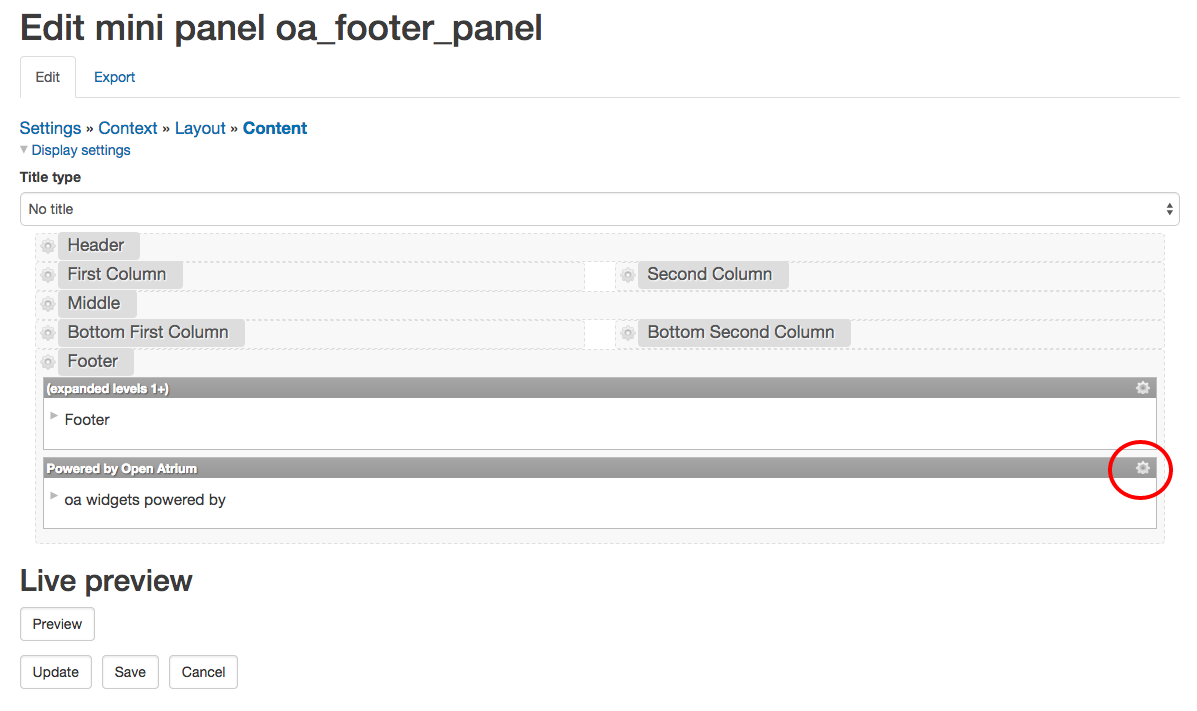
2) The footer is using a Mini Panel. Go to Structure -> Mini Panels and edit the Footer and remove the "Powered by" widget.
3) The login page is a Panels page. In the general settings for the panel is a CSS class of oa-login. Edit the panel and remove that css class and that will remove the background image.
4) Of course, it's also easy to override all of this in your site-specific theme, so if you create a subtheme of oa_radix you can add/remove whatever you want.
Comment #2
paean99 commentedNice detailed info. She would be useful in the documentation. I didn't find it there.
Comment #3
wildweaselmi commentedYou must have hours like me... all the time :)
1) Confirmed this worked
ADMIN - Open Atrium - Config - Banners (changed Site banner image to Corporate Logo.png and click Save configuration) --- Banner Position is selected as Hidden and remaining checkboxes are unchecked.
2) Clicked ADMIN - Structure - Mini Panels and the only four options are:
Open Atrium Sidebar Bottom
Open Atrium Sidebar Top
OPen Atrium Toolbar
Open Atrium Footer <-- made most sense so I clicked under Operations the Down Arrow and selected Disable but when I refresh the pages, they still show the footer...
3) I've been going through ADMIN options looking for Panels page. I assumed it was Panelizer (ADMIN - Configuration - Content Authoring - Panelizer but I don't see anything about login page or anything like that.) Also tried ADMIN - Panopoly but don't see anything there either... could you give me another push in the right direction?
Thanks again for your help
Comment #4
mpotter commented2) You can't just disable the Footer mini panel. You need to Edit the mini panel and hide/remove the "Powered by" widget.
3) Try the General tab on admin/structure/pages/edit/pm_existing_pages-user_login Panels Pages are in Structure/Pages. You were confusing that with Panelizer (and yes, it is confusing, but that's what learning Panels is all about ;)
Comment #5
wildweaselmi commented2) Confirmed that worked.... (below for reference)
Clicked ADMIN - Structure - Mini Panels and the only four options are:
Open Atrium Footer click Edit to the far right of this
Right under the Edit Tab you will see a link: Settings >> Context >> Layout >> Content (Click on Content)
Find the Powered by widget and click on the Gear Icon on the far right and at the bottom select Remove
3) Confirmed worked... (below for reference)
Clicked ADMIN - Structure - Pages (under List Tab, clicked Edit next to pm_existing_pages-user_login)
General (found on left)
Under Add body CSS classes remove oa-login
Click on Update and Save located on the bottom
Thanks Mike for your help... wouldn't of figured that out on my own. I've been trying. Hope this helps someone else.
Comment #6
wildweaselmi commentedComment #7
mpotter commentedDo not assign issues to yourself unless you are working on a patch submitted to a bug fix. See the guidelines on using the Drupal issue queue.
Comment #8
sydkoh commentedwildweaselmi
Thank you for your confirmations. The "breadcrumb" content below edit was not obvious.
mpotter
Maybe you should keep in mind that things need to be spelled out more clearly or put into docs. Lots of systems out there everyone won't be familiar with drupal or open atrium.
Comment #9
Argus commentedCreated a documentation page for this: https://www.drupal.org/node/2382821
@sydkoh Most documentation is written by users like yourself. You are encouraged to contribute!
Comment #11
candelas commentedHello
Sorry for my bad English and I hope it is ok to reopen the issue.
I have just installed Open Atrium and learning it. I am very enthusiastic to be able to learn it. I want to modify the footer and I followed the instructions in #9 but in my minipanel Open Atrium Footer I don't get any way to remove the logo or add anything. I attach a capture.
Thanks
Comment #12
candelas commentedComment #13
candelas commentedI found how. I attach the page where to change it
Comment #14
Argus commentedAdded a screenshot to the document pages