Hi, Love the Software!
With that said, I've had the following issue on a clean Open Atrium 2.21 install (tried twice) as well an install on a shared host with hostgator (tried 3 times).
I didn't check the server environment for Pantheon, but on the hostgator shared hosting account I have PHP 5.4 installed. The install went smoothly in both situations - no errors at all as far as I was able to tell. To repeat, I attempted this more than once on BOTH Pantheon, AND a Shared Host with the exact same issue.
Once installed and I began adding a "Space" and subsequent Discussion type "Section" At this point I noticed there was no discussion area present. I followed the link to customize the Discussion page, and I saw the following notices in each of the nodes:
(untitled node)
Placeholder for empty or inaccessible "View: Open Atrium Discussions: Discussion Topics"
(node titled "Comments")
Placeholder for empty or inaccessible ""This node" comments"
(node titled "Add Comment")
Placeholder for empty or inaccessible ""This node" comment form"
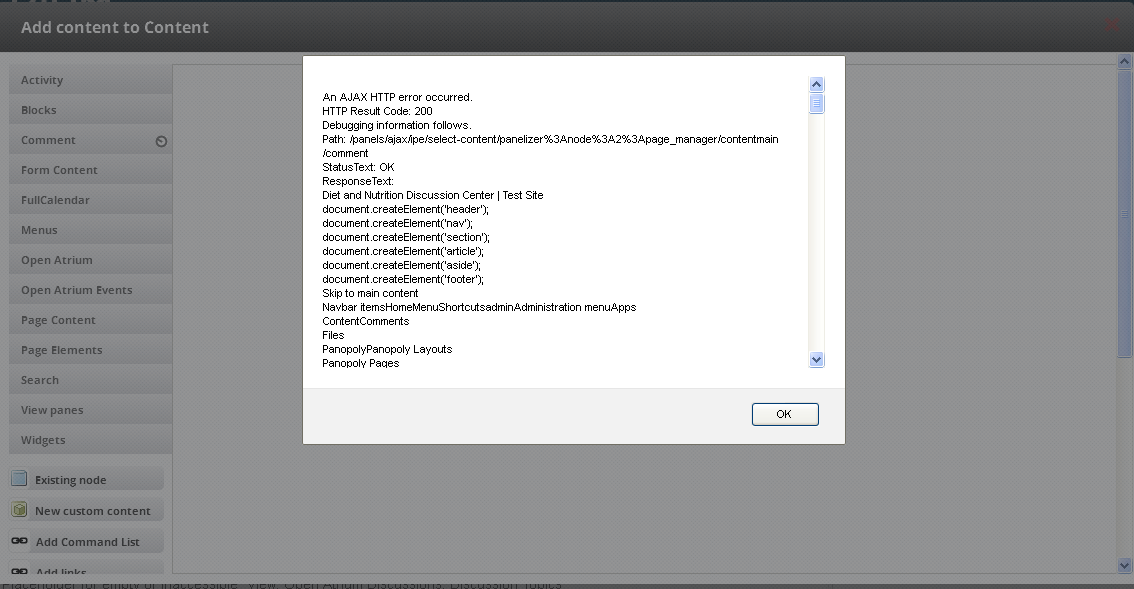
I also attempted to add a new "Comments" node, and the following error occurred:
An AJAX HTTP error occurred.
HTTP Result Code: 200
Debugging information follows.
Path: /panels/ajax/ipe/select-content/panelizer%3Anode%3A2%3Apage_manager/contentmain/comment
StatusText: OK
ResponseText:
Diet and Nutrition Discussion Center | Test Site
document.createElement('header');
document.createElement('nav');
document.createElement('section');
document.createElement('article');
document.createElement('aside');
document.createElement('footer');
Skip to main content
Navbar itemsHomeMenuShortcutsadminAdministration menuApps
ContentComments
(This error goes on for more than 100 lines)
Attached you can find images for each error as described above.
Please advise, thank you



Comments
Comment #1
Argus commentedCould you describe how you added the Space and Section?
Comment #2
Argus commentedComment #3
jkingsnorth commentedPantheon seems to work OK still for me, so if you could provide exact step-by-step instructions as Argus mentions then we'll take a look =]
Comment #4
jkingsnorth commentedSince there has been no further discussion on the issue I'm going to close it. Feel free to reopen it against the latest version with full steps to recreate the issue if it is still a problem, thanks =]
Comment #5
freakanika commentedHi, This is still an issue for me. I have spent hours searching for solutions including updating jquery (as suggested in other forums) and they haven't worked. I think vuyovich has documented it well here and I can't understand how it hasn't been able to be reproduced using the Pantheon install as I have done this and it comes up with the exact same problem that vuyovich highlights here. I add a Discussion Section under a Space called Human Resources. I am expecting the discussion section to appear (like in the calendar section) but the page is absolutely blank except for the title. So I click Customize this Page and new pane under the Content box in order to see if I can add a discussion section. The only thing here is Comments, but when I click this it comes up with the problem vuyovich has on his screenshot.
Comment #6
Argus commentedTry adding some discussions and replies. These views only show when something is posted. They don't have a "no content" warning.
ps: adding a reply to a closed issue doesn't attract much attention... (only from the people who followed the issue).
Comment #7
freakanika commentedThanks Argus I tried re-opening it but Drupal web administrator has asked that I apply for a 'not a spammer role' and it is taking a while. Thank you for your reply I added some discussions on the page and worked out what I had to do there (I still don't understand the concept of having a placeholder text). Anyway I am new to Drupal and learning. Unfortunately the comments issue still happens when I try to add a Comments content block. I tried to get around this by adding a Reply content block but it was unusable. I won't get into this because this is an issue for another thread.
Comment #8
Argus commentedComment #9
freakanika commentedI don't know if this helps but I see the original post was in a different version, I'm also doing this in oa 7.x 2.26
Comment #10
Argus commentedIndeed seems a duplicate of #2268103: Support core comments