Upgrading to 7.x-1.4 from 7.x-1.3 results in broken Javascript on page. The console in Chrome just outputs the following message:
Uncaught Syntax error, unrecognized expression: #
I'm running the latest core and the latest of all my other modules. I should also note that I'm using jquery_update set to version 1.5.2.
Here's a list of every other JS file included on the page in case there's a conflict somewhere.
/sites/all/modules/contrib/jquery_update/replace/jquery/1.5/jquery.min.js?v=1.5.2
/misc/jquery.once.js?v=1.2
/misc/drupal.js
/misc/ui/jquery.ui.core.min.js?v=1.8.7
/misc/ui/jquery.ui.widget.min.js?v=1.8.7
/misc/ui/jquery.effects.core.min.js?v=1.8.7
/misc/ui/jquery.ui.button.min.js?v=1.8.7
/misc/ui/jquery.ui.mouse.min.js?v=1.8.7
/misc/ui/jquery.ui.draggable.min.js?v=1.8.7
/misc/ui/jquery.ui.position.min.js?v=1.8.7
/misc/ui/jquery.ui.resizable.min.js?v=1.8.7
/misc/ui/jquery.ui.dialog.min.js?v=1.8.7
/sites/all/modules/contrib/views/js/jquery.ui.dialog.patch.js?v=1.8.7
/sites/all/modules/contrib/token/token.js?v=1.0
/modules/contextual/contextual.js?v=1.0
/sites/all/modules/contrib/jquery_update/replace/ui/external/jquery.cookie.js?v=67fb34f6a866c40d0570
/sites/all/modules/contrib/jquery_update/replace/misc/jquery.form.min.js?v=2.69
/misc/ui/jquery.effects.drop.min.js?v=1.8.7
/misc/vertical-tabs.js?v=1.0
/misc/form.js?v=7.31
/misc/states.js?v=7.31
/misc/ajax.js?v=7.31
/sites/all/modules/contrib/jquery_update/js/jquery_update.js?v=0.0.1
/sites/all/modules/contrib/admin_menu/admin_menu.js
/sites/all/modules/contrib/admin_menu/admin_menu_toolbar/admin_menu_toolbar.js
<script type="text/javascript">
<!--//--><![CDATA[//><!--
window.CKEDITOR_BASEPATH = "/sites/all/libraries/ckeditor/"
//--><!]]>
</script>
/misc/tabledrag.js
/sites/all/modules/contrib/devel/devel_krumo_path.js
/misc/textarea.js?v=7.31
/misc/progress.js?v=7.31
/misc/autocomplete.js?v=7.31
/misc/machine-name.js
/sites/all/modules/contrib/references_dialog/js/references-dialog.js
/modules/field/modules/text/text.js
/misc/collapse.js?v=7.31
/modules/filter/filter.js
/misc/tableheader.js
/sites/all/modules/contrib/hierarchical_select/hierarchical_select.js
/modules/menu/menu.js
/sites/all/modules/contrib/metatag/metatag.vertical-tabs.js
/profiles/acquia/modules/pathauto/pathauto.js
/modules/node/node.js
/sites/all/modules/contrib/conditional_fields/js/conditional_fields.js
/sites/all/modules/contrib/field_group/field_group.js
/sites/all/modules/contrib/safeword/safeword.js
/sites/all/modules/contrib/workbench_moderation/js/workbench_moderation.js



Comments
Comment #1
Gastonia commentedI am getting this same issue as well, and it just started after upgrading. I am not using jquery update, and except for views and some other essentials, I really don't have any modules installed. Turning off the module fixes the problem. Uninstalling and reinstalling did not help. How can I downgrade to 7.x-1.3? Is that an option?
Here is a list of my .js files as well on my broken page, if that helps
Comment #2
Gastonia commentedFor those of us that this is affecting, not only are our forms unusable, but all Drupal jquery is non functional, which means that everything javascript related doesn't work on the page where Field Group is used. Upgrading to critical.
Comment #3
behindthepage commentedThis is a major problem now because my client can't edit their site with the Wysiwyg editor as this update has broken all jQuery.
Could we have a fix asap please.
Regards
Geoff
Comment #4
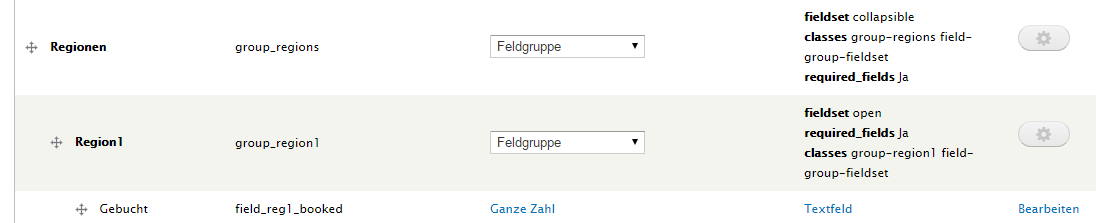
nils.destoop commentedCan anyone give a screenshot with the fieldgroup setup in field UI? We use the 1.4 on our sites, but don't have JS problems.
Comment #5
nils.destoop commentedComment #6
behindthepage commentedMy Solution
I fixed this (after hours of trying things) by selecting "jquery" in the jQuery and jQuery UI CDN settings on the admin/config/development/jquery_update page. Any of the other settings don't work for me.
On my journey, when I was using the local JS files I was only getting errors when aggregating the JS files. So there seems to be something in the Jquery Update 7.x-2.4 (local) JS that doesn't play well with others. The JS from jQuery may have those bugs removed.
Wonder if this will work for others.
Regards
Geoff
Comment #7
erwangel commentedSame problem here after updating jquery to 1.9. Fixed by downgrading to 1.7 with jquery_update. Field_group version used 7.x-1.4
The curious thing was that the error didn't happen on all pages displaying field groups (I use it with collapsed option), but only when field group was following the display of a link field.
Comment #8
behindthepage commentedI got fieldgroups working by deleting the field group and jquery update modules and re uploading and applying this patch
https://www.drupal.org/node/1995892
Regards
Geoff
Comment #9
cjallenD1 commentedI got fieldgroups working by downgrading to field_groups 7.x-1.3 (https://www.drupal.org/node/2097719)
I think this commit causes it - http://cgit.drupalcode.org/field_group/commit/?id=ead74fb26453b8e8784594...
For now I will just stay with
+ Field Groups 1.3
+ Jquery 1.5
Comment #10
nils.destoop commentedI can't reproduce this.
I'm testing with following:
- jquery update 7.x-2.4 (tested 1.9 and 1.5)
- horizontal tabs on a node form
This patch is the only difference between the js version in 1.3 and 1.4. Can you test if reverting this one fixes your problem? https://www.drupal.org/files/issues/field_group-2190425.patch
Comment #11
matthew.woodard commented#6 worked for me ... Was getting this error with the devel_themer module.
Changed jquery_update to jQuery CDN and v. 1.10 - fixed.
Comment #12
anybodyI can confirm this problem still exists with:
jQuery update 7.x-2.4 (jQuery Version selected: 1.7, compressed, local)
Field Group 7.x-1.4
Switching the jQuery version (from 1.5 up to 1.10) did not change anything (all caches cleared ;)) and the problem seems to be caused by the drupal form states API for me.
Comment #13
kfu commentedI found out that the problem only exists if there is a collapsible fieldgroup inside a collapsible fielgroup. If the fieldgroup only consists "normal" fields (and no other fieldgroup), everything is working fine.
Problematic structure:
My workaround was to change the "collapsible"-Attribute in the Subgroup (Region 1, Region 2) to "open":
Since the Subgroups (Region 1, Region 2) contain a lot of fields, the layout for the user isn't that nice (it would be good to close the subgroups), but this solution works.
Here's my config:
jQuery Update 7.x-2.4 (jQuery Version: 1.7, compressed, local)
Field Group 7.x-1.4
Comment #14
ruscoe commentedI had this same issue after upgrading from 7.x-1.3 to 7.x-1.5.
If you're having this issue, make sure the ID field is not empty (screenshot attached). It looks like this is a new field that should have been auto-populated in an update hook, but it wasn't. Manually entering an ID solved the problem for me.
Comment #15
ruscoe commentedThis patch fixes the issue for me.
Some field format types were missing from the condition in field_group_update_7007() that determines if the ID setting should be populated.
If you've already upgraded to 7.x-1.4, you'll need to run the update again after applying this patch.
Comment #16
ruscoe commentedComment #17
rajeev_drupal commentedReviewing this.
Comment #18
rajeev_drupal commentedComment #19
rajeev_drupal commentedThis Patch is working fine for me.Making RTBC.
Comment #20
nils.destoop commentedThx for the patch. I committed it to dev.
Comment #22
anybodyThank you very much, works good. What about a new stable release in some days?
Comment #24
rooby commentedHow can updating an old update hook be a solution. What do we expect all the users already on the latest version to do? Do they have to go in their database and manually roll back the schema version and run an update again?
That's not a good experience, couldn't it be done in a new update function?
Comment #25
fox mulder commentedHi!
I had this issue too, found this thread and made the above steps:
1. update field_group to dev ( from 7.x-1.5 )
2.
UPDATE `system` SET `schema_version`=7006 WHERE `name`='field_group';3. run update.php
but no luck. In my case a tab type field_group causes the error. 'tab' is missing in $populate_id_setting array, does not this type need ID? If so, why does it cause error?
Comment #26
duwease commentedPatch in #15 works after I manually roll back the schema version and `drush updb` the module. It's been a year since the last comments, though, and no official fix?
Comment #27
nils.destoop commentedComment #28
xjm