[updated issue summary by ergophobe]
This apparenty simple issue turns out to have several complexities. To save testers, reviewers and maintainers from going blind reading the whole thread, this is a summary of the problems and fixes proposed by the latest patches (#31)
Status
The patch in #31 is viable and working fine for me on both a complex project (with Panopoly + Zurb Foundation + Organic Groups) and on a clean install of Panopoly 7.-1.18.
It still needs Behat tests, but I really have no clue how to go about that and would beg, plead and cajole anyone to take that on for me.
Using/Testing this Patch
This patch adds an input filter which must be enabled.
After apply the patch you must run example.com/update.php or drush updb. Alternatively, go to admin/config/content/formats/panopoly_wysiwyg_text and enable "Adds Panopoly image classes to caption wrappers".
To make it easier to get more testers, I have also uploaded two zip files in #32 so you can just unzip and install without having to patch.
The Problems and Fixes
Problem: Images that are styled to float will float outside div.caption (see original report below).
Fix: If the image is a child of .caption, remove the float.
Notes: This is just simple CSS.
Problem: Quarter Size image has a width of 25% of the parent element, so it only occupies 25% of the caption box.
Fix: We apply an input filter that looks at image tags for Panopoly image styles and, if found, injects them in div.caption
Notes: This could possibly be fixed in Caption Filter, but would be much more complex. In Panopoly we have the advantage that image styles are namespaced and the relevant CSS uses both the element and the style (as in img.panopoly-images-quarter). The problem with doing this in Caption Filter is you can't know which classes to grab. The caption code for classes just looks like this:
"attributes":{"class":"panopoly-image-quarter media-element file-teaser"}
If we just take all those classes and inject them into the great-grandparent div (which is what we would have to do), there is a strong chance of breaking existing themes. By doing this only for name-spaced panopoly styles, we can avoid that so we are fixing this here until something more general is found for caption filter.
This is UTF8-safe and forces the save to UTF8. For the reasons mentioned below in #28 this is the desired and expected behavior in Drupal.
Problem: On rendered page, caption box grows to the size of the caption if it's wider than the image.
Fix: We use Javascript to set the width of the div.caption container to be the same width as the contents (but see caveats).
Notes:
1. imagesLoaded. Because of the way browsers handle images, you can't use ready() (or Drupal.behaviors or DOMDocumentLoaded (which we all know), but you also can't use load() or window.onload. Those will not work with cached images or in other circumstances with webkit browsers (see #28 below). So we use the imagesloaded libary, which is already widely used in Drupal both within Panopoly (with the Manual Crop module) and elsewhere (the Equal Heights module, the OpenFed distro, etc). This lets us reliably wait for images to be loaded before trying to get the size.
2. Widths. We make the best attempt to get the total width of the contents - margins, borders and padding for the img, div.caption-inner and div.caption-width-container - but we can't add widths in units other than pixels, so we throw those away. So if a themer has set a margin in ems div.caption-inner, we're going to throw that away. Sorry. Any alternative to that is ridiculously complex and unreliable.
3. This could probably be fixed in Caption Filter. I'm planning to point the Caption Filter maintainers to this issue and let them decide whether they want to do this or not. If they're interested, we might eventually be able to move this code over there, but as mentioned, they have a much more complex problem because they need to allow for a way more general environment and they can't count on things like imagesLoaded being available. So given that it's easy -- ha! sort of ;-) -- to do here because all the tools are in place, I would just do it and get a functional solution out to Panopoly users until a more generalized solution comes out for Manual Crop.
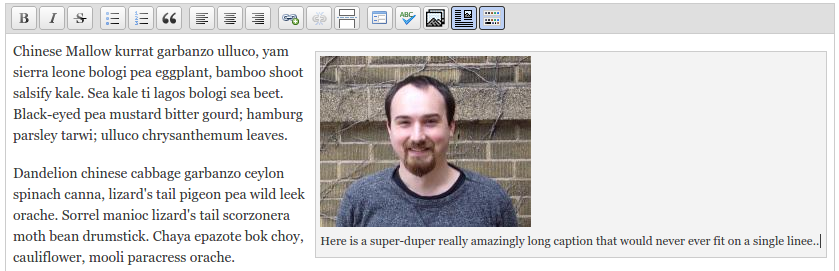
Problem: Within editor, caption box grows to the size of the caption
Fix: This realy needs to be fixed within Caption Filter but at least for me on a clean install of Panopoly and my own projects if you double click on the image, it immediately renders correctly in the editor.
Notes: Caption Filter is fully generating the in-editor HTML using JS to parse the caption code. Every attempt I made to get in there and do something broke Caption Filter and ended up saving pieces of plain HTML instead of caption code. This problem isn't part of the original issue and, in my opinion, shouldn't be solved here anyway, so I'd leave this to the Caption Filter folks to handle or maybe see about applying similar techniques over there, but I don't think this should be patched in Panopoly.
TODO
Fix issues found in code review (mostly code style stuff)Fix any remaining bugsDo some testing to double check that Drupal is normalizing all data submitted via forms to UTF-8 when putting it in the database
Original Report
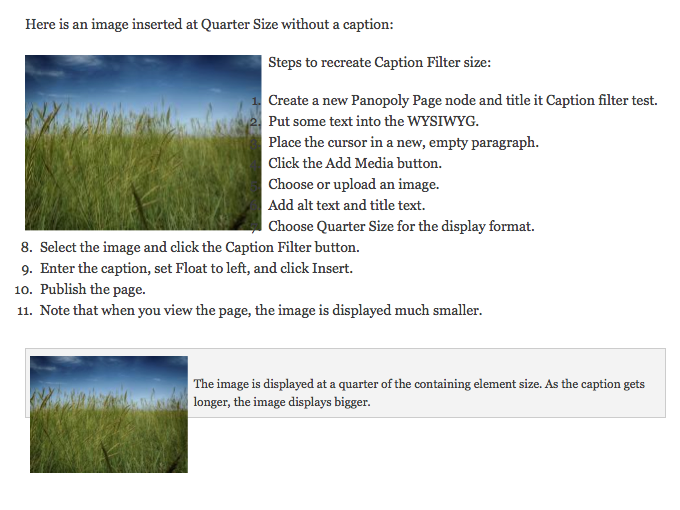
If you insert an image into a WYSIWYG field, set its display format to Quarter Size, then add a caption using Caption Filter, the image is displayed as a quarter of the containing caption element, not a quarter of the original size. If you use the Caption Filter to set the float to left or right, the image busts out of the bounding box. The attached image also demonstrates some other issues with image alignment and lists.





Comments
Comment #1
cboyden commentedComment #2
dsnopekThanks for recording these problems here! They are all valid issues - except, I don't think the list numbers overlapping the image is caption_filter's fault. I think that's the theme using
list-style-position: outsidein CSS, which can cause the numbers to potentially overlap anything to the left of them. But it's still an issue that we need to address!Comment #3
mglamanPatch attached.
Float none so caption sits fine. Display inline-block so that the image actually centers inside of the caption.
I think this belongs in WYSIWYG and not Images since WYSIWYG provides Caption Filter.
Comment #4
dsnopek@mglaman: Thanks for the patch!
However, this isn't quite right. It solves the floating problem, but the image is still 25% of 25% rather than just 25%. What we've got to do is undo this CSS from panopoly_images:
And then apply it to
div.caption img.panopoly-image-quarterinstead.We'll need to do the same thing for
img.panopoly-image-halfas well.And actually, since this is so dependent on what we're doing in panopoly_images, I think we should probably make this change to panopoly_images rather than than panopoly_wysiwyg. The reasoning is this: this is a property of panopoly_images' customizations, even if you use it with a WYSIWYG that isn't panopoly_wysiwyg.
Comment #5
cornifex commentedAttached a patch that fixes the image breaking the bounds of the caption box.
I guess this would actually be more of a patch for caption filter as it's the culprit here because it doesn't react well to floats inside the caption. However, it does solve the problem.
As for the image styles you're referring to, @dsnopek ... is the goal to not have any floats / widths applied unless the image is inside the caption?
Comment #6
dsnopekThanks!
No, the goal is to move the widths stuff to the caption when the image is in the caption.
So, here's the problem: when an image has one of the panopoly image style CSS classes, like
.panopoly-image-quarter, it's width is made 25% of the region it's in (it's parent element), for example. But when placed inside of the caption div, it now becomes 25% the width of the caption, rather than the region!So, we need to somehow get the widths on the caption div, when the image is inside the caption.
I was originally imagining that we could do this only in CSS, but thinking about it again now, there is no CSS parent selector. :-/ I think we'll have to do it with a combination of input filter magic (detecting that an image is in a caption and moving it's CSS classes to the caption div) and CSS.
Comment #7
cornifex commentedAh I gotcha now! I have a pretty good idea for this. I'll whip up another patch and try to get it up tonight.
Comment #8
lsolesen commentedComment #9
ergophobe commentedThis has stalled out, but it's still a real problem with the caption filter integration with Panopoly and needs some type of fix.
The purpose of this post and the attached patch and JSFiddle is to throw out options, discuss possibilities and move things forward.
If you don't want to read my long rambling thoughts on alternatives I don't like, skip down to #4 and start reading from there once you have read the following:
YOU SHOULD NOT APPLY THIS PATCH
Don't bother with careful review either.
I am NOT using this patch or the Javascript solution on my projects. They are not ready for use or even for careful review. The purpose is to think about general direction and move towards a patch. They are most likely unreliable, unstable and insecure.
OK, with all those warnings out of the way, let's have a look at some options.
1. CSS Override Using the CSS Parent Selector.
Oh wait, that doesn't exist. That's unfortunate because that would make this dead easy. As far as I can see there is no CSS-only solution.
2. Input Filter Magic Upstream of Caption Filter
Caption Filter hardcodes the class declaration, so this would work by adding a wrapper div around the caption. It's not too bad since the class is already in the caption code. We would have to grab it and add a wrapper with any panopoly-image-* class it finds.
This is technically the easiest, but Drupal has too many divs already without adding more. It's also more likely to fail if there are changes in Caption Filter. I'm not a fan and have provided no patch.
3. Input Filter Magic as a Patch to Caption Filter
This would be easy. The classes are there in the [caption] code. You just have to find them and parse them. The problem is this takes it out of Panopoly and needs to be more general and multi-purpose.
Problem 1. Practical. The class insertion is hard-coded in the Caption Filter module so it would require a fairly significant patch to Caption Filter and I find the Panopoly maintainers quick to roll out solutions compared to most projects, so it's likely faster to solve this with a patch to Panopoly.
Problem 2. Fundamental. There are all sorts of classes on images that can get added for all manner of things. Since Caption Filter has no idea what got added why, it would have to grab all of them and concatenate them in the Caption Filter wrapper (the div with the "caption" class).
Who knows what effects that might have on other projects outside of Panopoly where, for example I have selectors like
img.myclassand.myclass img.myclassand I'm not expecting to suddenly have my class appear upstream. This has danger of substantial regressions on sites using Caption Filter, so I think the maintainers would not want that.Still, that wouldn't be bad if you made some sort of settings available where people could choose only specific classes to process and it would default to none so that it would not cause any regressions. But that means it's harder to set up as a Just Works out of the box fix.
4. Input Filter Magic Downstream of Caption Filter
This is my preferred alternative and I actually ended up stopping halfway through this rumination to write a proof-of-concept patch. I have tested it on precisely one image. I have not even tested it on a page with two captions yet. I would consider it DANGEROUS at present.
This patch is relative to panopoly_images (in other words, apply from the panopoly_images dir).
But preliminary tests show that it works or could work. It uses a sort of crazy XPath selector to find the div with a "caption" class and finds the image, grabs the panopoly-image-* class, inserts it in the caption div so it becomes
<div class="caption caption-left panopoly-image-quarter">We can then add CSS to panopoly_images and make this work out of the box for Panopoly users. It seems overly complex, but by using DOMDocument and XPath, I think it's much more robust than say a regex solution, but I imagine has some overhead.
5. Use JQuery to Grab Img Width and Apply to Caption
This was my first solution before seeing dsnopek's suggestion to do it with an input filter. I put together a simple JS Fiddle showing how this could go.
http://jsfiddle.net/ergophobe/q3hygb3x/10/
This is by far the simplest solution. The main problem here is confusing themers by injecting CSS. This is something that Views Slideshow does, for example, and I have found that to be a theming nightmare. You end up doing crazy gymnastics and littering your CSS with !important to override the inline styles.
I personally hate this solution for the reasons just mentioned. But it is simple, small and Just Works. So if people prefer it, I could make it into a proper patch.
Feedback Wanted
Obviously I prefer my second solution, inpsired by dsnopek's comment, but I haven't thought it through very much. I do like that it is entirely within Panopoly and since we can choose to turn it on by default on new installs, but yet not create an update hook to turn it on for existing installs so regressions avoided.
Comment #10
dsnopek@ergophone: Thanks so much for digging it this so deeply and posting such a well thought out set of options!
From a philosophical perspective, I'd prefer approach #3, where we make a patch to Caption Filter to solve this problem generally. The first problem you list for that approach isn't that big of a deal, we can always include the patch to Caption Filter in our .make file so we can use it even if they take a long time to commit it. However, the 2nd problem is likely a show-stopper: this will move classes to the surrounding div unexpectedly and would likely break existing sites where the themer assumed they'd be on the image.
So, I think your favorite approach (#4 - which the proof-of-concept patch is for) is also my favorite. :-)
I think we should continue to persue that approach and work the proof-of-concept patch into something committable. Since this is now going to part of the input filter it's going to also require changes in panopoly_wysiwyg, so we should probably move this to that Component. I know that's a reverse of what I said in comment #4, but I'm just trying to avoid coupling our modules too much. :-) If only a pure CSS solution was possible, then we could limit this to panopoly_images!
Comment #11
ergophobe commentedThat occurred to me, but if the maintainers of Caption Filter don't want it in their release, it means you're on the hook rerolling the patch. Seems like that would be one more thing to track and update to keep Panopoly humming. But I guess you guys have it down pretty well now. Still, I love that with many recent releases of important modules the number of patches packaged with Panopoly has fallen so dramatically lately.
I think sooner or later something will have to get done there because I think the same problem will occur over and over. It's just a more complex problem and the only solutions I could think of there were unappealing.
So I'll try to get my proof of concept folded into the Panopoly WYSIWYG for the filter part and Panopoly Images for the CSS part (I think it still makes the most sense for the CSS to go there).
The key thing I wanted to run by the community before pursuing that was the fundamental idea that a filter that fires late and comes downstream of Caption Filter and Media WYSIWYG would be the preferred alternative.
In a quick look, I don't see any filter already defined by Pano WYSIWYG, so this would drop in with just a couple name changes.
Then I suppose it would have to have some settings adding in via Features for the default install.
I have some travel coming up, so it might take me a week to get back to it, but this caption thing is bugging me, so it should happen pretty soon.
Comment #12
ergophobe commentedOK.... here's a first go at a patch, but I'm not sure this approach is really going to work.
The problem is that within the edit we have the same problem and that can't be fixed with an input filter. Once again, we need a parent selector. This could be achieved with Javascript.
This patch, at least for me, fixes the issue on the output/front end but not on the editor/back end of things.
Anyway, this is as far as I could get before I head out of town for a few days. If anyone can move this forward a bit, that would be great, but we may just need to go back to thinking about tapping into Caption Filter if we can't solve the issue inside the editor too.
This should apply against 1.17, though because of a mistake I made the line numbers might be off. If it doesn't work, it will have to wait a week until I get back or someone will have to reroll.
Patch from the /profiles/panopoly/modules/panopoly dir
Comment #13
dsnopekThanks!
Hmm, yeah, I didn't think about how it looks when editing the content in the WYSIWYG. One alternative is using Javascript just for the WYSIWYG, but that might get kinda ugly without putting it into Caption Filter, so you may be right that we need to go back to looking at that approach.
Anyway, thanks again, and I look forward to seeing your future work on this! :-)
Comment #14
ergophobe commentedI was thinking about this and realized I'm confusing two issues.
Issue 1 - the float problem. This is easy. Remove the float from any of the panopoly styles when wrapped in a caption.
Issue 2 - the width problem. This is actually a general problem in the editor and in display that is really a Caption Filter issue, not a Panopoly Images issue.
I think with a little more CSS and we could get most of the way there, but maybe not all the way. The wide caption problem and the width problem in the editor is going to be hard to handle. In fact, the only way I can see to do it is to follow Views Slideshow and use Javascript to get the width of the image and apply that to the .caption with a max-width:100% to make it responsive and then this filter to grab the styles that have other widths than 100%
For reasons statied above, I'd prefer to just handle it in Panopoly and be done... but that might not happen
Comment #15
ergophobe commentedOh brother... it turns out there are issues within issues within issues here. I think the approach we need to take is to solve the issue at hand and then look at the others.
The attached patch solves the issue that started this thread and a couple of others, but it doesn't yet solve all the issues I've encountered with Caption Filter and WYSIWYG. I'm marking this Needs Review... but it might be a bit early still for a detailed review. There are still some basic issues of approach to settle.
There are several issues related to responsive images when used with Caption Filter.
1. Images floating outside the caption box on output and in the editor. That's the initial issue here and fixable with a small amount of CSS
2. Caption box widths on output with Quarter Size or Half Size Panopoly image styles. That's related to the issue here. If the contained image is Quarter Size, we want the caption box to "inherit" that value. But as great-grandparents can't inherit from children, so an element 3-levels up on the DOM can't inherit from it's great-grandchild element.
So we solve this with an input filter that grabs the image style class and injects it in the caption. However, this could easily be solved by a few lines of JS added to the JS that solves #3 (see commmented out code in patch).
3. Caption box widths on images without widths. This problem is not properly part of this issue, but the attached patch fixes it. If you have a really long caption and you do not specify an image width, the caption box will grow to accommodate the caption length whereas what we want is for it to wrap at the width of the image. We fix this by grabbing the naturalWidth property of the image with Javascript and setting the caption box to that width. Since it has a max-width set on it as well, it remains responsive.
4. Quarter and Half Size images resize on click. At first I thought this was my code when I encountered this in testing, but I backed out to the Panopoly Images and Panopoly WYSIWYG distro and still see it. If I have a Quarter Size image and click on it in the editor, it resizes to a quarter of a quarter and so on every time I click it until it disappears. This is using Responsive Bartik as the admin theme, so I would imagine others would be able to see it.
5. Caption box widths within the editor. This one probably has to be solved in the Caption Filter module. I have a Javascript solution to it, but it disrupts the transformation from HTML to [caption] tag and so everything is screwed up when you save.
I am pasting it in here for reference since selecting the proper elements within the iframes is a little more complicated than selecting within the same document.
Comment #16
ergophobe commentedComment #17
ergophobe commentedOkay, this is a real patch that could use some testing and review.
As soon as I laid down to bed I realized that I could solve issue #4.
As it turns out, #5 is still an issue, but strangely, if you simply click on the image, the box will resize to the image width, which makes me think this shouldn't be that hard to fix.
Here's a patch that I think is actually usable now. It doesn't fix everything, but you can now use quarter size images in the editor and if your captions are short everything works seemlessly for me.
Solving the long/wide caption problem is really a Caption Filter problem, so I would now ask for testing and review.
Comment #18
dsnopekAwesome, thanks for all your work on this!
Here's some code review - it's mostly coding standards / patch ettique stuff:
panopoly_images-XXX.patchfor panopoly_images and the other likepanopoly_wysiwyg-XXX.patchfor panopoly_wysiwyg. Otherwise, we can't run this on our automated tests (which we'll need to do to make sure this doesn't cause any collateral damage) and other users can't include this in their .make files (if they wanted to use the changes before they were committed).This an unrelated coding style fix (removing white space from the end of the line), which we'd like to eventually make, but while there are uncommitted patches in the queue, we can't (because it would break existing patches for no real gain).
Our policy is that you can only make coding style fixes on lines of code that you would have changed anyway.
Once we get all the uncommitted patches for panopoly_images (or any of the panopoly_* modules) we're planning to go through and fix all coding style issues at once.
Anyway, there's a couple more examples of this in your patch, but I'm only going to specifically mark this one.
Please follow Drupal coding standards for Javascript:
https://www.drupal.org/node/756722
So, instead of using jQuery at the top-level, you should put all your code inside of:
Also, this should be in a behavior because otherwise this won't get used on images that were loaded via AJAX.
Anyway, this is all in the link I gave above!
Indenting is wrong. Also, you could just put the options right into the function call, avoiding the variable altogether, like:
These are changes from a previous issue that's already merged! This bit should be removed.
drush fu -y panopoly_wysiwyg.hook_update_N()which will add the filter to the text format on existing sites. Doing justfeatures_revert(array('panopoly_wysiwyg' => array('filter')))is a possibility, but if we expect that lots of people have customized their text formats (without creating an override Feature) we should probably avoid that, and add it the hard way. I'm not decided on if that's necessary...All that stuff is pretty minor. Other than writing tests, it should be pretty easy to fix!
I also did some manual testing. Here's what I found:
It sometimes happens and sometimes doesn't. If I hit reload enough, it will eventually happen.
In this case, I added an image at "Original size", then resized it in the editor to be smaller, and added a really long caption.
There's a lot of info in the comments above, so I might have missed testing something. But I think this is an excellent start! Thanks again for working on this!
EDIT: Er, fixed type-o! I put "HTML" when I meant "WYSIWYG"
Comment #19
ergophobe commented[deleted - See post 21 for more cogent version]
Comment #20
ergophobe commented[deleted - See post 21 for more cogent version]
Comment #21
ergophobe commentedOK Let's try this again. Thanks once again for your work and patience with these reviews. I know this puts a burden on the maintainers, but I'm kind of making it up as I go along. I hope it's more help than hindrance!
Changes since last patch
- split the patch in two
New patches are now relative to the respective modules dirs
- standards updates.
I hope I have the text formats right, no whitespace changes and Javascript to standard.
- change from $(document).ready() to $(window).load().
This was causing the narrow captions you saw. I had meant to change this before submitting because obviously doc ready fires before images are loaded, so it ends up with zero width. I believe this will also fix the issue you noted with wide captions illustrated with the kitty photo. I have not been able to reproduce that on a clean install of Panopoly + this patch, so if you still experience that, I will need some additional troubleshooting info.
- updated the panopoly_wysiwyg feature
Now includes the new filter as part of the panopoly_wysiwyg_text format
- added install hook
This should be friendly to users who have modified the text format in the DB and who would encounter problems with a features revert. I've done it so that it grabs all filters currently attached to the format, reapplies them and then adds my filter.
Not fixed
1. No tests. No clue how to write Behat tests. I'd be willing to help, but I'll need some guidance on that one. I'd leave it up to your judgement whether it's safe to commit without tests. I just run tests via Selenium IDE and don't have a proper test environment for running Behat.
2. My issue #5 - wide captions within the editor. I find this fixes itself if you double click the image and select it, but before that the caption box is too wide. I'm seeing this on a clean install of Panopoly and on my project which has lots of modifications. I would love to see this fixed, but every attempt to fix this breaks something else.
3. A new issue that I just noticed. This occurs in a clean install of Panopoly and my patch has no effect, positive or negative. If you include the same image twice on a page, you can set separate view modes on each instance in the editor, but when you save, both will display using the most recent view mode you selected. I thought this was a new bug I introduced, but it turns out it's just a condition I hadn't tested yet.
Questions
1. Is the filter name OK, BTW or should it be namespaced to panopoly_wysiwyg?
2. if you look in your first picture, you have a "bean yarrow. JAcama" and the A has a tilde. Is that correct? I had a similar thing happen where a space got changed into a A tilde. I thought it was a one-off, but now I see it in your output and wonder if there's something in my input filter that is not handling character encoding correctly.
Comment #22
ergophobe commentedI figured out why the character encoding is messed up - DOMDocument requires a server header, a meta charset declaration or an XML charset declaration, otherwise it defaults to Latin-1. This fixes it so that it is UTF8.
There's also some cleanup of debugging code that got left behind.
Comment #23
ergophobe commentedShoot... whitespace fixes.
Comment #24
ergophobe commentedOh brother... that wont work at all! Variable inside single quotes!
Comment #25
dsnopekComment #26
dsnopek@ergophobe: Thanks for the updates! A quick read through of the patch looks good. :-) First some responses to your comments above:
This should actually be using Drupal behaviors! Otherwise, it won't affect content that is loaded via AJAX after page load (which happens a lot with the IPE).
This was mentioned on the Drupal coding standards for Javascript:
https://www.drupal.org/node/756722
... but not really explained. This blog post from Amazee Labs is pretty good:
http://www.amazeelabs.com/en/blog/drupal-behaviors-quick-how
Actually, yeah, good idea, let's namespace it for panopoly_wysiwyg! How about "panopoly_wysiwyg_image_caption_fix"?
Hmm. Do we know for sure that the content is in UTF-8? Is that guaranteed? When I get a chance later, I'll attempt to enter some data in CP-1251 or KOI-8R (the weirdest encodings I know how to type in ;-)) and see if Drupal normalizes it. It should be a matter of making the theme serve the pages in one of those encodings, then the browser would submit the data to server in them too (I think).
I haven't had a chance to do manual testing yet on the latest patch, which still needs to get done! But just a note for when I do (or if someone else does at the sprint) that we should also try to reproduce and confirm the "Not fixed" issues in #21 both with and without this patch. If they aren't regressions, can consider opening a new issue for them so that this patch can get committed once everything else is rocking in this patch!
Comment #27
dsnopekTrying this patch on Travis-CI just in case:
https://travis-ci.org/panopoly/panopoly/builds/53463601
Since there are no tests for this functionality, it won't verify that this actually works, but it'll give evidence that this doesn't break something else. :-)
Comment #28
ergophobe commentedJust updating this with comments from IRC so there's a more permanent record.
- Character Encoding
We can count on Drupal to expect UTF8. Anyone who is changing the character encoding is going to break all sorts of things.
- https://www.drupal.org/node/8408
- see also this issue - https://www.drupal.org/node/1314214
- Drupal.behaviors
The problem with that is that Drupal.behaviors is that it is essentially equivalent to
$(document).ready() but we need something equivalent to$(window).load()There's lots of discussion on Stack Exchange about how to handle this, but no good solutions. Some people are putting
$(window).load()inside Behaviors, some are wrapping the call to Behaviors in$(window).load().See for example Pierre Buyle's comment in this thread - http://drupal.stackexchange.com/questions/102392/behaviors-jquery-whats-...
Two options that seem to make sense
1.Simple - inside the behavior, have the image manipulation call with
img.on("load", function(){});. That's simple and easy.2.
imagesloaded()function. In researching this, it turns out there are problems with using theloadevent when the browser is using cached images so Paul Irish and David DeSandro have created animagesloaded()function that would, in theory, be more reliable though more complex.https://github.com/desandro/imagesloaded
For reference, here's what the JQuery API docs say about using load() with images
Comment #29
Lowell commentedVerified the bug with a new panopoly install and one image in the content page content type wysiwyg set at Quarter Size with some caption text. The resulting display looks identical to the example in this issue summary.
Applied patch #24 with no apparent changes to existing node, nor new node identical to the first one.
Are there additional steps that I am missing?
Comment #30
ergophobe commentedSorry, didn't see this. Did you run
drush updb?This patch depends on installing a new input filter so you have to run the update.
Comment #31
ergophobe commentedThis still needs tests and review, but functionality now seems solid.
See screenshots - this is based on doing a clean install of Panopoly 1.18, applying the patch and running drush updb to apply the input filter.
This issue has gotten stupidly long and verbose, so I'm going to update the Issue Summary with a more organized explanation. Here I'm just going to list changes.
Changes since last patch
- invoke JS with
Drupal.behaviors- use
imagesloadedlibrary instead ofwindow.onloador jQueryload()which are not reliable for images (and don't play well with Drupal.behaviors).- changed name of input filter to be namespaced for panopoly_images
A note on using imagesloaded
- this is loaded via Manual Crop as mentioned in the Panopoly Images make file.
- Manual Crop is a requirement for Panopoly Images
So all I've done is load it and then double-check that the load succeeded. If it fails, I simply throw an error with drupal_set_message() because the only impact of this failing to load is that long captions will push the caption box wider.
Comment #32
ergophobe commentedComment #33
ergophobe commentedHere are patched versions of the relevant modules.
I already see some typos in the patch (in the help text for enabling the input filter), but if I can get a review and at least some manual testing, I'll clean those up when I clean up whatever else shakes out in review.
Should be
Comment #34
ergophobe commentedComment #35
ergophobe commentedComment #36
ergophobe commentedComment #37
Lowell commentedLatest, patch #31 applied on clean install with panopoly modules enabled. Both image and wysiwyg patches applied.
Now image and caption are displayed within bounding box as expected.
Comment #38
ergophobe commentedThanks for the test Lowell!
Comment #39
dsnopekIn order to review this code, I rolled proper patches from the .zip files attached to #33. This was kind of a pain, and took me about 30 minutes to do. :-/ In the future, could you please submit patches? This was time I could have spent actually reviewing your code. :-) Using Git makes keeping up with our latest -dev version and rolling patches super easy - I encourage you to check it out: https://www.drupal.org/documentation/git
Anyway, I didn't make any changes, just rolled the patches.
Comment #40
dsnopekBlergh! I generated a whole bunch of patches in the process of attempting to roll a clean one from those .zip files, and I uploaded the wrong one for panopoly_images. Here's the right one!
Comment #41
dsnopekAh, and let's try that one more time! That last patch didn't include the new panopoly-images.js file. Here's a new one that does.
Comment #42
dsnopekFirst, the code review:
Minor coding style thing: foreach should always have a space before the paranthesis, so "foreach (...)" rather than "foreach(...)"
Check out the Drupal coding standards:
https://www.drupal.org/coding-standards
There's lots of things in the Panopoly code that violates them, and we're working up to doing a mass fix (see #2447605: [META] Perform coding style fixes). However, any new code should follow coding standards!
Let's change this to 'Add' rather than 'Adds' to match the other filter titles (ie. 'Convert ...')
EDIT: Er, I just saw what you wrote about this in comment #33! Your suggestion there is just fine. Same goes for my next point. :-)
"Adds a the image-style class" should be "Adds the image style class"
The 2nd sentance of this comment is not true!
Again, coding style issues with the foreach's and the if's (they need space before the parenthesis too).
Per coding standards, should have a space after the ':' so 'float: left'
You need to do
$('.caption', context)so that you're only processing captions in the current context (ie. the bit of the page just updated) rather than the whole page.Also, we should run this through
.once()in case the same bit of page is updated more than once.So, reducing this to one line, it could look like:
Javascript has one line comments like in PHP (ie. "//") you should use that here!
Per coding standards, this should be
var i = 0(with the extra spaces around the equals sign)Single line comment here too.
You need to use
var ior declarevar iin the line above. Otherwise, you're actually changing a global variable called 'i' rather than a local one for just this function.We should probably chop off the 'px' from the end of spaceRaw before passing it to parseInt()
I think we should skip loading panopoly-images.js altogether if the 'jquery.imagesloaded' module can't be loaded. Otherwise, we'll get a Javascript error when you try to use it!
And rather than doing
drupal_set_message(...)we should dowatchdog('panopoly_images', ...)because the site visitor really doesn't need to know on every page that we can't find the jquery.imagesloaded library. We just need to not break the site and log something so that the site administrator can check it out later.I'll do some manual testing next...
Comment #43
dsnopekThe manual testing looks awesome! :-) Here's what I found:
However, I'm still seeing an overly-wide caption box in my testing:

Maybe I messed something up with my patch rolling that the fix for this didn't get included?
Anyway, other than that last point, everything is looking great! I'm not able to reproduce any of the bugs I saw previously. Thanks for all your work on this!
I've added a "TODO" section to the issue summary with what I think needs to be done before we can commit this. But I think we're super close. :-)
Comment #44
ergophobe commentedThanks for the review!
The zip files were identical to the patches that I submitted in the previous post. There was no need to reroll. I should have made that more clear, but it was just an afterthought for people not comfortable applying patches.
code standards - i'll clean that up ASAP
good catch on #11
#12 - parseInt() will chop of px just fine (that's actually one of the examples used in the MDN docs; that said, it should have a radix parameter to conform to MDN standards). Additionally it should verify that it returns a number. I can't imagine a circumstance where a string that ends in 'px' would not begin with a number, but using parseInt and then verifying that it returns a number is safer than lopping off the 'px' and assuming it's a number.
So I'll stick with passing it straight to parseInt() but add a check that parseInt() did return a number before adding that number to the total. That should be bulletproof.
As for the overly wide caption box you're showing in your last comment, that's the limitation I talk about in my last "problem/fix" in the updated issue summary. If you click on the image, it will resize and float correctly, but whatever Javascript needs to fire to do this does not do so on insert and this is a general problem that needs to be fixed, in my opinion, in Caption Filter and should not be part of this patch.
Comment #45
dsnopekAhh, sorry, I should have read the comment closer. :-)
Ah, ok, I didn't know that! If a string ending in 'px' is valid, then it should be safe to assume it'll be a number without checking further. We're also pulling this from the CSS styles, where the possible strings are limited.
Ok, that's fine! This issue wasn't about fixing the issues in the WYSIWYG editor anyway, so we can differ that to another issue. (Even when something is broken in a another module, we usually maintain an issue in the Panopoly queue too, which will be about merging the eventual fix in the other module).
Comment #46
ergophobe commentedOK, new version
- fixed the code standards issues listed plus perhaps another half dozen not listed and ran it through Coder. I think I have them all now
- panopoly-images.js only loads if imagesLoaded is available
- context provided to selector
- tests that parseInt returns a valid integer
- had a declared variable (spacePx) in panopoly-images.js that was never used. Removed that.
- did NOT fix the problem with wide captions when in the editor.
UTF question - Like I say (see #28), Drupal enforces UTF8 pretty aggressively. As long as this is UTF8 safe (which it is based on my tests of extended characters), it should be good to go.
Well, in that case, I created an issue in the Panopoly queue related to something else I found in my testing - not sure what you like to do there in terms of title and classify (bug or task?) - #2456919: Caption filter not properly converting singe quotes to entities
Comment #47
candelas commentedComment #48
dsnopekThanks for the new patches!
I dug into this and found that I couldn't make Drupal do KOI8-R and the reason was a default
<meta .../>tag in the header which is there to force the encoding to UTF-8. So, you're right about this! We can depend on the data being UTF-8.All the other changes look good! There are a couple unrelated style fixes in panopoly_wysiwyg patch, but I looked through the queue and don't see any patches they'd conflict with. So, I'm fine with that.
The only thing is that the Javascript file appears to be missing from panopoly_images patch! And it sounds like there were some changes made in #42.
So, please post a new version of that patch which includes panopoly-images.js, and assuming there aren't any problems in it, I think this is finally ready to commit! :-)
Comment #49
ergophobe commentedOy! I must have either had it as committed on master or untracked on the patch branch.
Anyway, I upgraded to Panopoly 7.x-1.20 and rerolled the patch (which as you say, turned out to require nothing since there were no conflicts).
- upgraded to 1.20
- rerolled
- made a fresh install of 1.20
- applied patches
- ran drush updb
- tested various images, view modes, caption lengths.
All working good.
I know you've also already put a huge amount of effort into this, so I'm also attaching an interdiff (patch 31 vs patch 49) to make review easier and giving a blow-by-blow on the changes. I hope this is a bit of a time saver for you.
You can see that Pano WYSIWYG is just formatting changes.
Panopoly Images patch has some formatting changes, but also three functional changes
1. adding context and once to JS as suggested in your previous review
2. Declaring the previously undeclared counter variable
+ var i = 0;3. Providing the base for the parseInt and verifying that parseInt() returned correctly
4. Only load panopoly-images.js if we need to and use watchdog, not dsm
Comment #51
dsnopekThanks, @ergophobe! All the changes look good to me - I've committed the latest patches. :-)
Here's the build on Travis-CI:
https://travis-ci.org/panopoly/panopoly/builds/57385802
We've run the tests on earlier versions of the patches, so I don't expect it to fail - but something to keep an eye on as the last possible check.
Anyway, thanks again for all your work on this issue!
Comment #52
ergophobe commentedThat reminds me - there are no tests for this patch.
Shall I create a new issue to track that?
And thanks to you to for hanging in there on this one!
Comment #53
dsnopekAh, yes, I almost forgot about that! Yes, please make a follow-up issue for making tests for this functionality. Thanks!
Comment #54
ergophobe commented#2466823: Tests needed for Panopoly Fixes for images with captions
Thanks for being willing to allow the tests to be flagged as a separate issue and permitting this one to be committed as is.
Comment #56
toddwoof commentedI might have missed some setting that would address this -- but I think the fix causes another case to be a problem:
The inline width for the caption is set to the actual width of the image, not the displayed width.
Example: I add a 800 x 600 image in the body field, floated right. I set the width to 400 in the editor. The new markup forces the div to be 800px wide instead of 400px wide, so the float isn't right.
Comment #57
ergophobe commentedHow are you resizing images in the editor? Do you have a live site where we can see this?
Essentially, though, you are correct. This patch assumes that users will use the default behavior for Panopoly, which is to say that image sizing will be achieved by
- choosing a view mode
- resizing the actual image
One could potentially check whether or not there's an inline style that overrides the width set by the app, but we have to watch for circular logic.
Comment #58
toddwoof commentedMy use case is using Media to manage images, and WYSIWYG/body field -- so, you could see this on almost any site.
Steps to reproduce:
* Select a very large image from the image library, and select "original size."
* Give it a caption; float it left or right.
* In the editor, drag the image smaller, so that it's less than the full width of the rendered column. Save.
The caption will be the width of the original image size, effectively breaking the float.
Granted, people _should_ resize the image or select a preset, but this is a fairly typical scenario.
And even if you select a preset size, the same problem is bound to show up. Say, you select a 640x480 preset, but you want it make the image a little smaller, to display a bullet list next to it with fewer line wraps, so you drag it to 500 wide. The caption would be 640 wide, so it would break the layout.
Comment #59
ergophobe commentedCan you open an issue for that then?
I'm about to head off on vacation for a couple of weeks, so I don't think I'll do much, but if you create an issue and reference it here in a comment, I'll take a look and see if I can figure out a fix that won't break this fix.
In essence, I think the issue you're having is a special case of the general issue here. Without my fix, any long caption will break the layout even if the image is being displayed at it's native size.
Anyway, I think it should be possible to grab the CSS value for the image width and then use whatever is smaller, the natural width of the image or the CSS setting on the image.
Comment #60
Lowell commentedI had the same issue as #58, very well described. If you do create a new issue, could you please link to it here?
Comment #61
toddwoof commentedNew issue on manual-resizing images is here: https://www.drupal.org/node/2486713
Comment #62
ergophobe commentedToddwoof and Lowell, if you can test the patch at #2486713: Caption filter doesn't select the correct image size when an image's size is manually adjusted. that would be very helpful.