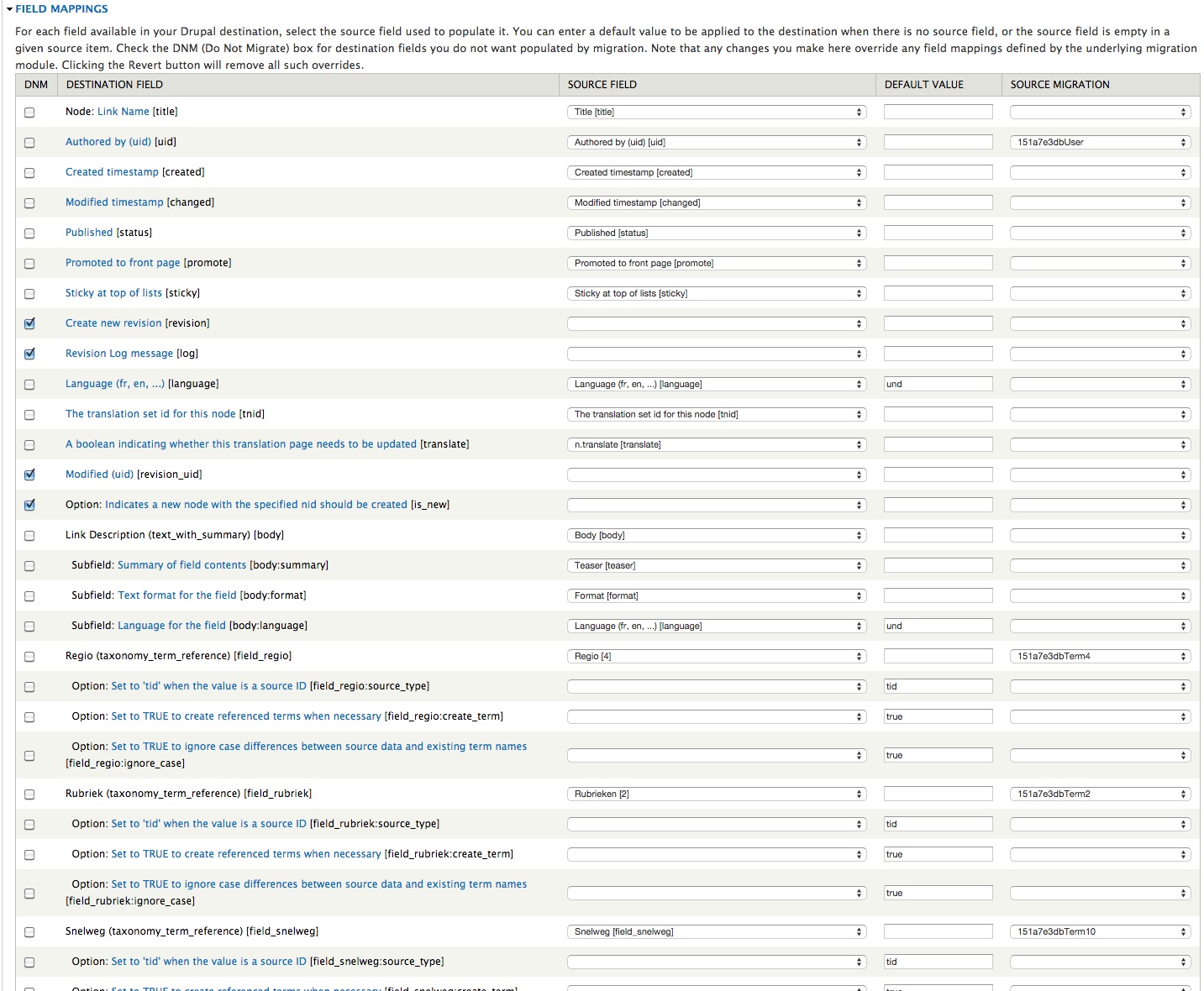
The latest versions of Weblinks work with Migrate, but they don't play nicely together. My migration class matches up all of the fields correctly, and the migration runs fine. But when I go the the view that shows field matchings I get the following at the top of the page in a big pink box:
    "url" was used as source field in the "url" mapping but is not in list of source fields
    "url" was used as destination field in "url" mapping but is not in list of destination fields
    "urlhash" was used as source field in the "urlhash" mapping but is not in list of source fields
    "urlhash" was used as destination field in "urlhash" mapping but is not in list of destination fields
    "click_count" was used as source field in the "click_count" mapping but is not in list of source fields
    "click_count" was used as destination field in "click_count" mapping but is not in list of destination fields
    "last_click" was used as source field in the "last_click" mapping but is not in list of source fields
    "last_click" was used as destination field in "last_click" mapping but is not in list of destination fields
    "last_status" was used as source field in the "last_status" mapping but is not in list of source fields
    "last_status" was used as destination field in "last_status" mapping but is not in list of destination fields
    "last_checked" was used as source field in the "last_checked" mapping but is not in list of source fields
    "last_checked" was used as destination field in "last_checked" mapping but is not in list of destination fields
    "reciprocal" was used as source field in the "reciprocal" mapping but is not in list of source fields
    "reciprocal" was used as destination field in "reciprocal" mapping but is not in list of destination fields
    "last_checked_info" was used as source field in the "last_checked_info" mapping but is not in list of source fields
    "last_checked_info" was used as destination field in "last_checked_info" mapping but is not in list of destination fields
For some reason Migrate cannot tell that the fields exist in the weblinks table, even though the D6 and D7 tables are identical.






Comments
Comment #1
gstegemann commentedThanks for reporting this.
I have not used Migrate yet, therefore I have no idea why theses messages are displayed. Which version of Migrate do you use? Can you upload or send me your migration classes to help me investigating this issue?
Have you also checked for any similar issues in the Migrate issue queue?
Comment #2
rsbecker commentedI am using Migrate 7.x-2.5, Migrate Extras 7.x-2.5, and Weblinks 7.x-1.0-dev.
My abstract node migration class:
The Weblinks migration class is:
I have not checked the Migrate issue queue for problems with weblinks specifically. But all of my other node migration classes are working properly. I think I had the weblinks migration class working with an earlier version of weblinks, but cannot recall.
Comment #3
gstegemann commentedI think your issue is not a Web Links problem.
Basically the Migrate module provides means to copy and optionally process data from a source to a destination. In the way you have written your migration classes the Web Links module is not actively involved (as far as I can see). From my understanding the minimum requirements are that the module ist installed and the Web Links table has to exist. The Web Links module does not support Migrate directly.
From what I have found the error messages about missing mappings may occur when the migration class is not registered. Have you tried to re-register your classes? Or the query is not pointing to table 'weblinks'? Have you also tried to view your migration setup using drush commands or the Migrate UI? Have you checked for any watch dog messages?
Comment #4
rsbecker commentedThe migration class is registered. It appears to be pointed at the right table in the source and destination databases, and there are no watchdog messages.
In fact despite the messages I quoted from the migrate UI, the migration class works fine. All weblinks nodes are migrated and all relevant fields are populated. no other node type gives such messages, Lthough their migration classes are constructed in the same manner.
It may not be a weblinks module problem, but something about migrating weblinks nodes is differant than migating other content types. I haven't a clue what that difference is.
Comment #5
gstegemann commentedI would say Web Links does not do anything special regarding its fields.
One thing which has been changed in the last months was a fix in hook_extra_content so that the extra fields can be managed in Structure | Content Types. But this hook also exists in the D6 version of Web Links.
If you don't mind, you may send me your migration module, so that I can try to reproduce the field mapping issue.
Comment #6
summit commentedHi,
May be same problem. Trying to get weblinks nodes from D6 to D7 through Migrate D-D, but the Url-field is not in the mapping sources and also no possibilty to choose from in the mapping destination fields.
Greetings, Martijn
Comment #7
gstegemann commentedMay be. But I really don't know since I never have used Migrate nor done any testing.
Can you provide us more details, like screen shots, etc. Or even your migration classes?
Comment #8
summit commentedHi,
I use Migrate, Migrate extra and Migrated2d out of the box for a Drupal 6 - Drupal 7 Migration.
With this configuration there is no source field for the weblinks link-URL field (d6).
May be it is a Weblinks D6 error? Because I can't select the link-URL as source, and may be because of this I can't select a destination field also?
My migration classes are standard from Migrate, Migrate extra and Migrated2d modules. I can off course provide them to you if you want them?
See attached the mapping of the Weblinks Content type with no link-URL field shown, while it is in the contenttype fields! See screenshot 2.
Here a issue about the link-field, may be somewhat connected: https://www.drupal.org/node/1004066
Don't you think that Web links should have a Migrate solution, certainly because Migrate will be in core D8, and therefore be the first migration solution people will think of.
And while next to me I think lots of people are still on Web links 6, and because of your great work can move to D7, Migrate support would be beneficial to keep those people using this great module!
Greetings, Martijn
Comment #9
summit commentedScreenshot 2; Link-URL in D7 weblinks contenttype. Greetings, Martijn
Comment #10
rsbecker commentedI did this stuff a year ago, so I may be fuzzy on what happened. But note that in my last post I reported that the migration succeeded. The problem was that when I looked at the structure in the migrate UI it appeared that none of the fields had been mapped.
I used migrate and migrate_extra, not migrate_d2d. I had a pretty standard abstract node class. The following was the weblinks class.
Comment #11
summit commentedHi,
Thanks for posting. I would love to be able to use Migrate_d2d for this. And I think lots of D6 to D7 migration sites would love to also in the near future. Because this is intuitive and no program skills are needed so lots of people can benefit!
This remark of you The problem was that when I looked at the structure in the migrate UI it appeared that none of the fields had been mapped. is still valid for the Link-URL field and other specific Weblinks fields. The Link URL field is specific important because this is the most value adding in my opinion.
@GStegemann; Would that be possible to look into please? I made also a migration issue for this: https://www.drupal.org/node/2467371#comment-9802589
May be this is somehow needed. Did the field name of D7 Link-URL changed between D6 and D7; https://www.drupal.org/node/1819738? Is this why it is not shown?
I see in a closed issue you both had a conversation about Migrate also. Now Migrate_d2d is really mature I think Weblinks should be part of it also! https://www.drupal.org/node/1977080#comment-7345510
And may be the migrate_d2d class should be extended to get Weblinks in?
https://www.drupal.org/node/1819738
Anyhow I think it would be great to have a weblinks Migrate solution so I and other D6 weblinks users can Migrate!
greetings, Martijn
Comment #12
gstegemann commentedAs of current I can confirm, that the URL field is not available for mapping. But I have no idea why.
I can check. But will take some time, since I'm quite busy with other projects.
Most probably something like that has to be done. Or someone finds the reason why the URL field is hidden for migration.
Update: I think the reason simply is that some Web Links information is stored in a second database table which is solely managed by Web Links. Which in turn means that an extended query has to be added to a migrate_d2d class. Out of the box migrated2d just migrates data from the node table only. As described in comment #11 from rsbecker.
Comment #13
gstegemann commentedComment #14
summit commentedHi,
Great you found the source of the problem. So the weblinks specific info from rsbecker should be added to the node class somehow?
In my case only the Link-URL field?
Comment #15
gstegemann commentedYes, somehow somewhere. Most probably somewhere in migrate_d2d since module Migrate Extras is not actively supported anymore. Or we have to extend Migrate Extras temporarily.
Comment #16
summit commented@all; Anyone else may be knows how to deal with this to get this within Migrate_d2d?
A specific class or extending the node class?
@GStegemann, very much preferably inside Migrate_d2d!
Comment #17
summit commentedI think Weblinks in the end should be placed in this queue when it has Migrate support; https://www.drupal.org/node/1996518.
is it then also available within Migrate_d2d?
Greetings, Martijn
Comment #18
gstegemann commentedComment #19
gstegemann commented@Summit: sure, migration support in Web Links might be very helpful for certain sites and is a valuable add-on. But currently we are concentrating to get the 7.x-1.0 release out. So new features will not be added before the first 7.x release is published. I hope for your understanding.
If all agree I would like to change this issue to a Feature request.
@rsbecker: can you provide us more details where you added your migration class? Thanks.
Gerhard
Comment #20
rsbecker commentedIt is #10 above.
Comment #21
gstegemann commentedThanks. Sorry for asking: but where did you place the code actually? I.e. in which module? In Migrate Extras as a include file? Or also somewhere in Web Links?
Comment #22
summit commentedHi,
I think with Migrate_d2d, the taxonomy links are not necessary to get from this extra weblinks.inc (submodule).
Hi rsbecker, should it done be something like this as a weblinks.inc in migrate_d2d/d7/weblinks.inc.
First add it to migrate_d2d.info as:
Then the code
But I do not see it within the UI for the weblinksNode yet....did I construct the code correct? (I removed all terms stuff from the code..)
EDIT: May be a field handler is needed: https://www.drupal.org/node/1429096, as explained in: https://www.drupal.org/node/2467371#comment-9807955
But how to construct this for weblinks...
Greetings, Martijn
Comment #23
summit commentedI hope it is not cursing..but link module has made a link.migrate.inc where we may be could learn from; http://cgit.drupalcode.org/link/tree/link.migrate.inc
for instance language support should be added to above code to be general usable.
It should then be placed in weblinks.info, like:
files[] = weblinks.migrate.inc
EDIT: I found a nice article I think; https://www.acquia.com/blog/drupal-drupal-data-migration-part-2-architec...
I hope you guys can make a working version from this..
greetings, Martijn
Comment #24
gstegemann commentedMartijn, thanks for pointing to the additional migration information. Looks very helpful. But I need some time to study it.
Comment #25
summit commentedGreat. my first deadline is 20th of april. Because Google maken then a change for which D7 is much more suited.
EDIT: found another interesting post; https://www.drupal.org/node/1513766 Sorry I can't program enough...I tried the submodule of rsbecker but no go.
Migrate_d2d ui don't show the Weblinks fields as possibility for source-fields.
If I need to help with testing let me know.
Greetings, Martijn
Comment #26
summit commentedI tried all sorts of things...but I just do not get to show a destinationhandler on Migrate_d2d.
Looked also in this example: https://cheppers.com/blog/data-migration-through-migrate-api. I am just no programmer enough..sorry.
tried a couple of things..see attachments...somehow I do not get it all the way...
Based on https://cheppers.com/blog/data-migration-through-migrate-api; I tried weblinks_2.inc
Based on other examples and rsbecker example I tried weblinks_1.inc. Both tried for migrate_d2d.
greetings, Martijn
Comment #27
gstegemann commentedDont't mind. I'm getting closer.
I already see the missing mappings. But I have not performed the import yet.
Comment #28
summit commentedHi, Great. Looking forward for the code and a nice weekend further!
Greetings, Martijn
Comment #29
gstegemann commentedHere is my first draft of the Web Links migration code.
Instructions to use:
The migration process can be executed from the Migrate Dashboard.
Please note: the migration code is not fully tested. Use at your own risk. Second the assignment of Web Links navigation vocabulary Term IDs does not work yet.
@rsbecker: can you upload the code of function
rsb_migrate_get_terms? And second where in your code is the array sourceVids set? Thanks.Comment #30
gstegemann commentedUpdate: re-uploaded migration code, removed some debug output.
Comment #31
gstegemann commentedComment #32
summit commentedHi Gerhard,
Tried the code from https://www.drupal.org/node/2210683#comment-9812875
I got the following: screens:
1) the screen with goto Content | Migrate | Configuration and click on "Re-register all static classes"
2) But when I try to do an import I got "An AJAX HTTP error occurred. HTTP Result Code: 500 Debugging information follows. Path: /batch?id=69&op=do StatusText: Internal Server Error ResponseText:".
I still do not see the weblinks fields like "URL-Link" when doing a regular import through the fields UI, but I see now added a new Group "Drupal 6 to Drupal 7 Web Links migration.". Which is then how it is implemented, right?
What could be the Ajax HTTP error please?
Thanks for your achievements so far!
Greetings, Martijn
Comment #33
summit commentedEdit, sorry, of course I have to map the fields first...
But with trying to map the fields. No of the needed fields are there...
I see my Weblinks Destination Nodetype, but still no "URL-link" field.
And I can map my Destination fields with the following from the sourcelist;
No fields liks; 'w,url, 'w.reciprocal, w.last_click,w.last_status, w.last_checked, w.last_status_info, w.click_count, w.urlhash.
And also no fields to choose from which I use like other term_fields for Regio and Category.
One field what I see is Weblinks Taxonomy terms [weblinks]!
I saw this issue on migrate, which may be has to do with the fact that I can not choose the weblinks fields, like "URL-list" from the sourcelist:https://www.drupal.org/node/2467371
But also is needed that the vocabularies, which are attached to the nodetype in D6, should come along with the migrate and not only the weblinks taxonomy, right?
Sorry to have to report this.
Greetings, Martijn
Comment #34
gstegemann commentedHi Martijn,
Regarding 2): do you have access to the server logs and PHP error messages? Otherwise it is diffcult to diagnose Internal server errors. Did you add the second database connection to your D6 source database? Can you enable PHP error logging on your server?
Sure, the migration cannot work until the cause of Internal server error is found.
That looks perfect.
Yes. Can you click on this link? Then, on the next page the singe parts of the migration should be displayed.
I have no idea without any further information.
Comment #35
gstegemann commentedRegarding #33:
No, you don't have to map anything. That will be all done by the migration code.
Some more questions:
The migration code will not work unless you have adopted it to your sites setup.
Comment #36
summit commentedHi Gerhard,
Yes I have the "legacy database". I removed all term-based code.
But still no weblinks fields in the sourcelist. And as you can see in the image of my destination type. It has a couple of Taxonomy term fields, which has to filled with the term fields from D6. Not being the Weblinks taxonomy, because I needed in D6 more than one vocaubulary and implemented them through taxonomy and content taxonomy. I think the import will not work while all those other fields are kept blank with the import.
See image weblinks_withtaxofields.jpeg attached.
Greetings, Martijn
Comment #37
summit commentedHi Gerhard, also reading further..I am better in improving then building code..
I saw this: https://www.drupal.org/node/1152150
ADDED THIS $this->source = new MigrateSourceSQL($query);
I added that to class WeblinksLinksMigration. And finally I see my w. fields within the sourcelist, which is great. But still some stuff...in next comment:
Comment #38
summit commentedHi Gerhard,
1) The Tanonomy term fields for region, category, highway etc...which I added on D6, which I see in Node migrate edit form are not shown in the source field to choose from within "Drupal 6 to Drupal 7 Web Links migration".
2) Somehow the added weblinks node fields, like "url" are not shown within destination. I just see only the ordinary node fields and CCK/Fields within destination.
This is also told with this note:
greetings, Martijn
Comment #39
summit commentedHi Gerhard,
With disabling all fields which do not have a sourcelisting, and also disabling destianation fields which are not mapped, I got rid of the error 500.
with this code; issue: https://www.drupal.org/node/1014558
I got rid of this error:
I really need to be able to map all fields which are also in the "regular" node migrate extended with weblinks fields. See attached image for the mapping of my vocabularies but in the "regular" node migrate...the weblinks fields like "url" are missing. Thats the main thing.
So two options:
1) use the group which you build. Thank you for this, but with this I cannot get to fields for other modules like CCK fields, location etc...and all my nodes have references to lots of terms and also a location.
2) use regular node migrate, but then I cannot get to the fields of weblinks ..url etc..
The best thing would be having a group like you build with the fields added, or no group but using the url etc..in the "regular" node migrate form.
greetings, Martijn
Comment #40
summit commentedAttached image..greetings, Martijn
Comment #41
gstegemann commentedHi Martijn,
here the next version, refactored based on your comments and further testing.
The details:
Yes, works now.
That is expected behaviour. I couldn't know how your Web Links are structured. To have them included into the migration I have to add these to the migration code. So which Vocabularies have to be included and what VIDs do they have?
That is expected as well, since these fields are from the custom table. But don't mind, they are mapped and will be correctly migrated! Currently I see no way how to make the extra destination fields available for selectable mapping.
Yes, I understand. The missing vocabularies can be added, no problem. I just need the names, their VIDs and field names. The extra Web Links fields become definitely mapped and migrated. The only thing is that these fields are not shown in Migration UI mapping editor. But if you look at the Migrate UI View page you will see that all field mappings are there.
That is the option I currently can offer. An alternate option would be to implement a Web Links Field Handler for the extra fields. But for that I need more time to investigate.
Comment #42
summit commentedHi Gerhard,
Great! I will give you my vocabularies underneath, I read that in D6, there are no vocabulary fieldnames:
For vocabulary migrations, source_vocabulary and destination_vocabulary are
required arguments. Note that in Drupal 6 vocabularies did not have machine
names, so we use the vocabulary ID to uniquely identify them.
Vocabularies on D6 and in () the english names:)
I need them to be abled to map within the UI, because they are dependend on term-migrations which are getting different numbers through migration proces, like stated on migrate_d2d. The Vocabulary destinations are shown within the UI, but I give you the fields just if they are necessary.
Thanks for this! And Yes I think for others and general uses a Web links Fieldhandler is necessary.
When you guys finish Weblinks 7 1.0 you can add then this Fieldhandler by the code, so people can smoothly migrate this great module also!
So win-win. Weblinks 6 users can go to Weblinks 7, because it's there and use the standard migration method Migrate and Migrate_d2d to support this!
Greetings, Martijn
Comment #43
gstegemann commentedHi Martijn,
here is another update which includes support for the Statistics module and fixes corrupted node sticky values.
Regarding your vocabularies: I will provide you some code snippets how to add them later.
You're welcome.
I already tried it. But currently I'm still looking for some appropriate examples.
I hope so.
Comment #44
gstegemann commentedComment #45
gstegemann commentedHi Martijn,
here the code snippet to add your vocabaluries to the Web Link Migration (in class WeblinksLinksMigration):
But before you execute the migration you have to check the field and machine names of your already done Taxonomy Migrations. I have taken the names from your screen shot from comment #40. E.g. the Taxonomy reference field of Vocabulary 'snelweg_traject' is just named 'snelweg'. So it might be possible that the Taxonomy reference fields of other Vocabularies with an underscore in their names have a shortened field name as well.
Please note I couldn't test the above code since I don't have a corresponding infrastructure.
Gerhard
Comment #46
gstegemann commentedNew upload of the migration code, including basically cleanups.
Comment #47
summit commentedHi Gerhard,
Very much thanks for the code. There was missing a ' in the $this->dependencies .
It is not yet correctly working. The taxonomy fields are not filled somehow. May be the 'tid' is not working. I had this in the manual UI also. I needed to add TID and the
Or per vocabulary migration the depending 151a7e3dbTermX is needed somehow...
I disabled the termfields in the ui, is this correct?
Second; with the new code I have half of my weblinks in Migrate as items 229, while the node Migrate handler says 428 which is the correct number.
In the older weblinks.migrate.inc I had also 428..
See attached my current weblinks.migrate.inc.
Greetings, Martijn
Comment #48
summit commentedI think there needs to be a Field Handler, because apart from the Weblinks fields, I am able to migrate all other Node, Term etc..fields with the WeblinksNode Migrate option as shown in https://www.drupal.org/files/issues/weblinks_regularnode_migrateform.jpg . When I am able to see the weblinks url field as a source field in this, and able to map this from the D6 website, I think Weblinks works like any other nodetype migration!
So no documentation except from the weblinks url field and other weblinks stuff is necessary then.
What I read is that Addressfield has a fieldhandler what may be can be an example. See https://www.drupal.org/node/1429096 and https://www.drupal.org/node/2018113 for field handler issues and http://btmash.com/article/2011-04-27/migrating-content-part-3-nodes-your... , http://netsperience.org/content/blog/drupal-7-migrate-v2-and-addressfiel...
And Addressfield fieldhandler info http://api.devtrac.org/api/migrate/plugins%21destinations%21fields.inc/c...
Comment #49
jonathan1055 commentedGreat work, thanks for taking this on.
Would it be worthwhile commiting the changes and adding the new file before we release 7.x-1.0? It seems like you have done a lot and I'd be OK with having this in even if it is not complete yet. You would get more people testing it, and that would help. I don't know how far away a 1.1 release would be, so it's worth considering adding this now, and then work on the final changes.
Jonathan
Comment #50
summit commentedHi,
I think release 7.x-1.0 needs the Weblinks fieldhandler. Otherwise it will be to much manual instructions and changes to get it per user working.
A fieldhandler is the regular way a module works together with Migrate. See Location, Addressfield and other modules.
Hopefully you get to this also with this input https://www.drupal.org/node/2210683#comment-9818443
Greetings, Martijn
Comment #51
summit commentedHi,
I forgot the dependencies after a good night sleep...
They need also to be set on Hard in the ui I think under dependencies,
but stiil no terms, and somehow filters to tighten 229 instead of 428 records..
So almost 200 weblinks are somehow not counted in the equation...
Here another resource that may help: http://miss-hana.com/migrate-contents-from-drupal-6-to-drupal-7-using-mi...
Greetings, Martijn
Comment #52
summit commentedComment #53
gstegemann commentedTrying to answer all the questions since yesterday:
I have seem something similar during my tests. In my runs I had 11 nodes, and later 10. But that is correct because one "weblinks" has two revisions. Do you really have 428 Web Links nodes? Have you checked the query in the Migrate UI? Do you have revisions in you "weblinks"? Or all of your 428 Web Links nodes real nodes? Or do you need all the node revisions migrated? If yes the migration code needs to be changed.
Sure. But first I have to understand how a Migrate Field Handler works and how it has to be applied. That is just a matter of time. And first I have to work for my client projects. But thanks for your additional links. Especially the article from BTMach looks very promising.
No. Much too early.
No, not really. It would block us for a too long time. We can still release 7.x-1.0 and provide it later. And for basic Web Links migration we can still offer the current migration code. Anyway, I will have look into already available field handlers. As said the article from BTMash points into the correct direction. Again, it still makes sense to have both: a sort of basic migration and a Web Links Field Handler.
That is always good.
Hm, strange. Any messages available in Migrate UI? Did you double check the field names? What about if you can provide me at least one of your D6 vocabularies? You can use the module Taxonomy XML to export one and sent me the export file. Is that OK for you?
Gerhard
Comment #54
gstegemann commentedI found the reason for this and fixed it in the todays upload.
Either you fix the join statement for table 'node_counter' to a leftjoin,
$this->query->leftjoin('node_counter', 'nc', 'n.nid = nc.nid');or you merge your changes into the todays version of the migration code which includes also to migrate the log message from the last node revision.
Comment #55
gstegemann commentedComment #56
summit commentedHi Gerhard,
Yes, that fixed the 229-428 amount!
Somehow the weblinks node keep being in the 'Language neutral'. While I think they must be in Dutch..nl.
I tried setting that in the inc file. Attached my latest file. Could that be why the terms are not filled?
I also do nothing with the vocabularies in the mapping ui, see attachment. That feels counter-intuitive.
Yes I will export my two largest vocabularies!
I PM-ed you for further info.
greetings, Martijn
Comment #57
gstegemann commentedOK, good to hear.
Yes, the default language is set to 'Language neutral'. But you can change that to 'nl'. Just change 'und' to 'nl' (at 3 places).
Strange. In fact I'm missing the setting 'tid' in lines "Option: set to tid when the value ..." which should be automatically set by these lines:
What you can also try is to add the following line to every vocabulary setup.
And I'm missing also the machines names of your Vocabulary migrations (3rd column SOURCE MIGRATION). Did they change in the meanwhile?
Comment #58
summit commentedHi Gerhard,
What you are looking at in the image weblinks_term_mapping.jpg is the UI of the "admin/content/migrate/groups/weblinks_group/WeblinksNodes/edit".
No codebased from weblinks.migrate.inc is somehow automated added to the UI.
The dependencies are shown, but I had to select the "Hard" option I think.
I can give you admin access if you want?
I will change the setting to defaultValue(TRUE).
No the machines names of my Vocabulary migrations (3rd column SOURCE MIGRATION) didn't change.
None of the vocabulary fields are automated filled in the UI. May be there has to trigger some code to do so?
Greetings, Martijn
Comment #59
gstegemann commentedYes, I know.
And that is really strange. Did you re-register the class? You can also try to remove the "Web Links Group Migration" settings and re-register it again.
OK. That's good.
Maybe later. First I will test it here.
Comment #60
summit commentedHI Gerhard,
Yes the terms are filled! We are almost there!!
I see when I change anything in the ui...other stuff is not working anymore. So nu ui changes... I tried to make the dependency to
But then the user dependency needs to work also. Now I got this error:
EDIT: I tried adding 151a7e3dbUser to the $this->dependencies but then I got Ajax error..
Greetings, Martijn
Comment #61
summit commentedHere is the image in which you see no 3rd column SOURCE MIGRATION) for Author, while this is necessary.
Terms are filled, but when I add in the UI in the 3d column the right dependency 151a7e3dbUser terms are not filled anymore.
greetings, Martijn
Comment #62
gstegemann commentedUnderstand. So possibly we have to tell migration code which User migration it has to apply.
So try to activate this at this location in the migration code:
Currently the line is commented. So uncomment it, change the User migration machine name and update the migration settings.
Comment #63
summit commentedHi Gerhard,
I did this (after setting up a bed for my daughter from Ikea....).
Still this error:
With uncommenting and changing this code:
May be we miss something the same as with Term Migration..a sort of
greetings, Martijn
Comment #64
summit commentedLatest code attached. I am off the coming two days on a course. Thanks for looking at it...we are almost there!
Greetings, Martijn
Comment #65
summit commentedHi May something from https://www.drupal.org/node/1133448 ?
greetings, Martijn
Comment #66
gstegemann commentedRegarding comment #65:
No, 'sourceMigration' must refer to the Migration of the terms itself. So we did that correctly. And the 'uid' are also correctly mapped. But did you re-register the migration class again? Any changes in function hook_migrate_api require that this function is executed again, otherwise the changes I suggested in #62 will not be recognized by the migration.
But the following is an option:
So uncomment the line 'soft_dependencies' and set to the machine name of your user migration.
Then I wish a good time at your course.
Gerhard
Comment #67
summit commentedHi Gerhard,
Thanks! Will test this friday evening. We are almost there..the user and stuff needs all to be in code, because it is not in ui.
I think as term reference, the user reference (column three should be filled also), right?
Thanks and yes it is a great course until now!
Greetings, Martijn
Comment #68
summit commentedHi Gerhard,
Tested it, but No. Still no user attachment, so still the error:
Also as shown in attached screenshot you see that the user dependency (SOURCE MIGRATION) is not filled in.
This is a screenshot after clicking "Register statically defined classes" and than imidiately going into;
EDIT: I also tried to uncomment $api user migration;
But then I get a fatal error:
And
greetings, Martijn
Comment #69
summit commentedArrghhhh I am not getting out of this any more...
Constantly my site says..
On http://www.campingcontent.nl/admin/content/migrate/groups/weblinks_group with WSOD...
and when I go back to http://www.campingcontent.nl/admin/content/migrate/configure
I got
EDIT: Somehow with uncommenting stuff, cleaning cache for 10 times and reregistering I am there again to test further..
Still not seeing user Source Migration in dependendy.
greetings, Martijn
Comment #70
summit commentedHi,
I added this to the weblinks.migrate.inc, and removed simplemapping uid. See attached the code.
I think that is working, while in the UI you see the result.
But now I get:
EDIT, Here I see that node_comment_statistics is also used..but where within weblinks.migrate.inc? http://www.kss-inc.com/sites/all/modules/migrate/plugins/destinations/co...
I see here a somewhat different usage of if (module_exists('statistics')) {..
http://www.drupalcontrib.org/api/drupal/contributions!migrate_d2d!node.i...
No CHANGE though....no migrated records anymore and continuously the Column count failure (1136).
greetings, Martijn
Comment #71
summit commentedHere is the latest code. I commented roles.
Current bug is what is withholding the import is
Where the .. is this coming from...I think we are very close...but this is breaking the import every time..
Greetings, Martijn
Comment #72
summit commentedMay be something like this is necessary: http://www.drupalcontrib.org/api/drupal/contributions%21migrate%21plugin... ?
See also latest comment for fieldhandler, ui insertion: https://www.drupal.org/node/2467371#comment-9839551
greetings, Martijn
Comment #73
gstegemann commentedHi Martijn,
regarding #68 and #69: when you uncomment the proposed User migration then you have to either remove the Roles dependency or uncomment the Roles migration code as well. But basically uncommenting the Web Links user migration code is not needed at all since you have already migrated the users.
regarding #70:
That cannot work neither. A default value of '0' for UIDs is not very useful, since a UID '0' does not exist (Anonymous user) and a default UID has been defined in the basic Migration class, which is '1'. And second the statement with 'uid:ignore_case' makes no sense for UIDs since UIDs are numbers and not names. And then you have mapped the UID two times, see here:
And in the lastet code you did not uncomment the soft_dependencies:
That is part of initial NodeMigration class where the Web Links migration classes where extended from (object oriented programming).
That happens due to the two statement added by you:
Please remove them. These statements are only useful for the vocabularies migrations.
No. That is an example to repair migrated node comments. And if you look at Web Links migration code you will see also a step to migrate the node comments.
I have already read this. But again I need some spare time to investigate the construction of a field handler. And I have a full time job too. Please be patient.
Comment #74
summit commentedHi Gerhard,
Thanks for your remarks, yes I will be patient and not try something out of the box again.
As you explained is my own adding also the problem of my fridaynight frustration...
Thanks for the update! and have a great weekend!
Greetings, Martijn
Comment #75
gstegemann commentedHi Martijn,
I would say yes.
So a last question for today: everything works basically but the Users are missing in your Web Links nodes? Correct?
You're welcome. Have a nice weekend too.
Gerhard
Comment #76
summit commentedHi Gerhard,
I couldn't resist, but I think this is working:
I commented:
And
As you explained.
Greetings, Martijn
Comment #77
summit commentedHi Gerhard,
With this I think we are coming to the next chapter.
How to migrate other inserted fields within the Weblinks contenttype.
I have the locations module field within my weblinks contenttype and 429 locations in my D6 database.
There is info about Migration Locations: https://www.drupal.org/node/2018113
There is a locations.migrate.inc (see: https://www.drupal.org/node/943178).
I attach my Weblinks Contenttype fields and architecture in the image.
How can I get Locations to be also Migrated with my Weblinks Nodes?
Greetings, Martijn
Comment #78
gstegemann commentedRegarding #76: yes, that might work.
One change: you should keep this statement. It migrates the UID of the last change of a node.
Comment #79
summit commentedHi Gerhard, great! Will change and then the main stuff is migrating!
Now up to locations migration!
Greetings,
Martijn
Comment #80
gstegemann commentedHi Martijn,
regarding #77: I will look into it.
First some questions:
Knowing this earlier the Field Handler approach would have much more appropiate. I was assuming that you just need a basic Web Links migration. Unfortunately I haven't read your comments in #39 carefully enough. Then I might have known earlier what your requirements are.
Regarding #79: did you migrate your location data already?
Gerhard
Comment #81
summit commentedHi Gerhard,
Here the most location info gathered https://www.drupal.org/node/943178
The good thing of your method until now is that it is a completely automated method which you can run whenever you like. Just remove the settings, reregister and off you go!
No I didn't import my locations yet, while they are CCK locationfields within the weblinks nodes.
My (CCK) fields I use in D6 weblinks content type are from the following CCK modules;
Location and Link
Regarding location, the following submodules; phone and fax
the following fields are attached to a weblinks node; locationname, street, extra, city, state/province, country, coordinations (lat,lon), phone nr, fax nr.
Regarding Link; link title and link url. This is a second Url on which the weblinks node info is external from the site found.
This is used for the fields affiliate1 (on another site I have affiliate2, affiliate3 also), and linklink.
Regarding meta tags; I use metatag description and keywords per node.
Regarding redirect...I do not know what needs to be migrated. I do not see information in my weblinks nodes with this..
Is this the info you need please? Do you need a screenshot of my D6 content type weblinks?
Greetings, Martijn
Comment #82
gstegemann commentedHi Martijn,
I checked this already. But I need to sort the information first.
Yes, correct.
OK, I understand.
Quite a lot of extra information. Another argument for a more automated solution.
Most probably the Meta Tags field might be already available when we remove them from the addUnmigratedDestinations statement.
OK, makes the migration little simpler.
Yes.
I think you provided already a screen shot. Maybe better would be a screen shot of a typical Web Links node. Can you send me already as PM.
Gerhard
Comment #83
summit commentedHi Gerhard,
PM-ed you a typical Weblinks node exported with node_export module.
Greetings, Martijn
Comment #84
summit commentedHi Gerhard,
And here my latest code.
Greetings, Martijn
Comment #85
gstegemann commentedHi Martijn,
here is the first version of the Web Links migration code including a destination handler. The code is much smaller and simpler. Basically this version makes much more use of the inherited Migrate migration classes.
Instructions to use:
The migration process itself can be executed from the Migrate Dashboard.
Some notes:
Add your existing User migration here:
After registering the migration code check the mapping in the Migrate UI. Check if all your CCK fields and vocabularies do exist. Make any required changes in the UI and save them. I tested it and this works now. At least I had no Ajax errors on my test site. In case of missing vocabularies they have to be added as we did in the previous version (comment #45).
Gerhard
Comment #86
summit commentedHi Gerhard,
I didn't change anything in the code, except my Weblinks vocabulary 3 instead of 9 and made my language "nl".
Then I added lots of changes in the UI, see attached. Also the user dependency.
This went well!
The other steps, I already did with the "first" draft of the weblinks.migrate.inc.
The Location fields and Metatag (which is Nodewords in D6), fields: pagetitle, keywords and description, I was not able to map. They where not shown in the select list in the UI. All other fields where shown with the dropdown in the UI!
Greetings, Martijn
Comment #87
gstegemann commentedHi Martijn,
Good to hear.
I see. That means that for the Location fields also migration code has to be added/implemented.
Nodewords to MetaTags migration is a different story, see https://www.drupal.org/node/2201929. I have to check whether to incorporate this into Web Links migration code or to implement it as a separator class/module to migrate the metatag data for all your nodes. However, in my opinion the Metatag migration has nothing to do with Web Links. Therefore I would prefer a separate stand alone solution.
Can you ask user johnvsc for the full code of his implementation?
Gerhard
Comment #88
summit commentedHi Gerhard,
I asked John and forwarded the mail to you.
I also saw this http://cgit.drupalcode.org/metatag/tree/metatag.migrate.inc
Greetings, Martijn
Comment #89
gstegemann commentedHi Martijn,
thanks.
I've seen that you are following an issue in the Metatag issue queue and have create this #2388205: Upgrade path: Nodewords Pagetitle, by-path settings.
Is that still a problem? Does it mean that at first the content of nodewords_pagetitle has be merged into Nodewords? What is the current status?
I have installed the Metatag module and do see the Metatag destination fields already. So somehow the bridge to the Nodewords source fields has be built as already implemented in https://www.drupal.org/node/2201929.
Regarding the Location module I have to test it first.
Gerhard
Comment #90
summit commentedHi Gerhard,
nodewords_pagetitle made it possible to give metatags with different pagetitle then the ordinairy pagetitle and gave the possibiltiy to give tokens bases in the url arguments. So the description of he url /holland/Amsterdamcan have the keywords Holland and Amsterdam with using arg_alias tokens in D6. I do not think this is a migrate issue, if metatag page title, description and keywords are getting through.
Yes I see the destination fields also, but no drop down field from D6 contenttype to match to. Like you state 'the bridge' is missing somehow. I think the UI method is great to move further with!
Greetings, Martijn
Comment #91
gstegemann commentedHi Martijn,
here is something to play with: Web Links migration including Nodewords. I have use some code from this module: #1434756-26: Potential starting point.
Comment #92
summit commentedHi Gerhard,
Yes! This is working! Now the Nodewords fields are shown in the UI, so they are bridged and migrated! Thanks!
About Location data I found: https://www.drupal.org/node/2018113
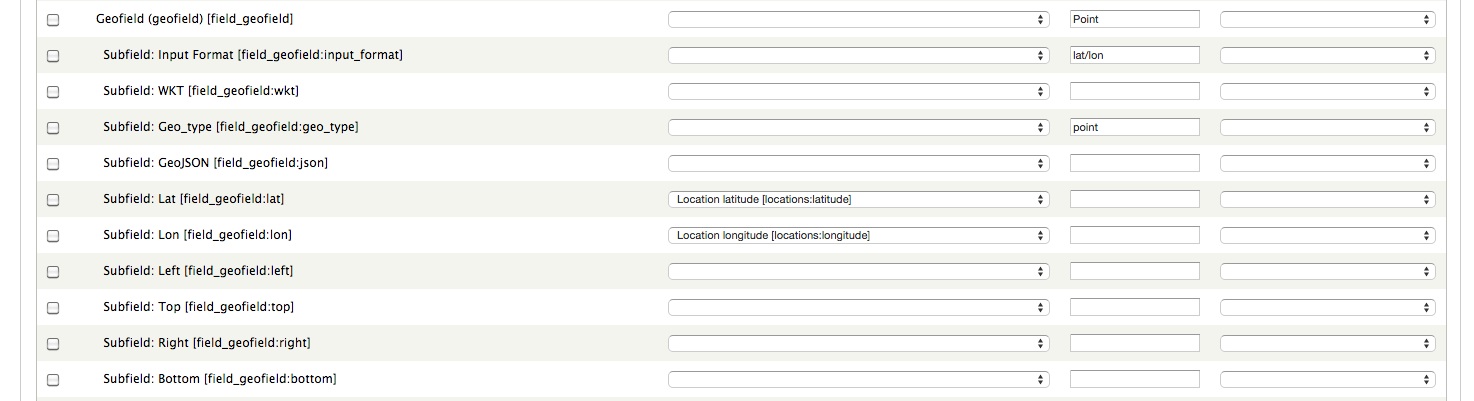
I changed my D7 contenttype and added a Location field and didn't use the node location information for D7 Weblinks contenttype.
Now with using this Location Field, the destination fields are shown in the Migrate UI (see attached image). But also no Node Location data in the selectlist like earlier with Nodewords. Again I think the bridge from D6 Node Location information to D7 Location field data needs to be build, likewise Nodewords.
See also here, that the location.migrate.inc is a Location field handler, not a Node location handler (https://www.drupal.org/node/2325727)
I think in D7 people are expected to use the D7 Location fields instead of the ordinary as explained here (https://www.drupal.org/node/375259#comment-1288348)
Greetings, Martijn
Comment #93
gstegemann commentedHi Martijn,
Great! However, the Robots Metatag does not work yet. Do you more Metatag fields?
Second I will try to test Nodewords-Metatag migration module as well. Then one could migrate all Nodewords data for all nodes.
I will check that. But today I'm quite busy. So it will take a while.
Gerhard.
Comment #94
summit commentedHi Gerhard,
No I do not use other Metatag fields. I think the best approach is the UI approach, so everyone can use all available stuff in D6 to be migrated to D7 per node.
I understand you want to test the Nodewords Metatag Migration module, but that doesn;t do the trick when I see other comments on drupal.org.
About Location data, I understand completely. I will test when you are ready for this. Thanks for all work until now!
Greetings, Martijn
Comment #95
gstegemann commentedHi Martijn,
Now I'm a bit confused. How does your setup regarding Location look like? Which modules do you have installed now? Location on D6 and D7 site? Or Addressfield on D7 site, since the link https://www.drupal.org/node/2018113 points to D6 Location to D7 Addressfield migration.
Comment #96
summit commentedHi Gerhard,
I have the regular Location Node on D6 site.
But to get Destination fields showing I added a Location Field to my D7 Weblinks Contenttype.
I think Location Fields is the way forward from D7, so thats why I did this.
So I have Location Node installed on D6 with Weblinks and location, street, stae, country, lat,lon fields etc..And I have Location with a location Field on Weblinks installed on D7.
Is this clearing up the situation? The link to the migration with Addressfield was an example what may be is to be used by you with some tweaking.
Sorry if that confused you.
greetings, Martijn
Comment #97
summit commentedHi Gerhard,
Regarding Location Node migration, I found also this: https://www.drupal.org/node/1938880
May be first see if Location Node migration is working..
greetings, Martijn
Comment #98
summit commentedHi Gerhard,
With the goal not to change anything in the source-site, but use it within the migration, I think it is best to first see if location node migration is possible within Weblinks.migrate.inc.
The location module itself has only location field migration, and not location node migration fro what I see. I saw this two issues where location node migration is being used: https://www.drupal.org/node/1938880 and https://www.drupal.org/node/2018113#comment-8432383 and https://www.drupal.org/node/1989466#comment-8714729
Is this may be valuable information to get location node migration in?
Greetings, Martijn
Comment #99
gstegemann commentedHi Martijn,
thanks for all the links, but I knew them already.
Anyway, here is the next version including Location migration support.
Assumptions:
The migration code attempts to migrate every location item available, apart from 'email' which is not available in D6.
Regarding Nodewords - Metatag migration: I have also added the 'metatag_page_title' field. Please check if that works.
Gerhard
Comment #100
summit commentedHi Gerhard,
Thanks! Will be able to test this tomorrow evening.
With the assumptions, I hope you are referring to the destination Drupal 7 contenttype and modules installed, right?
Greetings, Martijn
Comment #101
gstegemann commentedHi Martijn,
OK.
In fact I mean on both sides. According to your sample Web Links node you sent me you are using the Location items 'phone' and 'fax'. And these are only available when such sub modules are installed. Or were installed at the source site. The migration code needs at least acces to the source Location tables.
Test it and we will be see if something is missing. It works for me.
Comment #102
summit commentedHi Gerhard,
As told I am not at home to test right now. but I just installed a couple of years ago Location With the then normal Location Node way of working. if the field is named field_locations depends on the fact if the field without changing the code has this name. I hope so:)
Greetings, Martijn
Comment #103
gstegemann commentedHi Martijn,
yes, I know.
According to your screen shots the field name is field_locations. But in case not, the field name can be changed easily.
Comment #104
summit commentedHi Gerhard,
The screenshot was from my destination fields, not the source fields..
As shown here..https://www.drupal.org/node/2018113 I think the straight location node names are different.
I do not see them anywhere named with field something though...
Greetings, Martijn
Comment #105
summit commentedHi Gerhard,
I tried the migrate but got a database error with latest https://www.drupal.org/files/issues/weblinks.migrate.inc__8.txt
I see in the code
But I do not have a field "field_locations_lid" in my D6 table "Vakanties_content_type_weblinks"
My fields in this D6 table are:
Sorry to have to report this.
Greetings, Martijn
Comment #106
gstegemann commentedHi Martijn,
no big problem. That's how it appears on my site.
Can you check whether you have a table like 'content_field_location' or similiar as found is in the following line:
Somewhere should be a table were your location information is stored.
Gerhard.
Comment #107
summit commentedHi Gerhard, I do not have a location_field in my D6 site, I only have Location Node! So I do not think I have this table there.
I didn't use Location CCK field on D6.
I did the following with the code...and it seems to work! I commented that line of non existing table in my D6 configuration.
May be when Location CCK Fields are used in D6 this is needed?
Would this harm?
And shouldn't some assumptions also be tested, like
EDIT: Just for the record, when I remove my Location_field in D7, I do not see a Destination place for D6 Location information.
So this Migrate works from D6 Location Node to D7 Location Field (successor of CCK Field), right?
So I have to alter my migrated D6 views to use the D7 Location Field stuff instead of Location Node.
Greetings, Martijn
Comment #108
summit commentedHi Gerhard,
Just for the record, when I remove my Location_field in D7, I do not see a Destination place for D6 Location information.
So this Migrate works from D6 Location Node to D7 Location Field (successor of CCK Field), right?
Not to D7 Location Node.
So I have to alter my migrated D6 views to use the D7 Location Field stuff instead of Location Node.
Greetings, Martijn
Comment #109
summit commentedHi,
And with rollback I got these messages:
Is this ok?
greetings, Martijn
Comment #110
gstegemann commentedHi Martijn,
I wasn't aware of this difference. But somewhere must be a reference to the Location ID (LID) used in a Node. I have to investigate this further.
I have to check.
Maybe. Currently the migration works because you are using location data only for your Web Links nodes. But migration may fail when you have other nodes with attached location data. So we have to check in which table the node's LIDs are stored.
Yes, definitely. But you asked for a quick solution. So I tried first to get it working for you. Any improvements can be made later. Or created this any problems at youre site?
Yes, that is the way migrate_d2d works (which provides the UI).
Yes.
Probably yes. Unless someone writes a Destination Handler for D7 Location Node. And as far as I know "Location Node" is deprecated.
As far as I understand all the discussions about D7 Location, I would say Yes. But you can ask the maintainer of module Location what the prefered methods are.
Yes. Those messages are issued by the Location module. They just mean that obsolete location data got deleted. This was already discussed in the Location issue queue.
Either you comment the following line in prepareRow (as Migrate should usually take care of this)
or you tell me how your D6 formats are mapped to the D7 format names.
Gerhard
Comment #111
summit commentedHi Gerhard,
Going in to your answers
1) I wasn't aware of this difference. But somewhere must be a reference to the Location ID (LID) used in a Node. I have to investigate this further.
I see here http://www.drupalcontrib.org/api/drupal/contributions!location!location....
that table location_instance makes the bridge between vid, nid and lid.
2) Yes, definitely. But you asked for a quick solution. So I tried first to get it working for you. Any improvements can be made later. Or created this any problems at youre site?
Yes I understand completely. It was also a remark for people which find this page to be aware of. Off course with adding a dependency it will also work!
3) Probably yes. Unless someone writes a Destination Handler for D7 Location Node. And as far as I know "Location Node" is deprecated.
Yes I will use Location_field from D7 on up! So it is work but for the better!
4) And going trough my just imported weblinks, I also see that the text format of the *Summary* and the *Link description* is reset with every weblinks node
to plain text
I was able to change this myself through the UI! To set as default "full_html"!
Greetings, Martijn
Comment #112
summit commentedHi Gerhard,
One other thing. The vocabularies
Can have more than one term referenced by a node. This is also the case in my D6 weblinks contenttype and node instances (see attached picture).
But in the D7 migrate result I only see one term reference brought within the migration.
Is this fixable please?
EDIT: I found this post that may be helps; http://stellapower.net/blog/migrate-module-migrating-nodes-taxonomy-terms
Thanks a lot in advance!
Greetings, Martijn
Comment #113
gstegemann commentedHi Martijn,
To be honest: I have no idea yet. The migration process itself is done by the Migration classes delivered with Migrate and migrate_d2d. So you should ask this question in your issue #2467371: Weblinks contenttype link-URL not possible to Migrate you already started in the migrate_d2d issue queue. Especially for free tagging vocabularies.
Update: thanks for the link. Looks like a possible way. But that requires more customization again which I would like to avoid. Maybe using hook_migrate_prepare_node can help here.
One other thing: could you please review and report all found deficiencies in one comment and not in bits and pieces. That is not very efficient and very time consuming. When you reply to a new version with "it works" I assume that it really works. Thank you for your understanding.
Gerhard
Comment #114
summit commentedHi Gerhard,
Sorry, but my enthusiasm wins it sometimes from rationality.
Great that the link may be gives some light on this!
EDIT: Gerhard...I feel so stupid. Being a little in the sun helps!
I suddenly thought about the fact that may be those Vocabulary fields are not set to unlimited, but only to one, and this was true!
I set the term_reference_fields to 'unlimited" and now the multiple terms role in!
Greetings, Martijn
Comment #115
gstegemann commentedHi Martijn,
I surely understand. But sometimes its better to decelerate for a while.
Great, that you found the reason for the imperfect terms migrations. But don't worry. I haven't done any research yet. Therefore no time wasted.
Gerhard
Comment #116
summit commentedHi Gerhard,
very happy that you didn't do research yet! You helped me so much.
A nice weekend for you. We have kings play and kings day in Holland this Monday.
This is still an open thing;. somewhere must be a reference to the Location ID (LID) used in a Node. I have to investigate this further.
I see here http://www.drupalcontrib.org/api/drupal/contributions!location!location....
that table location_instance makes the bridge between vid, nid and lid.
May be something like:
Will this work?
And these are messages I still got, but they do not harm in the short term:
And because I do not use weblinks volcabulary, because I can only choose one and my content is referenced to region and category..
I think we are 99% there with the migration. A fine weblinks.migrate.inc already!
Greetings, Martijn
Comment #117
gstegemann commentedHi Martijn,
You' re welcome.
Also a nice weekend for you. I've heart from kings day. Is that day a holiday in Holland?
The reference is already is there:
You can gracefully ignore them. 'legacy_nid' is just a helper destination field. 'metatag_copyright' is probably not supported by module Metatag or has a different name. Regarding field metatag_page_title: it may mean that module Page Title is not installed at your D7 site. A note regarding meta tags: there are so many different meta tag fields. Therefore the migration mappings of them is really site specific and may require more customization.
Yes. But you can disable Web Links vocabulary mapping when you set constant SOURCE_TERM_WEBLINKS_CAT to 0. Or I have to add an option to specify also the site's specific machine name of the Web Links navigation vocabulary.
No problem neither. Field 'vid' is the 'version ID' and not a vocabulary ID. You may remove the mapping in the code.
Yes.
Gerhard
Comment #118
summit commentedHi Gerhard,
About Regarding field metatag_page_title: it may mean that module Page Title is not installed at your D7 site. A note regarding meta tags: there are so many different meta tag fields. Therefore the migration mappings of them is really site specific and may require more customization.
This is still an open issue.
I use the Page_title module on D6, and not the Metatag_page_title after more investigation.
I tried bringing this in myself, but am stuck at the database level. These are the changes I foresee;
And then after this the database stuff which I am stuck...
Something like this? But it doesn;t work...I am stuck at this level
greetings, Martijn
Comment #119
gstegemann commentedI will look into this later.
Comment #120
summit commentedThanks Gerard!
Greetings, Martijn
Comment #121
gstegemann commentedMaybe some progress is going to be happen here the next time: #1281138-70: Upgrade path: Nodewords
I'm wrong about Metatag and module Page Title:
And I found this note at the Metatag homepage:
Page title - Functionality has been merged into Metatag, but will continue to exist.So on a D7 site the Page Title module should not be installed when MetaTag is used.
Gerhard
Comment #122
summit commentedHi Gerhard,
The Upgrade path Nodewords is about upgrading a site from D6 to D7, which is very difficult to get working...thats why I chose the Migrate path, see this tough issue: https://www.drupal.org/node/2464003
But I have my data in Page Title module on D6. How do I get this data in Metatag D7 using Migrate?. I think there needs to come a Source handler for D6 Page Title than, which will be converted to the Destination "Metatag_Page_title", right?
Something may in http://cgit.drupalcode.org/sandbox-jhodgdon-1946998/tree/Content67Migrat...
Greetings, Martijn
Comment #123
gstegemann commentedHi Martijn,
I think I got the Nodewords Page Title migration to Metatag D7 working. So try the todays version of the migration code.
Whether the meta tag page title needs to be migrated or not is defined by the constant NODEWORDS_PAGE_TITLE.
Gerhard
Comment #124
summit commentedHi Gerhard,
I am able to do this tonight. but may me I was not clear enough or I am not getting it yet...
I use page_title module for the "meta tags" page title in D6, not the Nodewords page_title. That was then the standard.
Isn't the following scenario the best for this:
1) Install module page_title on D7 for migration
2) Having a Page title source_handler as tried in #118 (https://www.drupal.org/node/2210683#comment-9876787)
3) through migrate_d2d UI set D6 page_title (page_title module) ==> D7 Metatag_page_title (metatag module)
4) Migrate Weblinks nodes
5) Uninstall page_title module on D7
6) Result migration of D6 Page_title page_titles to D7 Metatag page_titles and therefor using the right module for D7 and forward?
For this scenario , no destination, but only a source handler for Page_title module is necessary, right? Is this doable?
Greetings, Martijn
Comment #125
gstegemann commentedHi Martijn,
I see. And there is no option to "update/merge" this at your current D6 site?
No. As I wrote already in #121. Module Metatag may have problems with D7 Page Title.
No. First try the migration code from yesterday. The option I added yesterday allows to either just apply Nodewords Title or either Nodewords Page Title. And if that doesn't work at your site I can still add a query to the D6 page_title table and make the merge within the migration code. I have already defined a source field for that purpose: nodeword_page_title.
But that will be already done by the migration code, as described in 2). Second, there is basically no destination field D7 Metatag_page_title. It's just called 'metatag_title' (as fas as I have seen). The mapping would be then 'nodeword_page_title -> metatag_title'. At least during my tests the destination node meta tag was displayed as "Page Title".
Yes.
This step is not needed as outlined in 1).
Yes. That's the plan.
Bascially yes. But as I described here. I will do this merge within the migration code internally, controlled by an option.
As described above.
Gerhard
Comment #126
summit commentedHi Gerhard,
I think the query to the D6 page_title table and make the merge within the migration code. will be necessary to get the sourcefield within scope of the Migrate_d2d UI. It would be great if the destination will be the Metatag_page_title field, therefore doing two things. Abondon the page title route to D7 in favor of Metatag and migrating the information.
greetings, Martijn
Comment #127
summit commentedHi Gerhard,
There is now the Nodewords meta tag page title [nodeword_page_title],
But with the migration no filling of the Metatag title.
This is I think because this comes from the page_title module in D6, and not Nodewords.
I had to comment this line again for my situation:
Greetings, Martijn
Comment #128
gstegemann commentedHi Martijn,
thanks for testing.
Yes. I just wanted to be sure. I will add the Page Title merge later. It's a holiday today in Germany.
Yes, I know. I will add an option to disable this line in the next version. At my site I need this line.
Gerhard
Comment #129
summit commentedHi Gerhard, .enjoy your holiday! Greetings, Martijn
Comment #130
gstegemann commentedHi Martijn,
this version of the migration code includes the support for merging page titles from module Page Title.
The following options allow you to control the migration process:
'WEBLINKS_LOC_CONTENTTYPE' enables/disables the join of 'content_type_weblinks'.
'NODEWORDS_PAGE_TITLE' selects to either migrate the page title meta tag or just the node title as meta tag.
'MERGE_PAGE_TITLE' used in conjunction with 'NODEWORDS_PAGE_TITLE' enables to merge the page titles from module Page Title like a Nodewords page title.
However, I could not fully test the code since I upgraded my D6 site already to most recent version of Nodewords.
Good luck, Gerhard
Comment #131
summit commentedHi Gerhard,
It looks that it works!. Will investigate more thoroughly. Thanks for the variables. My settings where:
It takes now Page_title title-data
If I understand it correctly. with define('MERGE_PAGE_TITLE', 0); it takes Nodewords Page title data
And if both are zero define('NODEWORDS_PAGE_TITLE', 0); and define('MERGE_PAGE_TITLE', 0); no page title data is migrated?
Greetings, Martijn
Comment #132
gstegemann commentedHi Martijn,
Ok, great to hear. Yes, please check if all your nodes become migrated correctly.
You're welcome. Your settings look OK.
Yes.
Correct. And in case when no metatag tag 'title' exists the node's title is taken as a meta tag 'title.
Gerhard
Comment #133
summit commentedHi Gerhard,
This question is may be out of scope...but is it possible to limit the location_country information to its 2-character shortcode; lile UK, US..
Because Location/Gmap is not the way forward to D7 I want to use the Adressfield for Location information. But it stops by the Countrycode..
This is the error:
EDIT: found this related to the destination Addressfield: https://www.drupal.org/node/1326044#comment-6210674
and this of course for this purpose: which is exactly what I try to accomplish. To get the info AND in location AND in addressfield, so I can see what views are better to construct within D7. https://www.drupal.org/node/2018113
EDIT2:
Tried it myself, but still this annoying error with:
EDIT3: Tried to truncate, but still same annoying error..
The great thing from migrating instead of updating is that you can move to better maintained and more standard modules through the Migrate_d2d UI.
This is what I try to accomplish using weblinks nodes with better fields than I had in D6!
Greetings, Martijn
Comment #134
gstegemann commentedHi Martijn,
Sure, that is possible. Do you want just to have the country codes truncated or even translated to reasonable values? But then I need a list of to be translated values.
And do you need also the mapping your location data into Addressfield?
Sure, that's the wrong place/way to do it. You have to either use a callback function or perform the truncation in prepareRow.
Yes, definitely.
Gerhard
Comment #135
summit commentedHi Gerhard,
I would very much like that the Address field to be used as a sidekick from location. Getlocation module needs Addressfield also. I think translated to reasonable values is than the case. You mean this sort of list: https://www.drupal.org/node/1136340 ?
I need mapping my location data to location AND addressfield. It is difficult now to see whats better, because I have to go into the google maps views to see what is the best fit. So preferably both. I added an addressfield to my weblinks content type, so both can be filled from migration D6.
Thanks again! and greetings,
Martijn
Comment #136
gstegemann commentedHi Martijn,
Basically yes. But a programmatically solution is better, like here: #1814860: Convert source country as text into ISO with addressfield destination handler.
I can understand. But this is really not a migration job. Sounds now more likely to be reorganisation task.
Then I would suggest, that you first perform your tests and then we can talk about further enhancements of the migration code. To assist your tests I can implement the Country Code lookup. But for any further steps I would very much prefer to have a clear and full specification of what you need.
Gerhard
Comment #137
summit commentedHi Gerhard,
I understand what you mean! Yes after the Addressfields are in, I will investigate all possibilities with Google Maps Views and hopefully no migration items come out of this.
The best Google Maps view solution needs Geofields and Addressfields, but I have on D6 Gmap Location working. I will investigate this further!
Greetings, Martijn
Comment #138
gstegemann commentedHi Martijn,
here is now the migration code version with added support for country name to Country ISO code translation.
Comment #139
summit commentedHi Gerhard, Thanks!
I tried to get the addressfield filled with the following extra code:
But I still get:
See attached my latest code.
greetings, Martijn
Comment #140
gstegemann commentedHi Martijn,
That cannot work. The function 'addFieldMapping' maps fields by name and not by content.
As far as I can see you may have country names which are not found by the function 'country_get_list'.
What I can do is to truncate the country code fixed to 2 characters in case of an unknown country name and display a message.
Gerhard
Comment #141
gstegemann commentedHi Martijn,
I've added now the Addressfield migration and the plausibility check for untranslated country names.
I couldn't test the Addressfield migration since I haven't installed it.
Comment #142
summit commentedHi Gerhard,
Stil
May be I can set a Devel statement somewhere that you can see what is going wrong?
greetings, Martijn
Comment #143
gstegemann commentedHi Martijn,
I found a small bug, which caused to not truncate the Country Code. Fixed in current attachement.
Question: were any warning messages displayed during you tests? Like "Unknown country name ..."?
Comment #144
summit commentedHi Gerhard,
Sorry to have to report that the same database error is still there;
I think warning messages are in the top of the screen. No warning message show during import.
greetings, Martijn
Comment #145
gstegemann commentedAdd a 'dsm()' call as shown below and see what values are set in all the 'locations:' properties:
Comment #146
summit commentedHi Gerhard,
I got 500 error...I see something strange though:
could this be a problem?
I commented this line // //$this->addFieldMapping('field_address_country', 'locations:country');
This is my output of the first error-node:
I think placeholder_10 is the field_address_country. It is ES in this case..
EDIT; could this may be help: https://www.drupal.org/node/1326044#comment-6005836 Array?
greetings, Martijn
Comment #147
gstegemann commentedHi Martijn,
Yes. Change it to:
In 'addFieldMapping' you don't map database table columns. You map migration field names.
And check which destination fields are really displayed in the migrate_d2d UI.
I think it is placeholder_6.
Comment #148
summit commentedHi,
Could this may be help https://www.drupal.org/node/1326044#comment-6005836 Array?
I got Krumo output:
greetings, Martijn
Comment #149
gstegemann commentedHi Martijn,
No. The arguments method is deprecated. Sub fields is the way to go.
Array is OK. It works at least for the Location migration. And your Krumo output looks OK.
Comment #150
summit commentedHi Gerhard,
mmm...what could be wrong then..I map these fields in D2D:
greetings, Martijn
Comment #151
summit commentedHi Gerhard,
When I count correct, it's the sevend placeholder; 7 I think, you where correct with nr 6.
{field_data_field_address} (entity_type (0) , entity_id (1) , revision_id (2) , bundle (3), delta (4), language (5), field_address_country (6), field_address_administrative_area (7), field_address_sub_administrative_area (8), field_address_locality (9), field_address_dependent_locality (10), field_address_postal_code, field_address_thoroughfare, field_address_premise, field_address_sub_premise, field_address_organisation_name, field_address_name_line, field_address_first_name, field_address_last_name, field_address_data)
It looks from the output this field is somehow empty; and placeholder (10) holds the countrycode...
See output:
Array\n(\n [:db_insert_placeholder_0] =\u0026gt; node\n [:db_insert_placeholder_1] =\u0026gt; 1215\n [:db_insert_placeholder_2] =\u0026gt; 1217\n [:db_insert_placeholder_3] =\u0026gt; weblinks\n [:db_insert_placeholder_4] =\u0026gt; 0\n [:db_insert_placeholder_5] =\u0026gt; und\n [:db_insert_placeholder_6] =\u0026gt; Hotel Ibis Bilbao\n [:db_insert_placeholder_7] =\u0026gt; \n [:db_insert_placeholder_8] =\u0026gt; \n [:db_insert_placeholder_9] =\u0026gt; Barakaldo (Bilbao)\n [:db_insert_placeholder_10] =\u0026gt; ES\n
greetings, Martijn
Comment #152
summit commentedI now understand why placeholder_10 holds also the country ISO code. See attached my mapping of the addressfield. The mapping through the UI with locations:country works for a field which is not the country field like the field_address_dependent_locality ..
Greetings and a good night to you. Martijn
Comment #153
summit commentedHi Gerhard,
I feel so stupid again....I thought that the Address_field itself should hold the name....but working with the country stuff, and seeing that placeholder_10 also holded the Country ISO and that it was working...I thought may be should the main field also holds the country code (locations;country).
And it is working!
Now the addressfield is also filled!! So I can look into views what solution is the best from the migrated location information. You hoe!!
Thank you so much for your time and effort to get migrate and for shore weblinks migrate solution on a complete other level!
I have a friend watching over the migration result this week and I report back any findings, but it looks all stuff related to my weblinks nodes is migrated now!
Greetings, Martijn
Comment #154
gstegemann commentedHi Martijn,
thanks for your feedback. I'm glad that the Web Links migration now works for you.
So now I can start to do some cleanup of the code as time allows.
Gerhard
Comment #155
summit commentedHi Gerhard,
Yes I understand Code cleanup..I made a mess of it...
Off course willing to test for you more clean up weblinks.migrate.inc.
greetings and again thanks for this Migrate "travel", Martijn
Comment #156
gstegemann commentedHi Martijn,
Yes, some.
Thanks. I will come back to you when I have done my cleanup work.
You're welcome.
Gerhard
Comment #157
summit commentedHi,
My latest weblinks.migrate.inc with Geofield migration possibility also and mapping of the geofields with 'lat/lon' type.
Greetings, Martijn
Comment #158
summit commentedHi, sorry attached geofield.migrate.inc which was the basis for using geofield mapping with weblinks.migrate.inc
Now attaching weblinks.migrate.inc
greetings, Martijn
Comment #159
summit commentedgrrr..now attaching weblinks.migrate.inc.
greetings, Martijn
Comment #160
gstegemann commentedHi Martijn,
great to hear that the Geofield migration works as well. And thanks for contributing your changes.
Gerhard
Comment #161
summit commentedHi Gerhard,
I made a mistake and had to rollback my weblinks migration.
Is it correct that the rollback will not take with it all database records woth the bundle "weblinks"?
I try to re-import the weblinks nodes and I got continuesly errors like: (as an example)
I have to go through my whole database and every field_data ...and remove the "weblinks" bundle".
Is it possible to have a sort of rollback function which also removes all weblinks bundle records in the fields?
Thanks for going into this!
Greetings, Martijn
Comment #162
gstegemann commentedHi Martijn,
No, you can rollback as often you want. I've done that several times with no problems yet.
That looks like that the Language does not match. The bundle is stored as LANGUANGE_NONE -> "und", whereas you are using as default Language "nl". That seems to be key of your problem.
That's all handled by the Migration module. Maybe you should ask there what's wrong with the bundle.
Gerhard
Comment #163
summit commentedThanks for your quick reply and a great weekend! I will look into it more from a Migrate perspective.
greetings, Martijn
Comment #164
gstegemann commentedAfter all the iterations implementing a sort of reasonable Web Links migration module I've decided to mark this issue as fixed. The current version has to be seen as a 'proof of concept' implementation for any future migration solutions or projects.
I did some clean up and have added some final notes to the code and uploaded it again.
For any new questions and problems regarding Web Links migration new issues should be created. Thank you.
Gerhard
Comment #165
jonathan1055 commentedThat sounds good. Are you going to add the new weblinks.migrate.inc file to the project?
You could also change the title of this issue, as it does work nicely now. It should be a positive title ;-)
Comment #166
gstegemann commentedI'm not sure yet. Maybe a better idea is to package the Web Links migration into a sub module, including a small UI to setup the site/user specific migration options.
Yes, indeed. I had considered yet. Do you have an idea for a better title? Maybe something like 'Migration prototype based on Drupal-to-Drupal Migrate'.
Comment #167
jonathan1055 commentedI think a sub-module is a good idea. Then it can be enabled for those who need it, but will not take up coding footprint or memory if not needed.
For the title, how about '6.x to 7.x migration based on Drupal-to-Drupal Migrate'
Comment #168
gstegemann commentedYes. Then we preferably will go that way.
Great. I will take that.
Comment #170
gstegemann commentedIn the meanwhile I have added migration support for the "Web Links integrated node weight feature".
The migration of the Web Links node weight information, encoded in the sticky field, can be enabled/disabled through define 'WEIGHT_WEBLINKS'.
Comment #171
summit commentedHi Gerhard, Thanks it is working fine!