

 The 2026 Drupal Business Survey is open. Your response will help shape the future of the Drupal business ecosystem.
I'm trying to figure out a theme combination that works with this menu system. Project page, there are some references to
Zen, Omega, Corporate Clean, Marinelli, Danland
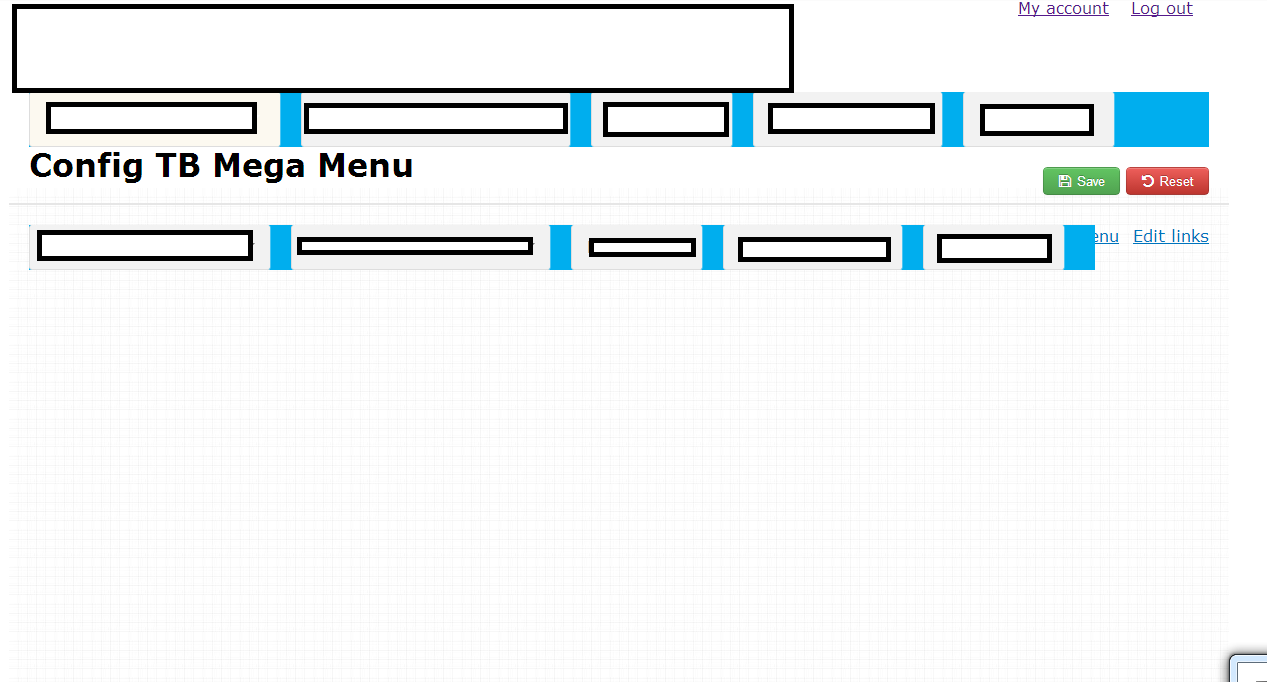
But my experience is not the same. I must be missing something. Here is what I'm getting in the zen theme.
Configuration not showing up correctly in zen (I whited out some stuff).
Are there dependencies that I'm not seeing in the documentation? I know in the video it asks me to install font-awesome, and chosen... But the project page doesn't say anything about it. So it's been a bit of a ride trying to get this menu system to work.
It's a great menu system. I look forward to using it. But I need to be able to configure it.
| Comment | File | Size | Author |
|---|---|---|---|
| configuration doesn't show top bar.png | 42.69 KB | JayShoe |


Comments
Comment #1
JayShoe commentedComment #2
JayShoe commentedComment #3
JayShoe commentedOddly enough, I figured this out.
Disable Module, Uninstall Module, Delete Module Folder. Redownload Module, re-enable Module. Now it works.
Comment #4
JayShoe commentedComment #5
JayShoe commentedI'm reopening this ticket. I can reproduce this issue by following these steps.
1. Install TB Megamenu
2. Go to admin/structure/tb-megamenu/main-menu, looks good right? OK
3. Go to admin/structure/block and enable the TB Megamenu block in "navigation" position.
4. Go to admin/structure/tb-megamenu/main-menu... The page will be messed up as described at the opeining of this issue. The Toolbox Area is missing and other things just look messed up.
WORK AROUND:
1. Go to admin/structure/block and open the TB Mega Menu block...
2. In the "Show block on specific pages" section select, "All pages but those listed", and enter, admin/structure/tb-megamenu/main-menu.
3. Go to admin/structure/tb-megamenu/main-menu and you can now continue building and editing the menus.
This stuffed me up for a while. I'm surprised others aren't experiencing the same issue.
Comment #6
josh.estep commentedIf you're troubleshooting this issue and are using context for block placement, temporarily removing the mega menu blocks from their contexts appears to be a workaround.
Once changes are applied, the blocks can be added back into their contexts.
Comment #7
JayShoe commentedThank you Josh for your note. As mentioned in #5, removing tb_megamenu from all blocks and displays while in the configuration page is the work around. You can not have the tb_megamenu active during configuration. And yes...
And I'll add - or just disabled on the admin/structure/tb-megamenu/* pages.
Comment #8
mattsmith3 commentedContext config: set the context as path to
Now it loads on every page but the tb_megamenu pages.
Comment #9
caseyb commentedThanks - #7 and #8 worked for me!
Comment #10
niner94949 commented#7 and #8 worked for me as well. Thank you for posting this workaround.
Comment #11
neilhanvey commentedneither worked for me :( this is crazy frustrating!
Comment #12
neilhanvey commentedthe only way i can get round it is when i go to the config page for megamenu is by clicking Save and the toolbox shows up.
Comment #13
Byte_Monster commented#5JayShoeThank so so much! This workaround worked fine for me.
Comment #14
manuelangelrp commentedneilhanvey, I've the same problem, and neither worked for me. Only when I click save the toolbox shows up. Also, if I add columns not save the settings
Comment #15
marcel.jtf commented#7 and #8 did NOT work for me either but #3 strangely did work
Comment #16
scottbaetz commentedSo, spent about 6 hours trying to figure out why the config menu wasn't showing up. This was the SOLUTION - I beg someone to add this to the installation or readme file.
Comment #17
Joel_XN commented#7 an #8 works perfectly for me!
Thanx @JayShoe
Comment #18
rbrownellThanks for the report and for contributing to the TB Mega Menu issue queue.
Drupal 7 reached end of life on January 5, 2025 and is no longer supported going forward.
As part of wrapping up Drupal 7 support for this project, issues that do not include a code-based resolution (including issues where the only patch is out of date and requires a re-roll) are being closed as Outdated as part of this cleanup.
This closure reflects the end-of-life status of Drupal 7 and the absence of an up-to-date fix we can act on, not the validity of the issue itself.
If the issue applies to a currently supported version of Drupal, please open a new issue with updated details.
Thanks again to everyone who contributed during Drupal 7’s lifecycle.