

Needs work
Project:
Commerce Discount
Version:
7.x-1.x-dev
Component:
Code
Priority:
Normal
Category:
Bug report
Assigned:
Reporter:
Created:
15 Oct 2013 at 21:18 UTC
Updated:
12 Feb 2019 at 13:13 UTC
Jump to comment: Most recent, Most recent file






Comments
Comment #1
Exploratus commentedI agree. The checkout page is a tad confusing. It shows everything with a discount, and then the subtotal all of a sudden doesnt have a discount, and then the discount is shown. A lot of people are going to wonder what is going on. Most websites showing a discount price on the product page dont line item that discount.
Comment #2
kevster commentedAgree this is a great module, most sites need this sort of feature. The alpha3 version has several improvements as well.
Im having the same issue as above but also I cant seem to expose the discount as a separate line item in checkout?
Comment #3
cigotete commentedsubscribed. Seems there is no sense among the information displayed about the item prices, the subtotal and the total price.
Comment #4
cravecode commentedbump!
Very curious how others are using this.
Currently with the line items showing as discounted, the SubTotal doesn't add up unless the user knows to also factor in the listed discount.
Comment #5
cravecode commentedAttached is my first go at a patch to keep the original line item price. Please test before considering using this. I don't know enough about all the workings of the commerce_discount module to know if this will have a negative impact on other pricing processes.
The patch only works for the dev branch of commerce_discount (7.x-1.x).
The effects of this patch need to be enabled by either a admin form setting or drush:
Display line item price as discounted price?to "No"drush vset commerce_discount_line_item_price_alter 0Basically this patch adds the following to the end of the
commerce_discount_add_price_componentfunction :You can merge from my sandbox project that was branched from this module's repo (7.x-1.x) at https://drupal.org/sandbox/cravecode/2199593
Comment #6
deardagny commentedI've been testing cravecode's changes in #5 and I haven't seen any problems yet. I just patched it manually because at a glance it looks like the patch file will try to remove the lines that we want to add (?). Either way, big help - thanks!
Comment #7
deardagny commented@cravecode - I found what looks like a conflict. I use Commerce Extra Price Formatters to display discounted prices on product pages and elsewhere. After applying your patch, the formatting provided by that module and the adjusted price went away. The discounts are applied and displayed correctly in the cart and during checkout, but everywhere else the original price is displayed.
Not sure if there's a simple fix for this but I figured I'd point it out.
Comment #8
shaneonabike commentedThis is a great patch but also I noticed that on the product page the price is not set properly either (with a discount). So people don't know what the 'real' price they are paying. I poked around but couldn't figure out where the actual section of 'rendering' this was since that would most likely be a better place to modify things.
Comment #9
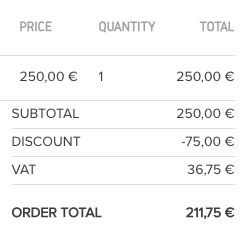
shaneonabike commentedI'm changing this to a bug report because I actually think it's a bit of a usability issue. Mainly, because if I were a customer and went to my order to see (attached) I would almost think that there was an issue with teh subtotal and that I should be receiving the product for free.
Comment #10
greenskin commentedHere's an updated patch based on the one from #5. Instead of setting the line item's unit price amount back to the base price, the line item's unit price amount is not adjusted at all, preserving any other potential price adjustments from other rules.
Comment #11
joelpittetLet's see if this patch flies?
Comment #14
torgospizzaThis patch is exactly what we needed. I was just confused by the fact that Discounts was basically overriding the Price formatter settings for "original price as loaded" options, which was especially problematic for Cart and Checkout views since you don't have a choice of how the price is loaded. This patch makes it FAR less confusing, since now the subtotal is the correct amount (summed up from the line items in the Cart Contents pane) and the math in the Subtotal section now makes sense.
That patch DID apply for me, though with some fuzziness. I'm not sure why, but it applied and worked well.
Here's a re-roll, let's see if it passes testbot.
Comment #15
torgospizzaWhoops, forgot "Needs Review"
Comment #16
torgospizzaHooray for green! I'd say this is RTBC, only because it makes the math at Checkout actually make sense, and I know at least one help ticket customer who will thank me for that!
Before:

After:

Comment #17
joelpittetThanks for the patch @torgosPizza, I'd prefer if someone else reviewed and tested your patch that's the normal etiquette. @see second sentance https://www.drupal.org/node/156119#rtbc
Comment #18
joelpittetThere are some nit picks that should be cleaned up if you have a moment. Though the concept looks pretty solid. I wonder how others are dealing with this currently?
Also can't remember how I got around this, I think it was with a formatter but not sure... will look into this. Is there cases when you would want to show the discounted amount on the line item as it's set?
space after the if.
commas at the end.
Comment #19
joelpittetI'm a plus one to this idea but I'd really like to know why it shouldn't be the default and/or the only way to show the line item. (VAT maybe?)
Comment #20
torgospizzaCool, yeah understood about the RTBC'ing thing. I didn't edit the patch at all, hence I figured it'd still be copacetic.
So, regarding the usage or other way of showing the line item, I'm not 100% sure. In theory, showing the discounting line item seems like a good idea, but then the fact that the subtotal essentially negates all of that by showing the sum total of the unprocessed line items leads me to think that altering the line item price in this manner was a mistake or an unintended consequence.
For example, I like the idea of showing a discounted line item in a product page, but that would pretty much be it, since the cart/checkout Views will always have the "calculated price" of that product, which in Commerce Discount's case includes a price_alter that throws the math off.
I'm not familiar enough with VAT to give an opinion but I would imagine - since they tend to be more strict with their rules - that the subtotal should probably match the prices of the line items that add up to it. Without this patch that does not happen, and it leads to a very confused customer. So yeah, to be honest, I'm surprised that this isn't the default - and while I do appreciate having a line item get its price altered by the Discount module, I think it really makes the most sense only in a product display context (especially if a user has a User Discount applied to their account, for example) and there is no other context than that. But once we move to the Checkout phase you probably want to keep those discounts listed separately for verbosity.
My two cents anyway.
I haven't really dived into the patch at hand to see if it has any other consequences. I don't think it will since it's not altering the price components at all... in any event here is a re-roll from me along with a helpful comment and space fix.
Comment #21
torgospizzaComment #22
joelpittet@torgosPizza oh I see, the patch #10 just re-rolled. Then RTBC is fine:) Didn't realize that from the comment.
Comment #23
joelpittetThank you for your take on the matter. I'd rather not carry the legacy tech debt around, especially as default, if it shouldn't be.
It may be the case that it shouldn't be altering the price, in which case if there is a valid use-case we should have the reverse of this patch AND, need a mechanism to alert people who upgrade of that change so they have a chance to swap it around.
Going to ponder this one a bit, but feel free to add to the conversation around this, at el.
Comment #24
torgospizzaYeah, and keep in mind that with all other instances of a Product price formatter we do have the option to show "original price" or the "calculated price for a user". It might even be beneficial if, rather than handling this with a price_alter that only allows "on" and "off", that we create a new calculator for Commerce itself - or alter the Rules that already exist - and use that method to apply the Discounts for a product. That would probably give more granular control, and would make more sense with how the default Commerce checkout and cart Views work.
Comment #25
torgospizzaUpon further inspection, I think this patch is close but not 100% yet. The main issue is that it seems to override prices across the board, regardless of what our Views price formatter or other settings might be.
I'd prefer we have this option broken out into a "show original prices at Checkout" option, since really that's the only place we need it to take effect.
So for example I want to show a user has a discount on a product page, using the price formatter's option to "show a calculated price for a user" but I would like the subtotal calculation at Checkout to show the original price. I had thought this was what the patch was doing, and I'd swear it worked correctly last time I tested it, but now it seems to override my product page's pricing settings. I'll try to poke around as soon as I have some time.
Comment #26
torgospizzaDigging in a bit more, I think the proposed patch is too broad of a change. What might be better is to utilize hook_commerce_price_field_calculation_options() in such a way that the Cart Summary view can have an option for how to display "Commerce Line Item: Unit Price". The current (and only, at least on our site) implementation of this hook comes from commerce_price itself, which only fires for commerce_product entities. If it were set to run on commerce_line_items and their fields I think we would then not have an issue, because the Cart Summary deserves to have the same price display / calculation rules and options as any other price that is displayed on a Commerce site.
I'm not sure if this is an easy addition or not.
This seems like a bug to me - if a price on a "line item" (I'm not quite sure why in this case product =/= line item) is supposedly going to be the "original price as loaded" then shouldn't it be calculated with NO discounts applied? Perhaps I'm just completely confused, but Cart Summary is using commerce_unit_price which adds price components, while every other commerce_price field also has the option of "calculating a price for the user" in its display settings. Those options become available only when hook_commerce_price_field_calculation_options() is called on that bundle/field combination, which is why we'd probably have to add an invocation of that hook for the commerce_unit_price field type.
Does that make sense?
My ideal scenario is:
- Show the discounted price on all product displays and product views if a user has a discount;
- BUT, at the Checkout page, show the original price "as set on the product".
This way, a user sees the prices she expects, but then when checking out, the original prices are there and they list the discounts as their own adjustments at the bottom of the Cart Summary pane. To me that makes the most sense but at the moment is not possible due to Cart Summary using commerce_unit_price, and how that price gets calculated outside the rules of commerce_price.
EDIT: I just realized (duh, of course) that I can simply add a relationship in Cart Summary to the referenced product, then add the product price as a field. It's not the greatest option but it could suffice if everything I've said above turns out to be superfluous.
Comment #27
adamwhite commentedThe problem I just encountered with the patch was that if I choose to show the original, non-discounted prices in the shopping cart, the taxes will still be calculated on the pre-discount total rather than the discounted total.
So without this module: $125 discounted 100% gives me %0 in tax.
With the module and the show original price option enabled: $125 discounted 100% still has the tax % calculated on $125 rather than 0.
I'm in Canada and using commerce_canadian_taxes module, so I'm not sure yet if this is a specific issue to that module or indicative of a wider issue with the method this patch takes.
Comment #28
dandaman commentedI agree. This math is an issue.
For example, in the attached image I created a $2 product that is added for free whenever another product is there. In the cart, it shows the top part, where the automatically added product is $0. In this checkout review page, as shown, the "Subtotal" should be $25.90 if you add up the three rows of the product list. However, the subtotal shows $27.90 and then a $2 discount is then applied afterwards.
There are two options to resolve this as I see it:
- Update subtotal to $25.90 and hide the discount line.
- The product shown as $0 should be shown as $2 on this screen.
It seems to me that this module should fix this otherwise it causes confusion for customers. Yes, I could work on some workaround using Views just for my site, but everyone who uses the module likely has the same issue.
Or maybe most of us in this thread are missing some setting that we need to change somewhere, I'm not sure.
Comment #29
Purnachandra Rao V commentedComment #30
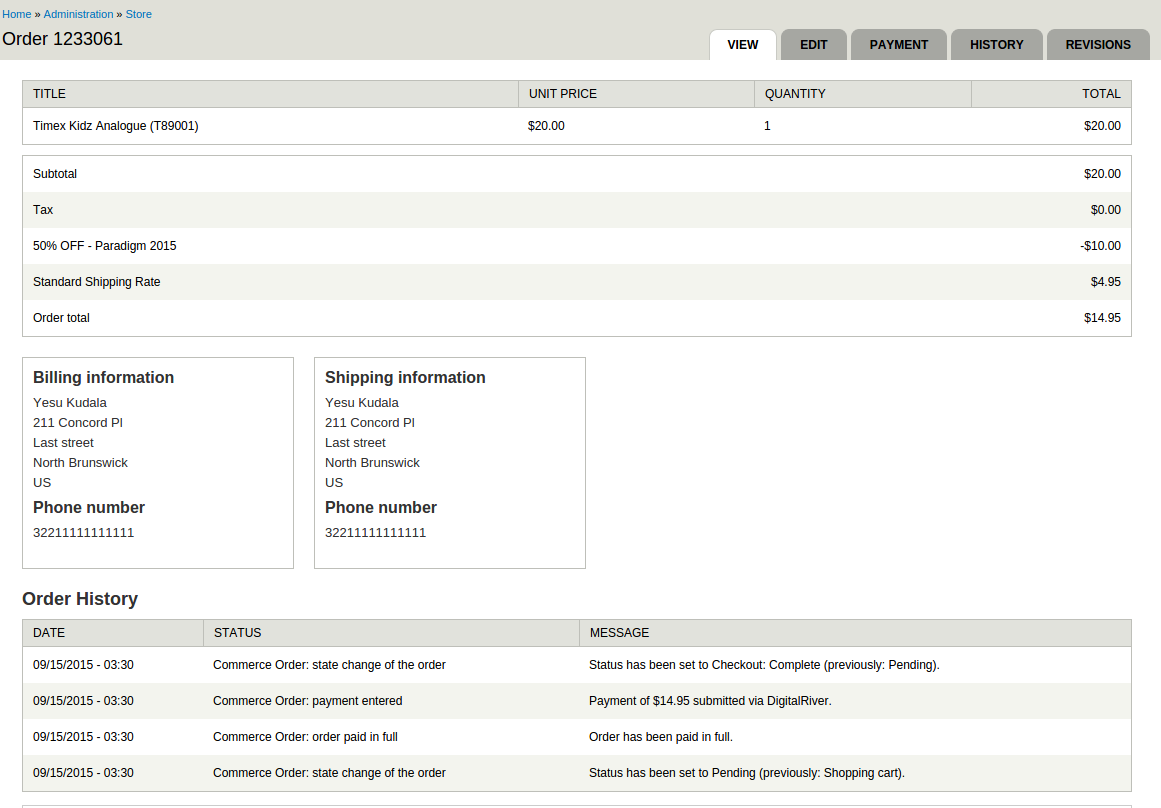
Purnachandra Rao V commentedWe used this patch commerce_discount-line_item_show_original_price-2112659-20.patch.
It is working fine as we expected.
Please find attached screenshots.
Comment #32
kevinsiji commentedRegarding #30
How we will know which product carries the discount, and how much. This leaves the customers confusing, with out clear information about the discounts/savings in line items, when there are products with and without discounts in same order.
Comment #33
nelslynn commentedAgree with #30. Subtotal not adding up to the items is confusing.
Suggestion: keep the item price the same, add an indication what items are discounted. See screenshot.
Or, include the discount in with each line item and remove the Discount line from the subtotal (Best way!).
https://www.dropbox.com/s/0jjzxn2lb4qyyan/Screenshot%202016-03-07%2016.5...
Comment #34
Adam Wood commentedThis issue has also proved very problematic for us. We've reviewed and tested the current patch, however it's method of altering price display globally is an issue for our use case, and we needed a way of choosing where to display a discounted price and where to display a base (original) price. As other's have mentioned, we need to display discounted prices on the product pages, but base prices in the 'Shopping cart summary' view.
The method we've taken is to use a field formatter that only displays the base price. This may not be the best solution to this issue in the long run, but it works perfectly for us, so we wanted to add it to the discussion. It's allowed us to keep the default 'Formatted amount with components' on the product pages, but chose our 'Base price formatted' formatter on the 'Shopping cart summary' view's 'Unit price' and 'Total' fields.
Note: this does not factor in where tax is needed to be included in prices, as this isn't a requirement for us. Changes would have to be made to this to accommodate this. Also, 13 lines could be removed from the formatter view if we can assume that the 'base_price' is always going to be index 0 in the components array. I'm not sure if this is a safe assumption or not.
This returns the following results on a checkout summary (we've also altered the order of the discount component in the order total to better reflect that the VAT is applied to the discounted amount):
Comment #35
Algeron commented#34 worked for me. Thanks Adam!
Additional steps:
- Clone the default
commerce_cart_summaryView, change the field formatters on Unit Price and Total Price- Set the
commerce_cart_contents_pane_viewvariable tomy_cloned_commerce_cart_summary|default(change machine name to match yours)- Add the following to your template.php:
Result:

Comment #36
fonant commentedThis is not an easy problem to fix!
In case it's useful to anyone else, here's the price formatter code I wrote for a UK shop:
which results in an order summary table like:
Comment #37
cravecode commentedI'm revisiting this issue for a new customer. I feel this issue has become irrelevant. In the commerce_price field, you can select a series of different formatters. One of them is "Formatted amount with components", it displays each price component. Visually it's not ideal but could be tweaked with some CSS.
I'm currently in the process of writing a contrib module to add a new formatter that is the price without any discounts. I'll update this issue with my contribution when it's ready.
Here is an example of the output from the "Formatted amount with components" formatter:

Comment #38
cravecode commentedComment #39
torgospizzaYeah for carts with lots of products that approach is definitely not ideal. Would love to see a patch with a new formatter, though!
Comment #40
Adam Wood commented@torgosPizza We're happy to work on a patch for this that builds on the solution in #34 if you think that could be a good option.
I feel that it might be Commerce's responsibility to provide a base price formatter without any other components, as it could have lots of uses outside of this module. That being said, it might be good to provide a price formatter that specifically excludes discounts created from this module. This should mean that taxes and other components aren't affected by this, and it allows users to specify it for the price fields on their cart views.
Do you think that a field formatted that removes any discounts would be best? It could possibly be called 'Formatted amount excluding discounts'.
Comment #41
cravecode commented@torgosPizza,
I should have a contrib module that adds a new formatter w/o discounts later today or tomorrow. I'll keep you posted.
Comment #42
torgospizzaI agree that Core should have this functionality built in. It does seem a bit weird that we can't just select "Base price" - plus the difference I had found previously was that a "line item" in a cart view is not the same as a product, so some of the other options for formatting an amount do not exist from one to the other (e.g., Calculate the Price for the current User).
So yeah - I'd say Formatted amount without discounts or something along those lines is a great option for keeping the visual formatting components intact while omitting any discount component calculation.
Comment #43
cravecode commentedIf anyone is interested, here is a module that contains a price formatter without discounts: Commerce Price Formatters.
The reason I'm not submitting this as a patch is because I'll need to create additional formatters in the future for upcoming work. This is the first requirements for a project. I hope others can benefit!
Comment #44
sebastien m. commentedThanks @cravecode for providing the module "Commerce Price Formatters".
Comment #45
tfranz commentedI tried the module "Commerce Price Formatter" – but unfortunately it seemed not to calculate the price WITH taxes …
I ended up with the quite similar module Drupal Commerce Extra Price Formatters.
With this module you have the option to show the original price (with taxes) and the discount price. With CSS i hide the discount price and keep the RRP-price:
Not the best solution, but it works for me …
Comment #46
dutchyodaI reworked the patch to work with beta5.