

Active
Project:
Views Reference Filter
Version:
7.x-1.0
Component:
Documentation
Priority:
Normal
Category:
Support request
Assigned:
Unassigned
Reporter:
Created:
7 Aug 2013 at 22:52 UTC
Updated:
10 Sep 2016 at 21:11 UTC
Jump to comment: Most recent, Most recent file






Comments
Comment #1
cmezei commentedSubscribing with an addition, how do I pass arguments to the view?
Comment #2
sbayrak commentedSame here. At least brief instructions needed. I have to use this module but I can't figure out where to start from.
Comment #3
staniel25 commentedFirst off, let me say Thank You maximpodorov.
This module seems to be heading in the right direction, especially since entityreference_view_widget is listed as "Maintenance Only".
After working this module for awhile, I think I can provide some tutorial detail.
I did get it to work, but as noted in other comments, I too was unable to configure a drop-down filter to display. Instead I needed to enter a NID.
This is what I did. I can't say this is completely correct, but... ;-).
A) Create two Content Types: Parent and Child.
For the Child, create an Entity Reference Field that points to the Parent.
B) Create valid test data: Create multiple Child nodes and at least two different Parent nodes.
C) 1) Create a New Page View.
2) View Name: "Entity Filter Test".
3) Display Name: "List1".
4) Path: "list1".
5) Format: Table.
6) Add Fields: Child field(s) and ...
7) Add Fields: Child Entity Reference field, which references Parent.
8) Filter: Type = Child.
9) Add Relationship: Select "A bridge to the Content entity that is referenced via field_parent".
10) Identifier: (optional) Shorten description to something like "ERed from Parent".
11) Apply.
12) Add Fields: NID, Select Relationship as "ERed from Parent".
13) Label "Parent Nid"
14) Apply.
15) Preview: Should show table containing Child fields as well as Parent Title, and Parent NID.
16) Save View.
D) 1) Create new View Display (same view):
2) Add: Entity Reference
3) Display Name (preset): "Entity Reference"
4) Format (preset): Entity Reference list
5) Filter: Type = Parent
6) Add Field: Title
7) Label: "Parent Title".
8) Pager: Display all items.
9) Format Settings: Check "Parent Title".
10) Preview should display list of "Parent Title's".
11) Save View.
E) 1) Return to "List1" display.
2) Clone Display (Optional, but helpful for reference)
3) Display Name: "List2".
4) Path: "list2"
5) Add Filter Criteria:
6) Search "filter"
7) Select: node: child "(field_parent) (entityreference filter)"
8) Select: Expose filter.
9) Label: "Select Parent".
10) Operator: is equal to
11) Relationship: "ERed from Parent"
12) MORE
13) Filter Identifier: short name like "parent_nid"
14) Apply.
To Test:
Go to: sitename.com/list2
Enter a known Parent NID into "Select Parent" (text?) field
Select Apply.
Table should filter to Child nodes the reflect Parent NID.
To remove filter:
Clear "Select Parent" field
Apply
(Note: URL does not reflect "All" value)
Should anyone have a way to make the Selection field a drop-down, I would appreciate knowing the trick.
Hope someone finds this is helpful.
Comment #4
bander2 commentedI am having a hard time even understanding what this module does. ID is not the only thing you can filter on right?
And this is for making selections on an entityreference field?
Does anyone have any screenshots of what this module does?
Comment #5
maximpodorov commentedIf you can think in SQL, this module provides the feature missing in Views module - second query filter, such as (quite informal):
SELECT n.title FROM node n WHERE n.nid [IN | NOT IN] (SELECT n2.nid FROM node n2 WHERE ...)
or
SELECT n.title FROM node n WHERE n.node_reference_field [IN | NOT IN] (SELECT n2.nid FROM node n2 WHERE ...)
Another use case is filtering of exposed filter options. Imagine the following case - you have taxonomy terms in exposed filter widget (drop down selector). But for some reason you want to show just several terms, not all the dictionary. With this module, you can do this by creating a view which generates the desired list of terms.
Comment #6
klonosThis would fit perfectly in the project's page ;)
Comment #7
maximpodorov commentedFixed. Thank you. It something is not clear, please reopen the issue.
Comment #9
Yuri commentedEven with the explanation mentioned above, I still think (and experience it myself) it as being rather difficult to understand and set up.
Some screenshots, or an instruction video or feature would be helpful.
Comment #10
apmsooner commentedI second that. I've spent a great deal of time trying to figure it out.... i finally gave up. The explanation just makes no sense to me i guess without some sort of visual example.
Comment #11
Yuri commentedAt #3, in display List2 its important to say that inside 'Configure filter criterion: Content: Parent (field_parent) (reference filter)' should NOT have a relation set (because the entity reference field is part of the child entity itself) otherwise the exposed filter does not work the way it should.
Comment #12
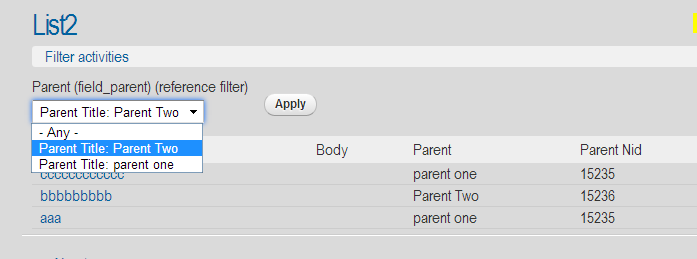
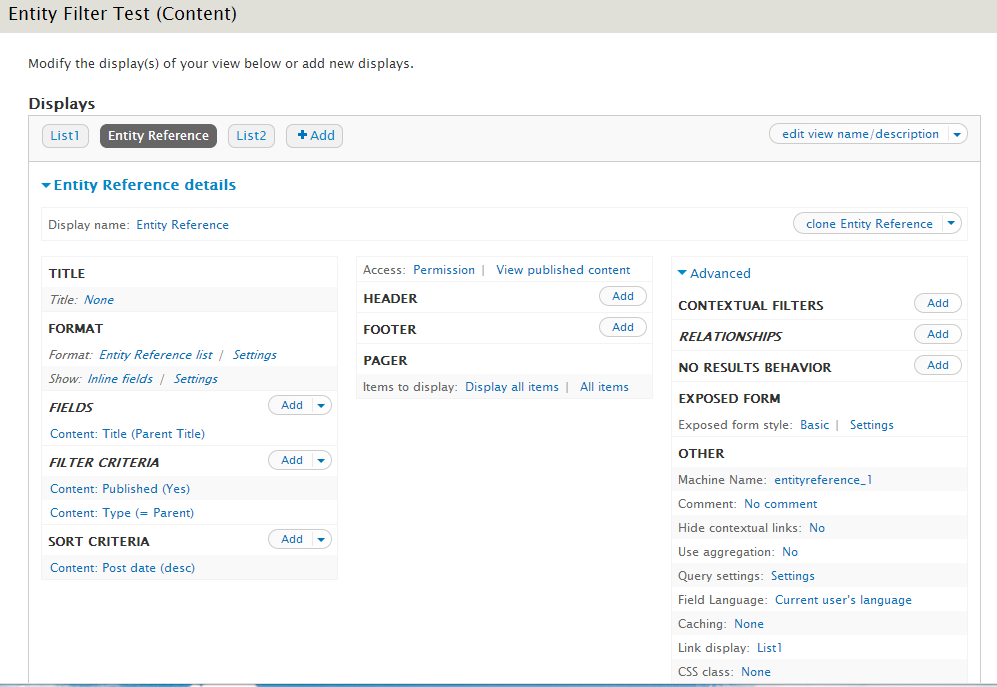
Yuri commentedI got example #3 working, here are screenshots:
The entity reference display

The child display with exposed entity reference filter

The entity reference filter, using the entity reference display view.

the view page display 'list2'

Comment #13
apmsooner commentedAm i even correct in thinking what this module does? Here is my scenario so i'm hoping i can gain some understanding of whether this module even does this so i can try to figure out Yuri's example:
I have a node entity of type "Ingredient", the node contains multi-value field collection of type "Weights" so the relationship there would be like this:
Node = Butter
Weights = 1 cup, 1/2 cup, 1 pat
Also, i have a node entity of type "Recipe", the node contains a multi-value field collection of type "Recipe Ingredients".
The field collection here would contain an entity reference field of type node to "ingredient" (butter) and an additional entity reference field of type field collection to "weight" (1cup, 1/2, etc...). Where i felt the use case for this module is that when ingredient is selected, ajax request would filter the "weight" entity reference field to weights associated with that ingredient. Otherwise, without this.... all weights would show. I know this is a complex scenario but is the module designed for this or am wrong in my assumption of it's purpose? If the module does indeed satisfy this scenario, i would be delighted to continue trying to figure it out and post additional screenshots.
Thanks
Comment #14
apmsooner commentedPerhaps this screenshot will depict what i'm trying to do. Note that i have a patched version of entity reference module that is passing a token argument from ingredient to an entity reference view of weights. This works to a degree but the weights field don't update via ajax, i only see the filtered values after manually saving the form and reediting. So... is the module designed for this scenario? Also, is there a requirement that both fields need to be select? Seems like a read something about autocomplete maybe can't work to trigger ajax request?
Comment #15
maximpodorov commented@apmsooner, your use case is the subject ob my https://drupal.org/project/ddf module, though it can not be ready for field collections now (but can be improved, of course).
Current module is for Views only, it defines Exposed (and non-exposed) filter only.
Comment #16
apmsooner commentedAhh, okay got it. So if i understand you correctly for this module, the purpose would be filtering values for views exposed forms based on another view. So if i had a taxonomy with 50 terms but only wanted 10 of them to select from in an exposed form, this module can help with that right? But it in no way serves as a form widget within nodes for example on an entity reference field right? I think thats where we are all confused.
I'll follow the DDF module as that is most intrigueing to me for my use case.
Thanks.
Comment #17
maximpodorov commentedExactly.
Comment #18
nithinkolekar commentedI am trying to setup "views reference filter" which involves two separate view one in primary which has the exposed filter (basically entityreference field) and another chile view who's display is set to entityreference and has some contextual filter like current logged in user.
In configuration of exposed filter field "view used to select the entities" and "arguments for the view" is not showing. What criteria must match to show this settings? Should I have the entityreference display in same view instead of separate one?
module version
Entity reference : 7.x-1.1+4-dev with patch #2010898-82: Use tokens for entity selection view arguments
Views Reference Filter : 7.x-1.3+5-dev
simple screencast would be helpful which involves separate views.
Comment #19
maximpodorov commentedCould you try 7.x-1.4 version?
Comment #20
nithinkolekar commentedok got it working in dev version itself.
What was the cause?

I was trying to apply to pre-existing view which already has exposed filter set. When I removed that field and tried adding field, that same field had another alias which ends with (reference filter). That is what should be added. See screenshot.
Comment #21
nithinkolekar commentedsmall remaining configuration
how to pass contextual filter from primary view to secondary view?
Tried to send second contextual filter of primary view with both %2 and !2 but it is not working.
Comment #22
maximpodorov commented!2 should work. Please open a separate issue if it doesn't.
Comment #23
droddis commentedHI there,
this may be a repeat though I'm not sure it is. Any suggestions/help would be helpful.
I'm using this in a Drupal Commerce site where I have a series of accessories, some of which can fit a number of different products. I want to create a filter that does the following:
1. Select a brand from a list of available manufacturers (Currently taxonomy terms attached to the product entity)
2. Once the brand is selected a second drop down will appear of all model numbers that appear on the product entity that also have the brand from the first drop down. So only show model numbers listed on product entities that have the selected brand also attached.
I hope this makes sense, and if so is there a way to configure this module to allow me to create exposed filters that users can use to find parts that fit the specific brand and model they are searching on?
Thanks in advance,
Comment #24
tistou commentedmaximpodorov,
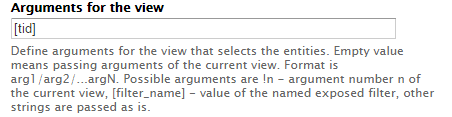
Could you please elaborate more on passing another exposed filter selected value from primary view into secondary view? Help text states:
[filter_name] - value of the named exposed filter, other strings are passed as is.
I am not sure however what is filter_name of the exposed filter I'd like to use as a argument, where to find it and what to put there exactly. My couple of guesses did not work. Screenshot of the example would be very helpful.
Thank you for answering questions!
Comment #25
Rasti commentedHello,
@tistou I have same issue, can't figure out how to pass the other exposed filter value,
how we get the correct filter name? did you figure out yet. or anyone can help?
Thanks.
Comment #26
Rasti commented@tistou
After my comment and doing a lot tests, turn out it works, But not in the view preview page, they wont show up the correct way.
Here the way i did:
1. Add both exposed filter and in my case one is taxonomy and the other is Views Reference Filter for Nid.
2. Get the name for the first filter in this case the taxonomy,so you can pass it. go to the filter under the More option you find the name which in this case is "tid":
3. Then go to the Views Reference Filter in the argument part put [tid].
Save the view and go look at it outside the view preview in the real page.
Here the page I am working on still not finished but you can see it in action. http://resourcesgame.com/specialbuildings
Hope this work for you too.
Comment #27
MrsWho commentedThanks for the tip Rasti: I was able to get a similar behavior to what #14 wanted once I understand the argument/view settings better, and that the preview doesn't work. It would be great in the future to have a preview that did show this behavior for testing.
Comment #28
Rasti commented@MrsWho,
You welcome, I know the pain when you doing something right and it doesn't work.