
Views Bulk Operations development guide (Drupal 7)
You are browsing documentation for an older version of Drupal, which is not supported any longer, and the information may not be correct. See current documentation for Contributed modules
This guide applies to Drupal 7, Views 3 and Views Bulk Operations 7.3-x branch. You can find the Drupal 6 version of this guide here.
VBO reuses and extends Drupal core Action system. Most of the Drupal core actions can be used as a VBO-compatible action. This guide focuses on some VBO-specific functionality. If you are looking for Drupal core actions, please check the Examples module.
Define the actions
First, we need to implement hook_action_info().
function MYMODULE_action_info() {
  return array(
    'MYMODULE_my_custom_action' => array(
      'type' => 'node',
      'label' => t('Search and replace text in a field'),
      'behavior' => array('changes_property'),
      'configurable' => FALSE,
      'vbo_configurable' => TRUE,
      'triggers' => array('any'),
    ),
  );
}
An associative array of action descriptions. The keys of the array are the names of the action functions, and each corresponding value is an associative array with the following key-value pairs:
- 'type': The type of object this action acts upon. Core actions have types 'node', 'user', 'comment', and 'system'.
- 'label': The human-readable name of the action, which should be passed through the t() function for translation.
- 'configurable': If FALSE, then the action doesn't require any extra configuration. If TRUE, then your module must define a form function with the same name as the action function with '_form' appended (e.g., the form for 'node_assign_owner_action' is 'node_assign_owner_action_form'.) This function is paired with a '_submit' function, and possibly a '_validate' function.
- 'triggers': An array of the events (that is, hooks) that can trigger this action. For example: array('node_insert', 'user_update'). You can also declare support for any trigger by returning array('any') for this value.
- 'behavior': (optional) A machine-readable array of behaviors of this action, used to signal additionally required actions and permission requirements that may need to be triggered. Currently recognized behaviors by Trigger module:
- 'changes_property': If an action with this behavior is assigned to a trigger other than a "presave" hook, any save actions also assigned to this trigger are moved later in the list. If no save action is present, one will be added. Modules that are processing actions (like Trigger module) should take special care for the "presave" hook, in which case a dependent "save" action should NOT be invoked. (When not specified, 'behavior' defaults to having the 'changes_property' behavior. This will trigger the save action, so if you intentionally want to avoid any save actions, set 'behavior' to an empty array.)
For View Bulk Operations purposes the forms defined for the 'configurable' setting are presented during the Bulk Operation execution process, after the action has been selected, and before the confirmation step (discussed as the "Per-Bulk Configuration form" below).
In addition, VBO supports these settings:
type: You can use "entity" to make the action available to all entities - nodes, taxonomy terms, users, etc.vbo_configurable: Set this to TRUE if you want to make the VBO configurable (so there will be one more step before executing the action that user can choose extra options). If TRUE, then your module must define a form function with the same name as the action function with '_views_bulk_operations_form' appended (e.g., the form for 'node_assign_owner_action' would be 'node_assign_owner_action_views_bulk_operations_form'.) This function is paired with a '_views_bulk_operations_form_submit' function, and possibly a '_views_bulk_operations_form_validate' function. These forms are added to the Views configuration form for the Bulk Operations field.aggregate: Set this to TRUE if you want all selected entities to be passed at once (all entities are loaded at once, making it possible to hit the memory limit)pass rows: Set this to TRUE if you want to pass row information to action$contextpermissions: An array of permissions user must have (all of them) in order to execute the action. See more about access permissions.
Add a VBO configuration form
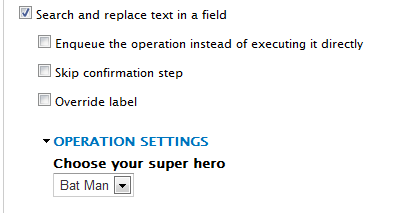
We can add extra settings to the VBO configuration form in the Views UI.
function MYMODULE_my_custom_action_views_bulk_operations_form($options, $entity_type, $settings_dom_id) {
  $form = array();
  $form['hero'] = array(
    '#type' => 'select',
    '#title' => t('Choose your super hero'),
    '#options' => array(
      'Iron Man' => t('Iron Man'),
      'Bat Man' => t('Bat Man'),
    ),
    '#default_value' => !empty($options['hero']) ? $options['hero'] : '',
  );

  return $form;
}
$options will be an array of previous settings. When adding this action for the first, it won't be available.
Add a per-bulk configuration form as well
If you need to make your action flexible, that there could be a global View-wide setting as well as a per-bulk setting, we can do that as well! Observe that the $settings variable contains the information from the Views configuration form, while $form_state is passed by reference and contains the normal form state information in case you need to modify the form state (for example, to attach field widgets) during the setup of the per-bulk form. This function should return the $form variable for the form you want the per-bulk settings page to use.
// The function name must be [action_name] + '_form'.
function MYMODULE_my_custom_action_form($settings, &$form_state) {
  $form = array();
  $form['hero'] = array(
    '#type' => 'select',
    '#title' => t('Choose your super hero'),
    '#options' => array(
      'Iron Man' => t('Iron Man'),
      'Bat Man' => t('Bat Man'),
    ),
    '#required' => TRUE,
    '#default_value' => isset($settings['settings']['hero']) ? $settings['settings']['hero'] : '',
  );
  return $form;
}

// The function name must be [action_name] + '_submit'.
function MYMODULE_my_custom_action_submit($form, $form_state) {
  $return = array();
  $return['hero'] = $form_state['values']['hero'];
  return $return; //Note, return value here must be an array.
}
This form will be presented everytime we are about to execute some action on a set of chosen items.
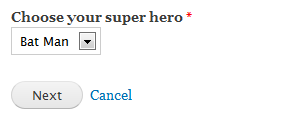
$settings will contain the View-wide configuration we added with mymodule_my_custom_action_views_bulk_operations_form, as well as the view object itself and the current entity type.In the submit function, we should return data to be passed to the actual action function so we can make the action "flexible".
ACTION!
It's time to create our action. So far, we have a View-wide setting form added, and there will be a form everytime to reselect the configuration for each bulk. The function name below comes from the hook_action_info() array that was built in the first steps of this article.
function MYMODULE_my_custom_action(&$node, $context) {
  $message = t('Node title is %title. Sincerely, %hero', array(
    '%title' => $node->title,
    '%hero' => $context['hero'],
  ));
  drupal_set_message($message);
}
$node is the node object. If you are executing the action on a user entity, this obviously will be the user object.
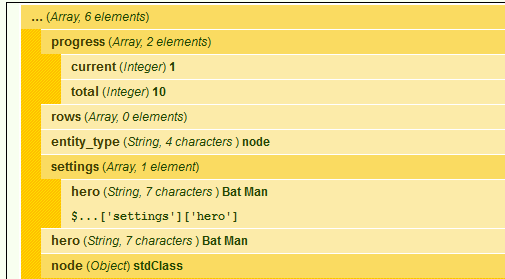
$context variable will contain our per-bulk setting and the view-wide setting. This variable is also useful to determine the batch's position (current item, total number of items), and it contains the entity type.
rows in the $context array will be empty because we do not have aggregation in this action (I will add an example soon).
Permissions for actions
In some cases, you need to make sure users who execute the actions have the permissions to perform them. There are many layers that you can enforce permissions.
If the user has access to the View, and to perform an operation on the entity (Create, Read, Update, Delete), there will be no further checks and VBO will execute the action on the entity.
See the behavior property in the initial action definition. Following behaviors are used in VBO:
views_propertychanges_propertycreates_propertydeletes_property
Entity access will then be checked using entity_access function.
You can, however, define specific permissions for each action using the permissions key in the initial action definition.
function MYMODULE_action_info() {
  return array(
    'MYMODULE_my_custom_action' => array(
      'type' => 'node',
      'label' => t('Search and replace text in a field'),
      'permissions' => array('access content', 'administer site configuration'),
      ...
    ),
  );
}
Note that permissions must be an array of permissions. User executing the actions must have all the defined permissions in order to execute the action.
There is a sub module, action permissions that defines a permission for each action, so you can configure it in the permissions page. Permissions you define in the action definition are strictly requirements only; they will not be added as a permission. Use hook_permission for that.
That's it!
You defined your custom action, added a configuration form, added a modification form, and created the actual action function!
Guide maintainers

