This issue was split off from #2018871: Make summary and details collapsed by default to separate the styling changes from the default behavior (collapse details by default).
Examples
Admin/content on load (current):
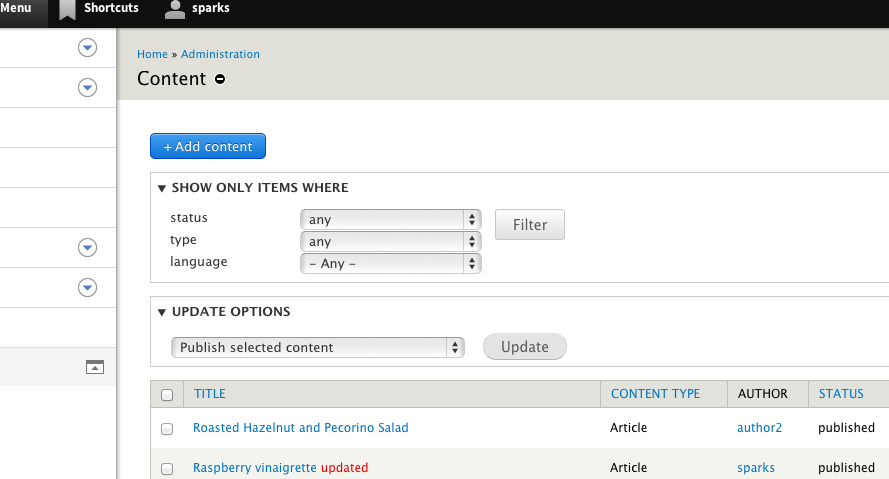
admin/content on load (proposed):
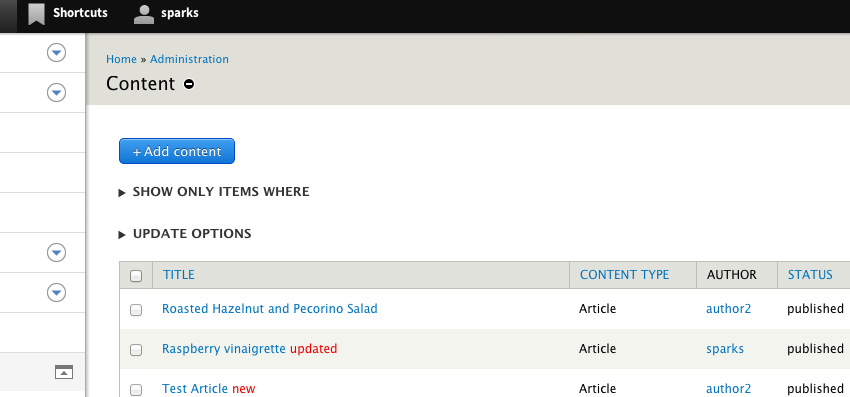
Misplaced focus:

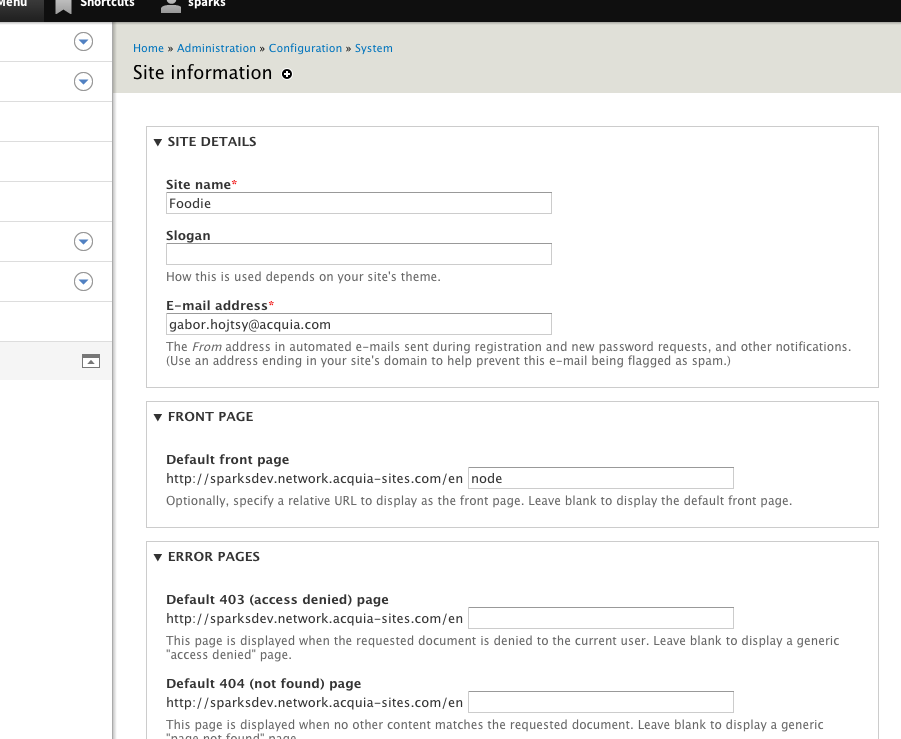
admin/configuration/site_information (current):
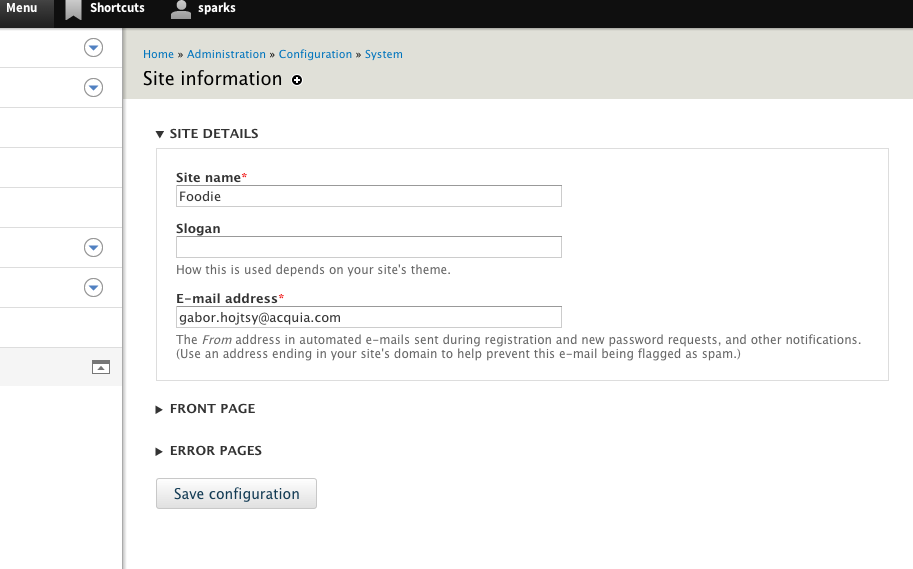
Changes to system.theme.css
Remove the border because it is unnecessary. The presence of the down arrow affordance tells the user "there is more here". Margin is added since the padding that inset the text from the border is removed.
details {
- border: 1px solid #ccc;
margin: 1em 0;
}
Padding that inset the text from the border is no longer needed. Setting outline to none removes the browser focus effect on summary since it's not a form element that requires focus.
summary {
cursor: pointer;
+ padding: 0.2em 1em .2em 0; */ltr/*
+ outline: none;
}
Remaining tasks
Needs an accessibility review to decide what happens for keyboard users regarding outline, focus etc. See comment #15 and #16.


Comments
Comment #0.0
tkoleary commentedadded images
Comment #0.1
tkoleary commentededited
Comment #1
lewisnymanIt makes sense to move this styling from system to the Seven theme. We shouldn't be adding this kind of default styling to all Drupal themes.
Comment #2
aedwards88 commentedI agree LewisNyman this change should be in the seven theme.
I have created a patch, and attached. Attachment seems to not have added I added the style change in my comment below.
Comment #3
aedwards88 commentedI have adjusted the Seven theme to match the look and feel according to the proposed screenshot
Here is lines 626 - 638 of the /core/themes/seven/style.css file.
Comment #5
aedwards88 commentedComment #6
lewisnymanI don't think you can include hashes in the patch file name? Seems to be breaking testbot
Comment #7
aedwards88 commentedThank you Lewis, I have re-attached the patch.
Comment #8
lewisnymanHere are a selection of after screenshots. I have to say, the uneven vertical/horizontal padding looks a bit weird.
Comment #9
tkoleary commented@LewisNyman
I think you're right but I suspect that this is more of a global issue with vertical rhythm.
Comment #9.0
tkoleary commenteded
Comment #10
lewisnyman7: 2048369-comment-7679907.patch queued for re-testing.
Comment #11
panda85 commentedComment #12
panda85 commentedPatch tested and working in IE9, IE10, Firefox, Chrome.
Patch should be applied to lines starting from 567 and not from 625
@@ -567,10 +567,16 @@ table.system-status-report tr.error {
..
Comment #13
panda85 commentedComment #14
rootworkUnless I'm misunderstanding something, this isn't ready to be closed, it's RTBC.
Comment #15
nod_what about keyboard users? should we really remove the outline?
Comment #16
rootworkWe could do an outline on focus (which includes tab by keyboard). Reference.
Comment #17
catchLooks like this needs more review.
Comment #18
emma.mariaComment #19
emma.mariaComment #20
tomreavley commentedComment #21
tomreavley commentedComment #22
Bojhan commentedI really like patches that tweak the visual design of Seven. However I am not sure about this patch, it wasn't tagged Usability so I never spotted it :(. I am happy to see that this patch didn't include collapsing all detail fields, that really needs more discussion as some details should really be open. Retitling this to what this issue is now just about.
There are various arguments, why we actually have a border and not just a collapse icon + label:
1) What we found in previous usability tests (Garland), is that people didn't notice just the dropdown + label and a line. With Seven we found that people still had difficulty (some of Mark Boulton his earlier designs were like this). We decided with Mark and the usability testing at the time to make the fieldset more noticeable, by adding a border.
2) So far we have not found any issues through usability testing that shows this design does not work. People are able to use it just fine.
3) From any usability testing we have done so far, we have never seen the behaviour expressed in the OP that the user focuses in on the label instead of the functionality below.
4) It is visually slightly harder to "group" functionality when you have the label hanging outside of the encapsulation. Having the label inside the encapsulation makes it visually easier to "group" things together.
5) It shows that there is a larger click area, especially on mobile this is important.
6) I am not sure how well this works when you have collapsed and open details below each other.
Accessibility wise we should be fine, because there is still a focus/hover state provided by the browser default. I am not sure if the history I just wrote is known. But this design seems to brush over the whole history of optimizing this design, a design that has proven to work very well. Given all of this, I am not very keen on changing this and tempted to mark this won't fix.
Comment #23
lewisnyman@Bojhan This seems to be the opposite direction we are heading in #2278565: Clean up module page grouping?
Comment #24
Bojhan commented@Lewis It is a very different page, we are using fieldsets to capture tables not forms. And also we do still have a line there.
Comment #25
lewisnymanI'm really not down with the idea of having fieldsets look different on specific pages. We need to move away from that kind of thinking.
Is there a one design component that can accommodate all collapsible fieldsets or do we need to define a minimal variant of the component?
Comment #26
rootworkI'm persuaded by Bojhan that this could have a negative impact on usability and doesn't demonstrate that it has a positive impact on it.
I also agree that we should have a fieldset design component that's consistent. But it does seem like the module page would be a legitimate variant -- because the children of the fieldset (modules) have a background color they naturally group together. These fieldsets (in the issue summary) don't have background colors, so when expanded I think it makes sense that they have a border.
When collapsed, it seems like both styles could have a single consistent appearance, which given what Bojhan related would include a border.
Comment #27
nod_I sidestepped the issue with the module page, let's ignore it. See related issue.
I'm with Bojhan. won't fix?
Comment #28
Bojhan commented@Lewis I don't see how the module page design is relevant here at all. Its a completely one-off design, where we doing a super weird thing by nesting tables in a details. Which is something you shouldn't be doing in the first place. Ideally we figure out how to fix the module page without using details.
Comment #29
mgiffordThis is generally a bad idea for accessibility:
border:none; outline: none;I really don't understand what problem this change solves. It would be nice to see an explaination.
For now though I'm going to set it as Won't fix.
Comment #30
tkoleary commentedTHe problem that it solves is reducing excess noise in the UI and making it more "open" and easier to read. Design studies show that when a page has fewer extraneous elements (lines, boxes, shapes) and generous space between elements, it is easier to scan.
See Luke Wroblewski's deck on form design here: http://static.lukew.com/webforms_lukew.pdf. There are sections on both reducing noise in forms and on best practices for conditional/hidden sections of forms.
Comment #31
tkoleary commented@mgifford
If you feel that this is an accessibility issue can you provide some evidence? Reopening.
Comment #32
mgiffordAlways good to call for some external evidence. Essentially here are two of the best sources:
http://www.outlinenone.com/
http://webaim.org/blog/plague-of-outline-0/
Best evidence though is ti simply try navigating the page without your mouse.
I don't have any evidence about
border:none;and not sure if there is any research on it. It might have some advantage for readability for some users. I'm really not that concerned about this piece of it.Interesting PDF. Lots in in it. I think the relevant section is probably down on page 44, but correct me if I'm wrong.
Comment #33
tkoleary commented@Mgifford from the article you linked:
Any one of these could be better if executed well
Comment #34
mgiffordAbsolutely.. If properly considered, there are lots of ways to replace
outline: none;without sacrificing accessibility. Unfortunately in many cases (including in D8) it's been removed without considering keyboard only users. Thanks for pointing that out @tkoleary.So, want to re-roll 2048369-comment-7679907.patch with some better alternatives?
Comment #35
lewisnymanOk, we need an issue summary update on the correct direction.
Comment #36
Bojhan commentedI feel like adequate reasoning was provided, why this is a bad idea in #22.
The work cited, provides little clues why its bad - our fieldsets are not ornamentation. We use fieldsets to bring order to the page, that cannot be brought by whitespace without sacrificing a major part of our efficiency and overall design. We try to only use fieldsets when they are truly needed (I removed some 100 or so in Drupal 7).