Hi
Firstly thank you for the great module. It fits my need very well.
Using the module I created my images uploaded in a node to organize automatically as a gallery. I use the same nodes for a view which is basically a gallery with first image of each node as the thumbnail to each gallery.
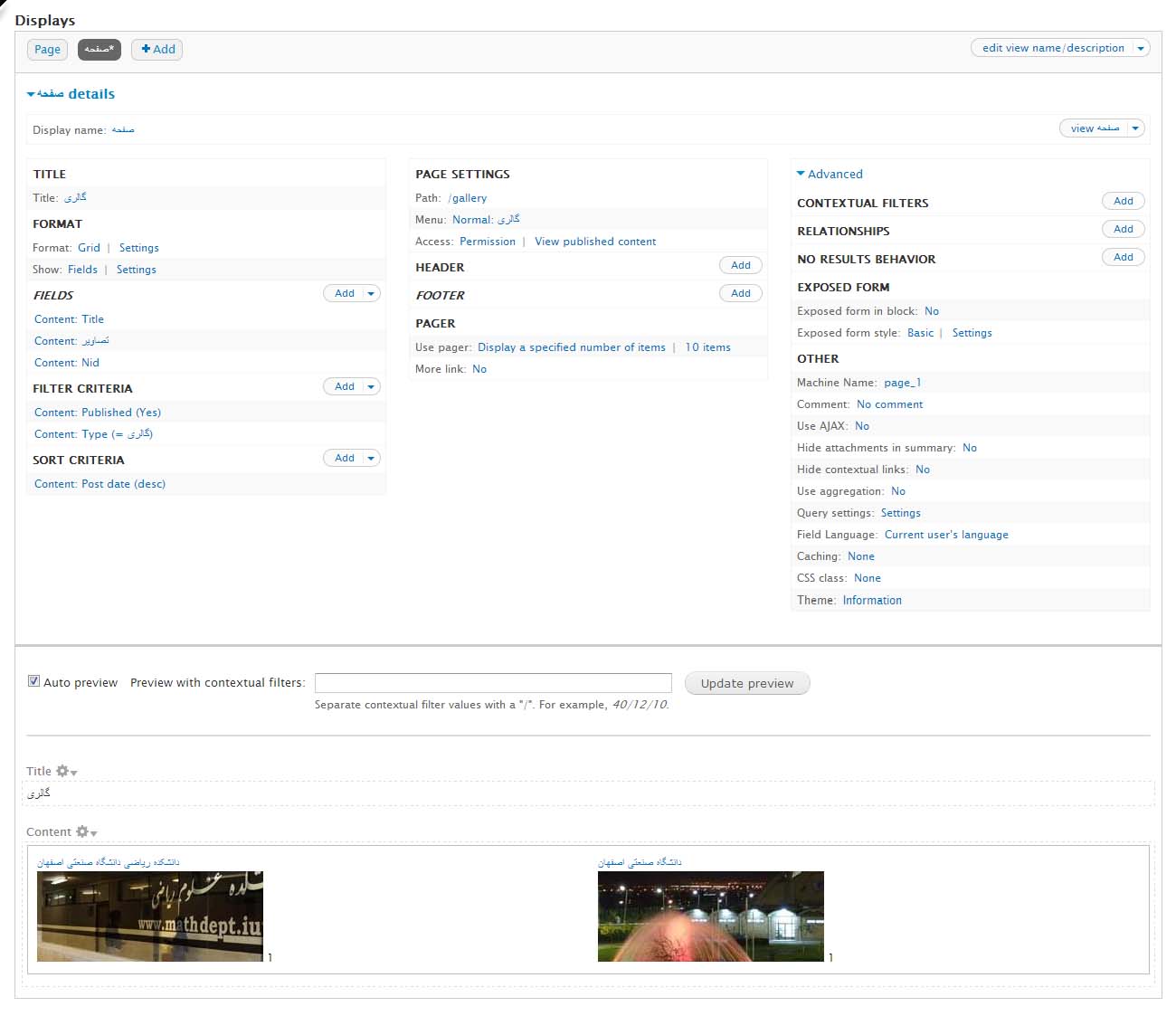
The problem here is quite unexpected, in the view created, after each thumbnail image we are getting a '1'. This '1' does not come if I do not use the grid formatter for the 'image' field. (I am attaching an image for your reference.)
It also gives me this error
Warning: Illegal string offset '#access' in views_handler_field_field->set_items() (line 862 of C:\xampp\htdocs\test\sites\all\modules\views\modules\field\views_handler_field_field.inc).
Can you please help me to know that where is it going wrong.
Best regards







Comments
Comment #1
alfababy commentedHi delc1,
Would you like give me some more information?
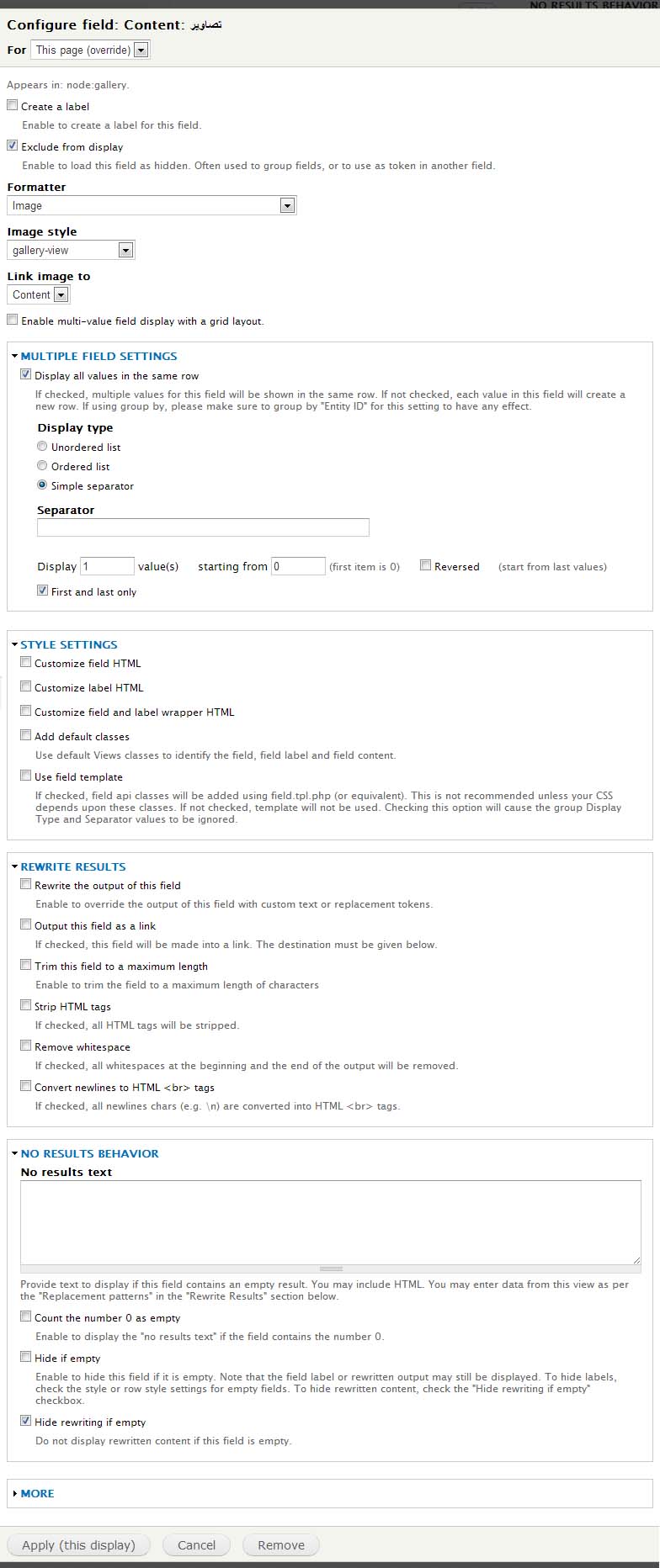
1. I want to know the field setting for image field.
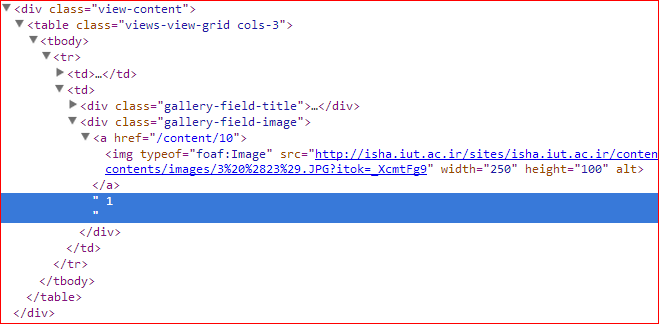
2. I want to know the html structure on the '1'.
3. Do you use views on this page?
Looks the error from views module, I want to check your settings first.
Thanks.
Cheers.
Comment #2
etesami commentedHi
I have this problem too. I created a page using views with title field and first picture of a image field which accepts multiple value. When I selected the Enable multi-value field display with a grid layout in manage display page for image field, a "1" comes after the images in this page. This views has Grid format and you can see the html structure of this page in the attachment file.
Thanks.
Comment #3
alfababy commentedHi Etesami and delc1,
I can't find the bug. Can you give me more info to reproduce the issue?
I want to know the views settings and field display settings like attached the screenshot.
Thanks.
Cheers.
Comment #4
etesami commentedHi
Please see this page,
I have used jQuery to hide "1", but you can see it now.
Comment #5
maulwuff commentedI get the same behavior.
I formatted my images field in display settings of the content type like:
image style: medium
linked to file
Multi-value Grid display: enabled
Number of columns: 2
in my view I have set this for the images field:
Display all values in the same row
empty separator
display 1 value starting from 0 (it's not this "1", I also tried to show 2 values)
the td cell looks like this:
"my image linked to content""1 " (yes, tons of blanks)
there is no html tag arround it.
The number of blanks is the same for first and last entry of the list. The list has more items than blanks.
Comment #6
maulwuff commentedwhen I comment out this line, located in
function grid_field_formatter_field_attach_view_alter(&$output, $context)the "1" is gone:
$output[$field_name]['columns'] = (isset($settings['grid_field_formatter']['columns'])) ? $settings['grid_field_formatter']['columns'] : 1;Comment #7
jrao commentedHere's a patch to fix this issue. Also you might want to add to readme that in order for grid to show up in views field, the "User field template" option under Style Settings needs to be checked.
Comment #8
Collins405 commentedPatch worked perfectly. Thank you very much jrao, I was scratching my head on this one!
Comment #9
dydave commentedHi guys,
Thanks very much to everyone for the great work on this issue.
Thanks a lot for the patch, the testing and reviews, it is certainly greatly appreciated.
@alfababy:
Did this get committed? I didn't see this got committed yet...
Could you please make sure this is tested again and that you clearly understand why the change made in the patch would be needed and resolve this issue?
Also, maybe we should consider adding a short single line inline comment in the patch to explain why it would be needed.
It would be great if this could get committed to the 7.x-1.x branch and if you could please update this ticket with the corresponding commit number.
Feel free to let us know if you would have any further comments, issues, questions, objections, recommendations, suggestions, testing, reporting or concerns on the patch from #7 or any other aspects in this ticket in general, we would be glad to provide more information or explain in further details.
Thanks again to everyone for your feedback, reviews, testing, reporting and great work on this issue.
Cheers!
Comment #10
System Lord commentedThank you for the patch! I did the update manually on 7.x-1.0 and it still worked. Hope it remains stable.
Comment #11
Vemma-1 commentedGetting patch errors of Hunk#1 failed at 163 (different line endings)
Hunk#2 failed at 207 (different line endings)
I also tried the dev module and still didnt work.
Is there maybe a CSS to fix this on a simple scale?
Same issue here while using both versions of this AWESOME module.
Comment #12
Vemma-1 commented@ comment #6
After omitting, the 1 does not show, but the actual posting node no longer shows in the grid format.
Comment #13
Vemma-1 commentedI tried contacting alfababy on his contact form. Hopefully this patch will get implemented in the module as a novice I can't patch it. Thx.
user found @
https://drupal.org/user/228431
Comment #15
dydave commentedHi guys,
Thanks a lot for all your follow-ups on this bug report and we certainly apologize for the delay of this response... (especially to @vemma).
Actually, this patch should have been committed a long time ago....
Anyway, so I had to dig into this issue from scratch.
Bug tested and reproduced with:
First of all, it took me some time to get to reproduce this issue and it would have greatly helped if anybody had initially mentioned that this problem actually happens when the Grid Field Formatter is configured for the Default view mode (See attached screenshot of the page default view mode configuration).
In other words, to be perfectly clear about how I managed to reproduce the problem:
I have tested with an Image and a Link field, but the bug would actually occur for whatever field is configured with grid_field_formatter for the default view mode (number, options, text, etc...).
So at this point, I came up with a couple of questions:
1 - Why is a '1' displayed?
After some debugging, I was brought to the function set_items (as mentioned in the issue summary, see the warning), in the file views_handler_field_field.inc and more particularly lines 848:
where the field is rendered through field_view_field and line 857:
where the function element_children is called:
Since the key
'columns'is provided in the$render_arraywithout a '#' at the start, it is then identified as a child of the array.In this test case, the following lines in views (lines 858 to 873) are evaluated as follows (devel test code):
since
$items[$count]['rendered']is not an array, its value is overwritten by the value$render_array['#access'], which in most cases would beTRUE(is the access wasFALSEthe issue would still be there, but since the field wouldn't show, it would be very hard to report and identify this bug), thus raising the warning as mentioned in the issue summary:Warning: Illegal string offset.2 - Why would this issue happen with Views and not when a field is displayed in a node?
In the case of a node, the field is rendered through drupal_render and a similar problem occurs, for the same reason as above related with element_children and a missing '#'.
See in drupal_render, in common.inc, line 5893:
where the
$childrencontains the'columns'key, to be processed, line 5909:Given that one of the elements is
$elements['columns'] => 2(the configured value in the settings), then it comes down to evaluatingdrupal_render(2). The trick here and the reason why no warning or error is displayed is because currently this value is considered/evaluated as a string and not an integer:The devel code:
returns empty with no errors, exiting from the code at line 5871:
$elementsis considered as a string ('2'in this case),$elements['#printed']returns the first item of string$elements, which is not empty.The devel code:
returns empty but prompts multiple warnings and errors, mostly due to trying to access array keys on a number:
In other words, if the value given for
'columns'had been strictly typed as an integer, the problem would have been much easier to identify, detect and wouldn't only have appeared when using the formatter in views.Let's try to sum-up:
1 - Why is a '1' displayed?
Since the '#' is missing for the 'columns' key when the field is rendered through Views fields, it is identified as one of the items to be displayed whose value is overwritten by field's access property, which evaluates to 1.
2 - Why would this issue happen with Views and not when a field is displayed?
Since the value for the 'columns' key is not stricly typed and identified as a string when the field is displayed, its value is ignored when going through drupal_render, which is the main difference with Views (in which case a '1' is displayed).
However, the issue with the 'columns' key identified as a "child" due to a missing '#', occurs in both cases.
The patch from #7 certainly seems to provide the appropriate solution in this case, without necessarily modifying the type of the 'columns' value to be a number, since the source of the issue in this case is that columns should be an element property and not a child or element itself.
All that being said, I went ahead and committed the patch against grid_field_formatter-7.x-1.x at 4fb0a68.
I allowed myself to mark this issue as fixed for now, but feel free to re-open it, or post a new ticket, at any time if you have any further objections with the approach suggested in this comment or related commit (we would surely be happy to hear your feedback).
Please let me know if you would have any further comments, feedback, questions, issues, objections, suggestions or concerns on the code changes, this comment or this ticket in general, I would be glad to provide more information or explain in more details.
Many thanks to everyone for your great help, reviews, feedback, screenshots, patches and comments on this issue.
Cheers!
Comment #17
John Ching commentedI am using Drupal 7.34 in which the patch above does not work because the codes are written differently from stated above. But I found the fix after reading explanation DYDave and Jrao above (thanks!).
In Drupal 7.34 just add # to front of columns. No need to edit any other codes. Like so:
Line 167: $output[$field_name]['#columns'] = etc. etc.
Line 210: $variables['columns'] = $variables['element']['#columns'];
Comment #18
dydave commentedHey @johnching,
Thank you very much for your nice comment and following up on this issue.
Just wanted to ask if you tried the dev version of Grid Field Formatter 7.x-1.x-dev.
Indeed, the problem was fixed a while ago in the development version, but no recent stable was rolled out (we'll probably need to work on that), so this is probably why you still encountered this problem with grid_field_formatter-7.x-1.0.
In any case, thanks a lot for posting your code and letting us know about your solution.
Feel free to let me know if you would have any questions, comments or suggestions about the code changes, suggested approach or any other aspects discussed in this ticket, I would be glad to explain in more details or provide more information.
Thanks in advance to everyone for your testing, reporting, reviews, comments and feedbacks.
Cheers!