Closed (fixed)
Project:
Image Picker
Version:
7.x-1.x-dev
Component:
Code
Priority:
Normal
Category:
Bug report
Assigned:
Unassigned
Reporter:
Created:
28 Feb 2013 at 14:23 UTC
Updated:
4 Jul 2013 at 15:03 UTC


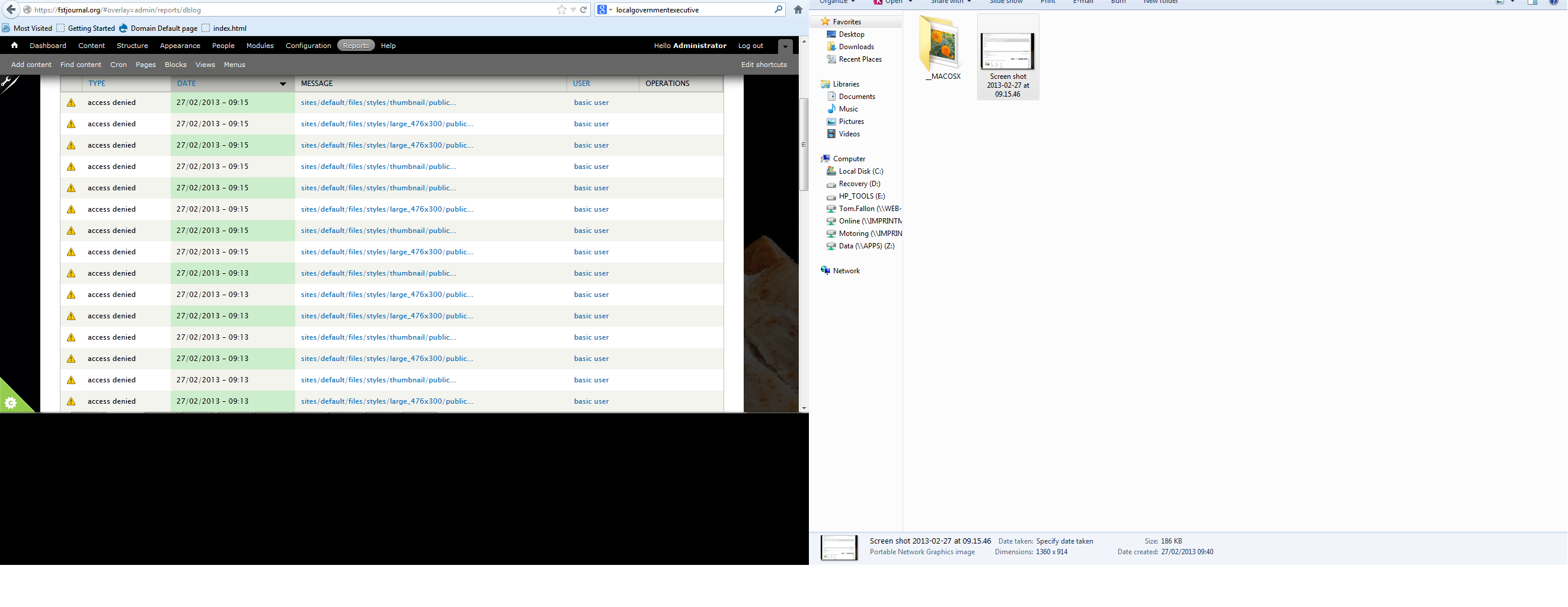
I have hit the following problem I attempted to use imagepicker (which has worked for months previously) and after selecting an image to display It displays the following broken image icon in the body (Screen shot attachment).
The file is trying to link to the following path.
"http://fstjournal.org/sites/default/files/styles/large/public/imagepicke..."
This is where things break down, After I get to "/sites/default/files/styles/large/public/imagepicker/"
There is no folder with the number 102. However if I go to "/sites/default/files/imagepicker" I see a folder named 102 with a file of ATP.jpg. It appears the imagepicker is using the wrong directory.
We are using IMCE as the file handler, CKeditor as the wysiwig editor. IMCE is creating personalised folders for each users images.
What is the root cause of this issue, and what is the remedy.
I have included the error reports to help.
<div class="imgp_title">
</div>
<p><a class="colorbox " href="http://fstjournal.org/sites/default/files/styles/large/public/imagepicker/102/ATP.jpg?itok=3mLskbgy"><img alt="Image" class="imgp_img" src="http://fstjournal.org/sites/default/files/styles/thumbnail/public/imagepicker/102/thumbs/ATP.jpg?itok=pQWZ1b17" title="" /></a></p>
<div class="imgp_desc">
This is test</div>
<div class="imgp_desc">
</div>
This is an excerpt of the body.
| Comment | File | Size | Author |
|---|---|---|---|
| warnings.png | 230.54 KB | tom m fallon | |
| Screen shot 2013-02-27 at 09.15.46.png | 186.66 KB | tom m fallon |



Comments
Comment #1
hutch commentedThe path "/sites/default/files/imagepicker/102" is where imagepicker stores the images belonging to user 102.
The path "/sites/default/files/styles/" (and below) are where imagecache files are created on the fly. These will be used if Imagecache (aka 'Presets') has been enabled for Imagepicker and one of the Imagecache presets was selected when the image was inserted into the content (in this case 'large').
Perhaps the 'large' preset has been removed but the image requesting it is still in the content, or perhaps IMCE files management is interfering in some way, I don't know anything about the latter.
BTW there is imagepicker-7.x-1.7 available, it has quite a few bugfixes in it.
Comment #2
brianlp commentedI can confirm this odd behaviour. I can't insert images any more with presets applied. The link inserted has this "?itok=bt94FoaV" at the end. The images aren't found (wrong url) and all I see is the missing-image icon even if I remove that ending. Seems like the link and the actual location aren't the same.
The lik looks like this:
/sites/default/files/styles/large/public/imagepicker/1/image.png?itok=DJRQqZfY
Comment #3
hutch commentedSomething has changed in the way that imagecache/presets are working. It should be creating the image on demand but no longer does so and I'm seeing "permission denied" but why I do not know, the file permissions on the styles folder (on my test rig) are correct. The appended query string "itok=DJRQqZfY" is added by image_style_url and is apparently a dos attack preventative, as you say it makes no difference wether it is there or not, the image and it's path are not created on the fly anymore.
How very annoying ;-(
So for now presets do not work, I will have to work on it.
Comment #4
hutch commentedI have commited a fix to dev, please test and report back, thanks!
Comment #5
tom m fallon commentedSorry for being away for a long time on this thread.
To fix this issue I reinstalled imagepicker on the clients website, and used lightbox.
Comment #6
brianlp commentedSomehow #4 slipped my notifications.
I replaced the imagepicker folder in sites/all/modules and all works fine (working with colorbox). Many thanks.
Comment #7
hutch commented