

Closed (duplicate)
Project:
Wysiwyg
Version:
7.x-2.2
Component:
Editor - CKEditor
Priority:
Normal
Category:
Bug report
Assigned:
Unassigned
Reporter:
Anonymous (not verified)
Created:
6 Feb 2013 at 15:42 UTC
Updated:
8 Jul 2022 at 00:38 UTC
Jump to comment: Most recent

Comments
Comment #1
Anonymous (not verified) commentedAfter installing TinyMCE, I found the problem went away. It seems to be just a WYSIWYG/CKEditor 4 issue.
Comment #2
shahard333 commentedHaving the same problem
Comment #3
Ian Griffith commentedGood afternoon. I am having the same problem with my developed theme. Can select the buttons in the cong section but when I go to the site, no buttons. Also have noticed that this occurred after updating Drupal Core and CKEditor as per updates instructions. Side issue is i now have moona skin only. could this be the issue. The techie who runs my server couldn't find an answer. Help!!!!! Griffo
Comment #4
alexander.sibert commentedI have the same issue.
Comment #5
Anonymous (not verified) commentedFYI - I have tried many other themes and I get the same problem.
Comment #6
kingswoodute commentedSubscribe - same issue. Thanks!
Comment #7
raavi commentedSubscribe - same issue
Comment #8
femaltol commentedAnother one confirmed for CKEditor 4.0.1, Acquia Marina theme and Wysiwyg 2.2. Subscribing.
Edit: As an addendum, this only happens for me in the latest (24.0.1312.57 m) Google Chrome. Firefox (18.0.2) and IE (9.0.8112.16421) do not have this issue.
Comment #9
kingswoodute commentedThat's interesting. I'm using Firefox (18.0.2) and Chrome (24.0.1312.57 m) and I'm still having the issue.
My simple test is that I've added the Center Justify button to the Full toolbar and then when I choose the "Full HTML" text format (as Superuser) and in both browsers I don't get a Center Justify button (or many of the other buttons that should show up in the Full toolbar).
The only filters that have been enabled for the Full HTML text format are "Convert line breaks into HTML" and "Convert URL's into links" and "Correct faulty and chopped off HTML" and none of them should be getting in the way.
Comment #10
ishener zaph commentedSame problem
Comment #11
Anonymous (not verified) commentedThis issue was opened for 7.x-2.2. Please do not change the version.
Comment #12
tommyindigo commentedSame here...subscribing
Comment #13
Anna_CKSource commentedAs CKEditor creators we don't support the Wysiwyg module, but for the CKEditor for Drupal module this can happen when you download the Basic or Standard installation packages and are trying to use the features that are available in the Full package only. The buttons will not be shown in the toolbar as the features responsible for them are simply unavailable. Try downloading the Full package instead and make sure that all needed plugins are there.
Comment #14
Anonymous (not verified) commentedAnna_CKSource,
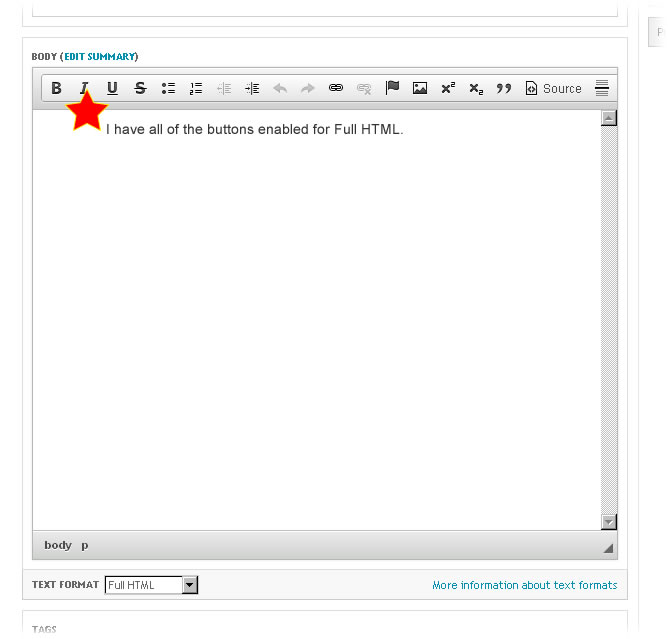
The problem is not that button are not appearing. The problem is that the standard buttons are NOT flowing down to a second row. I will try the CKEditor for Drupal module and post my results.
Comment #15
Anonymous (not verified) commentedI disabled WYSIWYG and installed the CKEditor module. The buttons displayed properly.
Comment #16
twodI think this is simply a bad side-effect of Wysiwyg not supporting using more than one button group/row. Notice how the toolbar goes all the way to the scrollbar in the screenshot. Buttons in a group should all move down to a new row if they don't fit, but since there's only one group, they can't wrap. I'll mark this a duplicate of #277954: Allow to sort editor buttons, please follow that issue and test the sort_buttons branch found in git. It's based on 7.x-2.x and does not yet contain the CKEditor 4 support code so you'll need the patch from #1853550: Ckeditor 4.0 - The version of CKEditor could not be detected. too. Note that there's currently no upgrade path in that branch, so you'll have to rebuild the editor profiles, and a few errors/warnings may be thrown when editing existing profiles because the toolbar/plugin data is not in the format the toolbar designer expects it.
And like Anna said in #13, make sure you have the Full package. It's currently the only one supported by the CKEditor 4 patch.
Comment #17
matthewveenker commentedHi all, I'm pretty new here, so bear with me, ok? I'm using Drupal 7.2 and trying to use the Full CK Editor package.
My whole reason for using the CK Editor module in the first place was that I really want to embed SWF files (I also got the CK SWF Embed module and activated it in the CK Editor settings area).
At first I got the Standard CK Editor package and that worked OK as far as showing my WYSIWYG controls, but it wouldn't show me the full range of buttons (particularly the SWF embed button). I tried every setting I could figure out in the CK Editor settings area, but no dice.
As per the advice above (#13) I downloaded the full CK Editor package.
But as soon as I put the full package library into the ckeditor folder - the whole Body text editing area refused to show up on my screen at all. I just couldn't edit the Body area at all that way. As soon as I disabled CKEditor and CK SWF Embed modules the Body text editing area showed up again.
This is frustrating, because I have several SWF animations that I am trying to embed in my multimedia portfolio website (http://www.matthewv.me/99_portfolio/multimedia). Currently I am having to just add links that go outside of my Drupal install to plain old HTML pages in order to display my animations. Seems silly that I would have to use a workaround like that.
Any advice?
Comment #18
twod@matthewveenker,I'm assuming you're using https://drupal.org/project/ckeditor_swf?
It's correct that the Standard package won't show all buttons, since it lacks a few plugins compared to the Full package. However, that would not affect the CKEditor SWF Embed module's plugin, since it's handled separately, unless it depends on one of the missing plugins.
You said you placed the Full CKEditor library in the ckeditor folder, I'm assuming you meant sites/all/libraries/ckeditor?
Just extracting the whole package to sites/all/libraries/ should be enough. Make sure to completely remove any old files first.
The CKEditor SWF Embed module should add a new box in the "Buttons and plugins" list once enabled, which you can then check to have Wysiwyg load the editor plugin from that module. It that does not happen, please check the browser's JavaScript console for errors.
Btw, this issue is marked closed - so it won't show up in the regular issue queue - and is about a slightly different topic. If you're still experiencing problems, please create a new support request and include as much detailed information you can about your setup and I'll see what I can do. That'll avoid automatically emailing everyone else in here when there's an update to your specific problem. Thanks.
Comment #18.0
twodRe-pasted the issue description as it was missing some key info.
Comment #19
jshock commentedOver a year old and no solution? Is the full version of CKEditor unusable with Drupal 7?
Comment #20
Pablo Gosse commentedYou could give this module a try. It's not actively supported, but it's been working well for us for 3 years.
https://www.drupal.org/project/wysiwyg_ckeditor_nice