

Closed (fixed)
Project:
Media: YouTube
Version:
7.x-2.x-dev
Component:
Code
Priority:
Critical
Category:
Task
Assigned:
Unassigned
Reporter:
Created:
15 Oct 2012 at 09:35 UTC
Updated:
29 Dec 2014 at 08:53 UTC
Jump to comment: Most recent, Most recent file



Comments
Comment #1
dddave commentedMmmh, too soon?
Comment #2
dddave commentedThis is completely wrecking my nerves here. Sorry for the on-off-on mess but for the live of my I cannot get this to work. Please can somebody tell my IF this works currently on installs which happened to have the file display settings NOT set before upgrading?
For images this is working but videos not.
Comment #3
dddave commentedTesting on the install where changing the file display settings is working I tried adding a new youtube vid which only results in the same mess. Go to: http://fromwaydowntown.de/de/inhalt/new-lands-canada and you can see a functioning video (New Lands by Canada) which was there before the upgrades. The other two vids are newly added from yt and vimeo and both are not working. This is a multivalue field so the settings are the same for each and every video. The old content works, anything new not!
Comment #4
ParisLiakos commenteddo you have any patches applied or this is just the latest devs, without any patch?
i smell incompatibilities with media_vimeo and media_youtube after the file types landed to file_entity
Comment #5
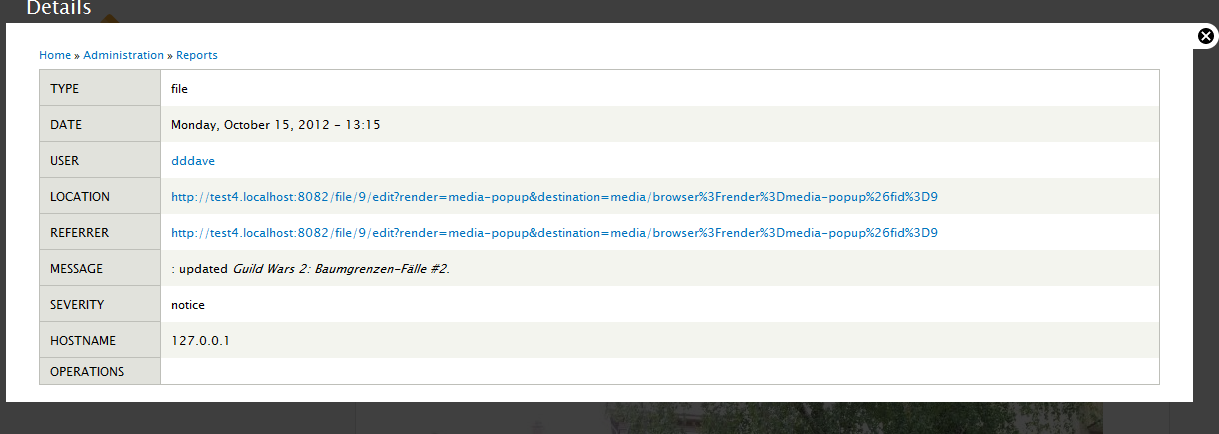
dddave commentedIt seems adding files now results in a watchdog entry (seems new to me) like:

Not sure this should be entered in the watchdog (at least not in this way) in any case.
Comment #6
dddave commented@rootatwc
No patches just latest devs of everything involved.
Comment #7
ParisLiakos commentedi suspect that your videos are uploaded with the type of undefined thats why this happen..can you check if they get indeed the undefined file type? or which type they get?
Comment #8
irous commentedI have the *exact* same problem, and I've been trying to figure this out for the last two days. Thumbnails that should have been generated from new videos are broken. "Rendered file" selected with "Full content".
If I go in edit the node and then press save, I get this error:
"Media: Only remote files with the following types are allowed: audio, video."
These, however, are indeed selected in my media field from Content Types. (Keep in mind that things were working perfectly until a week ago when I updated the Media module. I may have updated a few other modules as well that may have something to do with it. File entity, media Youtube etc.. I can't pin point it, unfortunately.)
When I get that error above, I check the logs right away and see a bunch of these:
"Notice: Undefined index: undefined in _field_ui_bundle_admin_path() (line 325 of /home/mysite/public_html/modules/field_ui/field_ui.module)."
In fact, I get the same bunch of errors whenever I go to update.php now...
Anyway, for the original poster, do you get the same error logs? Does it throw the same error when you edit the node that your video is on and click save? I'd like to know if we have the exact same issue since your initial post + picture looks exactly the same as mine.
Comment #9
ParisLiakos commentedok i found the root for the
"Media: Only remote files with the following types are allowed: audio, video."Videos from youtube have the mimetype
video/youtubewhich is not in the allowed mimetypes in video and unfortunately this is not a valid mimetype so you cant add it in the video file type in the file types admin section.That leads to youtube videos being recognized as
undefinedfile_type, thus not getting any display setings, just using the defaults.We need to add a hook so modules can define their own mimetypes besides the default media gets from drupal
Comment #10
ParisLiakos commentedAnd belongs to file_entity module
Comment #11
ParisLiakos commentedHa! drupal already gives you this possibility with
drupal_alter('file_mimetype_mapping', $mapping);So media_youtube or media_vimeo or any module that provides custom mimetypes should implement this hook to add its mimetype
see
http://api.drupal.org/api/drupal/modules%21system%21system.api.php/funct...
I am assigning this to media youtube, but @RobW this should be implemented to media_vimeo as well
Comment #12
ParisLiakos commentedand changing title, sorry for the noise
Comment #13
ParisLiakos commentedhere is the patch.
But i guess media_youtube should add this mimetype in video file_type on enable or install as well
Comment #14
dddave commentedPatch applied
but what should happen now? Any workflow to get this going? Flushed caches, re-saved and changed settings, re-enabled the module and such but nothing has changed so far.edit: Ok, you have to manually add video/youtube to the allowed mimetypes at admin/structure/file-types/manage/video/edit resave your display settings for good messure and flushing caches might also be a good idea and tadaaa: it works! Thanks for the patch!
Comment #15
irous commentedYeh, unfortunately I got the same result after a patch, cache clear, then resave a node.. additionally tried adding a youtube url manually in Web via Select Media and I still get the same errors I've mentioned earlier.. "Media: Only remote files with the following types are allowed: audio, video.", "Notice: Undefined index: undefined in _field_ui_bundle_admin_path()" etc in the log.
edit: ok, gonna try adding video/youtube to the allowed mimetypes as the previous post suggests
edit2: alright, it's working now :)
Comment #16
RobW commentedArriving a little late to the party here. Thanks for the detective work and patches dddave and rootatwc. Unfortunately for the last week I've been computerless (any recent post weird word choice or capitalization == autocorrect, please forgive) and for the next day or two I'll be setting up my new machine, so I won't be able to test and commit as fast as i'd like. If you think it's rtbc, maybe ping Dave Reid on irc and ask for an emergency commit.
Comment #17
ParisLiakos commenteddont worry, i think it can wait a couple of days
Hope your new pc rocks ;)
Comment #18
dddave commentedDave might be occupied with childrelated stuff for the next time anyways...
Comment #19
dddave commentedI guess this would need a follow-up or "needs work" in any case. Making users manually adding the mime type is broken usability.
Comment #20
RobW commentedOh right, the baybeees. Yeah, probably best to let him concentrate on that for a couple days :).
Comment #21
lsolesen commenteddeleted
Comment #22
ParisLiakos commentedClosed #1823984: Field 'type' not set in 'file_managed' as duplicate
Comment #23
RobW commentedAlright, here's a patch that both adds
video/youtubeas a mimetype and sets it as one of the video file type defaults withhook_file_default_types_alter(). Previous patch RTBC plus my own testing equals looks good to commit: http://drupalcode.org/project/media_youtube.git/commit/c0ba1bbThanks everyone!
Comment #24
Rob_Feature commentedIf I'm not mistaken, you still need to manually add video/youtube into allowed mimetypes, right? Is there any way to auto-allow this mimetype just by checking youtube as the allowed stream type?
Comment #25
ParisLiakos commentedHmm seems that hook_file_default_types_alter() fails if the type's default are overriden
maybe it would be better to do sth like this in an update function:
see #1496624: Provide an upgrade path for media types to file_entity types
comments: #41 and #46
But then again..this would be incompatible with media 1.x..
so what i suggest here, is getting a new branch for media 2.x and leave media_youtube 2.x for media 1.x
Unless you want to turn 2.x branch to exlusively support media 2.x branch...but i think you cant support both versions of media in the same branch anymore
Comment #26
RobW commentedRootatwc, by "seems that
hook_file_default_types_alter()fails if the type's default are overridden" do you mean that if you've manually altered the allowed mimetypeshook_file_default_types_alter()won't add a new one, or that it's possible to remove a mimetype created withhook_file_default_types_alter()?It would make things easier if there was a
hook_file_types_alter()that allowed non-editable additions to mimetypes, etc., for modules like M:YT that have file type configuration requirements to function. I could see that being a problem if a user wanted to move their Media: YouTube files from Video to a custom file type like "External video" or something, which I think was one of the goals of adding custom file type ui, but I haven't had time to play around with file entity lately to see how feasible that is.I'd really like to avoid creating a 3.x branch. If we can't reliably add the mimetype with code, I'd rather add an extra setup step to the readme/ module page.
Comment #27
ParisLiakos commentedyeah well, even if we had a way to lock a mimetype to a file type, we still need an upgrade path.
also stuff are gonna keep changing in media..
there is no need to create a new branch, you can go on wrapping things into conditions eg..
if (function_exists('file_type_load')) {..}else{...}
but that would make everything harder to read and grasp
i am just trying to ensure there is an upgrade path.
If i were you though, i would just state that 2.x is the recommended branch for media 2.x and the 1.x for media 1.x
That way we keep site builders less confused i think
dont know i am open to other ideas
Comment #28
jacobpov commentedany updates on this ? I have a live site same problem!
Comment #29
RobW commentedRight now you can get things back up and running by downloading the latest dev and manually checking the checkbox for the youtube stream and adding the video/youtube to the allowed mimetypes for your video files, explained in #14.
I'm thinking that adding rootatwc's update hook in #25 and making YouTube 2.x Media 2.x only is the way to go. I agree it would simplify things for sitebuilders, although I'm not looking forward to backporting all the work that's been done recently in 2.x to 1.x.
Comment #30
ParisLiakos commented@RobW: you dont have to backport it i think..if someone wants to use latest features he would have to go 2.x from 1.x
which is also true for media as well
and well if they *really* want those features and 1.x media version they could use the rc1 version of 2.x branch which works perfectly fine, but then just blacklist from updates:)
you could state so in project page.
Sth like:
"Although 2.x branch is now only compatible with media 2.x, versions before rc1 are known to work completely fine with media 1.x"
Comment #31
RobW commentedWell, I did a lot of bugfixing that was needed in both branches only in 2.x, and then told 1.x users to upgrade (bad maintainer, bad). So if 1.x becomes a recommended version again I'll have to do some backporting, which might entail merging RC1 with some of the Media 1.x support I stripped out for cleaner code, and calling it 1.x. It will work out.
Comment #32
ParisLiakos commentedah i see:)
well thanks for your patience anyway!
Comment #33
BenK commentedI've come over here from a thread with the identical problem for the Media: Vimeo module (http://drupal.org/node/1823078)....
Comment #34
jacobpov commentedJust to confirm that yes it works now had to re-submit my video nodes finally looking great.
Comment #35
bneil commentedHere's a patch of comment #25 against 7.x-2.x-dev.
Comment #36
beeradb commentedHere's a version of #35 for the 1.x branch. Just in case anyone needs it for build scripts. The patch in #35 is still the one to test.
For what it's worth, I tested the patch (on 1.x) and it works for our needs.
Comment #37
populist commentedHere is a re-roll of #36 to apply against 1.0-beta3 in case anyone needs that.
Comment #38
acrollet commented#35 works nicely, it would be great if this could get in, finding it took a frustratingly long time.
Comment #39
RobW commentedSorry for the recent absence, it's crunch month on client projects. Thanks for the work and review, committed: http://drupalcode.org/project/media_youtube.git/commit/bf1c454
Comment #40
shunting commentedThe new dev version works beautifully. Thank you.
Comment #41
drupalerocant commentedHello,
I just had some trouble in my website with inserting some youtube videos. In certain videos mediayoutube didnt allow me to insert them saying that "the video ID was incorrect or the video has been deleted".
I had installed the 7.x-1.x-beta3-dev (from march 28th) version.
Anyway I tried to patch this version which I couldnt finally.
I tried to patch the beta3 version with the #37 patch by populist, but drupal gave me this error when doing the update.php:
Then I tried th 1.x-dev version from March the 13th and patched it with #36 by beerabd but I got the same result.
So finally I couldn't manage to make it work and here I am inserting these youtube videos by hand, and what is worse, making my editors insert these youtube videos by hand.
Does someone know a way to fix it?
Can I give more information that could be helpful?
thanks in advance
Comment #42
RobW commentedAre you using Media 1.x or 2.x?
Comment #43
drupalerocant commentedI am using media 7.x-1.2
Comment #44
RobW commentedTry adding this patch to M:YT 1x: http://drupal.org/node/1783892#comment-6475826, or downloading the M:YT 2.x git repository and moving head to commit 825d80b, before things were introduced that broke 1.x compatibility. If that doesn't work, post again and I'll take a closer look.
Comment #45
St.Ego commentedPatch worked like majick; just saved my backend with a client site that suddenly stopped showing video preview contents correctly. Thank you for your hard work!!! ^.^
Comment #46
drupalerocant commentedThanks for the help!
I just tried to apply the patch to the 7.x-1.x-dev 2012-Sep-07, and the answer is:
The same happened trying to patch 7.x-1.beta3
Can you give me some instructions on doing what you say:
"downloading the M:YT 2.x git repository and moving head to commit 825d80b"
as I dont know where to look for it and dont know what "moving head to commit 825d80b" means.
Thanks in advance!
Comment #47
karimb commentedI can confirm patch #35 is working with:
media-7.x-2.0-unstable7
file_entity - 7.x-2.0-unstable7
media_youtube - 7.x-2.0-rc1
Thx @bneil
Comment #48
oystercrackher commentedUsing 7.x-2.x-dev, I still had to add video/youtube as mimetype and had to clear caches.
Thanks
Comment #50
axgalloway commentedNot sure if it is the same issue, but duplicate issues pointed to this one, with the error "The YouTube video ID is invalid or the video was deleted."
I am getting that error with this youtube video
http://www.youtube.com/watch?v=LO0IVvXhl6g
The field settings and filetype settings all have the youtube and video stuff checked with mimetype video/youtube there.
What could be causing this error?
I have these modules:
File entity
7.x-2.0-unstable7
Media7.x-2.0-unstable7
Media Internet Sources
7.x-2.0-unstable7
Media Browser Plus for Media 2.x
7.x-2.x-dev
Media: YouTube
7.x-2.0-dev
Comment #51
ParisLiakos commentedPlease use the latest dev version.its fixed there
Comment #52
axgalloway commentedI am using the latest dev. I tested it on another site too with the same combination of modules.
I got the same error with the same video.
Comment #53
ParisLiakos commenteddid you run update.php?
Comment #54
axgalloway commentedOn the first site, yes. It is drupal 7.18
On the second site, Drupal 7.17, Commerce Kickstart (commerce_kickstart-7.x-2.0-rc4), I installed it fresh.
If I have time today, I'll re-download it all and test it on a brand new site to see.
Comment #55
brunodboLatest dev fixes this issue for me. Moving back to fixed.
Comment #56
murzConfirm fixing this issue on latest dev, will be good to see release with this patch.
Comment #58
damienmckennaClosed a duplicate: #1922026: [url] could not be added. Only the following types of files are allowed to be uploaded: audio, image, video
Hint: it'd be really great to get rc2 out so the module worked :-)
Comment #59
jordan8037310 commented#35 works for me on 7.x-2.0-rc2... hopefully this rolled into prod soon
Comment #60
olak commentedtrying to upgrade to 7.x-2.0-rc2 i get this message:
the database upgrade doesnt finish. tried th patch of #35 comment (erasing lines 165-166 form media_youtube.install) with no luck. it always complains for line with:
file_type_save($video_type);my setup:
commerce kickstart 7-1.14 with modules:
Date 7.x-2.6
Embedded Media Field 7.x-1.0-alpha2
Media 7.x-1.2
HTML Mail 7.x-2.65
Localization update 7.x-1.0-beta3
Lightbox2 7.x-1.0-beta1
Mail System 7.x-2.34
Media: YouTube 7.x-2.0-rc2
Nice Menus 7.x-2.1
Panels 7.x-3.3
Piwik Web analytics 7.x-2.4
Simplenews Content Selection 7.x-1.0-alpha5
Service links 7.x-2.1
Simplenews 7.x-1.0
Wysiwyg 7.x-2.2
Zen 7.x-5.1
Comment #61
jordan8037310 commentedHey olak, you need to update your Media module to 7.x-2.x. It doesn't have to be dev version, but Media 7.x-2.0-rc2 requires Media 7.x-2.x+ and not 7.x-1.x. Something I read elsewhere in this thread I believe. Media also requires File_Entity and you need the 7.x-2.x version of that as well.
My enabled modules during update/install:
File_entity 7.x-2.0-unstable7
Media 7.x-2.0-unstable7
Media_field 7.x-2.0-unstable7
Media_internet_sources 7.x-2.0-unstable7
Media_youtube 7.x-2.0-rc2
Hope this helps!
Comment #62
ParisLiakos commentedmmost likely a completely different problem
Comment #63
olak commentedthanx jordan8037310 it's fixed :)
Comment #64
happysnowmantech commentedI ran into this too after upgrading Media 1.x to Media 2.x. Instead of upgrading to the dev version, I did this as a workaround and it solved my display problem.
UPDATE file_managed SET type = 'video' WHERE filemime = 'video/youtube';Comment #65
Cebb commentedI am having this issue.
When adding a youtube video, it shows a filmstrip for preview. As well as in teasers.
When I open the node, it shows an empty html5 video player with no video content.
If I configure the teaser to open in a lightbox on click, it successfully plays the video.
The youtube search feature in media browser also shows nothing but filmstrips.
Versions:
Media - 7.x-2.0-alpha3+108-dev
Media Youtube - 7.x-2.0-rc4+14-dev
Comment #66
olak commentedlook for the display settings of your media fields in content types as also in structure-file. maybe something there needs a different setting
Comment #67
wer0ckz commentedcomment #61 , thank you!