Closed (duplicate)
Project:
D7 Media
Version:
7.x-2.x-dev
Component:
WYSIWYG integration
Priority:
Normal
Category:
Feature request
Assigned:
Unassigned
Reporter:
Created:
9 Oct 2012 at 18:34 UTC
Updated:
20 Sep 2013 at 12:49 UTC


I started to look into coding this but didn't have the chops. So, here's my proposal:
In #1421786: display fields when embedding with WYSIWYG embedding full view modes (with their fields) was included, but we ended up with a problem where most images inserted via the WYSIWYG are floated (or otherwise positioned). This causes problems, however, when you include fields because floating the image does not float the fields (the entire view mode embed needs to be floated or otherwise positioned together).
Rather than hardcoding float presets, I propose a more flexible solution. It includes:
This seems like a simple fix to a potentially complex problem and gives us even more flexiblity in how we lay out these embedded fields. Here's a screenshot:
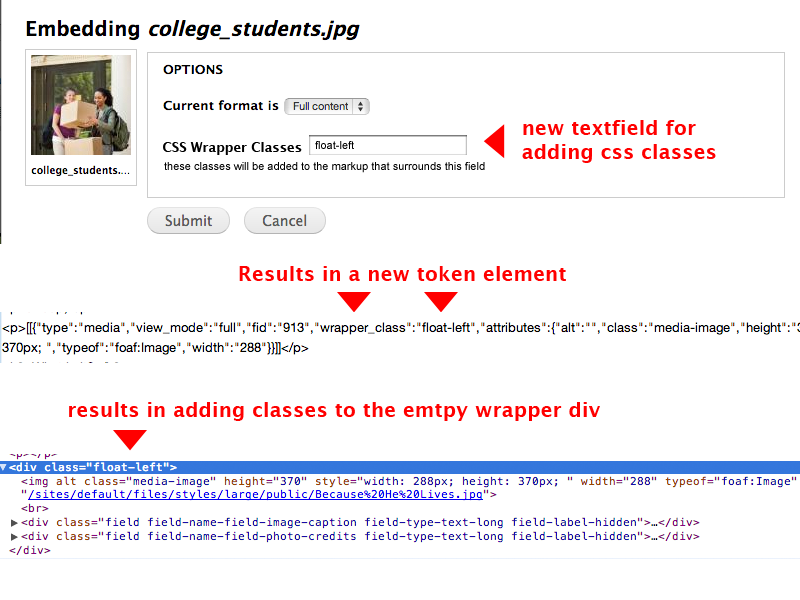
I can imagine that the argument against this approach may be that it's too complex for 'off the shelf users' who aren't modifying CSS. I agree that's probably the case, but it's potentially a powerful addition for advanced site builders while a 'plug and play' solution is underway and, once something more point and click is in place, this still has an added benefit of customizing more advanced layouts of embedded fields.
| Comment | File | Size | Author |
|---|


Comments
Comment #1
ParisLiakos commentedHow about making the wrapper element completely optional as well?
So there is a checkbox:
Provide wrapper element (checked by default?)
Css wrapper class (textfield)
Comment #2
Rob_Feature commentedNot a bad idea, but it seems to me that a div may be appropriate to wrap the whole thing, even if it's empty. Afterall, it makes sense to keep the view mode's data all grouped together, otherwise it seems like maybe bad things could happen to layouts (ie. imagine a situation where something tries to float between fields) A div prevents the rendered fields from being separated from each other by surrounding html.
Comment #3
Rob_Feature commentedI'd be happy to spend time writing this if I could get some help on where/how it would be implemented....for starters, how to avoid additional media token elements from getting stripped on node_save
Comment #4
ParisLiakos commentedthe hard part for me is inserting them in wysiwyg with js, then i can figure it, so if you start i ll follow;)
Comment #5
Rob_Feature commentedahh, darn, i didn't even look at inserting them, I was assuming it would be simple...I am probably useless there too :)
Comment #6
arthurf commentedI'm wondering if this is a duplication of the functionality that the image button has on the wysiwyg? While I definitely understand the need for something like this I'm just wondering how this will integrate.
Comment #7
hyperglide commentedI would also ask that this be an option that the site admin can enable or disable.
Perhaps a permission that relates to different content formats, that user is permitted to use.
I can see how this would start to confuse 'content creators'
Comment #8
Rob_Feature commentedThe more I think about this, the first step could be, at the very least, to put SOME class on this currently unnamed div by default. Then, at least, we could do something to it in CSS. Right now, it's not usable. That gets us half way there...being able to add custom classes on top of that would be icing on the cake.
Comment #9
arthurf commented@Rob_Feature see #1872420: Add classes for embeded media items We've got some default classes there that should help with theming.
Comment #10
gmclelland commentedThis might have helped as well #1906342: Make WYSIWYG wrapper on fielded entities a container instead of prefix/suffix.
I'm using custom css styles with wysiwyg and ckeditor to float left, center, and right.
I'm also using the http://drupal.org/project/shortcode to also apply a clearfix when needed to the parent element.
Ideally, it would be cool if you could select alignment options when inserting the media item into the wysiwyg editor as part of the workflow.
Comment #11
Rob_Feature commentedJust a bump that this is still needed....there's still no way to apply a custom class (for example, to float an entire wysiwyg file entity (including it's fields)) to the wrapper div.
Comment #12
gmclelland commented@Rob_Feature - This also might be related #2070597: Add alignment class when embedding an inline image in wysiwyg.
Comment #13
arthurf commented@Rob_Feature - you can use hook_media_token_to_markup() to add classes and even pull styles from the editor's image settings. There is a workaround in javascript as well see: https://drupal.org/node/1411340#comment-7851455
Comment #14
Rob_Feature commentedYeah, this now looks like a dupe of #2070597: Add alignment class when embedding an inline image in wysiwyg (since that's where some code was posted)
Thanks guys!