

Closed (won't fix)
Project:
Views data export
Version:
7.x-3.x-dev
Component:
Code
Priority:
Major
Category:
Bug report
Assigned:
Unassigned
Issue tags:
Reporter:
Created:
17 Nov 2011 at 12:07 UTC
Updated:
6 Dec 2024 at 14:35 UTC
Jump to comment: Most recent, Most recent file

Comments
Comment #1
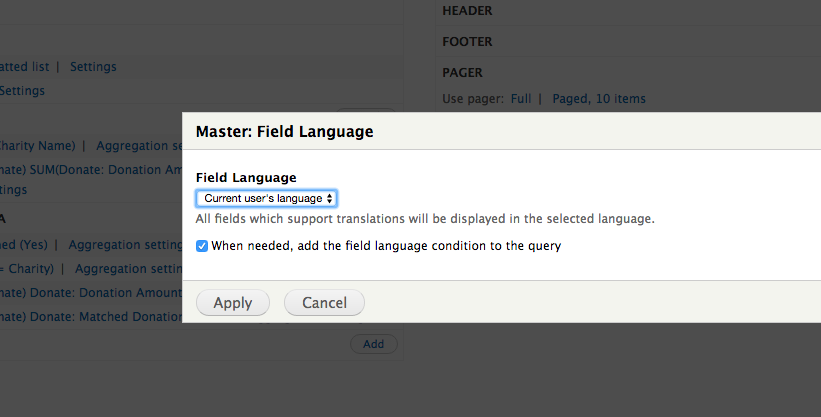
johnvDid you set the following in the Views display: Advance --> Other --> Field Language to e.g., "Language neutral"?
Comment #2
pebosi commentedSame problem here using CSV export. The option "Language neutral" is selected and also tried the other options of "Field language" with no success. And the content of Global Textfields gets translated too.
Comment #3
ram4nd commentedHad the same problem, I solved it by giving my labels unique names.
Comment #4
steven jones commentedLet's get some tests in, and then fix this eh?
Comment #5
steven jones commentedI can't seem to reproduce getting any field labels in views to be translated, let alone the ones in Views data export. How are you getting the labels translated in the first place?
Comment #6
steven jones commentedComment #7
frank ralf commentedSame problem here. When accessing the view via the /de/ path the label "image" gets translated as "Bild" in the exported XML. Will try the recommendations above and report back.
EDIT:
Setting option "Language neutral" doesn't solve the problem. A unique label name does work but IMO is only a workaround.
Comment #8
Mabuy commentedReal problem for me as the Google contacts CSV syntax forces me to use labels like "name" and "birthday" and the corresponding fields are not identified when importing to Google because these labels get translated in the produced CSV file to "nom" and "anniversaire". I also need to rewrite field values using text like "home" (to specify a phone type) but this gets also translated to "accueil" !
I confirm that Setting option "Language neutral" or even "English" doesn't solve the problem.
Comment #9
Mabuy commentedIn my case I solved the problem by adding a space in front of the labels, for instance: " Home". Then it doesn't get translated and the space seems not to cause problems during the Google importation.
Comment #10
megachrizA workaround can be to enable language detection, for example for 'session'. Then you can generate the XML with the English labels by adding the
?language=ento the URL. Problem is that the content can become English as well. In my case, I had added the path alias to the XML view and it fell back to the system path, because the path alias is localized.Comment #11
megachrizIt took me a long time to figure out at what place the label get its translation, but here is what I found:
option_definition()of the class views_handler_field from the file views/handlers/views_handler_field.inc the following code marks the label as translatable:$handler->init()is called in the methodget_handlers()of the class views_plugin_display from the file views/plugins/views_plugin_display.inc.init()call the label is still untranslated. I found out I could reach the untranslated label by callingget_option('fields')on an instance of views_plugin_display. That instance can be found on$view->display_handler.So, in the attached patch the untranslated label is retrieved by calling
get_option('fields')on the display handler. Note though that if a field handler overrides thelabel()method (for whatever reason), that code will not be executed. So there is a probability that this change has an undesired effect for some fields.Maybe there is cleaner, better way to fix this problem, but I currently not see it.
Comment #13
megachrizOkay, label is not always available in the fields' info.
Comment #14
BillyTom commentedI've got this issue as well. A fix would be much appreciated.
Comment #15
marktheshark commented+1
This is a great problem for our affiliate sites which choke on the localized labels (actually the label gets the value: 'invalid-tag-name') and we are forced to provide them with a non-localized feed (English), which can be parsed.
Comment #16
smurfxx commentedIt seems that this bug has not been fixed yet, if I export my view I get labels and fileds translated but the preview is ok.
Comment #17
PascalAnimateur commentedI can confirm patch #11 fixes the problem in my case, but we shouldn't assume
$fields_info[$key]['label']is set, in which case we should fall back to the default behaviour.I re-rolled the patch with additional checks...
Comment #18
PascalAnimateur commentedComment #19
IckZ commentedworks for me! thx a lot!
Comment #20
klausiLooks good to me, too.
Comment #22
steven jones commentedBrilliant, thank you!
Comment #24
adrien.felipe commentedSomehow last dev version (7.x-3.x-dev) does not contain patch #11 while flagged as committed.
Was it removed or something went wrong?
Applying #11 does fix the issue.
Comment #25
steven jones commentedWeird!
I've pushed an empty commit into 7.x-3.x to see if d.o will re-package with this commit included.
Comment #26
adrien.felipe commentedSeems ok now, thanks!
Comment #27
plazik commentedIt will work only if "Transform spaces" option is enabled.
Comment #28
minoroffense commentedThere's a use case that's been broken by this patch which is to actually export labels in specific languages. For example a CSV export with the word "Email" or "Courriel" in en or french.
I think just unilaterally disabling translation of labels is too big of a hammer to use here.
Plus this doesn't actually change all labels from beign translated. If you add labels and they're translated elsewhere they still show up in another language. Only prevents overridden labels from being translated by views.
Instead, there should be an option in the display settings to toggle "Localize labels" or something and actually load the source language values from the translation system.
Comment #29
minoroffense commentedComment #30
minoroffense commentedOr even arguably you could make the case to toggle the localization on/off per label.
Do these settings in the view have an effect on Views data export?
Comment #31
maddentim commented@minorOffense, I agree with you. I have a client asking for her CSV labels to get translated. I get why you would want to not have the translations typically, but there are use cases where you might want it translated.
I am trying to see how I might be able to undo this commit. Not finding quick success.
Comment #32
Lonnytunes commentedThe previous patch created a regression on my project... It was clearly not a good solution, labels are simply no longer translated.
I submit a new one providing a new option to enable/disable labels translation as proposed by minorOffense.
I chose to enable translation by default because it's probably the most often expected behavior (but this will switch again the behavior and might be consiger as a regression as well).
Comment #33
minoroffense commentedI would leave the default behavior the same as it stands to avoid confusion or unexpected changes to people's views. Leave things untranslated by default.
Comment #34
Lonnytunes commentedSame patch than in comment #32 but with labels translation disabled by default.
Comment #36
Danny.Wouters commentedHi, I have a view with the labels translation disabled. In this view there are fields with a custom labels and fields with the default value (title) of the field.
When I export the view, the labels of the field with a custom value are shown. The labels of the fields with the default value are missing.
I added an extra check on the title definition to the patch from comment #34
Comment #37
dmsmidtSince a new issue about the fact that labels don't get translated was marked duplicate I'm changing the title and IS to reflect the current problem.
Marking this as a Major problem, since existing projects got broken by the change.
Comment #39
steven jones commentedSorry for the lack of attention to your issue, please accept my apologies.
Drupal 7 is going to be end-of-life'd by the community in approximately 1 month.
As such, I am closing all non-critical looking, non-PHP compatibility issues for Views Data Export to tidy up the issue queues and reduce the noise. You can read about this on #3492246: Close down Drupal 7 issues.
If you feel like this issue has been closed by mistake, please do comment about re-opening it.
If you feel like the ticket is still relevant for the 8.x-1.x version of the module, then please search for a duplicate issue first, and if there really isn't one (and you've looked properly) then change the version on the ticket and re-open.
Thanks to everyone involved in this issue: for reporting it, and moving it along, it is truly appreciated.
The Drupal community wouldn't be what it is today without your involvement and effort, so I'm sorry that we couldn't get this issue resolved. Hopefully we'll work together in a future issue though, and get that one resolved :)