Closed (fixed)
Project:
Gallery formatter
Version:
6.x-1.0-rc3
Component:
Miscellaneous
Priority:
Normal
Category:
Support request
Assigned:
Unassigned
Reporter:
Created:
28 Mar 2011 at 09:53 UTC
Updated:
16 Nov 2011 at 17:51 UTC


Hi,
Thank you for this module. It works fine in D6 with fine Colorbox integration.
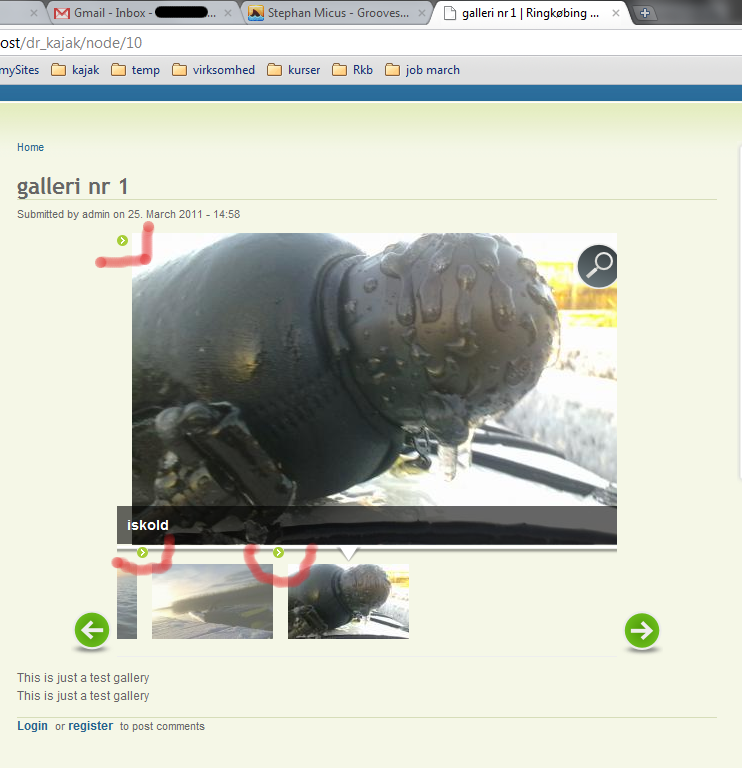
I'm having some minor problems with the styles and the Acquia Theme. Somehow the theme's list style image gets over the pictures, both thumbs and main picture. I have tried to change the Gallery formatter styles but nothing happens.
Any tips?
I attach 3 screenshots (IE, Chrome & Firefox).
| Comment | File | Size | Author |
|---|---|---|---|
| chrome.png | 227.95 KB | daishin | |
| firefox.png | 223.09 KB | daishin | |
| ie.png | 228.88 KB | daishin |



Comments
Comment #1
manuel garcia commentedWhat theme are you using daishin? Can you provide a link to the project here on drupal.org?
Galleryformatter comes with a default CSS that does this:
But apparently your theme has more specific css declarations for the LI elements... in any case, I cannot troubleshoot it or try to prevent it unless I get access to the theme itself.
In the mean time, I suggest you use firebug on there and see what CSS is causing that. Firebug is a great tool to have in any case ;) http://getfirebug.com/
Comment #2
DRIVE commentedI might have a couple "tips" in addition to getting Firebug... by far the best free tool for debugging (and not just CSS!)
Anyway, I found some themes allow their "content zones" to get hijacked by the default output of Drupal... Usually a scenario where they are using "default" Drupal classes to modify their theme's output, particularly tables and lists. In addition, I think that all modules should take a consideration to declare their container class as a top level block-element and not just a class, even if the class may be assigned to a div or a table tag... in turn denying their output to get hijacked by themes using default Drupal output classes to control the theme output.
A theme should not do things like use ".node .li { background-image:........"
or ".content li { background-image:....."
Drupal already has those built in and they DO have functional desirability particularly on the administrative side. Maybe I have misunderstood Drupal best coding practices but I do not think a theme should be hijacking default output classes... likewise, I believe a module should prevent hijacking by declaring classes that cannot be hijacked by malformed Theme's... like attaching them (module's classes directly to a div or table for example). Galleryformatter has this capability easily but it does not declare its own container's in the CSS aside from UL/LI classes.
If your code encounters <div class="content"><div class="galleryformatter">YOUR GALLERY "BOX"</div></div>
Your LI's are going to get hijacked by default Drupal classes (or hijacked Drupal classes from your theme) and your examples are what you get.
I have had to do a few different things based on the theme and finally here are my "tips" :)
.node .content .galleryformatter ul { list-style-type:none; }
.node .content .galleryformatter ul li { list-style:none;background-image:none;background:transparent none;padding-left:0;margin-left:0;border:none;vertical-align:inherit; }
*.node and .content in a theme were used by the theme to format lists for the theme's output where they should have their own classes so that a modules default CSS does not get hijacked... aalso a "reset" css was used by the theme which was further hijacking/scrambling output by assigning styles to things that it deemed "not set" thus line two declares a lot of stuff.
Another way to do do it more easily depending on your situation is to use div.galleryformatter { ul's li's etc etc}
BUT, if your content container is something like this:
<div class="content node bling blang galleryformatter bada boom"><div class="galleryformatter">YOUR GALLERY "BOX"</div></div>
Your UL's are going to be easily hijacked because it it going to use the first UL/LI code that is assigned from the first class it finds in order. The first ones would be .content or .node thus a theme that hijacked .content or .node to set UL/LI output by using .content ul or .node li is going to insert those into your Galleries as your screen-caps illustrate.
Another thing is to set some classes within your VIEWS and you can then set up block-level DIV classes in your GF greenarrows.css or your-custom-gftheme.css:
div.galleryformatter-greenarrows ul { your css to combat hijackings }
div.galleryformatter-greenarrows li { your css to combat hijackings }
div.galleryformatter-my-custom-gallery-374x176 { your css to combat hijackings }
* classes set from your "View" are very effective as well)
div.CLASSFROMVIEW { your css to combat hijackings }
ul.CLASSFROMVIEW { your css to combat hijackings }
li.CLASSFROMVIEW { your css to combat hijackings }
With the CSS there are numerous ways to take care of your issue. Firebug is job one... that way you can quickly and [more] easily analyze your HTML structure to see which way to defeat hijackers might suit you best. There are probably a number of persons who would not agree with my analysis but as I have been working with Drupal, default output, particularly with lists and tables has been a problem with every theme I have worked with, except the ones that ship with Drupal, which makes sense :)
Good luck!
Comment #3
daishin commentedHi Manuel,
thank you for your quick answer. I'm using Acquia Marina, which requires the Fusion Core and the Skinr module. I can not provide a link to the project, as I'm still working on my localhost.
I saw the Gallery Formatter default CSS and tried to tweak it to suit my needs, but as you say, the theme in question must have very specific declarations. I tried to get to them with Firebug, but the structure is so complicated (div inside div inside div...) that I decided to post my problem here.
Maybe is should be a question to post in the issue's page of the Acquia Theme?
Anyway, as theming is by now a secondary priority in my project, I have changed it to another (Arthemia), where Gallery Formatter is working properly.
Thank you again for the nice work. I'm setting the status of this post to fixed, if that's ok with you.
Comment #4
daishin commentedHi Drive,
I must have post my answer at the same time as you.
Thank you for your tips. Really good lessons on CSS hijacking. I will have them in mind if I find any more problems in the future.
Comment #6
chinita7 commentedI'm also using Acquia Marina and have exactly the same problem as @daishin.
I'm trying to hide the ''list mark'' by css but still can't find out how to fix it.
I also tried it with Garland and also it displays the ''list mark'' .
I read @DRIVE's tip but it's too complicated for me as I'm a newbie to Drupal.
Is there any easy fix for this?
I don't think there is a better gallery module for cck image fields so I really would like to stick to Gallery formatter.
Thanks.
Comment #7
skizzo commentedSubscribing. With stock Garland theme, I have not found a way to get rid of the list bullet appearing next to the image. I studied CSS basics, installed Firebug and tried to force "list-style: none" wherever I could, to no avail. Which rules should I add to my local style.css so that the bullets do not show up, at least in Garland? Thanks in advance.
Comment #8
manuel garcia commented@skizzo bullet lists do not show up on (unhacked) garland...