

Closed (won't fix)
Project:
Documentation
Component:
Missing documentation
Priority:
Normal
Category:
Support request
Assigned:
Unassigned
Issue tags:
Reporter:
Created:
27 Feb 2011 at 14:06 UTC
Updated:
23 Sep 2011 at 14:20 UTC
Jump to comment: Most recent, Most recent file


Comments
Comment #1
eliza411 commentedMoving to the docs queue
Comment #2
aspilicious commentedRead this carefully: https://docs.google.com/document/d/1plu1PjGjMTpQzmX18Vd4PY17lDGELxg_kCJQ...
Short version:
1) go to a branch
2) make changes
3) commit those changes (yes you need to commit stuff)
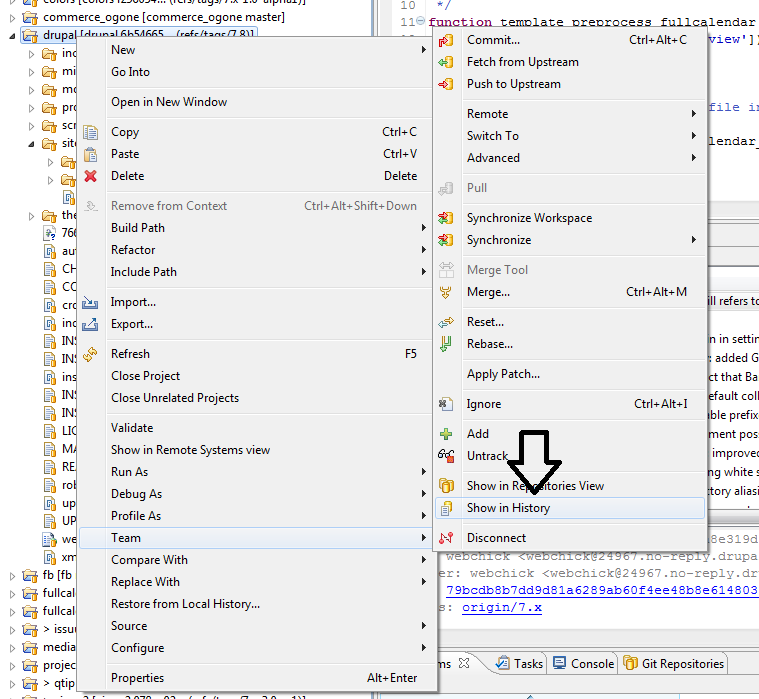
4) right click ==> team ==> show in history
5) right click the commit on top ==> create patch
And no you can't patch (yet) files between random commits in egit
Comment #3
hass commentedNo i do not like to commit and I may not have permission for this as I need to provide patches for project I do not maintain myself. First the test robot need to run the patches. Sound like Git is not ready for production use. We should rollback to CVS asap!
Comment #4
aspilicious commentedHass, you commit *locally*, you have a full copy of the history on your *local* computer, that is how git works...
Your commits wont be pushed to the server and you can commit as much as you can even if you don't have any permissions.
Only when you push your *local* commits to the server you need permissions.
Read the git handbook (http://drupal.org/documentation/git) if you would like to know more about git.
Git is not something that is rdy for production its a general version control system that is used by many people an systems. (look at github).
If you got troubles with applying patches, just read the manuals I wrote and that are available on the net.
We shouldn't rollback as CVS is crap.
Comment #5
hass commentedCVS simply worked. Git or EGIT seems to be very big sh**.
The docs are very bad too, incomplete and highly confusing.
Only look into your link. Screenshot and other drupal docs say the servername is drupalcode.com, other pages git.drupalcode.com, others git.drupal.org more others git-dev.drupal.org. Than urls without .git are working on clone and your docs say leading .git after project name. Than your docs show protocol git://, but this does not allow authentication. Http works, but is not encrypted (no go), https does not work, ssh2 works, but eclipse seems not saving this credentials in password safe. And finally you need to configure all this stuff every time again if you create a new clone. Nothing is reused/prefilled - it simply suxxx. Don't complain docs are not ready or I haven't helped to write them up - yeah I cannot - I have no clue what you guys have done there, but the current level of implementation does NOT allow me to work on my projects what suxxxxx much more than an outdated CVS that may have some limitation I never seen myself as I'm not administering it myself.
Maybe some of this stuff are eclipse EGIT issues, but they are very hard showstoppers I cannot accept myself and gives us only a feeling of pre-alpha software that simply is not usable at all. As eclipse is the primary dev platform for 70-80% of all developers this schould have become a blocker for Git implementation on d.o.
I'm hardly blocked and cannot work on any of my projects.
Comment #6
aspilicious commentedThere were a lot of troubles with CVS. File renaming is just one of those.
To answer on your git problems
==> Yes these are egit issues, complain in the egit issue queue. They are still in alpha.
==> If you hate egit learn command line tools
==> If you hate command line tools you hate me lol
To wrap this up: YOU HATE EGIT. If I could I would moved this to the egit issue queue.
And all the docs are made by people like me who put lots of efforts in making the transition as easy as possible.
I'm a total git noob and I after a few weeks I loved it. You just need to get a grip on the tools. And read a lot of docs and books.
Every programmer should evolve and not stick to any crappy tools they know from their past. And it's not because you didn't have any problems with CVS that others have no problems. They maybe need some more advanced functionallity you never needed.
And seriously I'm not a hard person but if you got such a little respect for everyone on here (yes I take this a little personal). Than I don't know if I'm ever going to help you again while you're asking for support.
Comment #7
hass commentedI'm sorry this was not against your work. So don't take this personally, please. I'm only complaining that current docs are highly confusing and maybe wrong. I cannot correct them myself as I do not understand it and I have not designed this worse migration. The file rename issue is not a real big trouble. We managed to rename some module files in CCK in past. Ok, dww may had not much fun with this, but this is not the point here. I'm fine with losing the history if the tools for a new system are working at all.
Today we cannot confirm that the tools we need for development are available. Like EGIT it seems not ready for production and for the reason that the tools (egit) are not available for 70-80% of all developers it is a wrong decission to start a migration if all the developers are standing in the rain now and cannot share their valuable work. Keep in mind that this may kill community effort as nobody can share patches with others as they are not able to create patches. This cannot be anything that we want and ONLY this in mind - CVS was much better - doesn't matter if grappy or not. It was already difficult to get patches for less popular projects, but now - we get nothing. We should add a statistics tool to review this. I'm sure this Git migration has a very very negative effect on the number of provided patches.
I don't hate You, but command line tools are not user friendly and if I have a plugin in eclipse like EGIT I must expect that all this stuff works as required (as I'm also a Git noob). With every day more it comes in my mind that I only have issues now that I do not need on my desk and I may need to wait a year or more to get some features back only for the reason that some people decided to act precipitately with a Git migration - maybe without investigating if the required tools are working or not. I cannot confirm that the tools are ready and Eclipse development progresss is really slow... we cannot expect that the tools are available in 5 years and I'm not an Eclipse developer nor do I want to become one.
Comment #8
arianek commentedtags
Comment #9
aenw commentedhass: if you have having problems with EGIT and eclipse, then be sure to search out documentation on eclipse and EGIT and ssh.
You *can* use ssh to connect with eclipse and egit. Here are some rough steps and notes:
Note: git.drupal.org uses a rsa SSH key
Now eclipse should be able to user your SSH2 key when you log in to systems, git.drupal or otherwise.
(As you fill in the information, EGit will automatically build the URI. Or you can just type in the full URI if you know what it is.)
- - -
hass, I share your frustration about the spotty documentation on the EGit tools. Documentation in the software world varies all over the place; documentation for open source projects tend to really be spotty and often lacking IMHO. But also realize that major companies have been using eclipse since it was developed in the 90s. And Git is used by major corporations as well. So someone out there is making it work; you have to try to track them down and get the info.
This response comes quite a while after your initial post (I wasn't using EGit then), but perhaps it will still be helpful to you, and perhaps it can serve as a draft for a documentation page so it will help others.
Comment #10
hass commentedIt was never a question of ssh. Aside ssh is blocked in MANY company firewalls and cannot used. I'm sorry, but all you have written above is unreleated to the question.
With egit there is no right click to create a patch yet. Also with latest egit plugin. It is no longer possible to share a patch the easy way like in past. It now takes too much time. I'm no longer spending time to share any patch since git migration and i'm sure others have the same issues.
Comment #11
aenw commentedOf course you can create a patch with eGit. You can even use 'right click' to do it. I did it a number of times this weekend.
In the Git perspective, with the history list for a branch, I can right click and choose 'create patch' then choose to create the patch in git form (my preference). I saved the resulting patch with an appropriate file name. That was it.
All of your issues seem to be with the eGit tool. They aren't about git. Folks have tried to help you out by taking the time to write up steps for you to follow. If they aren't providing you with the information you need then you need to be clearer about what it is you want.
If what you want is for eGit to be a better tool with better documentation, then you need to go over to the eGit project on eclipse.org and work with the folks there. All we can do here is to try to work together to document how to work with that tool; we cannot change that tool. If eGit is causing you so much pain, then explore other tools out there. If your workplace forces you to only work with eclipse and eclipse tools, then you need to discuss that issue with the powers that be in your workplace. None of us can do anything about those issues for you here with the documentation project on drupal.org.
So hass: If this is an issue of documentation for the drupal.org site, what, exactly, is it that you would like to see documented? If you could provide a rough outline of what it is you want to accomplish, then perhaps that would be clearer, and then others could begin to fill those steps in.
In #10 you state that you need to be able to create a patch with eGit, and that you want to be able to use right click to do so. You also state that it's "no longer possible to share a patch the easy way like in the past." Please tell us what the steps were that were "the easy way like in the past" so that someone can possibly let you know how to accomplish it currently and then you can write up the documentation so that everyone can benefit.
And just because something isn't "the easy way like in the past" for you doesn't make it a critical issue. You can review information about issue priority in http://drupal.org/node/73179 and http://drupal.org/node/45111. This issue is obviously *not* stopping people from contributing patches successfully to drupal.org.
Comment #12
hass commentedSee https://bugs.eclipse.org/bugs/show_bug.cgi?id=341036 others requesting this feature, too.
I still have no clue where I can do this in EGit. Aside of this I heard that everyone who creates a patch will invalidate other patches. This is not acceptable. Aside I have seen somewhere it requires 10 steps/clicks or more to create one single patch (and the required rollback to latest DEV is not counted here). In CVS it was one right click on the project folder. This was plain *easy*. in EGit I need to somwhere click something, click a history, find the item, right click, and so on I don't know. After this is done I need to reset/merge (?) my current project (no idea how) as I'm not sure if my patch goes in and I need to go back to latest DEV - *horrorible* - in CVS - right click on project, "replace with head" and you have been done. This was plain *easy*.
What may help a LOT would be step-by-step screenshots - how it can be created and how a branch can be resetted. Anything else may be useless. I cluttered more than one project only for this reset sh**.
Comment #13
aspilicious commented1) Stop being a freaking idiot...
2)
==> READ <== http://drupal.org/node/1077484 and follow the steps.
And yes here are two screenshots if you can't read.
Btw did I say you actually have to read and try those steps? It's a wiki you know that? If you find a failing step you can actually *change* the step so others can learn from it. It's MAGIC...
And when you're trying those steps you can even make some screenshots! AWESOME
And as an extra you can share those screenshots with the world!
It requires a click +/- 3 clicks to create a patch. 10 if you order a book on amazon before creating the patch...
3)
Reset a branch? What about googling: "egit reset branch"
Maybe... If you're one of those lucky people... it will link you to: http://wiki.eclipse.org/EGit/User_Guide#Reset_to_specific_branch_or_tag
4)
"Aside of this I heard that everyone who creates a patch will invalidate other patches. "
I heard that drupal Dries landed on mars with his 3 tiny horses...
5)
My grandmother uses IE6 because she thinks its plain *easy*, she thinks firefox or google chrome is horrible. That doesn't mean she is right...
Comment #14
tim.plunkettCritical support request?
Comment #15
jhodgdonThis thread has gotten abusive and does not belong on drupal.org or in the Documentation issue queue. I am closing it.