Problem/Motivation
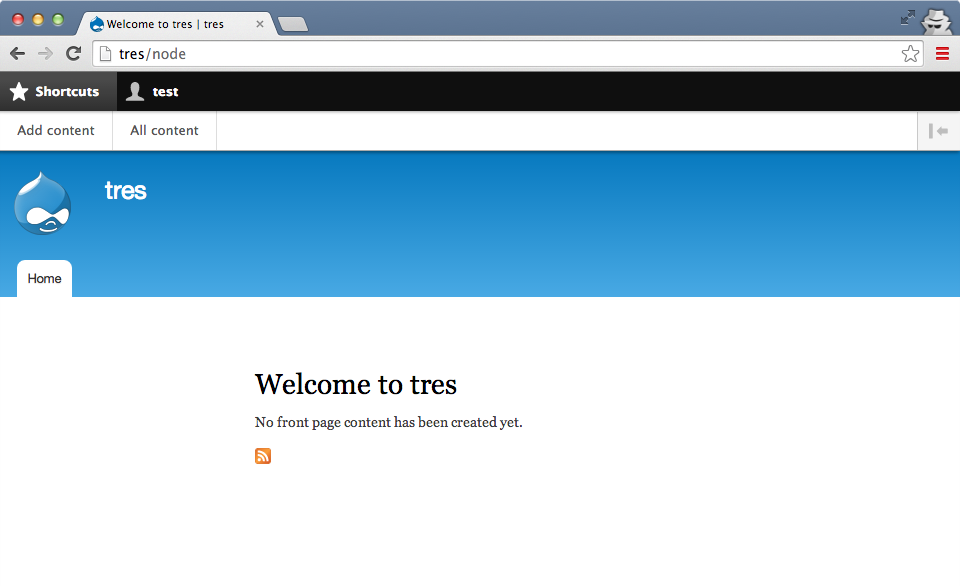
Toolbar doesn't have to just be for admins. Many sites are trying to give content editors or even regular authenticated users access to shortcuts, but currently that's only possible via ugly blocks, not the slick toolbar/shortcut integration. There's no reason toolbar requires a user to be an "administrator".
Proposed resolution
- Rebrand toolbar to not imply or require "administration".
- Grant
access toolbar permission to all authenticated users by default in the Standard install profile.
- Hide the default "User account" secondary menu block for authenticated users, because it's useless if you have those links via the toolbar already. It's needed for anonymous users, since this is the menu/block providing the 'Log in' link. We can leave all the plumbing for the menu + block (even for authenticated users) since not every site will necessarily want to embrace toolbar in this way, and some might still prefer the "User account" menu + block approach.
Remaining tasks
Commit blocking child issues:
- Decide if shortcut should depend on toolbar, and if so, make it happen. Otherwise, come up with a good way to suggest/encourage site builders to enable + use the toolbar if they're using shortcut. composer.json's
suggest comes to mind, but we don't support anything like that in core itself (right?)
- Grant
access toolbar permission to all authenticated users by default in the Standard install profile.
- Use role visibility to only show the "User account" secondary menu block for anonymous users.
- Make sure all users get a reasonable default shortcut set in the Standard install profile, not just admins. @todo Follow-up issue for this?
Once all this is done, #2377543: Add "Add" item to toolbar would be a big usability win as the next step.
User interface changes
These changes would only impact new installations using the 'Standard' install profile. Existing site owners/builders would have to reconfigure their site(s) if they want any of this:
- All authenticated users would see the toolbar.
- "User account" secondary menu block would be hidden for authenticated users (usually rendered the top right of the header region in most themes) in favor of the user tray in the toolbar.
- Possibly others (TBD)?
API changes
None.
Data model changes
None.
Release notes snippet
TBD.
Original report by @davidneedham
If you have the shortcut bar enabled and disable the toolbar module, the shortcut no longer appears. I would expect the shortcut bar to still exist, regardless of if the toolbar module is enabled or not.
If this is not a bug and this is the way that the shortcut module is intended to work, then the shortcut module should have a listed dependency on the toolbar module.


Comments
Comment #1
montesq commentedIn fact when the toolbar is activated, the shortcuts are displayed juste below the admin bar.
But when the toolbar is disabled, you are able to place a block in your layout to display the shortcuts...
Comment #2
David_Rothstein commentedRight, this is definitely not a bug, since the shortcut module works fine without the toolbar module enabled.
I can see it as a legitimate feature request (for Drupal 8) though. Maybe it would make sense to have an option where you can still have the shortcuts appear in a bar across the top of the screen, even without the core toolbar module (or any other toolbar-providing module) enabled. Not sure if that's a good idea or not, but let's leave the issue open for that possibility?
Comment #3
damienmckennaRight now there's massive confusion between the Toolbar and Shortcut modules as to how they should work both separately and together. The Toolbar module a not dependency of the Shortcut module, but out of the box if you only enable the Shortcut module you do not get any shortcuts bar. I think this should be resolved in one of two ways:
Without one of these two being done there will continue to be a major confusion over their usage.
Comment #4
jurriaanroelofs commentedThe block that is available is useless because there is not region in the seven theme where you can put it and have it appear in the right place.
Comment #5
andypostFor current D8 state it makes more sense to implement a shortcut-list as block plugin, which could be rendered in any region of layout
EDiT probably block could be configured #1122816: Assign shortcut set to role to limit number of items to display #1304486-17: Completely remove the ability to limit the number of shortcuts per set to provide upgrade path
Comment #6
wim leersSo essentially this would be a simplified version of the new D8 toolbar — but then with only the shortcuts.
I think with the new D8 toolbar, we've gained some flexibility that allows a new solution.
I propose:
shortcutdepend ontoolbartoolbar'st('Use the administration toolbar')tot('Use the toolbar')The end result then looks and feels much more modern — a responsive toolbar is much more useful than a tiny "Log out" link placed awkwardly.

Comment #7
Bojhan commentedI am not sure if its desirable to have this enabled by default for authenticated users. I can imagine you would want this enabled by default for your editors. Other than that the patch looks great, we should open this functionality to more people.
Comment #8
andypostOnce menu trees are cachable it makes a lot of sense!
But suppose that toolbar should check
module_exists()for shortcut like language module glue all over the coreAny reason for?
shortcut is a storage module, toolbar is frontend module
Comment #9
andypost@Wim is there a way to implement toolbar buttons as plugins? or a kind of menu block module to display subtrees which was just ported #474004-46: Add options to system menu block so primary and secondary menus can be blocks rather than variables
Comment #10
wim leers#8:
Toolbar doesn't assume that Shortcut is present, so I don't get this?
Yes:
Eh… I don't see why this matters. Probably related to your first remark?
#9: not right now, but I can see that making sense. You should talk to Jesse Beach to figure out why that wasn't done in the first place. I'm betting the plugin system wasn't ready back when Toolbar went in. This is highly off-topic though.
Comment #11
wim leers(FYI: there's also the Contextual Links Trigger (pencil icon) in the toolbar and the Tour trigger — neither of those are in any way related to menus — I can see why you might think that the Toolbar is a specialized menu renderer because of the admin menu, shortcuts and user profile links that it renders.)
Comment #13
Motlem commentedI achieved this functionality in kind of a round-about way. I wanted to display the shortcuts bar for some roles, but the admin toolbar only for the administrative role. I am using the shortcuts per role module, so have shortcut sets defined on a per role basis, but wanted to just use the stock shortcut bar.
In my theme's page.tpl.php file, I included the following snippet to pass the user roles in order to use them in my JavaScript file:
In my JavaScript file, I then checked the roles array for the admin role and flipped a switch if the 'administrator' role was there.
I then used jQuery to remove the toolbar element unless the 'administrator' role was detected, leaving the stock shortcut bar intact.
I of course set the permissions of the roles I want to have the shortcut bar to be able to "Use the administrative toolbar".
If those roles also have permission to "View the administration theme", you can duplicate this in your administrative theme in its page.tpl.php and js files to remove the toolbar for all but your selected roles.
Comment #14
Bojhan commentedComment #15
abhiklpm commentedThe shortcut icon should appear if core toolbar is disabled. If its not appearing you need to check the settings in this page also. Cheked in D7 version only.
admin/config/administration/admin_menu
Comment #24
dwwShould we split off as a separate bug report the fact that if you configure the toolbar for a given role that doesn't have access to anything under admin/* that you get a "Manage" button that doesn't appear to do anything at all? That's point 4 from @Wim's comment #6. I know this "feature" is about making that a more common use-case, and enabling the toolbar by default. But it sure seems like a bug to have an empty manage button. Is this the issue to fix that, or can we call that a bug and fix that independently of the rest of the proposals in here?
Cheers,
-Derek
Comment #25
dwwRe: #24, I now see that bug report already exists at #2135445: Toolbar displays Manage tab even if the user is not permitted to see it. I'll put my energy there. ;)
Cheers,
-Derek
Comment #26
dwwThere's now a working patch with all green tests at #2135445: Toolbar displays Manage tab even if the user is not permitted to see it. That's a blocker to the rest of this happening. Anyone interested in this is invited to help get that to RTBC and committed.
Also, after looking more closely at the code, I think nothing about the toolbar is "Novice" material. ;) Certainly not a change of this size and scope.
Comment #27
dwwSplit #6.2 out to a separate child issue: #3025839: Change toolbar's permission label to 'Use the toolbar'
Updated summary to use the template, and make this a proper parent issue to coordinate this effort.
Comment #28
dwwFrom remaining tasks:
I'm playing with this locally now. This statement isn't true. The secondary menu is what's providing the "Log in" link for anonymous users. :/ We'll either need:
A) Leave the menu and block, but use role visibility to configure it to only appear for anonymous users? It seems sad to have code creating other menu items for this menu when they'll never really be displayed. Then again, not everyone is going to want to embrace toolbar. So probably we can leave it alone, and just do the role visibility thing in Standard.
or
B) Build an alternate solution for the anonymous "Log in" link that's not a menu + block (ugh?).
Comment #29
wim leersYou're right. It's only true for authenticated users. +1 for changing the default block visibility to only show it to anon users instead (you added that to the issue summary but not in #28).
Comment #30
dww#29.1: Thanks! :)
#29.2: Righto. Clarified the summary even further. I also added this as a remaining task:
* Make sure all users get a reasonable default shortcut set in the Standard install profile, not just admins. @todo Follow-up issue for this?
Thoughts? Seems smart to do that in a separate issue since it would benefit non-toolbar sites already and it'd be changes in a different module.
Also, in remaining tasks, the child issues are both RTBC, so removed that. Yay! :)
Finally, this is really a toolbar issue, not shortcut. Shortcut is one of the main beneficiaries, but user is making good use of toolbar already. #2377543: Add "Add" item to toolbar would also be a big win with this, even without shortcut enabled at all.
Comment #31
wim leers👌
Comment #32
larowlan#3025839: Change toolbar's permission label to 'Use the toolbar' is in
Comment #33
dww@larowlan re: #32: Great, thanks!
Another thing we should try to clean up, either here or a sub-issue, is that the toolbar's div has the id "toolbar-administration". I added an @todo to the test case for #2135445-58: Toolbar displays Manage tab even if the user is not permitted to see it about this and pointed here. We could update that @see if we want to open a child issue for this, or fix directly as part of this.
Comment #34
dww#2135445: Toolbar displays Manage tab even if the user is not permitted to see it is also in 8.7.x now! That's a legit candidate for 8.6.x backport, but that's pending the thawing of a (temporary?) code freeze (which is why it remains RTBC for 8.6.x branch). Regardless, this issue is clearly 8.7.x-only material, so there's no need for it to remain blocked.
Updated remaining tasks accordingly.
Patch #6 is so stale that NW is misleading. Let's start fresh at active again. ;)
Cheers,
-Derek
Comment #45
quietone commentedThe Toolbar Module was approved for removal in #3476882: [Policy] Move Toolbar module to contrib.
This is Postponed. The status is set according to two policies. The Remove a core extension and move it to a contributed project and the Extensions approved for removal policies.
The deprecation work is in #3484850: [meta] Tasks to deprecate Toolbar module and the removal work in #3488828: [meta] Tasks to remove Toolbar module.
Toolbar will be moved to a contributed project before Drupal 12.0.0 is released.
Comment #46
quietone commentedToolbar module has moved to contrib.