

 Come together with the global Drupal community in Rotterdam, 28 Sept – 1 Oct 2026. Sessions, contribution, connection, and Early Bird savings until 8 June.
Problem/Motivation
When the navigation is expanded a keyboard user is able to tab through all the top level menu items as long as a submenu is not manually expanded either by mouse or keyboard interaction (see expanded.mp4).
The behavior when the navigation is collapsed is different (see collapsed.mp4). With the mouse cursor the submenu is expanded on hover which is ok, the "problem" is when a keyboard user is interacting (tabbing) with the navigation. As soon as a top level menu gets into focus that has a submenu that submenu gets automatically visible and the focus moves to the submenu item. That way the keyboard user has to move through the entire top level of menu items as well as all the entire first level of sub menu items available. The user has to move actually through the entire first level menu and first level sub menu tree. If the user is moving backwards with "shift tab" the corresponding submenus are expanding but the focus remains on the top level menu items.
I've also added #3286466: Tabbing order does not satisfy 508 accessibility requirements which is a related issue for the admin_toolbar, which also contains an extensive testing protocol for keyboard, screenreader and cursor to satisfy 508.
Steps to reproduce
- have the navigation expanded and tab through it, when the end of the navbar is reached "shift tab" back up
- collapse the navigation and now tab through it again, when the end of the collapsed navbar is reached "shift tab" back up
Proposed resolution
For the collapsed navigation don't open the submenu automatically on focus, no matter if you tab or shift tab through the menu. only expand the submenu to a top level menu item by pressing enter. that might also solve one problem of being able to visually distinguish if a top level menu item has a submenu or not when the navigation is collapsed, which would improve the situational awareness for everyone.
Remaining tasks
User interface changes
API changes
Data model changes
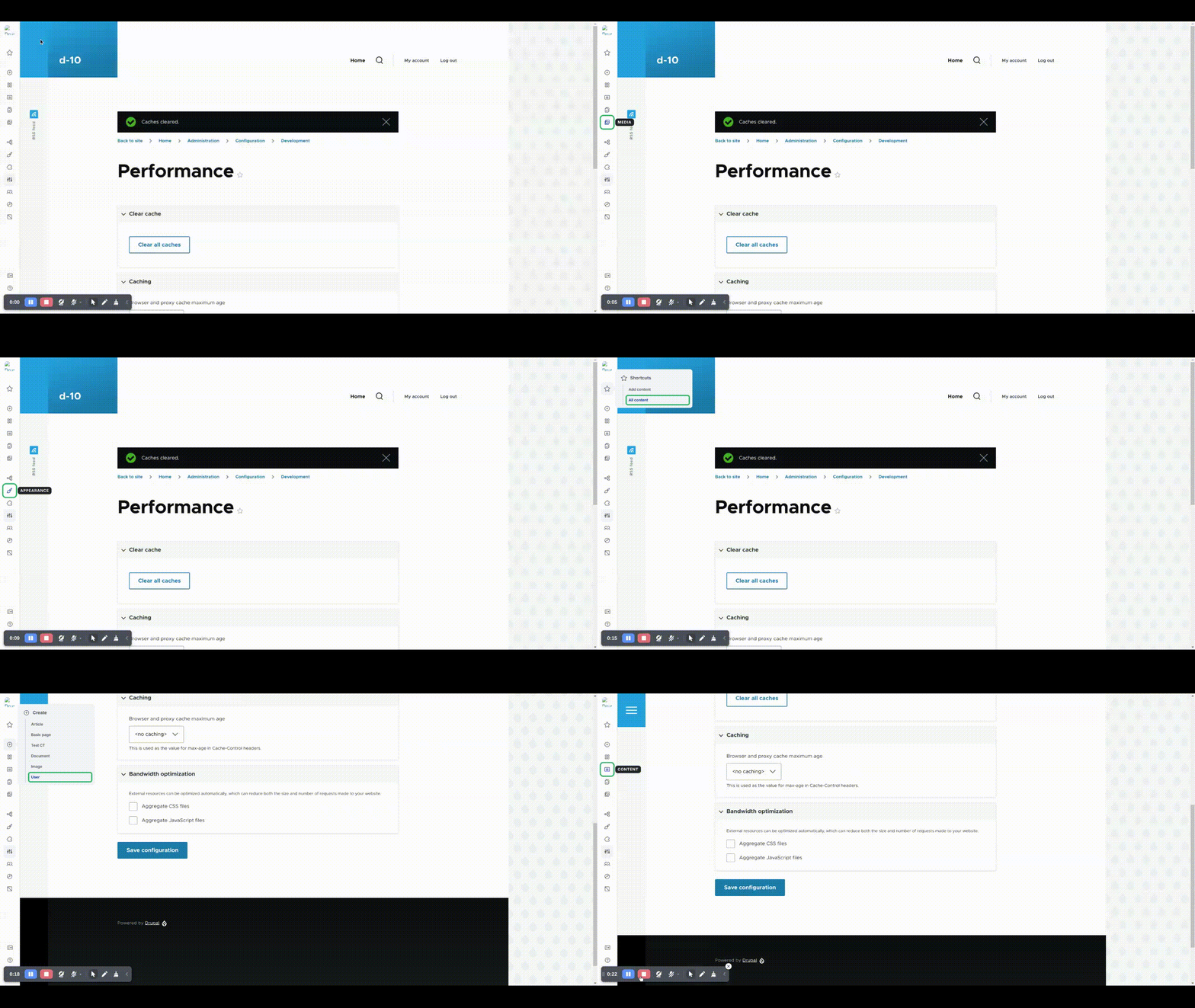
| Comment | File | Size | Author |
|---|---|---|---|
| #8 | navigation-a11y.gif | 454.91 KB | ahsannazir |
| collapsed.mp4 | 203.51 KB | rkoller | |
| expanded.mp4 | 221.89 KB | rkoller |
Issue fork navigation-3426627
 Show commands
Start within a Git clone of the project using the version control instructions.
Or, if you do not have SSH keys set up on git.drupalcode.org:
 changes

Comments
Comment #2
silviu s. commentedComment #4
silviu s. commentedAdded a fix for this. Now, if the navbar is collapsed and you navigate with the keyboard, the submenus will open when you press ENTER. If you press ENTER again or if pressing Shift + Tab before focusing on the submenu, it will close.
Comment #5
silviu s. commentedComment #6
silviu s. commentedComment #8
ahsannazir commentedThe keyboard navigation is now working fine. I just fixed some linting prettier errors. Attaching screen recording for reference
Comment #9
rkollerThank you @Silviu S. for the initial patch! I've manually tested the latest state to the MR including the changes from @ehsann_95. A few observations and thoughts:
The MR solves the problem of the tabbing order if the navigation is collapsed. You are now able to tab back and forth through the top level items as long as you don't expand one of the available sub menus by pressing the return button or spacebar.
The only problem i see (probably out of the scope for this issue but might justify a follow up issue), at the moment there is no direct visual cue for sighted keyboard users if a menu item has a submenu or not. This detail is currently only communicated indirectly, menu items without a submenu show some sort of "tooltip" with a black background showing the name/label of the menu item. That is the same behavior as on hover, the only difference, for top level menu items with a submenu, that submenu is directly shown on hover, while the submenu has the name/label of the parent top level menu item on top.
So it might be useful to have such sort of label in the form of the black tooltip for top level menu items that have a submenu but at the same time to provide some sort of visual cue that helps to directly identify top level menu items that have a submenu.
And I wonder if it would make sense to add (at least for the collapsed navigation state but probably might make sense for the expanded state as well?) to add the option for the user that pressing the esc key closes an open submenu and the focus returns to the parent top level menu item?
Comment #10
silviu s. commented@ahsannazir thank you for your update. Tested it and everything seems fine.
Comment #11
silviu s. commentedComment #12
finnsky commented@Silviu S. hello! thank you for work!
One thing here. Could you please provide MR without formatting fix? only real changes. It seems impossible to review what was changed
Comment #14
skaught@finnsky @SilviuS
yes #7 clearly says it was just formatting. i've reverted that commit.
Comment #15
finnsky commentedLooks good to me.
Moving back to RTBC. Thanks everyone!
Comment #19
ckrinaThanks all! Merged :)
@rkoller noting all your ideas in #9. This week we're going to start implementing the new designs and hopefully we can implement them there: the interactions will change slightly, that's why I've merged this already so we iterate piece by piece.
Comment #21
skaught