

 Come together with the global Drupal community in Rotterdam, 28 Sept – 1 Oct 2026. Sessions, contribution, connection, and Early Bird savings until 8 June.
Problem/Motivation
I'm not sure if this is the right issue queue or not so maybe it needs to move to core, but since Gin is doing a lot of overrides I thought I'd try here first.
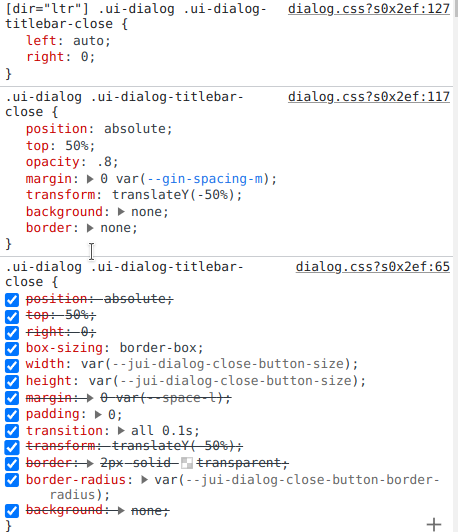
The close button on dialogs is invisible inside Layout Builder because the --jui-dialog-close-button-size (and also --jui-dialog-close-button-border-radius) CSS variable from Claro isn't making it into the frontend theme, so its width and height are zero.
This was not an issue in Drupal 9 because its version of Claro didn't use CSS vars for the close button height/width.
Steps to reproduce
Use Layout Builder to edit a node with Layout Builder iFrame Modal enabled, then add or edit a block which opens up a modal using Dialog.
Proposed resolution
Default the values in CSS? Or somehow get Claro's vars into the frontend theme?
Workaround
Add this to your frontend theme:
:root {
  // Claro vars don't make it to Layout Builder.
  --jui-dialog-close-button-size: 2em;
  --jui-dialog-close-button-border-radius: 50%;
}
Remaining tasks
User interface changes
API changes
Data model changes
| Comment | File | Size | Author |
|---|---|---|---|
| #5 | Screenshot_20230913_111028.png | 71 KB | idiaz.roncero |

Comments
Comment #2
karlsheaComment #3
saschaeggi@KarlShea are you using gin_lb? If so we might want to move it there.
Comment #4
karlshea@saschaeggi I'm not
Comment #5
idiaz.roncero+1 to this, not using gin_lb and seeing this problem after updating to Drupal 10 because of the missing variables.
Gin is used, but the source of the problem is Claro as Gin doesn't touch the width and height of the element.
Setting the variables --jui-dialog-close-button-size --jui-dialog-close-button-size solves the issue.
Screenshot of the CSS applied to the element.
Comment #6
idiaz.ronceroThe surprising thing is that I can see
/core/themes/claro/css/base/variables.cssloaded on my theme ¿¿??Comment #7
idiaz.ronceroSO.. i did a little investigation and the following is happening:
claro/global-stylinglibrary, which includes thevariables.cssfile)variables.cssfile is presentIf this is confirmed, it might be a major bug as CSS is moving towards variables and then, any AJAX loading of CSS assets that involves adding CSS variables might fail.
Comment #8
idiaz.roncero@KarlShea are you using layout_builder_iframe_modal
If so, I think that's the culprit. The CSS is attached, but inside an iframe (while the dialog topbar, where the button is in, remains outside the iframe). That's why the CSS variables can't access the outer scope.
Comment #9
idiaz.ronceroMy bad, this is independent of the use of layout_builder_iframe_modal.
It seems related to the fact that Layout Builder isn't using the admin, but the public theme, so Claro+Gin styling is not applied there.
Comment #11
saschaeggiFixed on dev branch 👍