

 Come together with the global Drupal community in Rotterdam, 28 Sept – 1 Oct 2026. Sessions, contribution, connection, and Early Bird savings until 8 June.
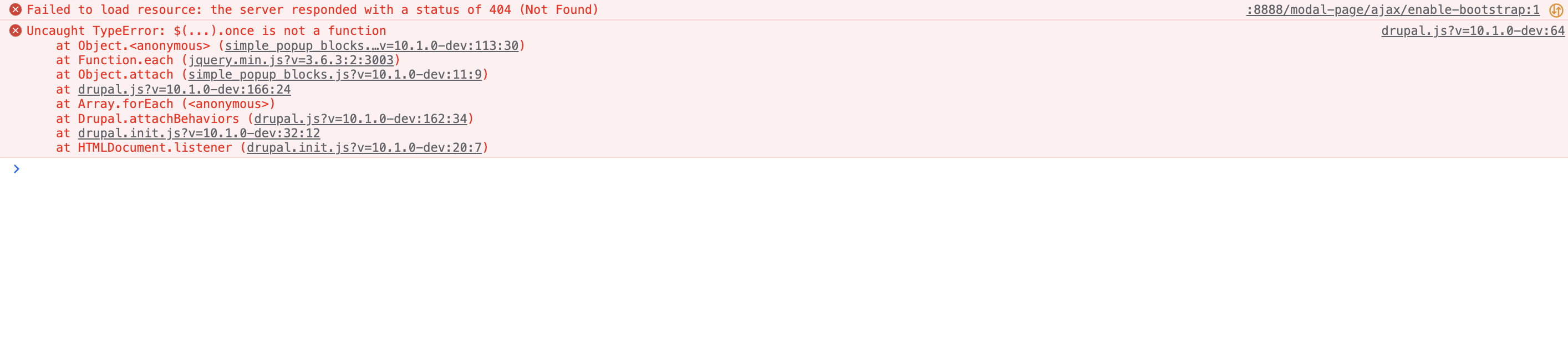
Uncaught TypeError: $(...).once is not a function with Drupal 10.
| Comment | File | Size | Author |
|---|---|---|---|
| #35 | once_deprecation-3350919-35.patch | 1.59 KB | mahmoud barhouma |
| #25 | once_deprecation-3350919-25.patch | 2.51 KB | pierreemmanuel |
| #16 | uncaught_typeerror_once.patch | 1.47 KB | agunjan085 |
| #9 | block-popup.png | 19.39 KB | omkar-pd |
Issue fork simple_popup_blocks-3350919
 Show commands
Start within a Git clone of the project using the version control instructions.
Or, if you do not have SSH keys set up on git.drupalcode.org:
 changes

Comments
Comment #3
igor mashevskyi commentedComment #5
igor mashevskyi commentedComment #6
hockey2112 commentedI am also receiving this error, and my popup is not appearing. Any fix for this?
Comment #7
hockey2112 commentedI applied the changes to the two files mentioned in https://git.drupalcode.org/project/simple_popup_blocks/-/merge_requests/..., but the issue still exists.
Comment #8
shivam_tiwari commentedComment #9
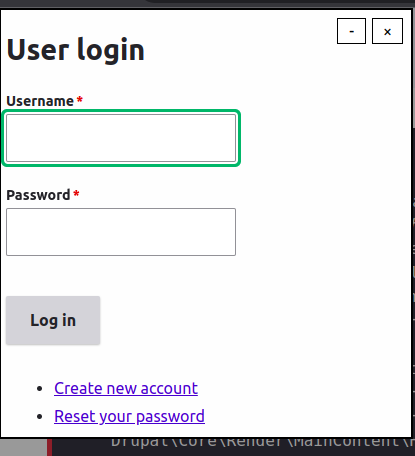
omkar-pd commentedI applied the patch and it worked for me. Attaching a screenshot for reference.
Comment #10
shivam_tiwari commentedComment #11
hockey2112 commentedI am using the Bootstrap Barrio theme. I set up the Simple Popup Blocks module according to the documentation, and I downloaded the two modified files from https://git.drupalcode.org/project/simple_popup_blocks/-/merge_requests/... and added them to my install , overwriting the existing files (and cleared cache). Here are the other steps I followed:
Uncaught TypeError: $(...).once is not a function (dupal.js?v=10.0.7:64 )
at Object. (simple_popup_blocks.js?v=10.0.7:113:30)
at Function.each (jquery.min.js?v=3.6.3:2:3003)
at Object.attach (simple_popup_blocks.js?v=10.0.7:11:9)
at drupal.js?v=10.0.7:166:24
at Array.forEach ()
at Drupal.attachBehaviors (drupal.js?v=10.0.7:162:34)
at drupal.init.js?v=10.0.7:32:12
at HTMLDocument.listener (drupal.init.js?v=10.0.7:20:7)
I have tried it in an incognito window as well, but it doesn't appear there either.
Any idea what I might be doing wrong, or anything else I can check?
Thanks!
Comment #12
hockey2112 commentedI may have identified the issue, but I still don't know what the issue was.
I uninstalled the Admin Toolbar module and its submodules "Admin Toolbar Extra Tools" and "Admin Toolbar Links Access Filter". The popup began working.
I then reinstalled that module and its submodules one by one, clearing cache each time, and the popup continued to work!
This doesn't make any sense to me. It seems to me that I have now reverted back to my original configuration in which the popup didn't work. Any idea what could have been changed by uninstalling and then reinstalling those modules?
Comment #13
gunjan.a2@tcs.com commentedI have applied the changes provided in https://git.drupalcode.org/issue/simple_popup_blocks-3350919/-/tree/3350... but was still getting js error in console when accessing site as anonymous user. Added patch to resolve the same
Comment #14
gunjan.a2@tcs.com commentedI have verified changes provided in https://git.drupalcode.org/issue/simple_popup_blocks-3350919/-/tree/3350...
The issue is not appearing for admin users but is replicable for anonymous users. Attached the patch for the same
Comment #15
gunjan.a2@tcs.com commentedComment #16
agunjan085 commentedI have tried the code changes mentioned in https://git.drupalcode.org/issue/simple_popup_blocks-3350919/-/tree/3350...
The issue is not occuring when logged in as admin & the popup is working fine as expected but its throwing error in console when opening site as anonymous user. Attaching patch for the same
Comment #17
agunjan085 commentedAdded core jquery library to the libraries.yml to resolve the console js error for anonymous user. Now the popup is working fine for both anonymous as well as admin user
Issue commit : https://git.drupalcode.org/project/simple_popup_blocks/-/merge_requests/...
Comment #18
nidhi27Verified the MR10 on 10.1.0 and it's working fine.
Earlier it was showing the error in console. After change popup is showing for anonymous users as well.
Added screenshots for reference.
Comment #19
nidhi27Comment #20
nidhi27Comment #21
Yuezhu commentedI tried to apply patch with composer on drupal 10, it keeps saying:
Could not apply patch! Skipping. The error was: Cannot apply patch https://www.drupal.org/files/issues/2023-04-27/uncaught_typeerror_once_0....
Comment #22
agunjan085 commentedHi yuezhu Please use the diff from MR https://git.drupalcode.org/project/simple_popup_blocks/-/merge_requests/10 for testing instead of the patch as it was an old patch
Comment #23
Yuezhu commentedWhen will the above merge request be merged?
Comment #24
i-trokhanenko+1 RTBC, please commit
Comment #25
pierreemmanuel commentedGenerate patch from MR diff.
Comment #26
hockey2112 commentedThe patch in #25 worked for me.
Comment #27
andrenoronha commentedThe patch in #25 worked for me.
Comment #28
djween commentedI applied patch in #25 and popup works for ADMIN user but not for AUTHENTICATED (non-admin) user or ANONYMOUS user for me.. Sorry, it required me to clear my browser cache for patch to work.Comment #29
umitPatch #25 worked for me. This module now needs to be updated.
Comment #30
vito commentedPatch #25 worked for me.
Comment #31
ravi kant commentedThe MR patch is applying and errors is disappearing.
But the popup is not working with 'Choose the identifier - Drupal Block' but working with 'Choose the identifier - Custom css id or class'.
Comment #32
cestmoi commentedI confirm patch #25 works well.
I applied patch #25 on Drupal `10.3.2` / simple_popup_blocks `8.x-3.1` and the issue is gone.
The `Choose the identifier` is `Drupal Block` and the popup is working for admin and anonymous users. The original block is hidden in the theme region and only shows in the popup.
Comment #33
joco_sp commentedPatch #25 worked for me on 8.x-3.1.
I didn't try the previous solutions, but all
onceerror messages are gone and the popup is working again.I am changing the priority to Major, because the bug makes the popup unusable.
Comment #34
i-trokhanenkoAny chance to get a fix committed? Thanks in advance!
Comment #35
mahmoud barhouma commentedpatch #25 did not work for me, I suggest that we replace once like patch below
Comment #36
abedmatini commentedwhen i installed this module https://www.drupal.org/project/jquery_once , this error Uncaught TypeError: $(...).once is not a function goes away. but the pop up still not showing up, not sure if i'm missing something else in the popup setup
Comment #37
abedmatini commentedI could make it work with CSS Selector id (*).
For some reasons, even if the Drupal blocks is selected, it is still looking for a selector id.
So installing https://www.drupal.org/project/jquery_once as well as selecting Css id (#) and targeting the block by that id, made the pop up visible for me
Comment #39
i-trokhanenkoCommitted the patch #25 as it works for most of the users.
@abedmatini, @mahmoud barhouma , please make sure the issue is not related to your custom theme. If not, feel free to open a new issue.
Comment #40
i-trokhanenkoComment #41
shivam_tiwari commented