

 Come together with the global Drupal community in Rotterdam, 28 Sept – 1 Oct 2026. Sessions, contribution, connection, and Early Bird savings until 8 June.
Problem/Motivation
The following applies only to the Gin toolbar at breakpoints < 976px, when toolbar-tray switches from horizontal to vertical.
When the Gin toolbar is set to either Horizontal, Modern OR Legacy, Classic, Gin applies background shading to sub-menus to help illustrate the parent/child relationship, and distinguish the active menu items from other items in the toolbar (since they all have identical margins).
Shaded Sub-Menus in Horizontal or Legacy toolbars below 976px

When the Sidebar, Vertical Toolbar is selected, this shading is not applied to the sub-menus. See the screenshot below:
Un-shaded Sub-Menus in Vertical or toolbar below 976px
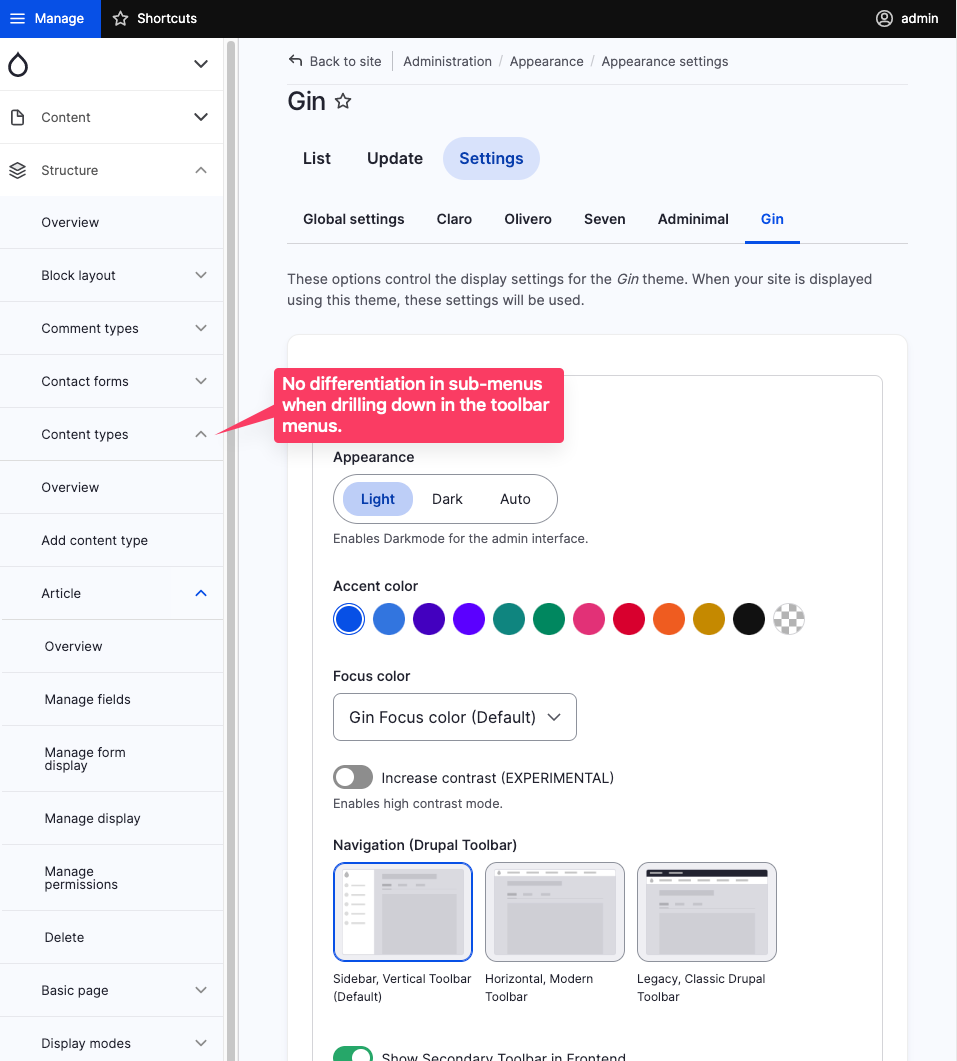
Steps to reproduce
- Enable Gin (and Gin Toolbar to test on the front-end)
- Select 'Sidebar, Vertical Toolbar' for the Navigation setting (/admin/appearance/settings/gin)
- Set the browser window to a width of less than 976px
- Click 'Manage' and navigate down the menu structure.
Proposed resolution
Copy the CSS that provides sub-menu background shading from horizontal_toolbar.css, e.g.
.toolbar .level-2 > ul,
.gin--dark-mode .toolbar .toolbar-toggle-orientation {
  background-color: var(--gin-bg-layer2);
}

.toolbar .level-3 > ul {
  background-color: var(--gin-bg-app);
}
Remaining tasks
Patch
Review
Commit
User interface changes
Add sub-menu background colors for the Vertical toolbar at breakpoints < 976px.
API changes
None
Data model changes
None
| Comment | File | Size | Author |
|---|---|---|---|
| #10 | after-220.png | 64.85 KB | justcaldwell |
| #7 | sub-menu-bg-colors.png | 210.76 KB | justcaldwell |
| #6 | 3336271-Sidebar, Vertical Toolbar (Default)-after-patch.png | 251.09 KB | nayana_mvr |
| #6 | 3336271-Sidebar, Vertical Toolbar (Default)-before-patch.png | 267.24 KB | nayana_mvr |
| #6 | Horizontal, Modern Toolbar.png | 271.48 KB | nayana_mvr |
Issue fork gin-3336271
 Show commands
Start within a Git clone of the project using the version control instructions.
Or, if you do not have SSH keys set up on git.drupalcode.org:
 changes




Comments
Comment #2
justcaldwellChanging to a bug report as I've just realized that sub-menus do have a different background color with the Vertical Toolbar in dark mode. So maybe this was just an oversight (?).
Comment #3
justcaldwellI figured out that the nested menu background colors are set for smaller breakpoints in claro's toolbar.css, but layout/toolbar.css overrides them. Moved the rule to the medium media query, et violà!
They should probably be a bit darker, and actually use Gin's color var's (as is done with dark mode) but this is a start.
Comment #4
justcaldwellHere's what the sub-menus look like with Claro's colors in effect:
Comment #6
nayana_mvr commentedVerified the MR!220 and tested it on Drupal version 10.1.x and Gin version 8.x-3.x. After applying patch the background shading to sub-menus is changed for Vertical Toolbar but I think it is not same as the one which is applied when Horizontal, Modern OR Legacy, Classic is used. Attaching screenshots for reference.
Horizontal toolbar

Vertical toolbar before patch

Vertical toolbar after patch

Comment #7
justcaldwellThanks for reviewing @nayana_mvr! Correct, the colors were coming from Claro, so they weren't consistent with the horizontal or legacy toolbar colors. My most recent changes use the same gin color variables used in those other toolbars. Now they're all consistent, and the changes are suitable to merge (IMHO).
Comment #9
saschaeggi@justcaldwell I've changed a bit the way to handle this. Please have a look. Needs a review.
Comment #10
justcaldwell@saschaeggi works fine for me. A screenshot with the latest version of 220 applied (vertical toolbar, light mode). I checked all three toolbars in both light and dark mode. Colors seem consistent across all. Thanks!
Comment #12
saschaeggi