

 Come together with the global Drupal community in Rotterdam, 28 Sept – 1 Oct 2026. Sessions, contribution, connection, and Early Bird savings until 8 June.
Problem/Motivation
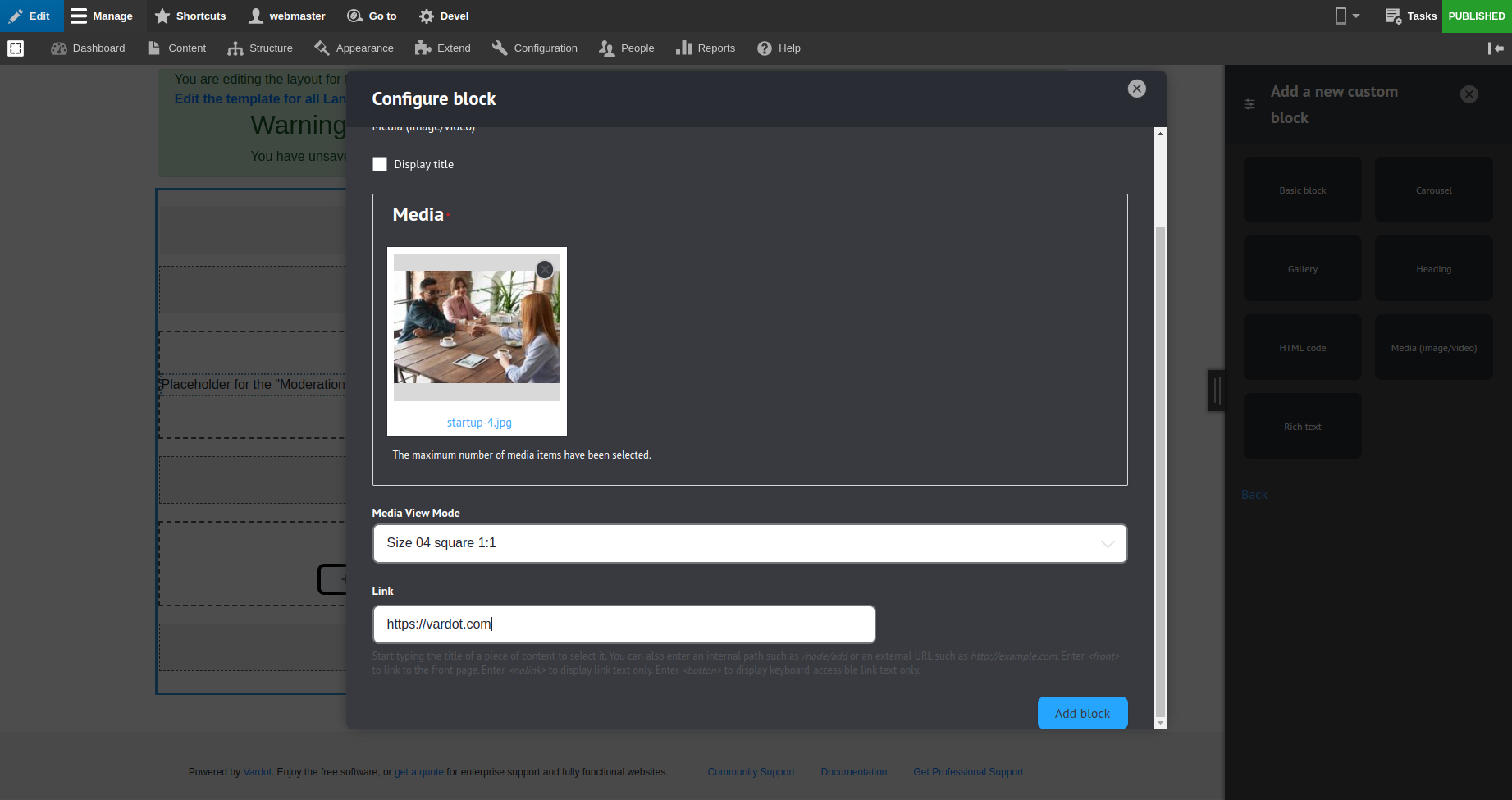
In media (iamge/video) block, when add/update block, block link field require link URL and link title.
The link title field is not used because the link will be a wrapper of the block.
Steps to reproduce
- Add media (image/video) block from layout builder page.
- In block modal there is a link field.
- Hide title input in link field.
Proposed resolution
- Hide input title in link field by a change for the link filed configs
- Limit the link display only to the image media type
- Hide the link field from the form and in the twig for all other media types based on the selected media type
Remaining tasks
- ✅ File an issue about this project
- ✅ Addition/Change/Update/Fix to this project
- ✅ Testing to ensure no regression
- ➖ Automated unit/functional testing coverage
- ➖ Developer Documentation support on feature change/addition
- ➖ User Guide Documentation support on feature change/addition
- ✅ Accessibility and Readability
- ✅ Code review from 1 Varbase core team member
- ✅ Full testing and approval
- ✅ Credit contributors
- ✅ Review with the product owner
- ✅ Update Release Notes and Update Helper on new feature change/addition
- ✅ Release varbase-9.0.7, varbase_layout_builder-10.0.16
Varbase update type
- ✅ No Update
- ➖ Optional Update
- ➖ Forced Update
- ➖ Forced Update if Unchanged
User interface changes
Before the fix:

After the fix:
On creating a new Varbase Media Block in the Varbase Layout Builder

When having media Image
When having a local video

When having a remote video

When having an audio

When Having a local file like pdf or docs

having an update process only to hide the link title

API changes
- N/A
Data model changes
- N/A
Release notes snippet
- Issue #3284568 by Abdullah Yassin, Rajab Natshah: Hide media (image/video) field link title input
Issue fork varbase_layout_builder-3284568
 Show commands
Start within a Git clone of the project using the version control instructions.
Or, if you do not have SSH keys set up on git.drupalcode.org:
 changes





Comments
Comment #3
rajab natshahThis is a great capture issue
Thanks for reporting and the fix.
It is a basic config change
go to
"/admin/structure/block/block-content/manage/varbase_media_block/fields"and edit the link
you will find Allow link text
Disabled
Comment #4
rajab natshahLimit the link display in twig only for the image media type
as it's not logical to have a link when the media type is not an image
both in the form and in the twig
Comment #5
rajab natshahComment #10
rajab natshahComment #11
rajab natshahComment #12
rajab natshahComment #13
rajab natshahComment #14
rajab natshahComment #15
rajab natshah✅ Released varbase_layout_builder-10.0.16
Comment #16
rajab natshah✅ Released varbase-9.0.7
Comment #17
rajab natshah