

 Come together with the global Drupal community in Rotterdam, 28 Sept – 1 Oct 2026. Sessions, contribution, connection, and Early Bird savings until 8 June.
Looking for testing and feedback as this patch might resolve many folks' pain points. We'd like to roll this into a D8 beta release once it passes muster by the community.
The D7 service worker by rupl works very well for Drupal. We don't have it in D8 because the service worker is not dynamic and we can not inject variables from the config. This patch is a port of the PWA module which keeps the D7 service worker and all of its functionality intact.
This patch also includes most of the code from #2954461: Add manifest.json file with the image upload issue in #2954461-37: Add manifest.json file fixed.
Issue queue implications
- Currently in the D8 version there is no way to replace variables in serviceworker.js, we implemented a similar approach to the D7 version and resolved #3020586: Add user/reset to default URL excludes in src/Controller/PWAController.php. We now have inputs for cache version, excluded URLs, and URLs to cache (cache URLs are now replaced in the service worker rather than the current method which uses a workaround to load them in a hidden iframe).
- Add manifest icons to default cache URLs #2981827: Precache manifest.json icons
- Because we used the D7 service worker the issues bumped from D7-D8 regarding the service worker should all be resolved.
- #2843026: Caching images and providing fallback when offline
- #2984140: Only delete SW Cache keys created by PWA module
- #2983935: serviceworkers.js - Response not cacheable
- #3038231: JS compatibility for older browsers
- #2907830: Shows HTTPS off for pwa module even if https is enabled
- #3007486: Exclude files from cache in 8.x-1.x
- #2984140: Only delete SW Cache keys created by PWA module
- #2913023: Allow SW to unregister itself after module is uninstalled
Full credit goes to Théodore "nod_" Biadala for figuring out the difficult solution of how to precache assets. For this solution in D8 we port drupal_http_request() to Drupal::httpClient.
| Comment | File | Size | Author |
|---|---|---|---|
| #76 | Captura de Pantalla 2019-07-23 a la(s) 9.30.37 a. m..png | 111.99 KB | lfjimenez |
| #58 | interdiff_55-58.txt | 12.33 KB | alexborsody |
| #58 | 3060759-58.patch | 190.97 KB | alexborsody |
| #55 | interdiff_42-53.txt | 1007 bytes | scuba_fly |
| #55 | 3060759-53.patch | 68.83 KB | scuba_fly |




Comments
Comment #2
alexborsody commentedComment #3
alexborsody commentedComment #4
alexborsody commentedComment #5
christophweber commentedComment #6
amanire commentedI haven't had a chance to troubleshoot this, but I am getting a 500 error when it tries to register the service worker script via the `/serviceworker-pwa` path. Also, the module supports development on non-https at localhost, right? I will follow-up later tonight.
Comment #7
christophweber commentedNot sure about HTTP support, we work strictly under HTTPS. @AlexBorsody can illuminate this more.
I'll see if I can reproduce the 500 error.
Comment #8
alexborsody commentedI have only run it over HTTPS this is probably the httpClient() call trying to reach the service worker but it doesn't exist possibly because no HTTPS, let me try running it over localhost.
Comment #9
amanire commentedHmm… OK well, I think it's probably not related to SSL. I used the
--ignore-certificate-errorstrick documented in this blog post by Dean Hume to run it on https locally with a self-signed certificate. Note that according to the Chromium devs, localhost is considered a secure origin and can server over http and the spec agrees (as long as it meets the requirements).I'll step through the code with a debugger next to see if I can pin this down. It's probably something stupid on my end but worth documenting.
Comment #10
mrpauldriver commentedUpon first saving the PWA config at /admin/config/system/pwa I am seeing a couple of errors.
Warning: unlink(/Users/paul/Sites/schoolpwa/public_html/web): Operation not permitted in Drupal\pwa\Manifest->deleteImage() (line 79 of modules/contrib/pwa/src/Manifest.php).Warning: unlink(/Users/paul/Sites/schoolpwa/public_html/webcopy.png): No such file or directory in Drupal\pwa\Manifest->deleteImage() (line 81 of modules/contrib/pwa/src/Manifest.php).These errors clear themselves after saving the config again or clearing caches.
EDIT
----
I am not seeing this with a clean install, so obviously something in my current setup. I have been using D8 PWA dev version for some time, with a custom manifest file. Be good to know if this could be a problem.
Comment #11
alexborsody commentedIf you were previously using a custom manifest file this version generates a manifest dynamically using most of the code from #2954461: Add manifest.json file I'll try to reproduce from this case, having applied the patch to a running instance of dev.
For #3060759-9: Fully working D8 version based on D7 Serviceworker I did get it working locally, but I'm running it under root, if under a subdirectory we would need to have an option to change the scope of where the service worker is registered. This could be another input on the config screen which updates the scope of the manifest and the service worker if installed under a subdirectory like localhost/drupal8. Can meanwhile add some error checking for that.
Comment #12
mrpauldriver commentedI am seeing serviceworker problems on a clean install.
3 x screenshots attached
Comment #13
alexborsody commentedThe start URL needs to be a relative path, something like / or /user/login
Also URLs to cache on install doesn't take tokens so adding relative paths line by line something like.
Also would be good measure to fill out the "Description" field to complete the manifest.
/node/1
/node/2
This is the same as the D7 version I think.
Comment #14
mrpauldriver commentedThank you. I am travelling and can only test on my Android phone currently, but I now see an install banner so guess this must be working now.
Can we use wildcards for cachable URLs?
/about* for example
Comment #15
alexborsody commentedNo wildcards at the moment though that and tokens is a great idea. Heres a reroll that includes some error checking of undefined variables that may surface and also checks if "URLs to cache on install" is empty. Adds some more user-friendly help text there too. Thanks for testing.
Comment #16
mrpauldriver commentedThe last patch did not apply
Could not apply patch! Skipping. The error was: Cannot apply patch https://www.drupal.org/files/issues/2019-06-20/3060759-15.patchComment #17
alexborsody commentedSorry about that I forgot to create the patch with the --binary flag, there's an offline fallback image asset.
Comment #18
mrpauldriver commentedThank you for the revised patch.
I am seeing a couple of Lighthouse failures;
In the case of 8. This is because of incorrect size values for the large image. I don't have much experience of creating patches so I just edited 3060759-17. Please find attached
As for 9. I am not a coder and could not see how to resolve this.
Comment #19
alexborsody commentedThank's that should fix the missing 512x512 manifest image, that got reverted somewhere along the way for me.
For 9...
I see the error
Theme color is ouput in the manifest as it should, however, this error is for a meta tag, not the manifest.
We could add a feature to output this meta tag in the header but that would be unlike anything else the module does. Conversely, PWA is a collection of different technologies so may be worth creating submodules to handle other areas such as meta tags.
Comment #20
mrpauldriver commentedYes it does require a metatag. And if you do decide on a metatag sub-module, it might also be worthwhile providing some optional iOS optimisations for PWAs
<meta name="apple-mobile-web-app-capable" content="yes">This allows iOS devices to run PWAs in full screen mode. The reason I say this should be optional, is because iphones do not have a back button, and it is therefore necessary to incorporate some UI in an app to enable backward navigation. The latest version of iOS Safari supports forward and backward swipe gestures, an indication perhaps that Apple are starting to recognise PWA's as a thing.
Another iOS metatag controls the appearance of the status bar. I am still experimenting with this and have yet to form an opinion about how important it is.
<meta name="apple-mobile-web-app-status-bar-style" content="black-translucent">I currently have these tweaks in my theme, but they might be good inclusions for the the PWA module. Especially if evaluation tools such as Lighthouse call them out.
References:
https://developers.google.com/web/updates/2015/08/using-manifest-to-set-...
https://developer.apple.com/library/archive/documentation/AppleApplicati...
https://medium.com/appscope/designing-native-like-progressive-web-apps-f...
For other feedback. I'd like to see a sub-module which shows a block which can trigger an installation action. I have started a separate issue about this.
Provide a PWA installation button block
Comment #21
christophweber commentedI think metatag output might better be left to the metatag module, but am open to other opinions. Either way, it would be better to open a new feature request issue, rather than getting side tracked here. Mind you, I do believe the mentioned metatags should be output somewhere, and we should also have full documentation how this is all set up. I plan to work on a proper doc section for this module soon, linked into the left sidebar of the module landing page as it should be.
Back to the task at hand: What I am deeply interested in here in this issue is whether the latest patch throws showstopper errors for anyone. Keep in mind that for those who have used previous versions of the D8 module, your phone (esp. Android) will hang on to the old service worker and cause possibly unrelated issues. In fact, even your desktop browser leaves the old service worker hanging around, but there you can at least get rid of it via developer tools.
Thanks for the feedback and testing thus far, much appreciated!
Comment #22
mrpauldriver commentedMore feedback if I may.
Firstly, using chrome usb debugging I deleted all service workers from my Android phone. I have since performed countless installs, making sure to remove any Chrome history and files on each occasion.
I am seeing inconsistent results for caching. On some occasions with the expected outcome of URL's being cached as expected and seeing the offline message where not. But on other occasions, finding that things have not been cached and not seeing an offline message - broken pages essentially.
The main question that comes to mind is when does the caching actually take place and how long should it take? Is it during the initial installation or after the app is launched for the first time?
For testing purposes, I think it would be helpful if the maintainers could define what is the 'works as designed' behaviour.
Briefly, my method of Android testing was;
- Configure the module with caching for about 6 paths using relative urls
- Clear any Chrome history and files for the https domain
- Reload the site. Observe cookie compliance banner confirming no history
- Select add to home screen install banner
- Enable airplane mode for offline testing (in different ways*)
- Launch the app and test various paths
- Uninstall the app and repeat
* By enabling airplane mode in different ways, I mean that I tested a number of scenarios;
- Before launching the app for the first time
- Immediately after launching the app for first time
- After launching the app and viewing the home page for a short while
- After browsing a couple of paths, closing the app, then re-opening
- A few other variations of the above
// Aside.
After first deleting the service workers I saw a number uncached image placeholders for the first time and probable confirmation that the old service worker was fighting with the new one. This will be problematic for some sites. Can it be mitigated?
Of the placeholder image; being a very dark gray, these made one page look like a heavily redacted document. Perhaps consider a much lighter color that would be easier on the eye. A scalable svg with a missing image symbol would be neat.
Comment #23
ruplIn the D7 branch of the module, you can choose which event to wait for before registering the Service Worker, and the default is
window.load. I also had options for "immediate" and DOMContentLoaded. If these options aren't present then I'd recommend setting towindow.load, as the caching requests by SW can interfere with normal page loads due to competing requests for CSS/JS/img assets.For testing: it's a tad confusing docs-wise because we've closed so many active issues and consolidated them into one meta-issue. While it makes the coding easier, many of the old D7 issues had specific criteria for testing, and that muddles the ability to leverage my past experience and advice I'd been dispensing for two years as people tested other D7 patches. I won't reproduce everything I wrote in those individual issues but there were steps to reproduce bugs, reproduce/confirm fixes, etc. You might want to read through them even though they were marked outdated. (For the record Chris/Alex spoke with me and we agreed to close the issues in order to make development of their D8 version more manageable, instead of splitting all their great work on D8 into several patches)
As for the issue of two SW files "fighting" with each other, yes that is totally possible, but please do use devtools and confirm this with screenshots before reporting. The majority of bug reports that roll in on SW-related issues are just support requests due to not understanding the detailed specified behavior of the SW lifecycle, including that it won't activate itself until the old one shuts off (and the criteria that triggers it is not straightforward).
Documenting all of the above gotchas in the module is undesireable, because browser behavior changes constantly and it's more responsible to link to externally-maintained docs for respective browsers.
Comment #24
alexborsody commentedI have a patch coming for seviceworker-load.js so we can choose which event to register on, like the D7 version.
Currently, the SW is indeed registered with the standard method endorsed by Google that rupl has mentioned above,
window.loadComment #25
chrisdotbm commentedHi everyone, This is my first drupal build since v2 or 3.
I have installed the PWA module and I have patched it with 3060759-18.patch but once I set up my Manifest in /admin/config/system/pwa nothing seems to happen. If I do an audit on the site it says "Does not register a service worker that controls page and start_url" + "Web app manifest does not meet the installability requirements"
I have a feeling I have missed something simple but I wanted to check to see if anyone could be of any help.
Comment #26
alexborsody commentedCan you show a screenshot of the config you have at /admin/config/system/pwa. Also can you let me know if you see anything at /admin/reports/dblog
Comment #27
chrisdotbm commentedThanks so much for helping!
I do not see anything to do with pwa in /admin/reports/dblog I had checked there before thinking I would see something as well.
Here are my pwa settings
Comment #28
alexborsody commentedTry setting your start URL to
//home#/looks strange to me.I am about to submit a patch to check for potential input errors, 404s in URLs to cache are another one.
Comment #29
mrpauldriver commented@chrisdotbm You might want to double check those 'URLs to cache on install'
I spotted a similar problem on a production site yesterday and could not figure out what the problem was as everything was okay with my dev.
I had changed the url alias of a node from /groups to /classes on production but had failed to update this is the PWA config. The service worker was failing and the error log was returning the following;
GuzzleHttp\Exception\ClientException: Client error: `GET https://www.kildwickceschool.org.uk/groups` resulted in a `404 Not Found` response: <!DOCTYPE html> <html lang="en" dir="ltr" prefix="content: http://purl.org/rss/1.0/modules/content/ dc: http://purl.or (truncated...) in GuzzleHttp\Exception\RequestException::create() (line 113 of /home/162921.cloudwaysapps.com/vrazewjpzq/public_html/vendor/guzzlehttp/guzzle/src/Exception/RequestException.php).After correcting the URL normal service resumed.
@AlexBorsody Is there a case for some error checking that presents a message for roles that have permission to administer the PWA? And also for such mistakes to fail gracefully so that incorrect URLs do not compromise the service worker?
In my case had I used the node ID path instead of it's alias, this would not have happened. But I guess this needs supporting anyway. Moreover, there is often a disconnect between site editor and administrator, and the module should not have reason to fail because an editor deletes or renames a node.
Would converting the 'URLs to cache' input into an entity reference field help with this?
Comment #30
mrpauldriver commentedLook like our replies just crossed :-)
Comment #31
mrpauldriver commentedI've got a strange thing going with the home screen icon, domain name url being duplicated. What could being causing this?
Error while trying to use the following icon from the Manifest: https://www.kildwickceschool.org.uk/kildwickceschool.org.uk/sites/default/files/pwa/512.pngcopy.png (Download error or resource isn't a valid image)Comment #32
alexborsody commentedFor the manifest issue in #31, the image upload from #2954461: Add manifest.json file is still imperfect so I rewrote it to be closer to the D7 version, this should resolve anything there. Also this patch includes error handling for 404 URLs there should be a warning message now instead of a DB log error. This patch also sets the scope when registering the SW to
drupalSettings.path.baseUrlso any issues with installing Drupal in a subdirectory like in #6 should be addressed too.Comment #33
alexborsody commentedSmall coding standards update to the patch in #32.
Comment #34
amanire commentedJust a quick follow-up on my 500 error at
/serviceworker-pwa, it's because I was running the site locally via Docker (Lando specifically) athttp://localhost:32855, and when Guzzle tries to get the offline pages in_pwa_fetch_offline_page_resources($pages)it fails because that site should be accessed at port 80 from within the container. I confirmed this by SSHing into the container and manually curlinghttp://localhost:80/serviceworker-pwaand there is a response with a generated service worker file.Comment #35
mrpauldriver commentedI am seeing that my iOS device does not install the icon on the home screen, but a screenshot icon instead.
Tested with Safari on iOS 12.3.1 - iPad mini 2
Comment #36
scuba_flyJust a quick partial review of patch #33
These classes are not used and can be removed.
Comment #37
alexborsody commentedAdd to homescreen is not supported by iOS yet. https://stackoverflow.com/questions/49601889/ios-11-3-pwa-add-to-home-sc...
Comment #38
scuba_flyFirst of all thanks for al the work you did on for this module.
I have some minor nitpicks for the ConfigurationForm.php:
Unused class.
Remove else and fix indentation.
Comment #39
scuba_flyOh, and I found a minor typo:
Should be: LanguageManagerInterface
Comment #40
scuba_flyFixed previous mentioned issues ( see interdiff )
Lets move this patch along :)
Comment #41
alexborsody commentedAwesome thanks for contributing scuba_fly.
Comment #42
alexborsody commentedTested the patch it's great, thank you! One thing I noticed, the
--binaryflag wasn't used so the images in /assets aren't included. Like the D7 version, we need these for the default manifest icon images and the offline image.Comment #43
mrpauldriver commentedRef #37 Take a look at Responsive Favicons module. They have home screen icons working for iOS.
I don't remember whether this came from their manifest file or some metatags.
Comment #44
alexborsody commentedI'll check, I see what you mean.
In comparison to the D7 version we don't have a 144x144 icon or an SVG at the moment, so maybe adding those will help. Have you tested against the D7 version?
Comment #45
mrpauldriver commentedSorry. No testing against D7
Comment #46
alexborsody commentedSo I tested on iPhone 8 Safari and was able to add to homescreen the icon uploaded to the manifest, following the steps here https://support.apple.com/guide/shortcuts/run-shortcuts-from-the-ios-hom...
Comment #47
mrpauldriver commentedDid you have to install the Shortcuts App that is mentioned your linked article?
EDIT
----
Seems a bit of a palaver and not something we could expect a site visitor to endure.
Comment #48
mrpauldriver commentedSo, a bit of reading up confirms that add to home screen is supported by iOS (and always was). But iOS does not use the icon referenced in the manifest file. A workaround is needed.
https://www.google.com/search?q=progressive+web+app+apple+touch+icon
It is necessary to insert the code below in the head and provide a suitable png file.
<link rel="apple-touch-icon" sizes="180x180" href="/apple-touch-icon.png">A bit messy as different sized icons were needed by different devices, but I think the 180 pixel size covers all. Perhaps someone can confirm this?
The code would need to go in the theme or otherwise be inserted with a module such as Metatag Favicons or Responsive Favicons. If using the later, important to remove references to the bundled manifest file so it does not compete with PWA module.
Comment #49
alexborsody commentedThought we decided in #21 and #19 this module only handles the service worker, not meta tags.
But this deserves a separate thread if not a separate module/submodule.
To stay focused on the patch we should move the meta tag ideas to another thread. This patch gets us up to speed with a lot of the missing functionality rupl and others did in D7 so D8 can have a full release.
Comment #50
mrpauldriver commentedI tend to agree. Just writing up my findings to assist the discussion and help with basic documentation.
Comment #51
scuba_flyReview of #42
Great spotting the missed binary flag. I learned something :)
In my installation this is trying to get /themes/customtheme/logo.svg
That is not where it is located.
In my installation it is located at ./themes/customtheme/logo.svg or ./themes/customtheme/logo.png
Can we change this to
$image_size = getimagesize('.' . $theme_image);Or is this something that is wrong with my theme settings?
Comment #52
scuba_flyI guess we should use
$theme_image = theme_get_setting('logo.path', $nameOfDefaultTheme);instead of
$theme_image = theme_get_setting('logo', $nameOfDefaultTheme)['url'];Also in the Manifest.php
Comment #53
ruplRegarding #48 yes I would use a similar meta tag but opt for 192x192 instead of 180:
This tends to work for me in my personal projects that incorporate iOS Homescreen + true PWA w/ manifest support.
As for how to implement this, I personally think injecting our own meta tag is perfectly fine. The D7 branch already injects the meta tag for the
theme_color:Comment #54
ruplWhoops! After submitting I saw the comment in #49 about waiting for another issue to address meta tags. Fine by me :)
Comment #55
scuba_flyGetting the correct theme path for the theme logo.
Hmm this is actually comment #55
Comment #56
scuba_flyComment #57
alexborsody commentedCool thanks! This fix is awesome. Thanks for the interdiff too.
#53 I didn't realize we were injecting meta tags in D7. MrPaulDriver you're right, we should add that to D8 after all, I'll have a patch for that coming, as we're trying to get caught up to D7.
Comment #58
alexborsody commentedThis patch includes.
theme_colormeta tag as mentioned in #53 similar to D7.Comment #59
iamdroid commentedThanks, guys for your really great job!
#58 works perfectly for me.
Comment #60
christophweber commentedBased on #59 (and previous optimistic comments, and internal testing) I am setting the issue to RTBC, with the aim to commit what we have and roll a RC release unless issues surface.
Comment #61
ruplExciting! Great work to everyone involved with development, testing, and feedback!
Comment #62
mrpauldriver commentedAt Alex's request I tested this with a larger number of urls for caching, and did so with 65 or so. There were no problems.
I see that an additional icon of 144x144 pixels is being generated, but I am still seeing a basic screenshot icon on iOS.
Reading back through the posts is not entirely clear whether it was agreed Apple Touch Icon support would be part of a separate metatag issue; or to be dealt with via documentation or whether such functionality should be provided by this issue as hinted at in #57. Some clarification would be helpful.
My personal feeling is that despite Apple's less progressive approach to PWAs, we should have a proper icon for iOS, given that a well established method using a metatag already exists and has done for many years.
Forgot to mention also; full marks from Lighthouse.
Comment #63
amanire commentedYEAHH! I applied patch in #58 and I was able to successfully register the service worker at http://localhost:32813. That's right, non-HTTPS local development and no guzzle issues with the port.
I noticed the new default language attribute since I am using the multi-lingual Umami demo, excellent.
Saving and received a notice on URLs to cache on install for a missing URL, very nice.
I tried iterating the cache version as well and observed the new SW queue up, Waiting, Install after reloading the tab, and remove previous cache instance. Glorious!
Comment #64
alexborsody commentedAwesome news on localhost, thanks for testing those edge cases. MrPaulDriver thanks for testing those Precache URLs.
Regarding the Apple meta tags, there's a discussion Christoph started over at #3066848: Emit metatags for iOS from a submodule going on about how to best implement them, either manually, in this module or a submodule.
Comment #65
mrpauldriver commentedRTBC from me.
Comment #66
alexborsody commentedAlso noticed that we should add
/and/offlineto the URLs to precache like the D7 version does in line 53 ofpwa.installto make sure the offline page has all assets precached (CSS, icons etc). This makes the out-of-the box setup more straightforward.The site I am currently working on we don't put any default values in the config so it branches off from my contrib code a bit there and forgot to add that. I can make another patch soon or just commit once we push #58 through, since it's a really easy/minor addition. Thanks to gclicon for noticing that.
One last thought, if anyone gets a chance can they test uninstalling the module, would like to give that a good QA. Should function like #2913023: Allow SW to unregister itself after module is uninstalled. Not sure anyone has done that. The TLDR of it is that when you uninstall the module, this URL is hit /pwa/module-active and then the next time the browser is closed (entire browser not just tab) the SW uninstalls.
Comment #67
mrpauldriver commentedConfirm that the service worker uninstalls itself after the module is removed.
Comment #68
arrowShould the pieces of this that originated from other issues be split off and posted back at those issues so that contributors can get their issue/commit credit? Or maybe just adding the credits at those issues and being sure they're included as authors when this gets committed would be enough?
Comment #69
alexborsody commentedHey Aaron thanks for checking out the project. I thought about that too, but breaking it up into separate patches for each issue is too time-consuming for me at the moment, those issues have been closed out and referenced here. But planning on crediting each author in the commit for this patch. If anyone wants to volunteer time to break up the patches and post to each thread that would be good history to have though. This patch a rewrite of the entire service worker (from the current 8.x-1.x) and most of the PHP too.
Comment #70
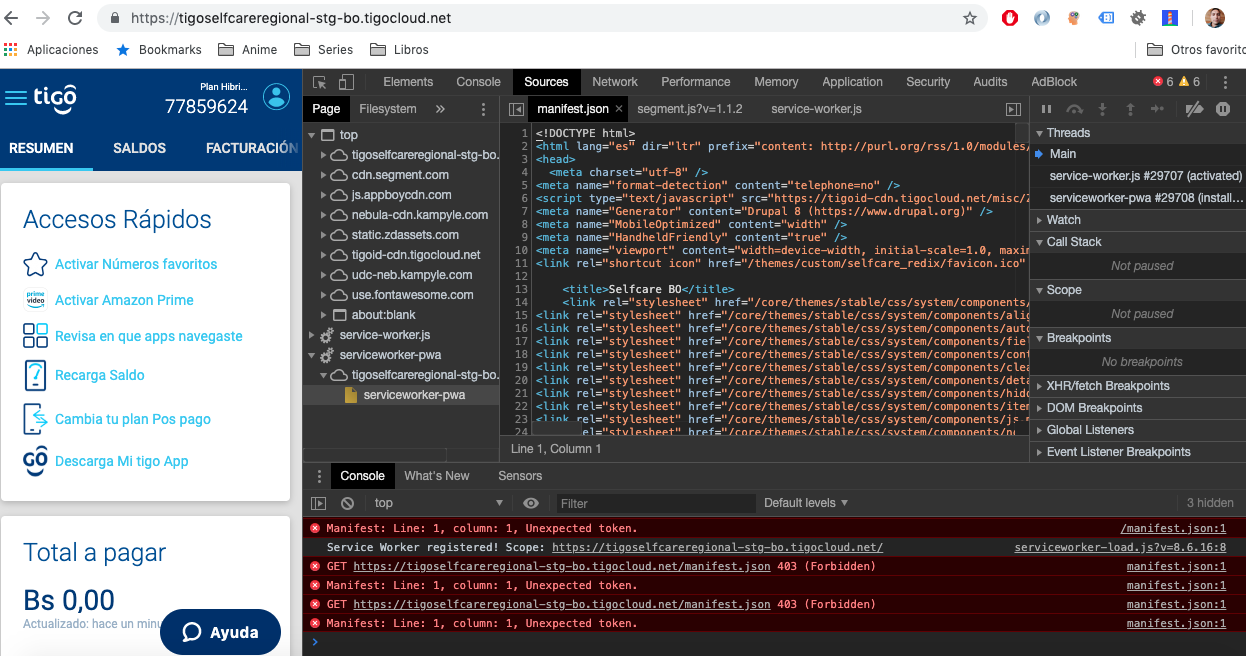
lfjimenez commentedhi alex, i have tested the patch in drupal 8 and it is working fine for anonymous users, am trying to make it work after i log in, is it possible?, i had an error saying not permissions for manifest.json file, i gave permissions from anonymous to authenticated users but is the same error, can you help me out please, thanks
Comment #71
alexborsody commentedYes it's possible, we really need more information than that, screenshots and exact error messages. Pretty sure
is not the error message. Let me know when you have more specific details and instructions to replicate the issue.
Comment #72
lfjimenez commented@alexBorsody i have attached the images for the error, i have configured the permissions for authenticated users, then i LOG IN, after that i get the console log errors.
Comment #73
ruplThe screenshots in #72 are a result of HTTP Basic Auth being used on a dev/staging site. See some discussion here: https://stackoverflow.com/a/51157352/175551
The manifest.json is fetched as CORS by default, since it's supposed to be a public manifest of your app (to be included in aggregators and app stores and such).
The SO I linked to above mentions adding the
crossorigin="use-credentials"attribute to ensure any credentials are sent along with the manifest request: https://developer.mozilla.org/en-US/docs/Web/HTML/CORS_settings_attributesI'm not sure if the module should fix this by default, but that's the problem (and solution).
Comment #74
lfjimenez commentedrupl thanks for the answer, the question is why is it working fine for anonymous users then?
Comment #75
ruplWhen I load https://tigoselfcareregional-stg-bo.tigocloud.net/ and look at the HTML response, I do not see a manifest nor a reference to the
serviceworker-load.jsscript tag. It doesn't seem like it's loading the PWA.When I curl https://tigoselfcareregional-stg-bo.tigocloud.net/manifest.json I do see the manifest as an anonymous user. No auth was needed.
It seems my explanation in #73 is wrong.
Comment #76
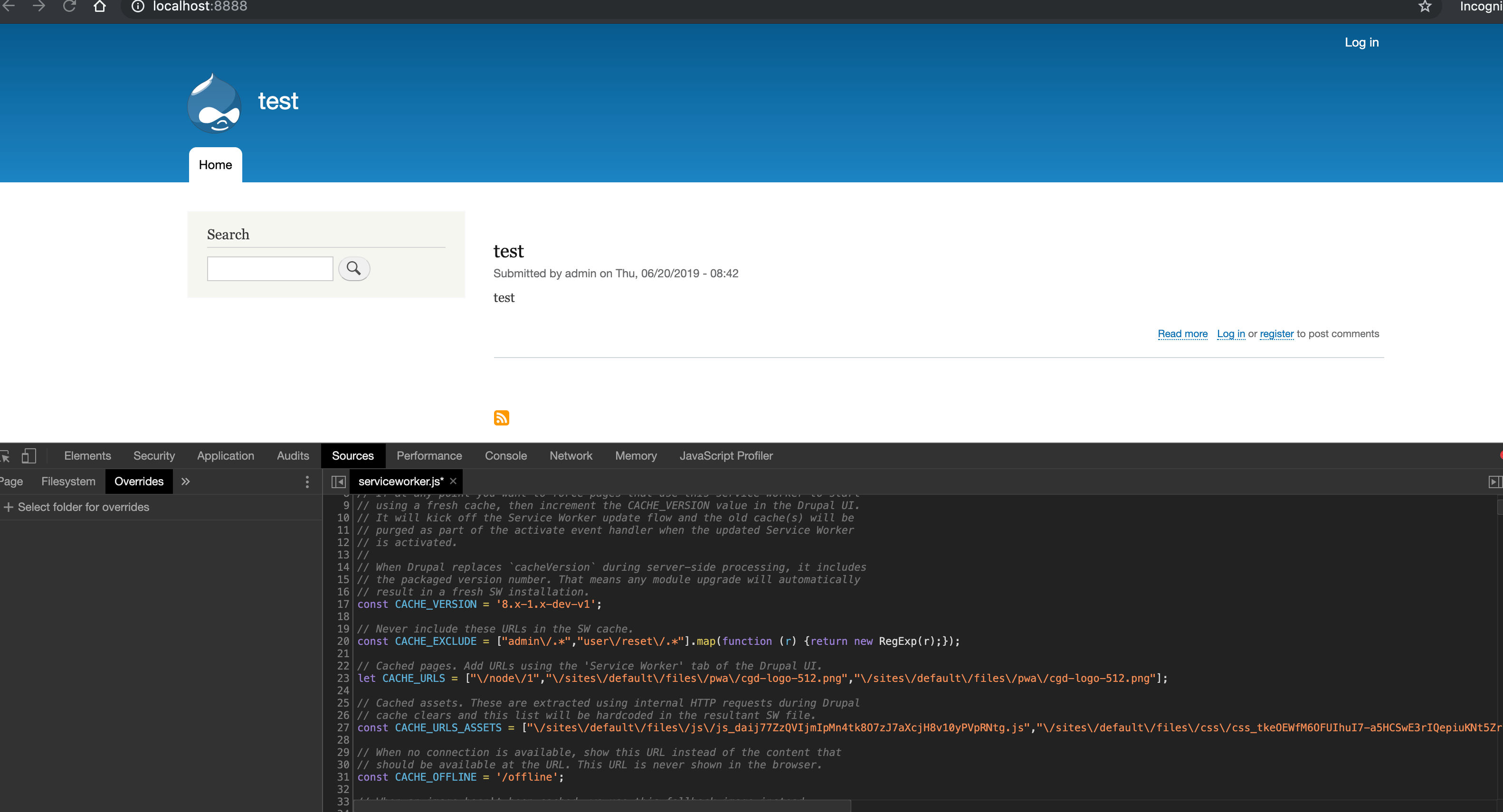
lfjimenez commentedI have been checking out with a partner and she realize the problem is on permissions, i am attaching the image where i have to change to make the module works for authenticated users, i had to change it from "access pwa" to "access content". for those 2 urls, should it be changed in this patch? or am i missing something i can do without modify the code?

Comment #77
alexborsody commentedHey lfjimenez thanks for clarifying that, I have this running on a few sites and haven't seen this.
I am also seeing the same as #75, /manifest.json loads when visited directly but don't see the link in the HTML. I use
access pwain .module to access the manifest + service worker, and am only granting that to anonymous now on install.Looks like we could also add.
user_role_grant_permissions(RoleInterface::AUTHENTICATED_ID, ['access pwa']);Still, if you enabled permission for authenticated manually not seeing why it wouldn't work.
Comment #88
christophweber commentedComment #89
christophweber commentedAs Alex is rolling our first beta I have added all contributors to other D8 issues to properly credit everyone who stuck it out on this long journey.
Looking forward to a solid 8.x-1.0 release soon.
Comment #90
christophweber commentedComment #91
lfjimenez commentedalex could you help me please making the change about the permissions to "access content", i haven't done yet a patch update, so i would appreciate if you do the change in #76, thanks.
Comment #92
christophweber commentedWe will definitely check into that @lfjimenez. Alex and I just decided to roll the beta now and deal with remaining glitches as we near a 1.0 release.
Comment #93
christophweber commentedOk folks, we have a beta release out, please use that going forward and let us know what you find in fresh issues. I am closing this one now.
Thanks to everyone who contributed!
@lfjimenez, I opened a fresh issue for you: #3069828: Permission issue
Comment #94
alexborsody commentedlfjimenez after you set permissions to true for authenticated user try separately clearing cache and rebuilding permissions and let me know if that works.
Also let's open another thread with this issue. I'm rethinking if we even need permissions to access the manifest and service worker. On one hand it could be useful in some cases maybe testing, on the other hand if permissions are disabled for a role and there is a residual service worker left on the user's browser from when it was enabled, we would need a phone home uninstall event to prevent making calls to the manifest. More added complexity in addition to your issue for a feature (permissions) that doesn't seem a priority.
Comment #95
ruplFantastic work all around! thanks Christoph for adding credit to all the previous issue contributors.
Comment #96
rupl@AlexBorsody just a little housekeeping: could you please make sure the
8.x-1.xgit branch is updated with your latest work? I noticed that no commits were pushed to that branch and when I pull from git, the last commit is:This is also confirmed by the main project page, which still reports that the last commit to the 8.x dev branch is 4 Oct 2018 (even though the new release is dated 23 July 2019)
It would be best to only commit to the 8.x-1.x branch and do local merges before pushing code. If others want to make new patches they should be able to do so from the
8.x-1.xbranch at all times.Edit: I'm not 100% sure but this might also require a re-release of the beta, as I see on our commits page that the
8.x-1.0-beta1tag is on that same commit: https://www.drupal.org/commitlog/commit/85315/f4178f7870baf11eb12a1f4bd1...Comment #97
christophweber commentedGood call on branching and housekeeping @rupl. Will do today if possible.
Comment #98
alexborsody commentedNote on guzzle requests.
Comment #99
alexborsody commentedGot it, updating this now.
Comment #101
alexborsody commented