

 Come together with the global Drupal community in Rotterdam, 28 Sept – 1 Oct 2026. Sessions, contribution, connection, and Early Bird savings until 8 June.
Problem/Motivation
Umami's new language switcher has various issues:
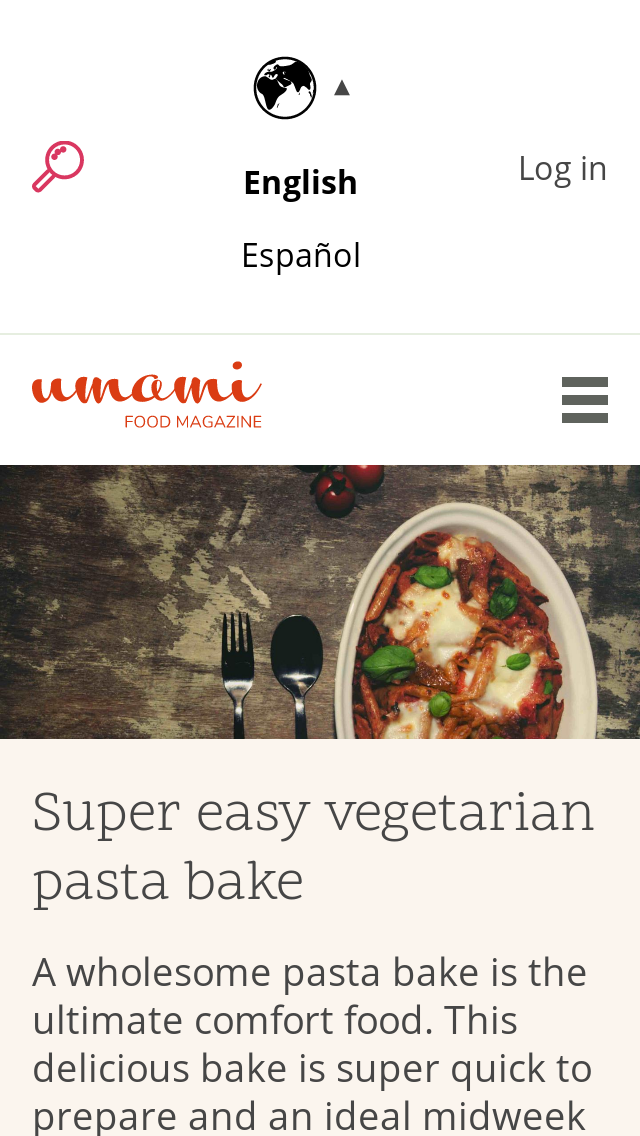
When adding more languages (beyond the existing English and Spanish) it will break the nice flow of the header, or when viewing the website in RTL language.
Umami's mobile main-menu has accessibility issues (#2940023)
Proposed resolution
Creating an accessible dropdown component can solve the current issues with both Umami's language switcher and Umami's mobile main-menu.
Remaining tasks
Create dropdown menu.
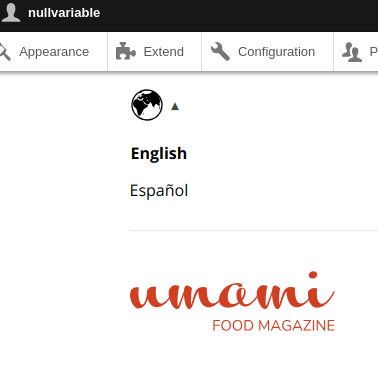
Figure out best positioning and a visual representation that will be easy to identify as "Here's where I can switch to another language"

| Comment | File | Size | Author |
|---|---|---|---|
| #115 | Screenshot 2024-08-01 at 14.28.36.jpg | 185 KB | markconroy |
| #115 | Screenshot 2024-08-01 at 14.28.28.jpg | 243.93 KB | markconroy |
| #115 | Screenshot 2024-08-01 at 14.27.51.jpg | 298.17 KB | markconroy |
| #100 | 3042417-100.patch | 35.66 KB | cp_dev |
| #94 | After_Desktop.png | 91.58 KB | priyanka.sahni |
Issue fork drupal-3042417
 Show commands
Start within a Git clone of the project using the version control instructions.
Or, if you do not have SSH keys set up on git.drupalcode.org:
 changes






Comments
Comment #2
shaalInitial patch:
Drop-down functionality that supports a11y.
Now it can be determined where it should be located and how should it look (currently a hamburger menu).
Known problems:
The class "language-switcher--collapsed" (which is only there to apply the CSS rule
visibility: hiddenis coming in a delay so the items do not disappear before the menu collapsed. There's a very rare possibility that someone will click multiple times in a certain rate and get the menu open while no items are shown.Major issue:
When logged-in + Big-Pipe is enabled (by default), the javascript code is running before the block of language switcher is loaded on the page.
Comment #3
shaalFixed minor trailing spaces.
Mobile preview (dropdown open, initiated on the top-left hamburger menu)

-----------------------------------------
RTL Mobile preview

Added video previews for wide screen, mobile screen, and RTL.
https://www.youtube.com/watch?v=YxBVxCBO4oI&list=PLtcCo3RK-3DYncIwEPU0PA...
Comment #4
shaalI made some layout changes according to the discussion I had with @kjay earlier.
Previews:

(Mobile - language switcher opened)
(Mobile - language switcher closed)

(Desktop - language switcher closed)

Comment #5
gábor hojtsyHm my hunch is the label of the dropdown should be the active item. "Language" in some arbitrary language is not necessarily recognisable by people in other languages.
Comment #6
shaalI tried implementing active language instead of using the label "Language".
In the way it is displayed now, I think that change is a regression and results in a confusing interface.
Keep in mind some devices that don't have javascript - and that dropdown is always open.
I am adding the patch anyway, in case it will become the way we would like to pursue.

Comment #7
shaalI made a re-roll for the CSS update. (interdiff was not possible because of that)
I changed the language switch to be a button element, so it can be navigated to using the keyboard.
Comment #8
shaalCreated a new patch with a globe icon to open list of languages.
The globe icon solves the problem of users who get to the website in a language they don't understand and allow them an easy way to find where to switch language (as opposed to writing a word in a language they don't know)
Desktop:

Mobile:

Mobile RTL:

Comment #9
pawandubey commented@shall
Patch#8 looks fine. Lets wait for others to provide their feedback on it.
Comment #10
MaskOta commentedThere is a contrib that does this. https://www.drupal.org/project/dropdown_language
Comment #11
markconroy commentedComment #12
mradcliffeSince this is es6, we should be able to use an arrow function instead. And I think the right function brace would be on the same line, if not using arrow functions
setTimeout(() => menu.classList.add('language-switcher--collapsed'), 500);could work, but it would return something to setTimeout.This probably needs
role="button"if it's a clickable thing, and check to see if it's tabbable (tabindex=0 may be necessary).This probably needs to set the cursor to a pointer.
Comment #13
mradcliffeI think that's fairly actionable so I'm going to flip to Needs work.
Comment #14
mradcliffeAdding novice tag as well.
Comment #15
joville commentedI would recommend to use a button element instead of a div with role="button" for a11y. button have already the role="button" per default without applying the role attribute.
Comment #16
nullvariable commentedHere's an updated version of the patch in #8 that implements a fix to listen for the `transitionend` event, instead of using setTimeout, so that if a user clicks faster than 500ms, we don't apply the collapsed class.
Also refactored to use Drupal.behaviors so the dropdown works well with bigpipe now.
Comment #17
pawandubey commented@nullvariable
Just wanted to check if you can generate the interdiff file for the same.
Comment #18
mradcliffeSomething's wrong with the patch. I'm not able to apply it with either
git applyorpatch -p1<either.Comment #19
nullvariable commentedIt seems that my local settings were a bit fubar, and so the file encoding and line endings were breaking the last patch. Here's a new patch in UTF8 with unix style line endings.
Comment #20
nullvariable commentedok, a couple more tweaks after conversing on Slack, and I've also tried to generate an interdiff file. Not sure if I'm doing it right, so feedback or suggestions welcome!
Comment #21
nullvariable commentedOK :/ Please ignore 19 & 20. 19 contains an issue where the context is too sensitive and causes the behavior not to trigger when you're logged out, and 20 lost the js file entirely for some reason.
This patch should resolve both those issues, and incorporates all of the work up through patch 8.
Regarding #15, there are a ton of styles that would have to be adjusted to switch from a div to a button, so I went ahead and added the role=button attribute to the div. I'm not attached to that, but diving into the stylesheets at that level is a bit outside of my wheelhouse.
I've also removed the "order" rules from the stylesheets per conversation with @shaal
Thanks!
Comment #22
nullvariable commentedOnce more fixed, thanks @shaal for the much better workflow (that actually appears to have worked this time)
Comment #23
shaalMade a change in CSS, so when opening the list of languages, the menu doesn't move down with it but stays on top.
Comment #24
nullvariable commentedUpdates look great @shaal
Logged in:

Logged out:
Very clean feel when expanding now.
Comment #25
shaalFound a javascript warning in the console.
Thank you @nullvariable for the quick fix!
Comment #26
mradcliffeI added back the Seattle 2019 tag because we shouldn't remove topic or event tags as it helps event organizers to track what issues were worked on.
Comment #27
shaalComment #28
andrewmacpherson commentedReview of patch #25:
<div role="button">doesn't have the expected behaviour of a button. The role attribute only addresses semantics, not behaviour. It also needs to be in the keyboard tabbing order, and respond to enter and spacebar keys when focused. The keypress should trigger the same behaviour as a click.Recommendation: use a
<button type="button">, like @joville already suggested in #15. This will give you all the necessary button behaviour. You just need to provide the click handler, and the browser takes care of the rest. Patch #2 used a real button, but this regressed in patch #4.I'm going to assume nobody has actually tried this with a keyboard since patch #3. Please get in the habit of testing things with a keyboard. It takes under a minute and doesn't require assistive technology.
After changing it to a
<button>, make sure it has a focus outline like all our other buttons. We'll hopefully get that for free from existing styles, but remember to check that.The aria-label attribute should be translated, so when a viewing a Spanish page, the aria-label will say something like "selector de idioma".
The SVG title element is unnecessary, as the button has an accessible name from the aria-label attribute. The title element can be removed.
The resulting
<div id="block-languageswitcher" role="navigation">block wrapper is navigation landmark region. The button should ideally be inside the landmark region, so that a when an assistive tech user jumps to the navigation region, they will find the button inside it. As things stand, the button is outside the landmark region; so when a user arrives at the navigation region it is apparently empty.The same mistake was made with the main menu button, and we have #2973258: Place the Umami menu button inside the <nav> element. That issue has been deferred until after the other accessibility issues for the main menu, because it needs a bunch of CSS to be re-worked. We can avoid this situation with the language switcher by getting the markup right first time.
This results in
aria-controls="null", because the ul.language-switcher doesn't have an ID attribute. An ID attribute needs to be generated at some stage (server-side or client-side, it matters not).Nitpick - the attribute name should have a hyphen in this comment, i.e. aria-expanded
Re. #21:
The main navigation menu uses a real
<button>when hidden at small breakpoints. Styling is not a reason to avoid using a real button. You can make a similar argument in reverse; using a div instead of a button means a ton of user-agent behaviour has to be re-implemented for keyboard accessibility and assistive technology semantics.I filed some related accessibility issues about the language switcher in general. These aren't Umami's fault, but if we are adding a custom block template we'll need to follow the same solution as those issues (whichever lands first, don't treat them as blockers for this issue).
Comment #29
shaalThank you @andrewmacpherson for the accessibility review and for such a detailed explanation in #28!
I made all the necessary fixes according to your feedback.
Comment #30
andrewmacpherson commentedReview of patch #29:
It's best to include an explicit
type="button"attribute, because without it the default type is a submit button. This button isn't associated with a form, so the missing type is probably harmless. However it could potentially be announced or classified differently by some assistive tech tech in the future.div.language-switcher-arrowinside the<button>. The benefits are:language-switcher--collapsedclass isn't being managed correctly. We're relying on this class to providevisibility: hiddento hide it from keyboard and assistive tech users. The class is added ininit(), then removed bytoggleMenu()andtoggleVisiblility(). The class doesn't get added back though, when the menu is collapsed again.As things stand, the language switcher passes WCAG 2.4.7 Focus visible when first initialized, but fails that criterion after opening then closing the menu. Steps to reproduce:
To fix this, we need to restore the
ul.language-switcher--collapsedclass when closing the menu.Nit-pick: there's a trailing space in this comment.
This is coming along nicely. It would be good to get a test case in place to assert correct aria-expanded state, visiblility (or tab-ability) of links, and response to keypress, similar to what we're doing in the main mobile menu a11y issue.
Comment #31
andrewmacpherson commentedOne more thing I noticed about patch #29:
+ <button class="language-switcher-toggle" data-drupal-selector="language-switcher-toggle" aria-label="{{ 'Language Switcher'|t }}">The aria-label uses title case here, but sentence case will do for an (invisible) name.
As it happens, this patch introduces "Language Switcher" (title case) as a new string, but there's already a Spanish translation for "Language switcher" (sentence case) from the core language module:
Comment #32
shaalThank you @andrewmacpherson, as always, such a detailed review, I am learning so much!
(... and then trying to avoid repeating my previous mistakes)
Re: #31 - I changed it to `Language switcher`.
Re: #30 -
30.1
Added an explicit
type="button"in the<button>element.30.2
Moved
div.language-switcher-arrowto be inside<button>30.3
Renamed some wrong CSS class names, and now hover/focus links have the same style as Umami's menu links.
30.4
Fixed
language-switcher--collapsedclass mechanism for switching it on/off.(thank you @nullvariable for your help!)
30.5
Removed the trailing space.
Comment #33
shaalAfter a call with @kjay,
Language-switcher block should use the main color that is used in body
#464646instead of black.Comment #34
kjay commentedI have reviewed this patch in a call along with @shaal and checked the issues raised for accessibility are addressed. Here's my notes:
#28 @andrewmacpherson’s feedback:
1. Use
<button type="button">: This has been done.2. Translate the aria-label eg: "selector de idioma": This has been done.
3. The svg’s title has been removed.
4. The button should be a child of the role=”navigation” region: It is now an immediate child.
5. aria-controls="null" is now correctly output as aria-controls="language-switcher-languages" along with the appropriate id on the ul.
6. // The template doesn't have the aria-expanded: is now correctly hyphenated
#30 @andrewmacpherson’s feedback:
1. Now has a type=”button”
2.
<div class="language-switcher-arrow">▾</div>: Is now nested in the button tag.3. Focus styles are now following styleguide default.
4. ‘language-switcher-languages--collapsed’: is now being reapplied on closure of the menu
#31 @andrewmacpherson’s feedback:
1. Language switcher is now title case.
I'm setting the patch to RTBC - great work!
Comment #35
andrewmacpherson commentedPer #32, sounds like @nullvariable needs a credit here.
Comment #36
andrewmacpherson commentedThe accessibility is very nice. All issues from #28, #30, #31 have been addressed. Hawesome!
This should probably have some tests coverage for the behaviour, using WebDriverTestBase or Nightwatch. I'd like to get more keyboard behaviour tests into core; so far we don't have many, and simple components like this are a good place to start. There are some work-in-progress tests at #2940023: [PP-1] Improve accessibility of Umami's responsive main menu which has a very similar circumstances to the language menu here. A good next step would be to look at that, and see if we can get similar tests into both issues.
Comment #37
tatarbjComment #38
shaalFixed a duplicate
parentElementin language-switcher JS file.Comment #39
shaalAdded the ability to handle multiple language-switcher blocks.
There's something wrong with how it utilizes
Drupal.behaviors.When logged in as admin + Bigpipe enabled, language-switcher's javascript code is running too early, before the language-switcher block was loaded into the page.
Comment #40
shaalFound it!
It was not an issue with
Drupal.behaviors, it was identifying correctly that the block is already loaded into the page.Comment #41
shaalAdded a fix for when the javascript of Drupal.behaviors is running and
contextdoesn't haveclassList.Comment #42
mgiffordComment #43
shaal#41 had a regression, it didn't work for anonymous users.
I updated the patch to support both anonymous and authenticated users.
Comment #44
smazHave gone through the patch in #43:
1) None of the functions are documented/explained, should they be? Not sure on javascript coding standards, or if it's clear enough on what they do, or because this isn't expected to be used like an API we don't need it.
2)
Two things here:
a) Can we simplify this if statement by doing something such as the following (this may be redundant based on point b))
b) This seems like two very different ways of checking about users... it also seems a little odd we're checking if a user is authenticated or anonymous - that is 100% of users, so seems like that's not what we're actually testing for. What are we actually checking for? Also, do we need this check? Could we not actually remove it, as the next if statement catches us before we try to do anything?
3)
We probably need to check for menu first too before checking for menu.length, incase no menu is found? That would go well with the suggestion above to remove the first if statement.
4)
+{{ attach_library('umami/language-switcher') }}This library hasn't been defined, the javascript was added to the global library.
r.e. nightwatch tests: I've made a followup for adding those for both issues/menus, as the plan is to make the code from here more generic & used for both the language & main menu drop down. Do we need to do WebDriver tests for this in the meantime?
Comment #45
smazSorry, there was one more thing:
5)
We should be using the jQuery .once included with core if possible for only attaching things once to an element.
Comment #46
kjay commentedThanks @smaz.
Addressing @smaz's comments in #44 and #45 - possibly still needs work but setting to needs review for the points below:
{{ attach_library('umami/language-switcher') }}because adding the css and js into a library causes a strange flash of green and height transition to the globe on page load / refresh. This may not be preferable and may require more work to use a library instead.Comment #47
shaalBased on @kjay work, and @smaz last review (thank you!!):
I renamed the language-switcher block template to a more generic filename (so it's not specific to block id), the new filename is:
block--language-block--language-interface.html.twigI created 'dropdown' as a public javascript component that other functions can call.
Now language-switcher is 1 line calling the dropdown public function.
(We should use the same technique for Umami's mobile main-menu)
Comment #48
shaalI created an example of how main-menu can work, using the same global dropdown funciton (that language-switcher is using).
When this issue gets committed, we can apply these changes on #2940023: [PP-1] Improve accessibility of Umami's responsive main menu
Comment #50
mradcliffeAdding tags.
The patch needs a test written for it still per accessibility review by @andrewmacpherson in comment #36.
Comment #51
shaal@mradcliffe regarding accessibility tests,
in #44 @smaz created a separate issue to create these tests #3068190: [PP-2] Add nightwatch tests for Umami's language switcher + main menu
Comment #52
shaalFixed lint issues that were reported when running
yarn lint:core-jsComment #53
mradcliffe@shaal mentioned in Slack asking for some help to convert the global functions using import/export in javascript.
I removed the Needs tests tag based on the previous comment.
Comment #54
john cook commentedThis patch looks good.
Manually tested this using mouse and keyboard only. The submenu is not in the tab order when the menu is closed.
Screenshots of before and after with the menu open.

Before:
After:

As there are other issues for improving test coverage and accessibility, I'm marking this as RTBC.
Comment #55
grshane commentedFix esLint errors for the dropdown, language switcher and mobile main-menu.
Comment #56
grshane commentedUpdate patch to include @shaal's previous patch
Comment #57
john cook commentedComment #58
shaalPatch #56 throw an error message in console -
Uncaught SyntaxError: Unexpected token 'export'
The Javascript is now broken and not running for both dropdowns :(
Comment #59
shaalThanks to Google :) I found out how to make import/export work in Drupal, without a packager.
I updated the CSS to better align the language switcher's icon & arrow.
Comment #60
grshane commentedTested, no console nor linting errors.
Comment #61
shaalFYI - this patch includes all the work that needed to be done to fix #2940023: [PP-1] Improve accessibility of Umami's responsive main menu
That other issue is about accessibility (major) issue in the mobile main menu of Umami.
Since this issue fixes the other issue, I am changing the priority of this issue to Major as well.
How do we bring the credits from the other issue into this issue?
Comment #62
markconroy commented@shaal as a maintainer, you can use the "Credit Others" field in the credits section to add those who helped out in the other issue.
Comment #63
markconroy commentedCreditting folks who commented on this issue for us, even though they may not have committed a file/code. We like to thank as many people as possible in OOTB
Comment #66
shaalAdding credits from a related issue that got fixed here #3016675: Umami main menu focus style is missing the top outline in Firefox
Comment #67
alexpottOn chrome when I click through the pages there's a flash of the language switcher. That's unexpected to me. Is it meant to happen?
Comment #68
alexpottHere's an animated gif that shows #67. The simplest way to trigger it is to press the browser shortcut to reload the page but if can occur when using the menu.
Comment #69
shaal@alexpott
The pages are being loaded with menus open and JavaScript closes them. In case JavaScript is disabled on that computer, the menus are fully accessible.
I don't know how often JavaScript is disabled on a computer, but it is a change we implemented after @andrewmacpherson commented on a related issue about accessible mobile main menu for Umami:
https://www.drupal.org/project/drupal/issues/2940023#comment-12981485
In https://inclusive-components.design/menus-menu-buttons/ they say
This patch adds the CSS code, to hide (opacity: 0) language-switcher and mobile-main-menu for 1 second and then reveal them.
After applying this patch, when JavaScript is enabled the flash effect is not visible and when JavaScript is disabled the menus are still accessible.
Comment #70
markconroy commentedThanks @shaal this seems like a very clever approach to allow the mobile menu and the language switcher work even with JS turned off or if JS fails to load.
I'm going to mark this as RTBC again. Perhaps in the future we will have an even better solution, but for now I can't think of what that might be. Thanks for all the hard work on this.
Comment #71
lauriiiIs there a specific reason why these selectors are using button element for targeting the element here?
I don't think we should be using aria-expanded for attaching styles because people changing this wouldn't expect it to affect styling.
This isn't supported by IE 11: https://developer.mozilla.org/en-US/docs/Web/JavaScript/Reference/Statem... 😓
It's a bit strange that the variable name is _class even though it's being set as an ID, data-drupal-selector data attribute and a class. 🤔 Do we really need all of these attributes?
Comment #72
lauriii#63: Thank you for helping credit contributors on this issue! Giving credit to contributors is important. It's important for us to recognize various different kinds of contributions, including people who haven't contributed any patches or code. The maintainers have worked on building a consistent system for giving credit across the project. Have you seen the documentation on guidelines who should be credited on Drupal core issues?
Comment #73
shaalThank you @lauriii
71.1 - I updated the issue title and summary
71.2 - Correct, it wasn't need so I removed it.
71.3 - I added a class to make the CSS transition clear.
71.4 - Thank you for referring me to core's
message.es6.js, I used that method here.71.5 - I renamed the variable to component_name, and I removed the id attribute which was actually not needed.
Comment #74
markconroy commentedHi @shaal
I'm sorry to report, but this looks broken in IE11. The dropdown for the language switcher works fine, but the height of it is too much making the pre-header region look wrong.
As well as that, the main menu seems to be completely missing in IE11.
Moving this back to Needs Work so we can figure this out - maybe on a joint call some time over the weekend if you (and me) are available.
Here's a screenshot from IE11 (albeit from Browserstack):

Comment #75
shaalre-rolled patch #73
(with special interdiff)
Comment #76
shaal@markconroy I was able to fix the IE11 issue by adding specific height to the globe svg icon.
While working on IE11, I found minor style issues and a few CSS rules that were no longer needed (see interdiff on this comment for all these changes)
I tested it on Chrome, Firefox, IE11.
Can I RTBC it myself?
Screenshot of the latest patch on IE11:

Comment #77
sreenivas bttv commentedHi @shaal,
#76 patch looks good and now no more issue in IE11.
Attached gif for further reference.
Hence updating status as RTBC.
Comment #78
kjay commentedSorry to have to pop this back to needs work but the main menu's layout is affected by menu item length. Please see following screenshots.
At install:
With a longer menu item:
We can discuss this in tomorrow's OOTB call because I think this is going to need some design discussion to help resolve.
Comment #79
shaalIn a session with @kjay we figured out a nice solution that solves #78.
After this patch long menu items no longer mess up the mobile menu.
Screenshot:
Comment #80
kjay commentedThanks @shaal for the updated patch. I've tested this in Firefox and Chrome and it works as per the screenshot you have supplied with the medium breakpoint size reverting the hamburger layout to normal menu as we'd expect.
I think it would be an enhancement to the layout if the following minor tweaks are added to this patch:
.language-switcher-language-url
.language-switcher-items__item
I don't have the option to test in IE11 right now so this still needs to be done.
Comment #81
mradcliffeI performed Novice Triage on this issue. I am leaving the Novice tag on this issue because the patch needs a few more tweaks and then manually tested again in supported browsers, particularly IE11.
I changed the status to Needs work based on @kjay's review in #80.
Comment #82
prabha1997 commentedI am working in this issue
Comment #83
prabha1997 commentedKindly review patch and i upload a patch as per @kjay suggistions
Comment #85
neelam_wadhwani commentedComment #86
neelam_wadhwani commentedKIndly review patch.
Comment #88
mradcliffeSomething doesn't seem right about the patches uploaded in #83 and #85. It looks like we've reverted the changes in #79. Instead we need to focus on making the only the changes @kjay mentioned in #80 for the selectors mentioned.
Thank you @prabha1997, @neelam_wadhwani for uploading the patches with interdiffs. These are useful, and we can check that the changes between the patches do not correspond to what you may have intended.
I'm unhiding the patch and interdiff in #79 because that has the latest patch to work off.I am leaving the Novice tag on this issue because the next step is still to take apply the fixes from #80 after applying the patch in #79, and then manually test in IE11.
Comment #89
nitesh624Comment #90
nitesh624Updated patch #79 as per suggestion in #89

Screenshot after applying #79
Screenshot after applying #90

Comment #91
nitesh624Comment #92
nitesh624Comment #93
priyanka.sahni commentedComment #94
priyanka.sahni commentedVerified and tested by applying the patch #90.It looks good to me.Can be moved to RTBC. RTBC +1.
One small observation is there on expanding the dropdown or clicking on it , it gets expand in the upwards direction instead of downwards.The icon should be in downward direction.
Steps to test -
1. Go to the admin site.
2. Go to the home page.
3. Verify the language dropdown UI.
After Patch Mobile View Language dropdown collapse -

After Patch Mobile View Language dropdown expand -

After Patch Desktop View Language dropdown collapse -

After Patch Desktop View Language dropdown expand -

Comment #95
markconroy commentedMarking RTBC based on patch from comment #90 - https://www.drupal.org/project/drupal/issues/3042417#comment-13622726 - and review from #94, and manual testing during today's weekly OOTB meeting.
Comment #97
lauriiiComment #98
nod_If we have a class, we should have a constructor method, not an init() method we have to call manually afterwards.
Static methods are not private, comment is incorrect.
Why does toggleVisibility has as an argument and toggleMenu doesn't? they are both event listeners.
I would prefer that we use the data in the event object
event.targetinstead ofthisto avoid confusions.Do we need to add and remove a 'true' class?
For no-jQuery once we need to work on #2402103: Add once.js to core I'm happy that both umami and olivero don't require jQuery but it's starting to become an issue to replicate D6-era patterns in core.
Instead of the if we can use
:notin the selector. And typically the element selection happens in the behavior, not in the constructor.The way the class is built and used does not add anything (explicitly passing the element to modify), the same could be done with a simple object and an initialization function.
Comment #99
mradcliffeI am triaging this issue for Global2020. I left the Needs manual testing tag because we'll still need to redo that after the changes in #98.
Comment #100
cp_dev commentedPatch updated to include comment #98 fixes
Comment #101
nod_can you post an interdiff as well please? it's a big patch so interdiff helps https://www.drupal.org/documentation/git/interdiff
Comment #102
nod_The init function was replaced but the usage in language switcher was not updated. The libraries declaration for the dropdown library is also missing. Did you test the patch? would be safer to use the patch from #90 to address the feedback
The jQuery once issue is close, so I'd like to hold off on commit so that we can use the vanilla-js once method.
Comment #104
mradcliffeI am removing the Novice tag from this issue because the issue is effectively postponed on #2402103: Add once.js to core.
Comment #111
wm_walsh commentedHi, I was contacted through the #recipes on slack to see if I can fix this. I'm mostly front end but have taken Mike Anello's Professional Module Development class Spring 2024 and was web developer at Kaspersky Lab North America on Drupal 6 subscriptions, OEM, and new product downloads with message screens. Built this higher education and state government website - we're a Massachusetts state college https://www.massbay.edu front and back end Drupal 7. Built Drupal 10 directory https://live-directory2024.pantheonsite.io/massbay-directory?page=20.
We're workiing with Boston Digital a Drupal Service Provider to schlep the maiin website into Drupal 10. I'm checking out W3C WAI etc., sounds like it has the pause but you don't want the pause, having two buttons to toggle click may be the way. Perhaps not just on the language dropdown but all the others.
Will DL Drupal 11 dev branch with git/compser and Umami install and work with it in docker, ddev, phpstorm, phpstan, xdebug, phpcs.
School has Accessibility coaches/lab that can maybe test with real clients,
Wendy Walsh -- Drupal since 2008
Comment #115
markconroy commentedHere's a new rewrite of adding an accessible dropdown for the language switcher, which I think is a lot simpler than what we have been trying up to now. Given that no one has worked on this in over 4 years, I think a re-write is warranted, so we can stop the discussion about things not working in IE11, and compiling our ES6 code to ... etc.
Here's my approach:
hiddenattribute on it, so it's not visible on the pagearia-expandedattribute between true/false, then toggle the hidden attribute on the languages correspondingly---
Thanks to Code Enigma for sponsoring my time to work on this.
Comment #116
skaughtmost generally, We should account for more space then just 2 active languages. As often sites can have 4-7. this would make the desktop design (to show as inline items) not as 'ready out of the box' considering the 'head width' available.
-Put a button in that block with the hidden attribute on it, so it's not visible on the page
-Use JS to remove that hidden attribute so we can see the button
-Use JS to add a hidden attribute to the languages so they are now invisible
Are you concerned with JS degrade, or just the breakpoint hide/showing.
Comment #117
markconroy commentedI was thinking that as well, though in this specific instance we know we only have 2. But, good point. I'll make a small change to give us the exact same experience on mobile and desktop, with all the languages in a vertical list. That will actually be less code and more scalable.
I have tested this with JS turned off, and it works fine. This is just to make sure that we don't see the button if JS doesn't load, but we do see the links.
---
Thanks to Code Enigma for sponsoring my time to work on this.
Comment #118
markconroy commentedComment #119
smustgrave commentedThink additional resource have to be up the OpenTelemtry tests?
Also do we need test coverage or we good since its a demo profile?
Comment #120
markconroy commented@smustgrave can you rephrase this please? I'm not sure I follow what you mean.
Comment #121
smustgrave commentedThe test failures in OpenTelemetryAuthenticatedPerformanceTest
Comment #122
wm_walsh commentedHi, I will do this.