


Experimental project
This is a sandbox project, which contains experimental code for developer use only.
The most important thing: Please create a name of the project as related to the project functionality, but not related to libraries or vendors which you used during implementation. The name of the project should show the main goal of the project or its features.
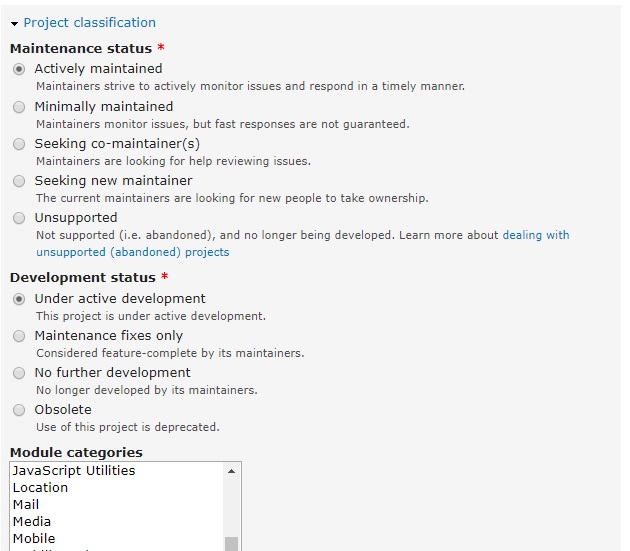
Also, please pay attention to the project settings and provide real information about maintenance and development status, you can change these parameters at any time if you are a project owner.
Overview
To create this description I've used the next resources:
Tips for a great project page
Best practices for creating and maintaining projects
Module documentation guidelines
Module owners: How to make your module description useful
So, the good project description should have the next information on the project page:
Useful description idea: use subheadings
Subheadings make your description more easily scannable.
Here's a list of subheadings that would be awesome. I'll describe them fully below.
- Overview
- Features
- Requirements
- Known problems
- Tutorials/Documentations
- Dependencies
- Sponsored and maintained by (Credits)
- Restricions
- Recommended modules
- Resources
Sponsored and maintained by (Credits):
Add to this section maintainers and sponsors of the project.
Currently, I am a maintainer of the project.
Profile link: https://www.drupal.org/u/ysamoylenko
Features
The project feature is a rightly described the project to provide an example for the community.
The small implemented module will add this documentation to your site help system and will have a link: /admin/help/project_description_testing
Requirements
Links to required modules or (vendors) if them not included to the project via dependencies or requirements using Drupal mechanisms for it at any step of project downloading/installation.
Also, please include information about the required environment, for example:
- Drupal 7.x (or special version === bad idea, ideally project should have the compatibility with any major version of Drupal core)
- Drupal 8.x (or special version === bad idea, ideally project should have the compatibility with any major version of Drupal core)
- PHP > 5.5 / > 7.0 (or special version === bad idea, ideally project should have the best compatibility with any supported PHP version by Drupal major version, but it depends on the task requirements)
Required PHP extensions:
- bcmath
- gd
- xml
- etc...
Required external libraries/vendors/modules if it not added to dependencies of the project and will not be installed automatically:
- Library/Vendor/Module name: link
- Library/Vendor/Module name: link
- Library/Vendor/Module name: link
Also, this section should have the steps for installing these required modules or libraries with details, but if these instructions will have so many texts, then move these instructions to INSTALL.txt file and include it to the project archive.
Don't forget to add this information to this section.
For example:
More information about the steps of installing project (theme/module) requirements you can find in the file INSTALL.txt.
Recommended modules
You should list any modules that are not explicitly required but will, if enabled, enhance the usefulness or user experience of the project.
Examples:
Commerce 2.0 has recommended modules list:
Inline entity form
Shipping
Stock
Coupons
File downloads
PayPal
Dependencies
If the project is a bridge or interface module is not fully functional on its own, but relies on some external service (e.g. SaaS) to be fully functional, such external dependencies should be disclosed.
Add the actual links for downloading them or add installation instructions. If they have so many texts, please add just a link to the service documentation page if it exists or adds this information to INSTALL.txt
Known problems
Known problems
Be upfront about any known problems, bugs, etc. Link to active issues regarding those problems. Tip: use [#nnn] syntax and Drupal.org will automatically link to the issues and show their current status inside the node body.
Resources:
The template for your project page has a tab labelled "Resources" near the bottom.
It will be very helpful for review the module functionality by the end user if you add the screenshots, videos, documentation and any other information which allow easying understand what your project does and which business problems it will be able to solve.
More details you can find on the page: https://www.drupal.org/node/997024
Finally, if the description is too long, please move some information to the README.txt or move this information to documentation page and add information about it to the project page.
For example, it can look like:
To read more details about the project please follow the link: Documentation page.
Also, you can view full project details in README.txt inside the project archive.
On the other hand, you can add your project help to the Drupal Help System UI.
Implementation examples:
https://www.drupal.org/docs/develop/documenting-your-project/module-docu...
P.S. If this sounds good to you...
Use this handy cut and paste skeleton to flesh out your project description.
<h3>Overview</h3>
<h3>Features</h3>
<h3>Requirements</h3>
<h3>Known problems</h3>
<h3>Tutorials/Documentations</h3>
<h3>Dependencies</h3>
<h3>Sponsored and maintained by:</h3>
<h3>Restricions</h3>
<h3>Recommended modules</h3>
<h3>Resources</h3>
Project information
- Created by ysamoylenko on , updated

