

 Come together with the global Drupal community in Rotterdam, 28 Sept – 1 Oct 2026. Sessions, contribution, connection, and Early Bird savings until 8 June.
After updating to Chrome 62, scald will not produce the file browser window for adding atoms (Doc, Picture, Video), as expected.
It may open after 5 or 6 clicks.
Flushing cache of site does not help. Clearing cache in Chrome doesn't appear to have an effect.
At best, two out of three of the atom types will open after clearing your browser cache.
Unable to replicate the issue in Firefox 57
| Comment | File | Size | Author |
|---|---|---|---|
| #8 | 2925410-8-chrome-62.patch | 348 bytes | DeFr |
| #7 | click_zone_after.png | 9.64 KB | billywardrop |
| #7 | click_zone.png | 17.94 KB | billywardrop |


Comments
Comment #2
nagy.balint commentedHi!
Are you using plupload? I guess the normal file upload would work, but its a plupload issue?
Comment #3
eleon216 commentedI can reproduce this problem (on an up to date Drupal 7 installation), and it's not plupload specific.
Changing the "upload type" to "managed file" doesn't change the behavior.
The buttons of some scald-providers are working, some not at all, and some work only sometimes (if you press them multiple times an you are lucky the filedialog of the provider will appear).
Enabling the developer-tools in Chrome (Shift-Ctrl-I) and switching to "simulate mobiledevice"-mode does kind of "fix" the problem.
I don't know what's the different in "mobile device"-mode. But in this mode it is possible to open the dialogs of all scald-providers. (a smaller screenresolution alone doesn't fix it )
Comment #4
nagy.balint commentedSo this is about opening the ctools modal itself, and nothing to do with file upload.
Can you try updating to the latest dev of ctools? We have to check the ctools issue queue as well.
Comment #5
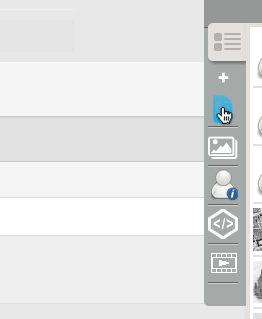
nagy.balint commentedIt is weird, the rectangle for the link is lower than the rectangle for the li, and i guess that is why it does not work, as only the clicks on the link count.
Might be a css issue, but why only in chrome 62.
Comment #6
fatibel commentedsame problem with chrome 62
Comment #7
billywardrop commentedWe have the same issue in our Drupal website and its only with Chrome 62. After further testing, we've found the following behaviour:
1. On first scald load, you can only click the bottom pixel row of the icon to open the create atom window (see attachment click_zone.png)
2. If you then cancel that window, then go back to the icon, the full button becomes clickable (see attachment click_zone_after.png)
Also when I click the button, in both Firefox and Chrome, I get the following error in the console:
[Deprecation] Synchronous XMLHttpRequest on the main thread is deprecated because of its detrimental effects to the end user's experience. For more help, check https://xhr.spec.whatwg.org/.
This looks like an ajax error. I hope this helps and if you need any testing done, I'm happy to help.
Comment #8
DeFr commentedAttached patch seems to fix the problem.
Comment #9
eleon216 commentedthe patch from #8 works for me.
Buttons work again in Chrome 62
and no regression in Firefox or Edge (still working there)
thanks DeFr!
Comment #10
billywardrop commentedThanks for the quick patch DeFr. I will test it on my local copy
Comment #11
billywardrop commentedI've tested the patch as well and this fixes the problem for me.
Comment #12
billywardrop commentedComment #14
nagy.balint commentedThanks! Committed.
Comment #15
nagy.balint commented