Don't know the best way to implement, but we have the following implementation on our site. Granted, this is for a custom context of full_width, which is all we allow for videos in our implementation, but there has to be a relatively simple way based on this css to make all YouTube videos responsive.
.dnd-atom-wrapper.type-video.context-full_width {
  width: 100%;
}
Wrap the scald_youtube_player's iframe code in this:
<div class="scald-youtube-wrapper" style="padding-bottom: <?php print ($vars['video_height']/$vars['video_width'])*100; ?>%;">
and add this css for the wrapper:
.scald-youtube-wrapper {
 height: 0;
 margin-top: 25px; /* to make room for the youtube controls */
}
Finally, add this css to the iframe:
.scald-youtube-wrapper iframe {
  width: 100%;
  height: 100%;
  position: absolute;
  top: 0;
  left: 0;
}
I would break it out into a css file and add in somewhere but IDK where the right place to do that is (scald_youtube_scald_preprender?).



Comments
Comment #1
nagy.balint commentedI don't think this is necessary. Because you can already set 100% in the context's settings. And there are sites where the user can switch between full and half and such contexts. So 50% and other is also needed. But the context settings can handle that.
Comment #2
scotwith1tWait, are you saying you can make a context responsive in some config option somewhere? What did I miss?!?
Comment #3
nagy.balint commentedGo to the scald settings, click on context link next to the video line, select the representation you are using, then in the width or height type your settings.
Comment #4
nagy.balint commentedClosing it, reopen if needed.
Comment #5
scotwith1tAre these settings no longer available since the move to a separate module? I don't have the height/width option using the latest dev of Scald YouTube and thus am getting the video as sized from YouTube (1280x720 typically).
Comment #6
nagy.balint commentedNo, they should still be there.
Its the standard context width and height setting which you can set for each context or representation, the same place where you can set up a player for a context or representation. Its a standard scald feature, no change there.
Of course it has to be implemented in the provider as well, but in the case of the YouTube provider its done.
Comment #7
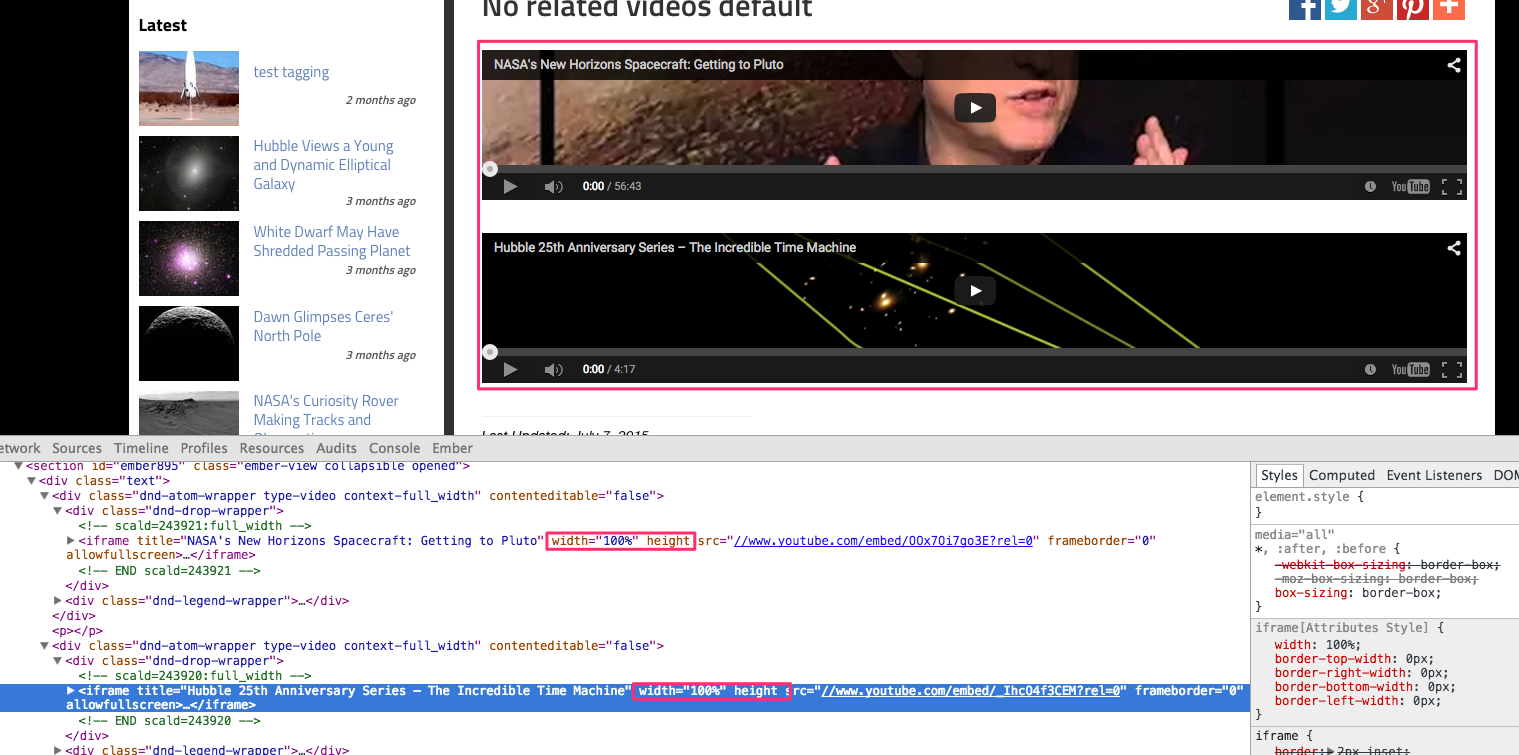
nagy.balint commentedTo illustrate my point, here is an image.
Comment #8
scotwith1tSorry, I realized later that this is because we haven't been able to upgrade from Scald 1.2 yet, so we don't have these options.
Comment #9
scotwith1tOn second thought, I've just updated to 1.4 on a dev environment and added 100% width only (no height) and the video is not responsive. The videos are rendered like this:

The approach originally outlined in the OP makes use of the approach outlined here https://css-tricks.com/NetMag/FluidWidthVideo/Article-FluidWidthVideo.php under "
Video (YouTube, Vimeo, etc.)" heading. The trick is that if you want the video to be responsive using this approach you should NOT specify the height/width in the context config height/width fields at all and just let the dimensions be provided by YouTube. However, I found that leaving the dimensions blank makes this approach not work since you get empty $vars['video_height'] and $vars['video_width'] instead of the YouTube. I added my API v3 key and tried again and still don't get dimensions from YT for these $vars. Poking around a bit, it seems there may actually be 2 issues: In scald_youtube_prerender, shouldn't this be: (Currently only has data['height'] and data['width'] there?) Also, does scald_youtube_register only get called when the atom is first created? If so, wouldn't you have to update any existing video atoms to pull in/save dimensions in $atom->data?Comment #10
nagy.balint commentedIt depends on your usage. For us if we set a specific height, and width to 100% or 50%, it seemed to be a good result. Sometimes having a percentage on width and a fix height is perfectly fine for responsiveness, its not always a requirement to make the player grow in height as well when you make the site bigger in width, although if the height is fix, then that could be implemented with site specific css, where on different breakpoints the fix height could be different.
For example:
And with media queries it can be defined for specific breakpoints as well.
As far as I saw, YouTube will give you a specific height and width on the videos page only (not from v3 api unfortunately). The only thing we could get from that is the ratio of the video which could be used to dynamically change the height depending on the width with some javascript code. That is likely the only reliable solution for all aspect ratios, but since not all users can get these values, not soo good either.
Apart from javascript, there is the css solution you have quoted, however it has a few issues, namely this one:
And also because it requires extra css, which would make it slightly more difficult to manage.
You can create a representation in code that does exactly what you need however. For example:
Then you just need to copy paste the scald_youtube_player.tpl.php, and change its name to scald_youtube_responsive_player.tpl.php into your custom module's directory, where you have defined the theme hook.
Then you can change the markup as you wish, you can select this representation after cache clear for the atoms, and you can implement any css you like in this custom module. You can define a class for your css in the new template.
Then that way you can easily implement the css solution for your site.
No, it should not. Your snippet shows how we get the width and height from the context settings, and those are not called video_width, since those are generic width and height fields, so the code for that is correct.
Actually that function is not called at all. It is just there so other modules can call it as far as I could see, but that code was not written by me, I was just updating it.
The real function that is called when you add a new atom is at scald_youtube_scald_add_form_fill
The dimensions are actually not available in the v3 api, only when the system queries the youtube video page (which seems to not work for some users so they cannot even get any dimension just the default).
So there is a default dimension, then thats changed if the system can query the youtube video page on adding the youtube video. Then the context settings width and height overrides that setting on display.
Currently there is no mechanism to update dimensions again from the youtube video page after the video has been added.
Comment #11
nagy.balint commentedOne issue could be with the isset check
It should be with empty, instead of isset, then if the setting is there but its empty it wont override the default to nothing.
Of course the height will still be a fix value.
Comment #12
nagy.balint commentedPatch implements #11
Comment #13
nagy.balint commentedCommitted #12
Comment #15
nagy.balint commentedComment #16
nagy.balint commentedComment #17
scotwith1tSorry, I've tested this over and over and it simply doesn't work as I would hope. The way the module is now, you can't format videos to be truly responsive. While I could see the possible need for an implementation like you described (100% width, fixed height), it is just not the de facto standard for responsive video implementation. While the context config settings are great, especially if you want to always use the same size video, you still can't really make them responsive without a wrapper div to work with. Gonna have to move scald_youtube to the custom category for now.
I started dabbling with a patch that put a checkbox in the scald youtube configuration fieldset for "Theme YT atoms responsively". Checking that checkbox could set a variable that would use an alternate theme function/tpl file that's responsive and ignore the context config options. The only thing I couldn't work out was getting a css file added to the page in the theme function for that tpl file or in the prerender function. For some reason it was never loaded to the page.
Comment #18
nagy.balint commentedHave you tried my suggestion to create a custom context (representation) and setting that up in middle of comment #10?
That way you would not need to customize the module, and you could just drupal_add_css your css in the render of that context.
Alternatively a player could be created, that can be set up for the editor representation, and which can override the render, but it can be a bit more complex that way since several provider uses the same entity.
Comment #19
marameodesignI know I am digging a conversation from a year ago - but I was hoping to enable fitvids and having the videos respond responsively - which is not the case.
Anyone has a better solution today than creating a custom context?
It's weird as fitvids work for every type of video I tried with, but not with scald.. Any pointers?
Cheers,